TrustRadius: an HG Insights company

Carbon Black Endpoint

Score9 out of 10

32 Reviews and Ratings

What is Carbon Black Endpoint?

Carbon Black Endpoint is an endpoint security and "next-gen antivirus (NGAV)" that uses machine learning and behavioral models to analyze endpoint data and uncover malicious activity to stop all types of attacks before they reach critical systems.

Categories & Use Cases

Media

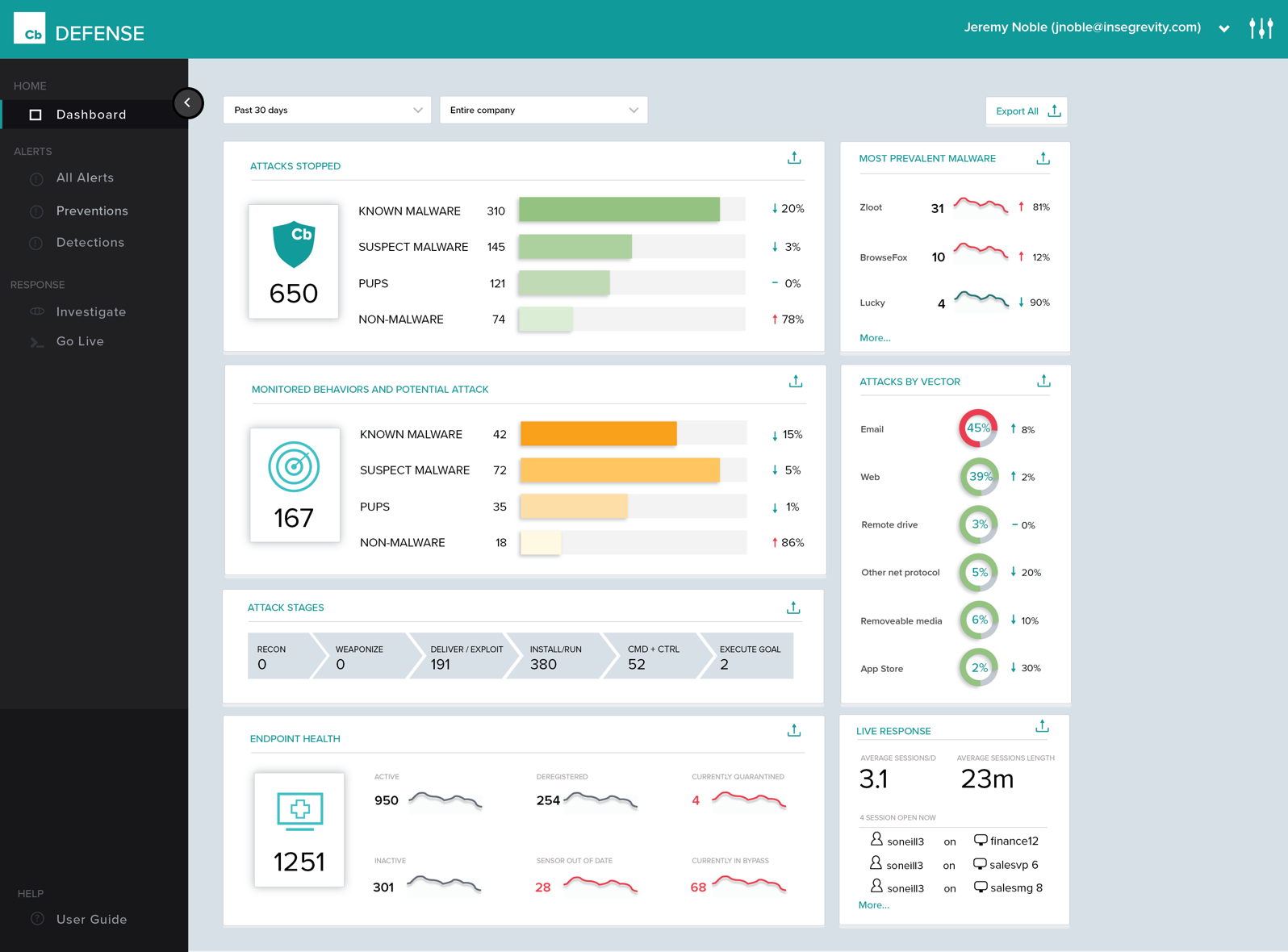
Cb Defense Dashboard
See every attack and potential threat at a glance in this interactive view
Cb Defense Alert Triage
Get answers to how and why each attack occurred
Cb Defense Response
Strengthen your defenses with every attack

1 / 3

Top Performing Features

  • Anti-Exploit Technology

    In-memory and application layer attack blocking (e.g. ransomeware)

    Category average: 8.6

  • Endpoint Detection and Response (EDR)

    Continuous monitoring and response to advanced internet threats by endpoint agents.

    Category average: 9.1

  • Infection Remediation

    Capability to quarantine infected endpoint and terminate malicious processes.

    Category average: 8.8

Areas for Improvement

  • Malware Detection

    Detection and blocking of zero-day file and fileless malware.

    Category average: 9

  • Centralized Management

    Centralized management supporting multi-factor authentication, customized views, and role-based access control.

    Category average: 8.5

  • Hybrid Deployment Support

    Administrators should be able to choose endpoint security on-premise, cloud, or hybrid.

    Category average: 8.3

Carbon Black Endpoint is Life Saver

Use Cases and Deployment Scope

Carbon Black Endpoint is used to detect malicious processes and software across our computing devices. It recently was able to detect a suspected compromised computer very quickly and allowed to investigate to safeguard our internal network rapidly.

Pros

  • Malicious Software and process detection
  • Suspicious Login Attempts
  • Root User Account of Attacks and Machines.

Cons

  • Ability to Attach Carbon Black Endpoint to non-Computing Devices such as Firewall appliances
  • Ability to Perform Deep Scans without using CLI so IT can ask users to run them instead of our intervention.
  • Automatic Enrollment for new device joined to our domain.

Return on Investment

  • Recent Brute Force Attack was quickly mitigated with Carbon Black Endpoint's detection
  • Easy removal and uninstall of Sensor on legacy/decommissioned devices
  • Can be difficult to deploy via Citrix VDI but do-able

Usability

Alternatives Considered

Symantec Advanced Threat Protection

Other Software Used

Cohesity, Exclaimer

Your best offense against malicious endpoint activity is to be found with CB Defense

Pros

  • It uses a thin, low-performance consuming, client.
  • It constantly monitors endpoint activity and processes, efficiently, and effectively blocking harmful apps.
  • It not only identifies and blocks apps known to be harmful, but prevents unknown, suspicious processes/apps from executing unless allowed in a defined policy.

Cons

  • It does not offer a way to scan individual files on your endpoint. Some users like to be able to do this. Personally, given the effectiveness of the agent, I don't see a need for this, but it would appease some users.

Return on Investment

  • By reducing the instances of infections, and so the cost of remediation, we have already realized a better ROI than with prior solutions of this kind.
  • In providing a cloud-based management portal, we are better able to manage the protection of our endpoints regardless of their connectivity to our LANs.
  • We are also able to prevent unauthorized apps from launching, giving us another way to conform endpoint use to company policies.

Alternatives Considered

Kaspersky Endpoint Security, VIPRE and McAfee Advanced Threat Defense

Other Software Used

Microsoft Office 365, CoffeeCup HTML Editor, Adobe Acrobat DC

CB Defense with Live Response ....What a wonder

Pros

  • History of Process Execution, really anything that happens in the system is easily seen within the Dashboard. I can determine if a bad actor has infected the system, be it malware, backdoor, rootkit, Trojan, then from that point, I can put the system into Quarantine.
  • Being able to quarantine the system from the Dashboard. With these type of tools, pulling the power and running a hard drive image is not needed. Put the system in quarantine, start the analysis. A year ago, the network engineer might move the system into a VLAN that has no access to anything, except the system performing the remote analysis... Now I do not have to rely on anyone to move a system, power it down, pull the drive, or image the drive. I can just start the analysis right from my workstation.
  • The Live Response, again goes hand in hand with the quarantine feature.
  • By now, I am sure you see a process. Its simple, and easy and all done from a cloud-based console, called the dashboard. .. deploy the agent, create the policy, and active live response, set up email alerts, and monitor your endpoints... you are now ready to perform a triage in the event of an infection. We have step 1, step 2, step 3... but, just remember, things do happen, nothing is perfect, but this product has its advantages.

Cons

  • I would like to see better integration with Alien Vault, other SIEM products such as Splunk has detailed instruction on the setup, but since we have 3 USM appliances within our organization, the integration would be key for us.
  • Some say that data leakage occurs from collecting information being sent to the cloud. The way the system works is it basically looks at a system and decide after time what is normal process execution, then uploads this data on port 443 to the cloud. I have read that this data can be seen by 3rd parties, but I haven't seen it myself.
  • ref: https://www.directdefense.com/harvesting-cb-response-data-leaks-fun-profit/
  • Sometimes I get some crazy alerts like Outlook has scraped memory due to Ransomware. Other times it's Word or Excel, even Chrome. I could go into the policy and start whitelisting, which by the way, whitelisting can be done within the alert, but who has time.

Return on Investment

  • It actually stooped a memory scraper from stealing credit card data from our POS system. The casino was bought from awhile back, so coming into this place 4 years ago, we had a flat network. Not good with POS System. Well, a memory scraper was released (employee downloaded a game) and Cb Defense just killed it... This was before a live response, so we pulled the system from the network.
  • I can't really say anything negative, at least from an ROI point of view.

Other Software Used

Trend Micro Endpoint Security, Tenable SecurityCenter, AlienVault USM, Tenable.io

Cb Defense: Grab your threat hunting gear!

Pros

  • It's Cloud based. Has reduced our on premise server footprint. Has also reduced all the management overhead. Specifically, frequent updates/upgrades. Mobile devices don't need to be connected to our network.
  • Threat hunting and analysis. We are able to see a ton of forensic information.
  • Management interface is intuitive and easy to use.

Cons

  • Tighter integration with its other products like Cb Protect.
  • More specific controls for FIM.

Return on Investment

  • A definite positive impact. It has decreased the amount of resources needed to manage an on-prem solution.
  • It has increased our ability to defend against and react to advanced threats.

Alternatives Considered

Symantec Endpoint Protection

Other Software Used

Cb Protection, Tenable SecurityCenter, Mimecast Secure Email Gateway

Cb Defense NGAV

Pros

  • Cb Defense was simple to deploy and set up. We used our system management appliance to deploy the agent to all Mac and Windows endpoints.
  • The reporting features are great and have recently been improved. You can trace the activity to see what parent application is triggering the event and how it was done.
  • Cb support has been really helpful tracking down issues and helping us to resolve them.
  • Cb pro services was great working with us to deploy the agents and set up policies.

Cons

  • Policy management can be cumbersome. It is simple to set up a single policy but you have no way to apply the rules to multiple groups. If you need to set up the same rule to multiple policies, you need to type it over again.
  • Agent updates can be very slow to deploy. We use a mix of rolling out updates via the web console and our management appliance. It can take several weeks to update all agents.
  • We can be confused on why a rule will apply to a file. Sometimes something is blocked but we don't understand why.

Return on Investment

  • We removed our legacy antivirus software that was not updating correctly and ended up being difficult to manage. This freed up more admin time for different tasks.
  • We have run into issues with people running scripts that are not in the whitelisted directories. They are blocked and require urgent response to resolve. This can cause extra work and some time after hours support.

Alternatives Considered

Cylance, SentinelOne and Webroot

Other Software Used

Zendesk, JIRA Software, Atlassian Confluence