TrustRadius: an HG Insights company

TOPdesk

Score8.8 out of 10

428 Reviews and Ratings

What is TOPdesk?

TOPdesk is the flagship highly-modular cloud-based or installed ITSM service desk and asset management solution from the Dutch company of the same name, for enterprise companies.

Read more details.

Media

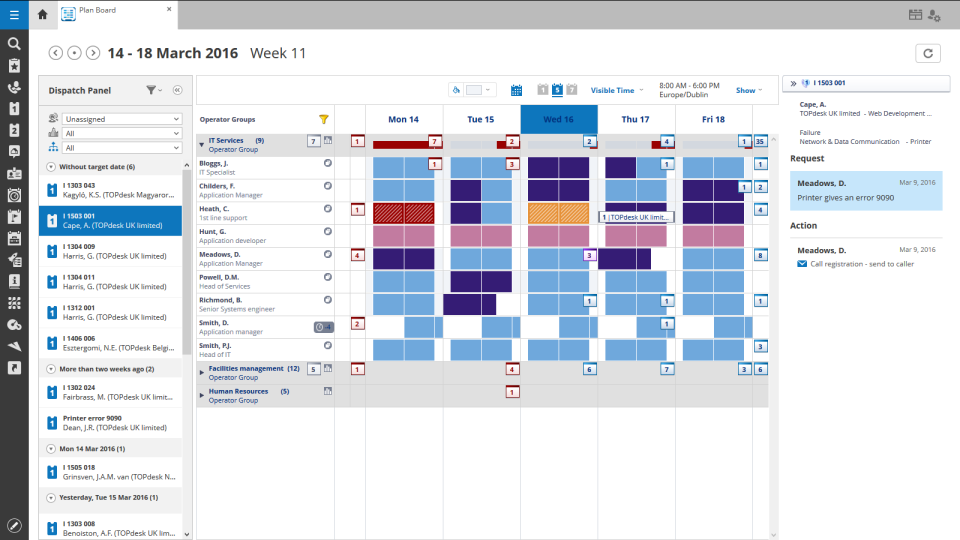
Screenshot of TOPdesk plan board
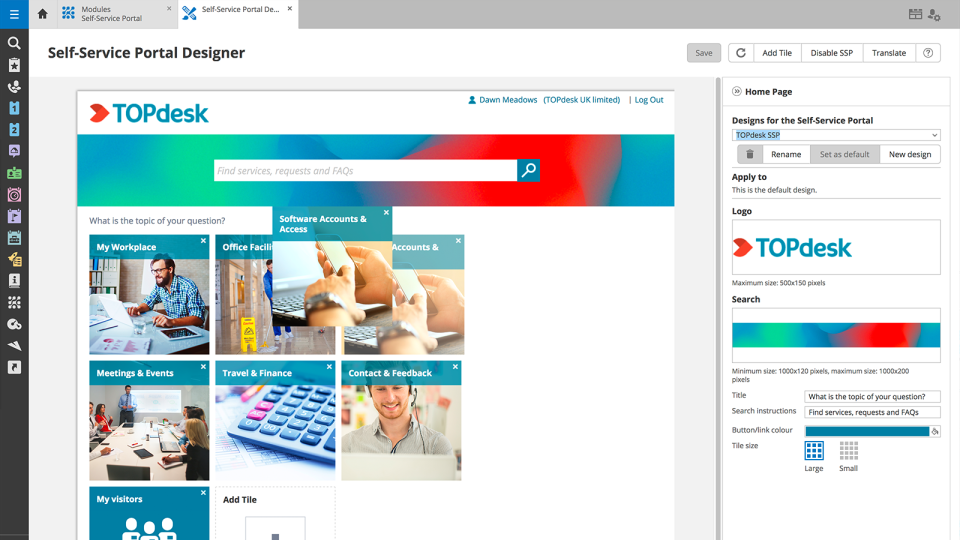
Screenshot of TOPdesk portal designer
Screenshot of TOPdesk service desk KPIs
Screenshot of TOPdesk asset management overview
Screenshot of TOPdesk call management
Screenshot of TOPdesk asset management dashboard

1 / 6

Screenshot of TOPdesk plan board

Top Performing Features

  • Organize and prioritize service tickets

    Prioritize tickets to ensure most urgent are tackled first

    Category average: 9

  • Configuration mangement

    Database for tracking and reporting all business assets

    Category average: 8.6

  • Self-service tools

    Repository of information documenting common issues and known resolutions which can be accessed directly by users

    Category average: 8.3

Areas for Improvement

  • Change calendar

    Calendar showing change schedule to stakeholders

    Category average: 8.5

  • Subscription-based notifications

    Users subscribe to notifications for ticket updates

    Category average: 8.5

  • Change requests repository

    Single repository of all planned changes and releases

    Category average: 8.4

Who Buys & Uses TOPdesk

Pros

  • Strong incident management capabilities, utilized by 74% of reviewers.
  • Effective change management features, implemented by 67% of users.
  • Valuable asset management tools, leveraged by 56% of reviewers.

Cons

  • Self-service portal limitations in design and form decision-making, mentioned by 22% of reviewers.
  • API and automation implementation challenges, cited by 19% of reviewers.
  • Reporting and search functionality needing improvement, according to 19% of reviewers.

Why is this

Use Cases and Deployment Scope

Incident/ ticket management

Pros

  • Service portal designer
  • incident registration
  • knowlodge base

Cons

  • The side of the practitioner can be better organized. On the page itself, more explanations can be provided to simplify its use, for example by using information icons.
  • The side of the practitioner can be better organized. The filled fields are not immediately fully perceivable. There may be information that is useful for forwarding a report. Think of the practitioner field. It is helpful that when you hover over it with your mouse, the complete information appears.
  • Reports are growing wildly, making it confusing due to the large number of users. There is too much information. Logical reporting, such as making SLAs transparent, should be created more easily.

Return on Investment

  • The rollout of self-service to the store and the continuous growth of its importance within the organization.

Easy to use Service Management solution

Use Cases and Deployment Scope

We use one TOPdesk installation to enable a service management solution for 9 of our business units in Europe. These business units can use the tool locally to deal with their issues (incidents/changes) or they can escalate their calls to the European IT organisation, all in one TOPdesk installation. The TOPdesk SelfServiceDesk portal is used to raise the calls and to provide the end user realtime status updates on their issues.

Pros

  • Easy to use Incident Management.
  • Performance/stability.
  • The TOPdesk vendor has a very good support team.

Cons

  • Reporting and selections. The reporting options are easy to use, but also limited in functionality. Reports can be scheduled to run automatically and to provide output per mail or in a document. Selections are more powerful, but there is no option to schedule them.
  • Change Management module is powerful, but has a steep learning curve.
  • The SelfServiceDesk. Good to see that there are great improvements in the latest TOPdesk version.

Return on Investment

  • One standard tool across the organisation instead of a wide variety of software tools and alternative solutions.
  • One central repository for all our business units in Europe.
  • Better options for the end users to raise their calls through the SelfServiceDesk, rather than email or phone.
  • Transparent view for the end-users on the status of their issues through the SelfServiceDesk.

Other Software Used

Oracle Database, SAP BusinessObjects Business Intelligence

Usability

TOPdesk

Use Cases and Deployment Scope

We use TOPdesk as a ITSM tool for Information services and Facilities.
Via our Selfserviceportals our users can create changes, incidents and reservations and link services to them. They can keep track of their open tickets and respond to questions send from a operator. The standard processes help with problemsolving.

Pros

  • Incidentmanagent
  • Changemanagement
  • Configurationmanagement

Cons

  • VA documentation
  • Documentation of bugs

Return on Investment

  • Less time spend on incidents
  • Automation

TOPdesk is a Top Service management application

Use Cases and Deployment Scope

We use TOPdesk for Incident, problem and change management for IT, Facility Management and Human Resource Management. Our scope is to become the One Stop Shop for every colleague of our organisation.

Pros

  • Assetmanagement
  • Automation
  • Incidentmanagement

Cons

  • Design options Self Service Portal
  • Form Functionality
  • Filter options in lists

Return on Investment

  • More efficiency in the workload for our administrators
  • More insight in the status of requests
  • Real time up to date information of the status of items.

Alternatives Considered

Atlassian Jira and Zendesk Suite

Other Software Used

Atlassian Jira, Atlassian Confluence, BiZZdesign HoriZZon (Enterprise Studio)

TOPdesk is great

Use Cases and Deployment Scope

We use TOPdesk to automate our IT proces flows (incident management, change management, problem management and asset management)

Pros

  • automation of proces flows
  • automation of mailflows
  • self service portal so users can find their sollutions

Cons

  • better use of images and videos in knowledge items

Return on Investment

  • Better self service
  • More efficiency in IT proces flows
  • Better communication for clients

Alternatives Considered

Insocial - Feedback Solutions

Other Software Used

Microsoft 365