TrustRadius: an HG Insights company

SolarWinds Task Factory

Score8.2 out of 10

64 Reviews and Ratings

What is SolarWinds Task Factory?

According to the vendor, SolarWinds Task Factory saves time managing tedious ELT/ETL tasks with high-performing SQL Server Integration Services (SSIS) components that can be used within the Visual Studio environment to connect to nearly any data source. Task Factory’s components and tasks have been optimized to ensure fast performance of data-centric applications, and the user can run Task Factory on an Azure-SSIS Integration Runtime (IR) with Task Factory Azure Data Factory edition.

Media

Salesforce.com Source
Dimension Merge SCD Transform
Upsert Destination
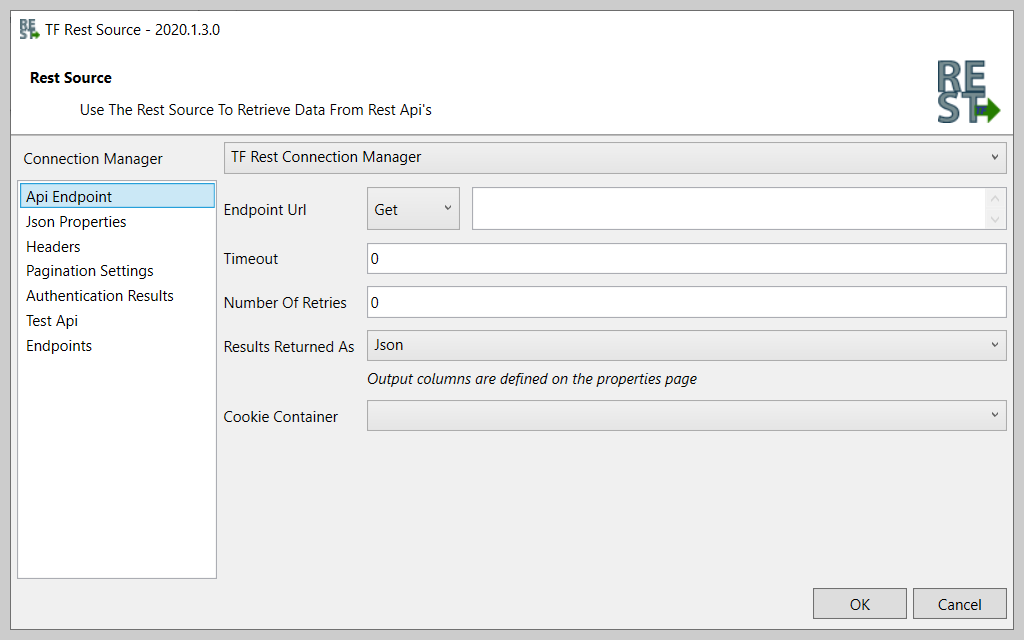
REST Source

1 / 4

Top Performing Features

  • Complex transformations

    Complex data transformations are data normalization, advanced data parsing, etc.

    Category average: 7.1

  • Integration with MDM tools

    Integration with master data management tools to ensure data consistency across the organization

    Category average: 7.8

  • Connect to traditional data sources

    Ability to connect to traditional data sources like relational databases, flat files, XML files and packaged applications

    Category average: 8.7

Areas for Improvement

  • Integration with data quality tools

    Integration with tools for cleansing, parsing and normalizing data according to business rules

    Category average: 7.9

  • Simple transformations

    Simple data transformations are calculations, data type conversions, aggregations and search and replace operations

    Category average: 8.1

Robust tool of working with data warehousing

Use Cases and Deployment Scope

It gives us best platform for connecting all data sources. Collection of data from our partners and clients gives us insights on how to manage our company better. When publishing our marketing campaigns it gets information and feedback from our clients comments. Our web designing team has been able to program most platforms without coding.

Pros

  • Managing data warehousing.
  • Integrating our servers to accelerate components.

Cons

  • I have not experienced any challenge from the operation of this great tool.
  • All the data tools function excellently.

Return on Investment

  • It has contributed to positive ROI.
  • We have achieved most of our objectives.

Access High Performance SSIS with SolarWinds Task Factory

Use Cases and Deployment Scope

We use SolarWinds Task Factory across our team to manage data by connecting all sources in one integrated solution, including REST sources. Managing ETL and ELT tasks is less tedious with SolarWinds Task Factory.

Pros

  • With Task Factory, it is easy to connect data from multiple sources such as SharePoint, Microsoft Excel, Facebook, etc.
  • Extension of SSISS with zero coding has enabled us to save time while managing the data warehouse.
  • Also, SolarWinds Task Factory makes it easy to automate metadata tasks in real-time.

Cons

  • Pricing is way too expensive compared to other alternatives.
  • Unavailability of existing mobile application.

Return on Investment

  • Connecting to third-party APIs, applications, and websites by integrating data in one solution.
  • No coding needed when managing tasks by automating them, thus saving time in real-time.
  • Improving performance by incorporating SSIS knowledge, which accelerates ETL procedures on business procedures.

Alternatives Considered

Azure Data Factory

Other Software Used

SentryOne Pragmatic Workbench, Call iQ, Bitrix24

Task Factory Speeds Development

Pros

  • Email notifications.
  • File management.

Cons

  • User defined settings for external package calls.
  • Better software update methodology.

Return on Investment

  • Faster development has reduced the amount of time it takes for some tasks.
  • Fewer script tasks make maintenance and administration easier.

Alternatives Considered

Cozyroc and ZappySys

Other Software Used

Visual Studio IDE, Microsoft Teams

Upgrade to Upsert

Pros

  • Fast, large updates and deletes.
  • Simple Upsert logic.
  • Very nice integrated help, including video.
  • Easy to install, well documented, and easy to use.
  • Support was excellent under Pragmatic Works. I cannot attest to Sentry One.

Cons

  • We had one case of an upgrade that would not work with existing code. They did release a next version very quickly.

Return on Investment

  • Task Factory allowed us to quadruple our data volume without scaling out our systems. Just implementing the fast update tools improved SSIS performance enough to maintain SLAs.

Other Software Used

Microsoft SQL Server, Informatica Enterprise Data Catalog

Love Task Factory!

Pros

  • Our first use case was integrating with our Partners' Secure FTP Sites. Task Factory did this seamlessly.
  • Our second use case involved Excel. We have multiple groups that use Excel to monitor their processes, and using the Excel refresh task made this very quick and simple.
  • Our third use case was for SMTP. The basic SMTP did not give us enough control out of the box that we needed. We send out E-mails on behalf of our partners using their SMTP servers, so being able to change those connections effortlessly using this task was a huge time saver.

Cons

  • Not sure. I have not run into an instance where their transform didn't provide what I needed more easily than other solutions.

Return on Investment

  • Huge ROI. With the SFTP and Advanced SMTP it saved us weeks in changes and hard coding that we would have had to do and maintain. The cost of the license was recovered the first day we installed Task Factory.

Other Software Used

Microsoft Visual Studio Code, SQL Server Integration Services

Usability
