TrustRadius: an HG Insights company

Serverless360

Score10 out of 10

8 Reviews and Ratings

What is Serverless360?

Serverless360 is a platform to manage and monitor Azure Serverless components related to enterprise integration. In a real-time scenario, the integrated cloud applications are not built with a single technology stack, it typically involves at least 3 or 4 different Azure Services. Currently, Azure Portal is designed more on vertical technology silos and it's difficult to visualize and manage such connected solutions. So Serverless360 is presented by the vendor as a tool that users can depend on to manage and monitor all distributed Azure Serverless components.

With Serverless360 you can;
1. Manage Serverless Applications
2. Get in-depth tooling support
3. Monitor distributed Azure Services
4. Maintain high-level Security
5. Get governance and audit reports
6. Choose your hosting model - SaaS and Private Hosting

Media

Composite Application logically groups together various resources from Azure Subscriptions (same or multiple subscriptions) and namespaces that represent a Line of Business (LoB) application in your application architecture.
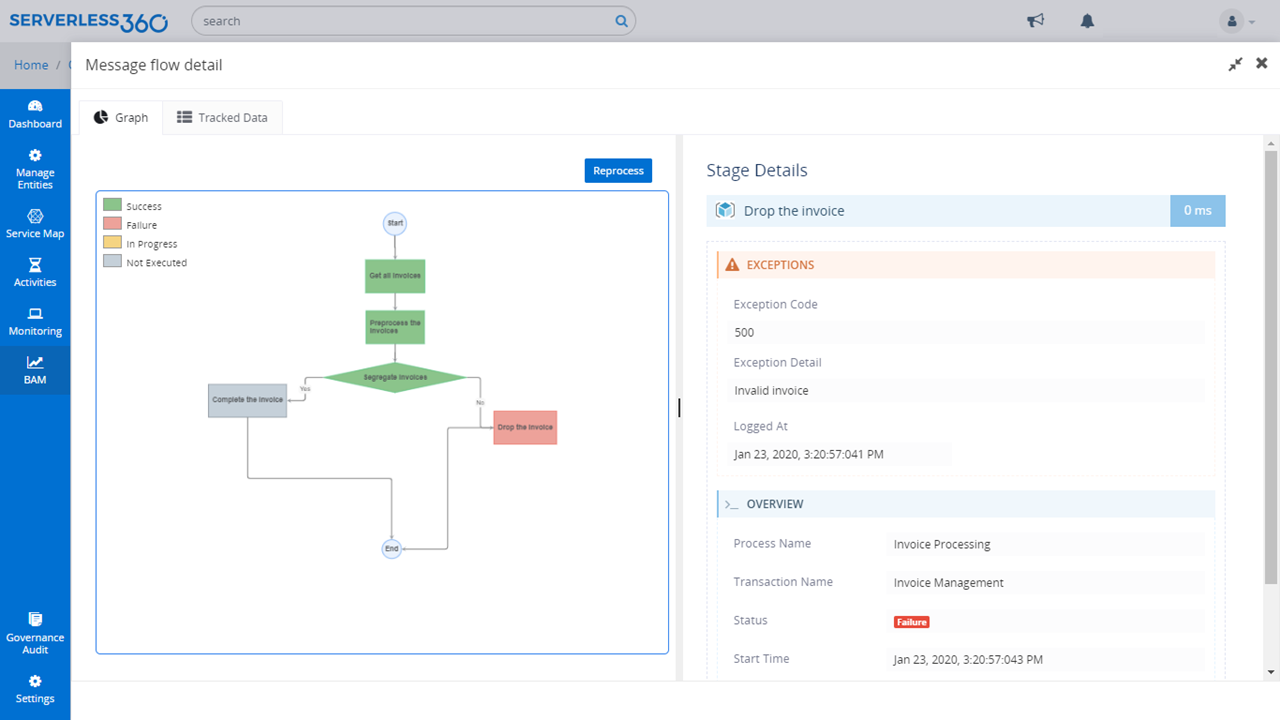
Business Activity Monitoring (BAM) gives full visibility of your end-to-end business process flow across your Azure resources.
Day wise Cost spent on a specific resource or resource type or environment can be attained by choosing the line chart
Cost visualisation capability in Resouce Map feature of Serverless360 comes in to provide the required clarity on the spending in your Azure subscription in fact across subscriptions.
A physical representation of the architecture, the user can derive relationships between the resources that constitute the composite application
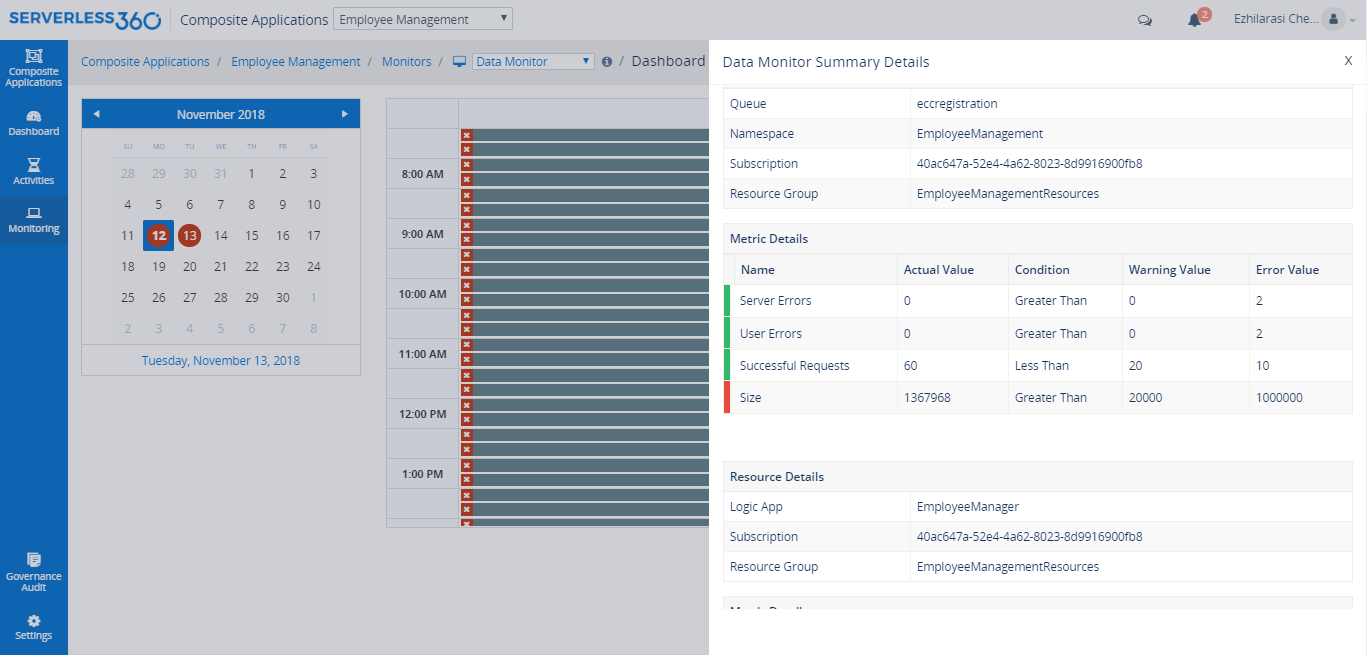
Data Monitoring helps to assess historical data and generating alerts based on expected criteria.
Governance and Audit feature helps the administrators to find out "Who did what" in the Azure integration scenario over a period of time.

1 / 7

Top Performing Features

  • Cost Management

    Provision of tools for cloud instance rightsizing and user chargeback and billing

    Category average: 8.4

  • Cloud Management Performance Monitoring

    Monitoring of storage, network and application performance metrics to achieve business service levels

    Category average: 8.5

  • Governance and Compliance

    Risk assessment analysis, audits and resource governance capabilities

    Category average: 8.6

Areas for Improvement

  • Resource Management

    Ability to manage and deliver cloud resources such as resource discovery and tagging, asset and license management and cloud-to-cloud migration

    Category average: 8.8

  • Systems Integration

    Integration of internal and external systems to support multi-cloud management

    Category average: 8.3

On time with my deadlines because Serverless360 is on POINT!!!!!

Use Cases and Deployment Scope

After a recommendation from a friend, I choose Serverless360 for building an internal self-service platform. Even without technical expertise, I found it easy to create my knowledge base This intuitive tool allowed me to draft entire pages swiftly, with drag and drop functionality I could effortlessly reorganize page order and entire categories within the knowledge base.

Pros

  • Capturing project ideas
  • Sharing ideas collaboratively
  • More affordable than competing software options
  • This tool offers extensive customization options to tailor it to your specific needs.

Cons

  • Expanding the functionality to cover other cloud platforms would be highly beneficial as it is currently limited to Microsoft Azure only
  • AI functions to be improved
  • Initial setup takes time but beats building custom solutions

Return on Investment

  • Serverless360 has greatly improved our business operations.
  • it helps us detect and solve issues faster leading to happier customer and increased productivity.
  • it help us save money by optimizing our cloud resources

Alternatives Considered

Datadog and Azure Monitor

Other Software Used

Microsoft 365 Business Premium, Dynatrace, Azure Monitor

Excellent Application with enhanced infrastructure monitoring

Use Cases and Deployment Scope

Turbo360 (formerly Serverless360) enables us to detect and fix issues on our production servers faster. It helps in checking different API performance and optimize it. In short, its prefect for staying on top of your software and monitor everything going on with your application and code. Great support team as well.

Pros

  • Detect and fix issues on production servers faster.
  • Monitors and optimizes API performances.
  • Significantly reduced time to spend on manual entries and troubleshooting.

Cons

  • Requires some initial configuration to make sure Azure resources are monitored correctly.
  • Needs flexibility in the type of alerts you can setup.
  • It maybe good to have more customized options.

Return on Investment

  • Allows to view more metrics.
  • Gives us a full visibility of the end user activity, network performance, system performance and code issue.

Usability

Alternatives Considered

Dynatrace

Ability to spot the cost spike is commendable.

Use Cases and Deployment Scope

We used to constantly go over budget on Azure due to a lack of granular visibility. Now, Serverless360 enables us to analyze costs across services and teams. Even with some customization needed, it’s been a gigantic improvement over our previous manual reporting. Our Azure spend has been reduced significantly since adopting this.

Pros

  • CPU monitoring
  • Performance Management
  • Compliance Reporting

Cons

  • Currently limited only to Microsoft Azure. Would love to see the functionality expanded to other clouds.

Return on Investment

  • Analyze cost across services and teams.
  • Big Improvement over previous manual reporting
  • Azure spend has been reduced significantly

Alternative for Azure Application Insights

Use Cases and Deployment Scope

One thing we felt difficult while using App insights was to identify the reason for a message flow failure within the entire transactional eco system. We will have to go through multiple logs and spend so much time to figure out at which stage the failure occurred. This key problem is now solved using Serverless360 Azure management.

Pros

  • Azure Cloud Management and Monitoring
  • Azure Cost Analyzer
  • Azure Documenter

Cons

  • Initial instrumentation can take some time, however i feel this is far better than building custom login or tracking solutions.

Return on Investment

  • We saved 25% on Azure cost year on year.
  • Time and resources.

The best in the market

Use Cases and Deployment Scope

Serverless360 provides real-time monitoring and key visibility in to the areas which needs improvement and optimize infrastructure utilization. Ability to identify performance issues and areas of focus for improvements .Every spike in utilization can be tracked. Issues are raised automatically and also integration is smooth.

Pros

  • Real- time monitoring
  • Timely and informative alerting capabilities

Cons

  • The user interface can be improved

Return on Investment

  • The tool's ability to promptly detect and report failures within a 5minute window is commentable.
