TrustRadius: an HG Insights company

RFP360

Score9 out of 10

8 Reviews and Ratings

What is RFP360?

RFP360, from Responsive (formerly RFPIO) is used by organizations to request information, respond to requests and connect, aiming to make the RFP and proposal process more efficient, effective, collaborative, consistent and repeatable for everyone.

Categories & Use Cases

Media

Proposal responders dashboard.
Proposal scoring dashboard, for proposal issuers.
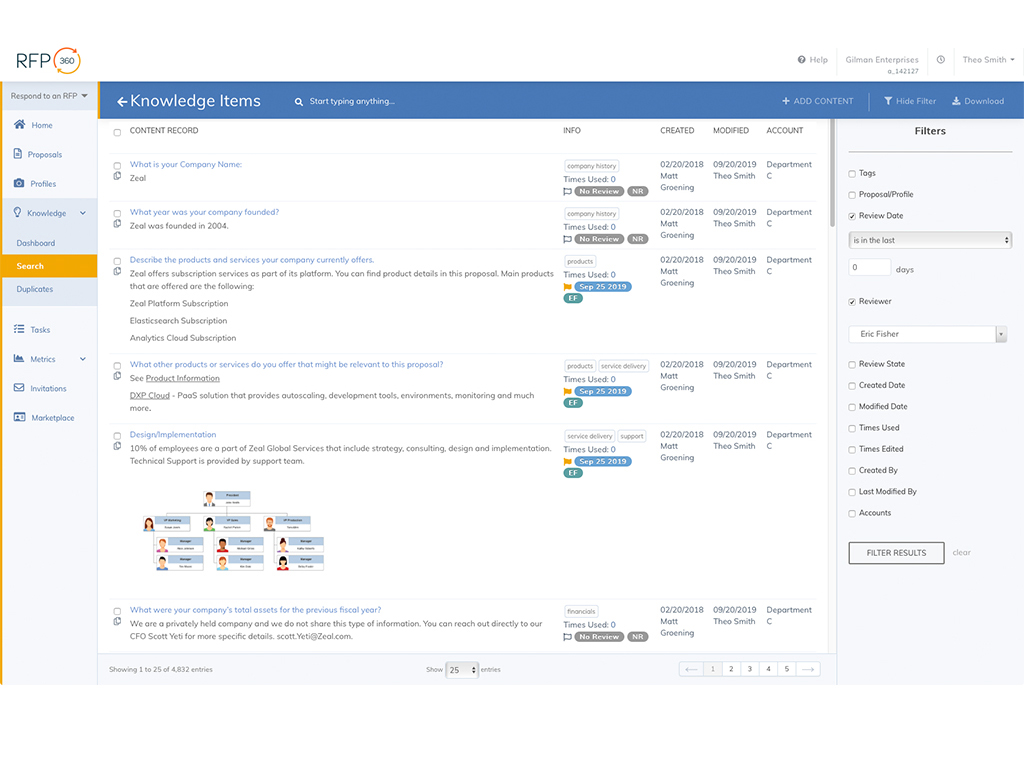
RFP responders landing page.

1 / 3

Top Performing Features

  • Searchable proposal database

    Proposals are organized in a central repository; users can easily locate proposals within the database.

    Category average: 7.8

  • RFP management & response

    Proposals can be created based on RFPs received.

    Category average: 8.5

  • Proposal content tracking

    Reporting & analytics around proposal content engagement and performance, e.g. what content clients spend time reading, and what content makes for a successful deal

    Category average: 8

Areas for Improvement

  • Proposal content library updates

    Users can update saved proposal language and standard proposal content.

    Category average: 8.5

  • Guided proposal creation

    A proposal authoring wizard, question flow, recommendations, or other elements guide salespeople in authoring proposals based on the particulars of the deal.

    Category average: 7.5

  • Proposal templates

    Allows users to utilize proposal templates for standard proposal layouts, with variable fields.

    Category average: 7.8

RFP360: A Robust Tool for Managing the RFP Process from Beginning to End

Pros

  • RFP Question Database: RFP360 provides a robust, easy-to-use tool for maintaining a database of questions to draw from. This makes it very easy and efficient to create an RFP questionnaire that is customized to our clients' needs.
  • Project Management: RFP360 provides tools to organize and execute an RFP/Search project from beginning to end, and to keep the project on track and efficient. After the initial work of creating an RFP Questionnaire and identifying potential respondents, it is very easy to publish the questionnaire, handle questions/follow-up, send out additional information mid-stream, and track receipt of proposals/responses. Additionally, the RFP360 tool automatically handles the receipt and processing of responses, including setting them up for evaluation.
  • Evaluation and Scoring System: RFP360 provides a flexible and powerful weighted scoring system that allows us to "grade" responses to each individual question, and to accurately provide the appropriate amount of emphasis based on the relative importance of the question (as determined by us when we set up the questionnaire). This provides a very powerful means of quantifying our analysis of responses. Additionally, RFP360 makes it fairly easy to evaluate responses from each vendor side-by-side, question by question, which is critical for accuracy and fairness of the analysis process.

Cons

  • Analysis Tools: although what is provided is quite good, there is definitely room for improvement. For instance it would be nice if it were easier/quicker for each evaluator to record their notes/comments when scoring, and to be able to search through those notes/comments later. Also, it would be really helpful to be able to annotate/mark-up the actual responses (highlight, underline, circle, call-out notes, etc.), with such mark-up tracked by evaluator, and with the option to hide/show mark-up.
  • Results Analysis, Reporting, and Presentation: in my opinion, this is the only area of weakness in RFP360. There are very limited options, after scoring/evaluation of responses is completed, for generating reports, graphs, charts, etc. to be used in evaluating results and presenting to the end client. I've always had to export the scores and use Excel to create the necessary visuals for final analysis and presentation.
  • Complex Questions: RFP360's ability to handle complex RFP questions (e.g. involving tables, charts, multi-part answers, graphics, etc.) is limited, and existing capabilities in this area are fairly cumbersome to navigate and use.

Return on Investment

  • Client Confidence: the use of RFP360 has allowed us to deliver a demonstrably robust process to our clients, providing them a very high level of confidence in the quality of our work.
  • Time Efficiency: RFP360's services provide a great deal of time-saving in the management of virtually the entire RFP process.

Other Software Used

LinkPoint Connect

Win all your future RFPs with Ease and Delegation

Pros

  • Sleek, modern design
  • Fast to use
  • Efficient
  • CSM team walking you through steps
  • Upload past RFPs to pick and pull

Cons

  • Learning how to properly upload your old RFPs
  • Having to tag certain answers manually
  • Need internet connection (no offline)

Return on Investment

  • Assigning tasks to team members and reviewing final responses before approval is a breeze
  • More success submitting rfps
  • Staying organized
  • Winning of more RFP scenarios

Other Software Used

Salesforce CMS, ZoomInfo, Outreach, Provana, KnowBe4 Security Awareness Training, Looker, Zoom, Expensify

RFP360 - Excellent RFP Management Tool

Pros

  • Organization
  • Ease of Use
  • Keyword Search

Cons

  • Handle PowerPoint Templates
  • Detect duplicates before saved
  • Nothing else

Most Important Features

  • The Data Repository
  • Keyword Search
  • Review assignments

Return on Investment

  • Speed to Draft
  • Ease of Use
  • Good ROI

Alternatives Considered

Avnio™ RFx

Other Software Used

Mailchimp, RSVPify, Zoom

Usability

Game Change for RFPs

Pros

  • Easy to upload RFPs into the platform.
  • Automatic response suggestions as you are working on questions.
  • Many different ways to use RFP360. Web, Chrome Extension, and Office add-ons.
  • Easy approval process.
  • Great dashboard to track the progress of the RFP and quickly navigate to work that still needs to be completed.

Cons

  • Question assignments. Currently, you can only assign sections and not individual questions in a section. This usually isn't a problem but can be when you need to assign just a few questions from a section to a certain individual.
  • The system can be a bit buggy sometimes. For example, I was having an odd issue this week where it sometimes wouldn't load all the questions in a section unless I refreshed the browser and quickly scrolled through the section to load all the questions. Usually it's nothing major though.

Return on Investment

  • Quicker RFP turnaround time leads to money saved.
  • Better RFP responses lead to more closed business.
  • Better team alignment lead leads to high efficiency.

Other Software Used

Asana, ClickUp, Chorus.ai, Gong.io

Great user experience!

Pros

  • Organization
  • Knowledge base
  • Team collaboration

Cons

  • Some people still call it RFP365 and it can be confusing
  • Finding the questions assigned to me is not always straightforward

Return on Investment

  • It saved me lots of time

Other Software Used

Zendesk Support Suite, Jira Software, Microsoft 365 Business Premium