TrustRadius: an HG Insights company

RationalPlan

Score7.7 out of 10

5 Reviews and Ratings

What is RationalPlan?

RationalPlan is project management software that has been designed to help project managers keep their projects on time and within budget. The main goal of this software is to make the process of planning projects as short and as straightforward as possible and to guide novice project managers through each step but offer enough tools to those who are more experienced.

Media

Project info
Notes and links
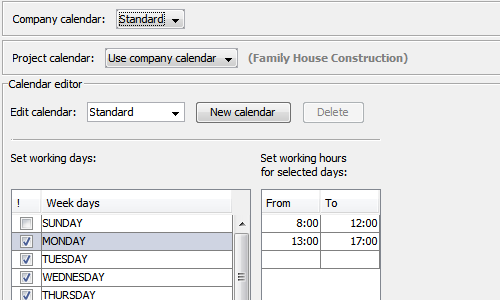
Working calendars
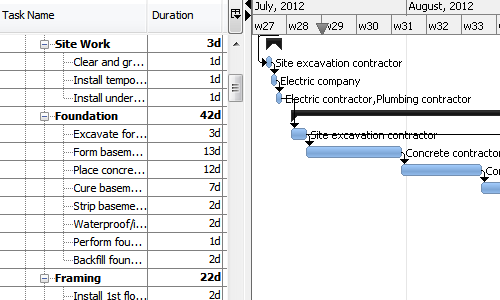
Gantt charts
Resource leveling
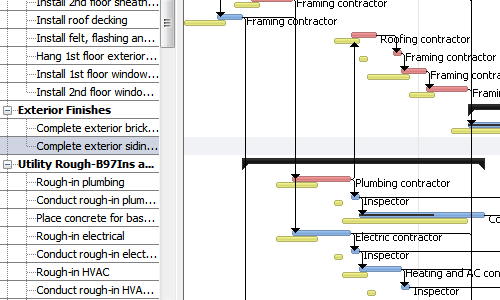
Baseline management

1 / 6

Top Performing Features

  • Mobile Access

    Mobile access is the ability to access the software from a smartphone or tablet.

    Category average: 8

  • Task Management

    This includes the ability to plan, track, collaborate and report on tasks.

    Category average: 9.1

  • Gantt Charts

    Gantt charts are charts that show tasks or events along the y-axis displayed against time along the x-axis.

    Category average: 8.3

Areas for Improvement

  • Timesheet Tracking

    Timesheet tracking is the ability to track all billable and non-billable hours for each project.

    Category average: 8.4

  • Invoicing

    Ability to create, manage and send invoices to clients during or after completion of a project

    Category average: 7.6

  • Document Management

    Document management provides for centralized management of all project documents.

    Category average: 7.9

Great value for a company that wants to enable personnel to plan and execute more effectively

Pros

  • Intuitive interface
  • Critical Path Highlighting
  • Baseline Capability
  • Customized Fields
  • Ability to integrate and email persons assigned tasks

Cons

  • Duration at top level only in days (no options to change). Not so fun when running multi-year projects and trying to convert to weeks months on the fly in meetings
  • Ability to customize built in reports (even if it was done outside and you had to use fields provided)
  • Printing flexibility for reporting

Return on Investment

  • Enables more people to use schedule tool in their work - soft cost, but valuable "thinking schedule" not just tasks.
  • Cost effective - more people can use the technology.

Rational Plan Multi - Best Project Management Platform

Pros

  • Portfolio view is great to get a feel for how your programme is running at a glance and which areas possibly might require attention. The fact that you can customise your view by adding your own columns is another plus.
  • All project information in one tool is a big plus for me considering the amount of projects we run with. This really improves efficiency and saves me time. You have the ability to add documents to tasks, manage risks, email resources tasks due for projects they are assigned to(might need some refinement depending on your requirements), material db with costing etc.

Cons

  • While the portfolio view is great is becomes difficult/cluttered with many projects. Highlighting master projects will help. Creating a tree view for master project and its sub projects would even be better.
  • Reporting is a big part of any project. While rationalplan has reports for key areas the presentation of these reports could really be improved. Make it more presentable. Add some burndown charts. I hate to compare you to MS Project but they do reporting really well in MS Project.
  • The email function is another great idea. Would be great if one had an option to either email an entire portfolio or by active project. At times I’m still scoping certain projects and if the WBS is not yet complete then this incomplete project is also communicated via email which leads to frustration in the team. You don’t always want to communicate tasks for all projects to all resources.
  • One need to be able to: Email per project
  • Email entire portfolio (as currently the case)
  • Email by resource (send pending or outstanding tasks to the resource in question)
  • Add a portfolio dashboard with graphical speed and bar charts giving you a glimpse of late projects, projects slipping, not started in progress etc., for your portfolio.

Alternatives Considered

MS Project, Web2Project, Project in a box and Wrike

Other Software Used

Wrike, Microsoft Project

Needed a plan quick with minimal cost and setup.

Pros

  • Simple interface easy to use.
  • Runs natively on mac and is reasonably priced for what I need - high level project planning.
  • Does way more than what I actually need it for.

Cons

  • Milestones should be a primary option instead of 0h to create one.

Return on Investment

  • Helps explain the target schedule and resource estimates for cost of the project

RationalPlan fits our needs as project planning tool

Pros

  • Runs on Linux and Windows.
  • It Can read Microsoft Project files.
  • Contains all functions needed for easy to use project planning

Cons

  • I don't miss anything.

Return on Investment

  • It is a very useful tool, but has no significant impact on our overall business.

Alternatives Considered

Microsoft Project