TrustRadius: an HG Insights company

QuickBooks Time

Score8.3 out of 10

303 Reviews and Ratings

What is QuickBooks Time?

QuickBooks Time (formerly TSheets) is a cloud-based time tracking and scheduling app that allows employees to clock in and out from the job site with the devices they’ve already got in their pockets. The vendor aims to help companies replace paper timesheets with accurate, electronic time data as well as make payroll and invoicing faster and less costly.

QuickBooks Time also accurately tracks time and GPS points (even without cell or internet service) then automatically syncs when back in service, making it a better (and cheaper) alternative to geofencing.

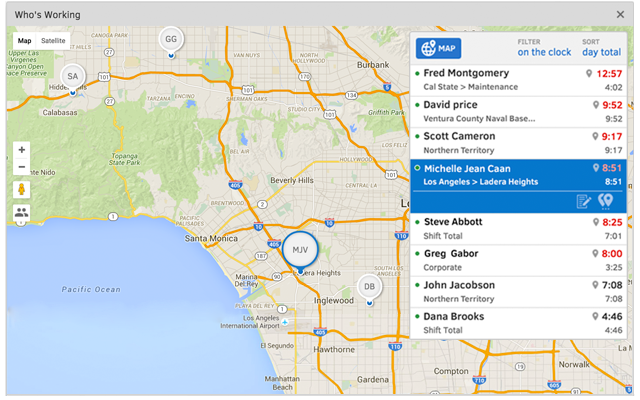
The Who’s Working” feature enables companies to see where employees are located and who’s working on what in real time. QuickBooks Time also features in-app scheduling that allows users to drag and drop shifts, assign jobs, see who’s working at a glance, and send alerts to managers if employees haven’t clocked in for a job or shift as scheduled.

The vendor offers free unlimited phone, email, and chat support to all customers.

Categories & Use Cases

Media

TSheets is the only time tracking app embedded inside QuickBooks. You can easily review and approve employee time cards to run payroll, do job costing, or create invoices--without ever leaving QuickBooks!
With accurate employee hours from TSheets at your fingertips, you're always ready to run payroll--without the tedious manual entry!
TSheets is more than just a time tracker. It keeps a timestamp for each clock in/out, job code change & GPS location. See who’s on the clock, where, and their assigned schedule—in real-time.
Creating a schedule with Excel is costing you more than you think. TSheets employee scheduling software makes it faster & easier than ever to build & share schedules with employees, assign jobs & shifts, & keep your workforce in sync.
Track time using devices your employees already use; any computer, mobile phone or landline, iPhone or Android app, smartphone browser, text message or Twitter.
Really friendly free, unlimited support by phone, chat, or email. We guarantee you'll be impressed.

1 / 6

Great product

Use Cases and Deployment Scope

We use QuickBooks Time for our roofing business, and everyone has very different schedules and working hours and it is an easy to use app that all of our staff can use effectively. We also track time for specific jobs and the notes section is very helpful to be able to track that.

Pros

  • Easy to use
  • Great reporting
  • Location tracking

Cons

  • none

Return on Investment

  • Helps us accurately record hours to jobs
  • Ensures we are charging for any labor we do
  • Easy to use

Usability

Alternatives Considered

Toggl Track

Other Software Used

ADP Global Payroll, AccuLynx, QuickBooks Online

Great product. Highly Recommend.

Use Cases and Deployment Scope

It helps to keep track what time is being spent on which clients. I like that it is easy to turn into create an invoice for said clients. Having multiple clients I serve as well as multiple projects for each client, QuickBooks Time helps me keep all of the billable work straight so each client is billed properly, while I simply have to start and stop time instead of working off a spreadsheet.

Pros

  • Information compilation
  • UI
  • Ease of use

Cons

  • Having the ability to run instant invoices
  • Keeping logged in a little longer as an option
  • A little less clunky transfer from time to invoices sent

Return on Investment

  • Decreased number of apps to go between
  • Saved time
  • Simple reporting made it easier for reconciliation

Usability

Alternatives Considered

Toggl Track

Other Software Used

QuickBooks Self-Employed (discontinued), Canva, Adobe Acrobat

QuickBooks Time has a well-designed watch chart

Pros

  • Full tracking of the work activities of our employees, allowing us to constantly review the breaks they take during each daily workday, and thus calculate the amount of pay based on the amount of work and hours worked.
  • It shows a complete schedule of activities from the main tab of the platform, which is configured by the main administrator of our project, or our shift manager, so that everyone involved in the use of the platform can see the activities.
  • In case of requiring presence in any activity within the platform, QuickBooks Time has an excellent alarm system that reminds us of the times when we must carry out our work activities.
  • We have been very pleased with the quality that the QuickBooks Time communication team has offered us when clarifying our concerns about the payment methods of the service. They have offered convenient plans that completely fit our needs and budget, and for this reason we would like to recommend QuickBooks Time to improve the overall management of employee hours.
  • QuickBooks Time is a dynamic service that helps to make it easier to schedule and make revisions to all operations during working time, as it is helpful to delimit the hours of delivery of each file. The main thing about this software is that since it is easy to use, all employees involved can take care of submitting their activity and hours without any problems.

Cons

  • There is not a sufficiently accurate GPS location tracking capability, leading to detection errors by the platform. It means that sometimes the GPS shows the employee in locations where he/she was previously, and not the current locations.
  • There are too many limitations in the notes tab, which despite showing great utility does not allow attaching content in any kind of format beyond text documents.
  • The hours must be entered completely manually, demonstrating that the platform does not have artificial intelligence capabilities that allow it to adapt to our management and memorize the daily schedules and operations, so that future sessions will be automatic.

Most Important Features

  • Allows you to create a total of hours worked for each employee, using information from your timekeeper to calculate the number of breaks and absences during working hours, to ensure accurate pay results.
  • Once timesheets have been submitted to the group administrator, they are locked and cannot be reissued unless the administrator allows revisions to the time reports.
  • It is easy to review and keep accurate track of all work sessions from any date, as the platform saves all reports over time.

Return on Investment

  • Due to the accuracy that the platform causes in the development of employee payroll reports, we can say that it has been good in improving our profits, since some employees even work better.
  • Our ROI is currently up to 5 percent, or 500% of the total investment we made when we started working with QuickBooks Time.

Other Software Used

Big Biller, Clio, ClockShark

Terrible customer service

Use Cases and Deployment Scope

We use the software on a daily basis to keep track of our staff working hours and locations.

Pros

  • Ignore customer service issues
  • Hanging up on customers
  • Fail to call back

Cons

  • Customer service
  • Resolving minor issues
  • Taking people off hold

Most Important Features

  • Tracking working hours
  • Tracking working location

Return on Investment

  • Not helping us resolve issue

QuickBooks Time is Great

Pros

  • Track time daily
  • Give full reports for payroll

Cons

  • Notifying employees immediately if they forget to sign out on a certain day, etc.

Most Important Features

  • Reports for payroll

Return on Investment

  • Helping clients get time tracking within software they are already using

Other Software Used

QuickBooks Online

Usability
