TrustRadius: an HG Insights company

Optimizely Web Experimentation

Score8.7 out of 10

580 Reviews and Ratings

Get a Demo

Contact about Optimizely Web Experimentation

Please fill out the form below to get in touch.

Optimizely

Connect with Optimizely

What are you interested in?

Already have an account?

You hereby consent to have TrustRadius share the information supplied on this form with Optimizely so that Optimizely and TrustRadius may contact you in regard to the information requested.

What is Optimizely Web Experimentation?

Whether launching a first test or scaling a sophisticated experimentation program, Optimizely Web Experimentation aims to deliver the insights needed to craft high-performing digital experiences that drive engagement, increase conversions, and accelerate growth.

Media

AI-Powered Experimentation with Opal:

- Instant Test Ideas: Generates high-quality A/B test ideas based on any goals and audience insights.
- Smarter Experimentation: The AI can suggest impactful variations, reducing guesswork and increasing test velocity.
- More Than Just Ideas: From hypothesis generation to analyzing results, Opal helps optimize every stage of the experimentation process.
the Web Experimentation Visual Editor :

- Tweak experiments using the visual editor or dive into custom code when needed.
- Modify elements, update styling, or add dynamic behaviors.
- Ensure perfect variations while keeping control over every detail of the experiment.
AI Content Suggestions:

- Generates copy variations to supercharge experiments.
- The AI suggests high-impact messaging for tests when hovering over a field.
- AI-powered content suggestions help skip the brainstorming process.
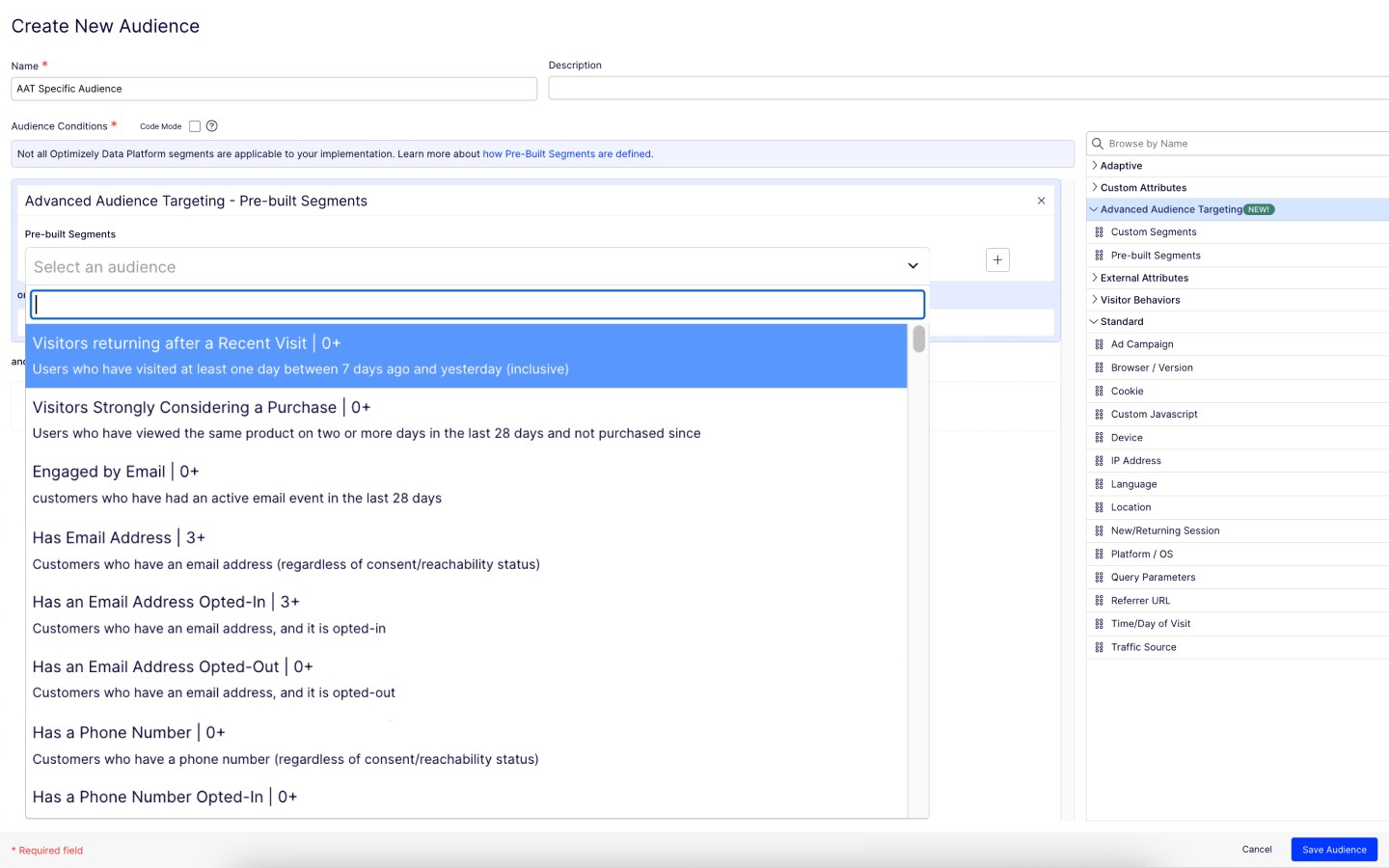
Advanced Audience Targeting:

- Delivers personalized experiences by targeting users based on behaviors, attributes, and real-time conditions.
- Defines precise audience segments using first-party data, geolocation, and device type.
- Can test and optimize for different audience groups to maximize impact and engagement.
Custom Templates in the Visual Editor:

- Offers pre-built templates for common test setups.
- Standardized variations and maintains brand integrity with reusable templates.
- Templates can be customized visually or tweak them with code for full flexibility.
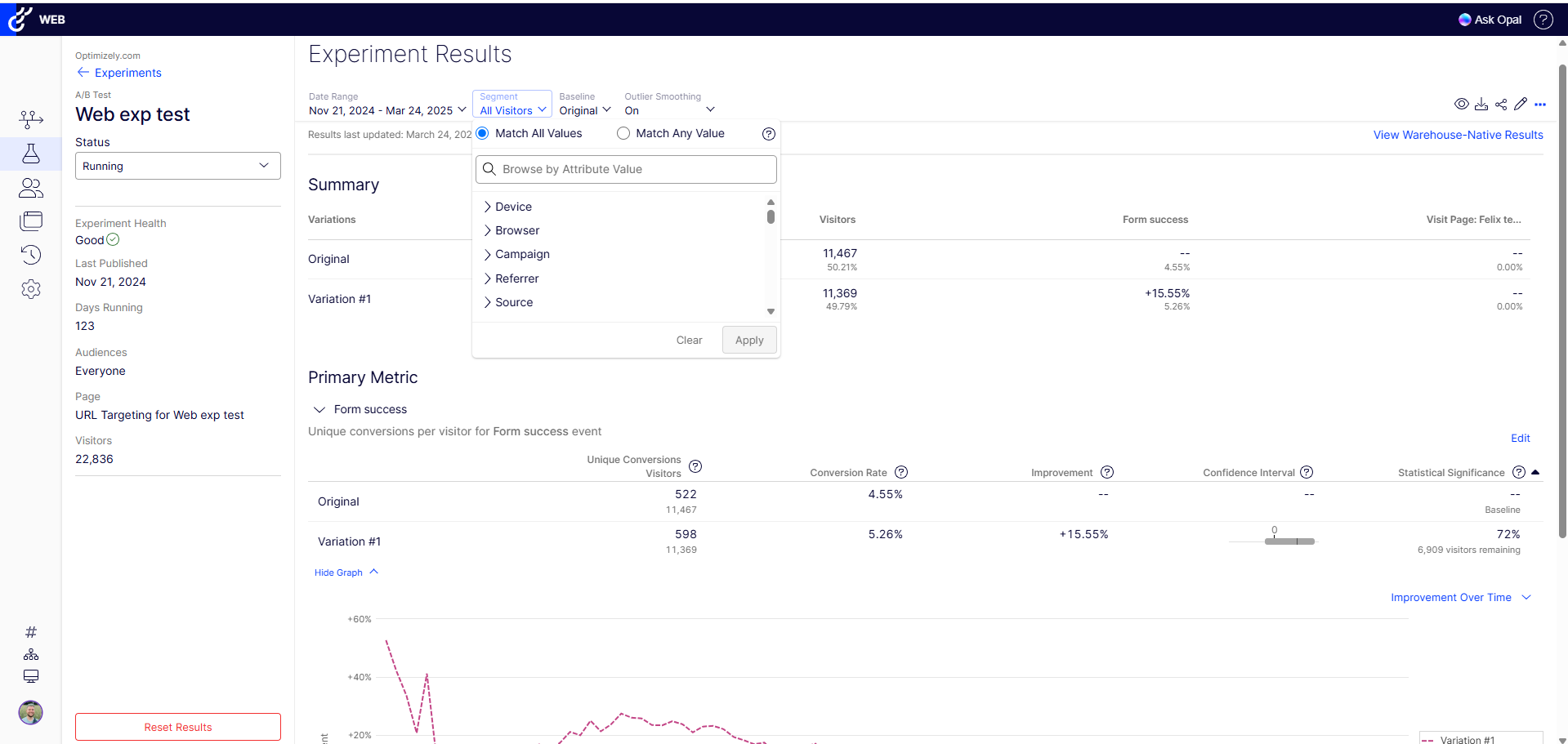
the Web Experimentation Results Page:

- Data visualizations help interpret experiment performance.
- Displays which variations are winning with built-in statistical significance calculations.
- Results can be filtered by audience segments, events, and conversions to uncover key trends.

1 / 6

Top Performing Features

  • Heatmap tool

    A tool that shows which elements of the page generate the most visitor engagement.

    Category average: 8.4

  • Traffic allocation control

    Ability to set what percentage of website traffic receives specific test variants in order to roll out code only to a subset of site visitors.

    Category average: 8.4

  • a/b experiment testing

    Create and test variations of a website, changing site elements such as headlines, CTAs, images, page design and layout, technical SEO changes, and new feature additions and collect statistical results of each variation’s conversion rates or other metrics.

    Category average: 8.6

Areas for Improvement

  • Dynamic experiment activation

    Ability to activate an experiment after the page’s initial load based on a set of conditions (e.g. if the visitor takes certain actions).

    Category average: 7

  • Server-side tests

    Ability to run server-side tests (e.g. A/B, A/B/n, multivariate, and split URL tests) to test out more complex design changes, roll out features to specific audience segments, or split site traffic between different site versions.

    Category average: 7.8

  • Page surveys

    Create on-page surveys and select which segment of users are asked survey questions using defined audience segments (e.g. new vs. returning users, mobile users, desktop users, etc).

    Category average: 7

Robust Web experimentation

Use Cases and Deployment Scope

I'm using Optimizely web experimentation to make our websites perform measurably better rather than relying on guesswork. It helps me to prove value quickly. I often set up custom event tracking, like monitoring engagement with embeded calculators or interactive product filters so we can measure deeper behaviors, not just clicks

Pros

  • Setting up multivariate tests directly in the platform, wiring it up to capture drop off events through the analytics pipeline

Cons

  • I'm currently trying more complex setups like syncing experiment audiences with our data warehouse. It is not always plug and play, sometimes I have to write custom javascripts to track very specific behaviors.

Return on Investment

  • Is shortened our experiment ideation to launch time from 4 weeks to about 8 days, freeing our dev team to take on more billable client projects

Other Software Used

TeamViewer, IBM Maximo Application Suite, Figma Dev Mode

Optimizely Web Experimentation Review

Use Cases and Deployment Scope

We use web experimentation to A/B test new functionality on our website. The goal is to improve the conversion rate.

Pros

  • I don't have a strong statistics background, so the thing that I really love about web experimentation is the stats engine. It makes understanding the impact of the experiments that we run a lot easier to understand. It calculates statistical significance and takes away all of the guesswork and the complicated formulas that go into that.

Cons

  • One of the areas that we struggle with when we are running experiments, which have a non-conversion rate objective. So things like revenue metrics where it's not a yes or no answer. We have to use other reporting tools to get information on how those metrics are being impacted. So wish there was a more easy way to track those kind of metrics. Average order value through Optimizely, that would be really, really useful.

Return on Investment

  • I think all of those, so conversion rate improvement is the key one for us so far this year. Through experimentation on optimizing, we've grown conversion rate by about 4%.
  • We've also launched a number of personalization campaigns using the new contextual multi-arm bandit capability through Optimizely. And in certain campaigns that has resulted in an increase in click-through rate of 100 percent, which is really, really strong.
  • It's also acted as a tool to de-risk the launch of certain initiatives. So we're going through a technical re-platform at the moment. We've used A/B testing as a way to soft launch that into the market, to certain audiences, to a certain proportion of traffic. And that saved us time and money because it's reduced the impact of any bugs that we've not managed to catch before launch through limiting the exposure to the market.

Other Software Used

Glassbox, Google Analytics

A fantastic product

Use Cases and Deployment Scope

We are using Optimizely for experimentation. We have mainly been testing to optimise checkout conversion and have been leveraging these findings to obtain buy in to test other areas of the site.

The tool has been excellent in ensuring we build stable and performant tests, and the service from the CSM has been excellent.

A big challenge we have is velocity due to very little resources. We have used Rapid X, but are now looking to leverage an Optimizely partner such as creative cx to ramp up velocity to obtain more learnings and build a test and learn culture

Pros

  • Very quick and easy to build tests
  • We were quite impressed that it didn't significantly degrade page performance.

Cons

  • The reporting area could be a bit more user friendly
  • Would love for to have better features for low traffic sites so that we can reach significance quicker.

Return on Investment

  • From the small tests we have ran, we have managed to bring in £6m incremental revenue
  • We have mitigated the risk of implementing loss making features
  • Its helped build a test and learn culture within the teams

Other Software Used

Contentsquare, Looker

Optimizely User Review

Use Cases and Deployment Scope

We are a large organisation with multiple domains in multiple markets. Optimizely is used for A/B testing and personalisation across all sites. We can test variations of landing pages, CTAs, and forms to increase lead generation and sales.

Pros

  • Easy user interface
  • AI capabilities
  • Good customer support

Cons

  • Glitchy visual editor/WYSIWYG
  • Login errors on certain browsers
  • A lot of dev customisation required to get it to behave in the way we need it to

One Platform full experimental cycle - Optimizely.

Use Cases and Deployment Scope

Optimizely Web experimentation is the primary tool I use to validate front-end and workflow changes. But beyond the day-to-day, I've leaned on it for more ambitious projects like an ongoing experiment with AI-driven diagnostic recommendations. I'm coordinating with our analytics team to pipe experiment data into Power BI. We've also partnered with Kin + Carta to implement a workaround that links Optimizely events with some of our older reporting systems.

Pros

  • Fast iteration on tools with real time reporting.
  • Safe rollouts on high-risk features.

Cons

  • I attempted to test a multi-step referral process across both desktop and mobile, but I couldn't complete it without involving Optimizely experts, as the setup requires a significant amount of custom code.

Return on Investment

  • Experiments that increase completion rates directly reduce support tickets saves us money in the tens of thousands.
  • Biggest ROI comes from avoiding sinking dev resources since we can just test first.

Other Software Used

IBM Cloud Continuous Delivery, Figma Dev Mode