TrustRadius: an HG Insights company

Ooma Office

Score9.2 out of 10

79 Reviews and Ratings

What is Ooma Office?

For businesses of all sizes, Ooma provides advanced voice and collaboration features which they describe as flexible and scalable.

Read more details.

Media

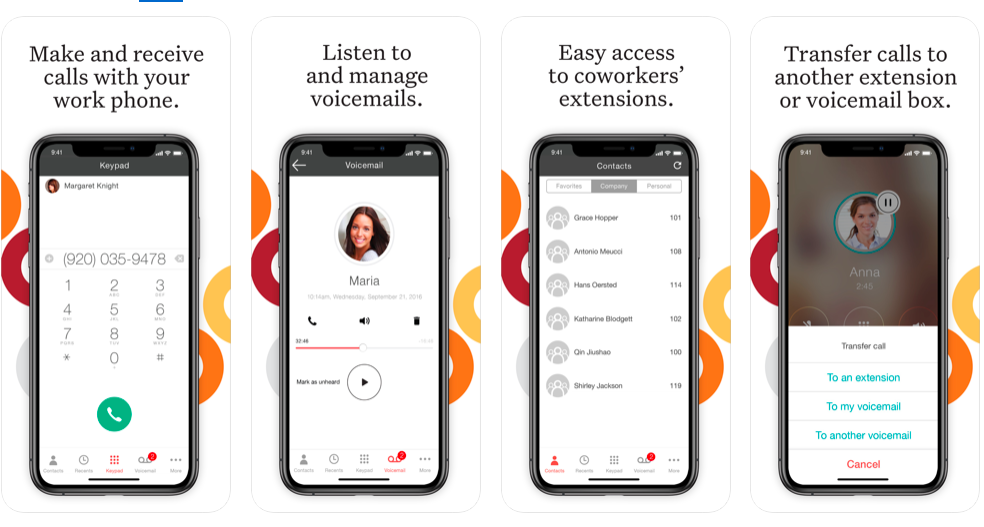
Screenshot of Ooma Business Phone Mobile App
Screenshot of Ooma Office Pro Desktop App
Screenshot of Customizable Virtual Receptionist
Screenshot of Configure System Settings through Ooma Office Manger Online Portal

1 / 4

Screenshot of Ooma Business Phone Mobile App

Top Performing Features

  • Audio conferencing

    Audio conferencing credentials for all on the system.

    Category average: 8.5

  • Call park

    Ability to hold calls in virtual location and subsequently access from any phone in system

    Category average: 8.1

  • Call screening

    Ability to block numbers or send calls directly to voicemail

    Category average: 8.3

Areas for Improvement

  • Call recording

    Automatic recording of inbound and outbound calls

    Category average: 8.4

  • Mobile app for iOS

    App for iPhone and iPad

    Category average: 7.8

  • Mobile app for Android

    Android app

    Category average: 7.7

Who Buys & Uses Ooma Office

Pros

  • Significant cost savings compared to traditional phone systems (71% of reviewers)
  • Enhanced accessibility through the mobile app, enabling remote work
  • Improved availability, potentially capturing missed business opportunities

Cons

  • Customer service difficulties reported by some users (29% of reviewers)
  • Call quality issues, including dropped calls and missing caller ID information (29% of reviewers)

Ooma Office Provides A Flexible Reliable Business Phone Solution.

Use Cases and Deployment Scope

Ooma Office is our primary office phone. While we have old-school office phones, we primarily use them on our mobile devices with the Ooma Office app, allowing us to "be in the office" from anywhere. The virtual assistant is suitable for routing calls and handling frequently asked questions, and although we have used it in the past, we currently ring through. It's a full-featured solution for a very reasonable price.

Pros

  • Saving money: Ooma Office saves a bundle compared to what we were paying for Verizon business phone services.
  • The mobile app is the most helpful part of Ooma Office for us. We can be "in the office" anywhere, even if we're telephonically.
  • The automated assistant can be invaluable in routing calls and handling frequently asked questions.

Cons

  • Transcribed voicemail would be very helpful in the basic tier of service.
  • Better caller ID reporting. Often, the caller ID is missing from incoming calls in the Ooma system.
  • Better SPAM call filtering at the basic tier of service.

Return on Investment

  • Ooma has saved a *bundle* compared to what we were paying Verizon for less capable service.
  • The mobile app has been our biggest win so far. Helping us capture business we might have otherwise missed.
  • The call assistant has helped us save time by handling frequent questions for info.

Usability

Alternatives Considered

RingCentral Contact Center

Other Software Used

Microsoft 365 Business Premium, Nuance Dragon Speech Recognition, Mozilla Firefox

Ease of Setup and Use

Use Cases and Deployment Scope

Ooma office provides the phones and VOIP for our company phone needs. We have both physical phones and services through their mobile app where our office can both send and receive calls and messages. The service is internet based and does not require any hard line installations. We are a construction company of about 75 employees.

Pros

  • Mobile phone app
  • VOIP phone setup and connection
  • Easy to setup and get started
  • Customized office phone solutions

Cons

  • The service is not as good as expected even with a high speed internet connection
  • Calls are dropped
  • customer service and changes on the account can be difficult to make

Return on Investment

  • For the price, the investment is minimal when setting up an office phone solution,
  • we have used this and their mobile features instead of purchasing company phones for our staff.
  • Reduced cost instead of having a mobile phone plan

Usability

Ooma Office has been great

Use Cases and Deployment Scope

I have 2 phone lines for my business, with 2 desk phones. I also have the soft phone on my computers both at work and at home. Ooma Office also has an app that I loaded onto my cell phone. I have phone access everywhere that I am at all times. Ooma Office also has a texting platform, so I have business texts everywhere at all times. I often need to fax documents or receive faxes and Ooma Office comes with fax service. I also have a toll free number for customers that have not gone the Cell phone or VOIP route, that way they do not have to pay to call me. Call recording is a handy feature and I have used it many times to back up information given in a phone call.

Pros

  • Text messaging
  • call quality
  • call recording
  • soft phone and mobile app

Cons

  • the soft phone app does not always keep up to date throughout the day, so I need to logout and back in to fix it
  • I have difficulty with the Ooma Office online navigation, because it does so much

Return on Investment

  • I have saved money off other VOIP services
  • I have saved money by not needing separate text service through work
  • I have saved customers by having availabity beyond the normal business hours.
  • During Covid, I was able to move my phone to my house and provide same level of service out of my house.

Usability

Alternatives Considered

Vonage Business Communications and RingCentral Contact Center

Other Software Used

Salesforce CMS, BombBomb

Good value and features but unreliable service lately

Use Cases and Deployment Scope

We use Ooma Office for our business phone services. This includes call transfers, schedules, text messaging, call recording, conferencing, and call reporting.

Pros

  • Call recording
  • Easy setup

Cons

  • Customer support
  • Notifiying users of network problems

Return on Investment

  • Ooma Office has allowed us to easily add remote employees

Usability

Best VOIP service at a reasonable price

Use Cases and Deployment Scope

We use it for our phone service and the cost is amazing affordable. It is a VOIP just plug the phone into the modem for internet and it is all set to use. It was simple when moving from an office to work from home I just had to plug in the phone into my internet modem and it was all set to use. Best service and product to use.

Pros

  • VOIP
  • Cost
  • Customer service

Cons

  • It works just fine for us

Return on Investment

  • Saves money on phone

Usability