TrustRadius: an HG Insights company

Tungsten Power PDF

Score9.3 out of 10

855 Reviews and Ratings

Try it for free!

Contact about Tungsten Power PDF

Please fill out the form below to get in touch.

Tungsten Automation (formerly Kofax)

Connect with Tungsten Automation (formerly Kofax)

What are you interested in?

Already have an account?

You hereby consent to have TrustRadius share the information supplied on this form with Tungsten Automation (formerly Kofax) so that Tungsten Automation (formerly Kofax) and TrustRadius may contact you in regard to the information requested.

What is Tungsten Power PDF?

Tungsten Power PDF (formerly Kofax) is a solution to manage PDFs for businesses and individuals available with a one-time purchase with no subscription fees. It has a built-in eSignature integration with SignDoc and DocuSign for a complete end-to-end document lifecycle workflow.

Benefits to Power PDF users:

  • Ease of Use: Works like Office desktop products, so it's easier to learn
  • Compatibility: Works across devices and platforms, share documents in a storage cloud
  • Security: Built-in features to protect information & compare documents to monitor tampering
  • Search: "Fuzzy Search" provides a Google-like search
  • 3D Support: Rotate, zoom, annotate and more on a 3D object
  • Speed & Accuracy: Accurate & speedy when converting PDFs to/from Word, Excel, and other popular formats
  • eSignature Integration: Sign & send PDF documents for signature via SignDoc or other 3rd party platforms
  • Dynamic Stamps: Customizable stamping with font, color, background
  • Redact Sensitive Information: Automatically detect & redact words and expressions for safe, secure document sharing
  • Create Interactive PDF Forms with a Single Click: Convert a flat, image-based PDF form into one that users can complete electronically
  • Formatting: PDF/A-4 Format to ensure retention all of the newest PDF features
  • Collaboration: Review, markup and revise PDFs with annotations, mark-up and stamps

Power PDF Advanced, Standard and Mac are individual, buy-once-own-forever licenses for desktop or laptop. Power PDF Business volume licensing is available for more than 5 users, with a single admin, server installation, and other collaborative features for teams, along with Generative AI features.

Free trials for all Power PDF editions available here.

Categories & Use Cases

Media

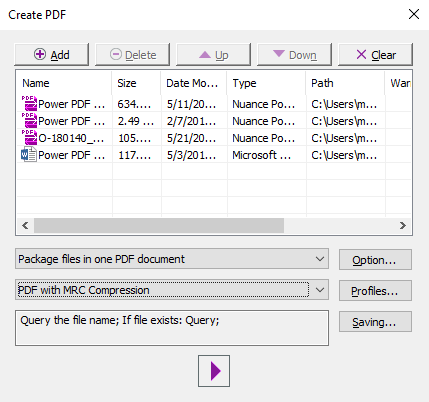
the PDF Create Assistant, which can be used to create multiple PDFs at the same time from a variety of source formats. Create individual PDFs, or combine into one PDF package.
PDF Profiles that can be created to apply commonly desired settings to new PDF documents created in Power PDF.
the application's color, changed from purple to blue, light gray or dark gray.
some lightweight document automation that can also be achieved with the Watched Folder and Sequence features.
where packages can be signed with pre built templates using Kofax Sign Doc or other integrating e-signers
PDFs that can be navigated with a thumbnail view
the application's Office-like look and feel
PDF to Word conversion, and vice versa, which can be carried out in the application.

1 / 8

Top Performing Features

  • Merge or Split PDFs

    Allows users to combine multiple PDF files into one document or split a single PDF into separate files.

    Category average: 8.6

  • Convert to Different Formats

    Allows users to convert PDFs to popular formats like Word, Excel, PowerPoint, or image files.

    Category average: 8.5

  • Page Management

    Provides tools to add, delete, reorder, or rotate pages in the PDF document.

    Category average: 8.1

Areas for Improvement

  • Edit Text and Images

    Users can edit and manipulate text and images within the PDF document.

    Category average: 7.9

  • Text Recognition (OCR)

    Supports Optical Character Recognition to convert scanned documents or images into editable text.

    Category average: 7.4

  • Form Creation and Editing

    Allows users to create interactive forms within the PDF document or fill out existing form fields.

    Category average: 7.1

Tungsten Power PDF is a Life Saver

Use Cases and Deployment Scope

Our business typically works with large PDF documents where only a small portion pertains to our operations. Frequently we use Tungsten Power PDF to extract relevant pages or sections and allow us to work with more manageable documents. Additionally, we typically use Tungsten Power PDF to convert PDF data into Excel spreadsheets for easier sharing and collaboration or to combine documents where sending multiple files isn't an option.

Pros

  • Extract pages to new file.
  • Search function can identify words and phrases in a document.
  • Edit text and typewriter function allows for making any PDF 'fillable'.
  • Combining documents allows to physically print and sign a signature page of a document and insert it into the digital copy.

Cons

  • Sometimes the search function doesn't always pick up text on a page. It can turn back "no results" from time to time when searching for words that are clearly on-display in my screen.
  • At times, the program becomes finicky and will only open a PDF if the program has been closed down or else it returns an error.
  • I've noticed from time-to-time if a file is open in Tungsten Power PDF for an extended time and I go back to it, much of the content has disappeared causing me to have to close the program and reopen.

Return on Investment

  • Saves hours from having to create Excel file or Word document from PDF.
  • Easily extract scope of work from our PDF quotes and turn them into work orders for our technicians.
  • Huge savings from avoiding printing 100+ page documents to get a form physically signed and then having to scan it back to electronic format. This is now done by printing one page, scanning it and combining it back into the electronic document.

Alternatives Considered

Adobe Acrobat

Other Software Used

Microsoft 365 Business Premium, Procore

Tungsten Power PDF

Use Cases and Deployment Scope

I have multiple licenses for Tungsten Power PDF. My spouse is a court reporter involved in the production of trial transcripts, many times with submissions from multiple court reporters. This requires her to format the combined transcripts sections in accord with the rules governing transcript page volume size and page numbering. Tungsten Power PDF empowers her to combine and format the transcript sections into a single transcript series of volumes. I have used and use various PDF programs. Tungsten Power PDF is the program that I use generally in my workflows for three programs that I frequently use. Those three programs are: LiquidText PDF, TrialPad, and the legacy version of CaseMap. These programs do much of their work on PDFs. Tungsten Power PDF is the only regular PDF program that I know that makes it possible to use the legacy versions of CaseMap.

Pros

  • page numbering and batesstamping
  • extracting pages
  • redaction
  • search and redact
  • dividing large documents
  • inserting pages
  • deleting pages
  • inserting blank pages
  • stamping

Cons

  • blank page insertion could be clearer
  • font control when using the typewriter can be better
  • The CaseMap functionality could be made more prominent

Return on Investment

  • Tungsten Power PDF is the only PDF product capable of competing with Adobe Acrobat, while being cheaper than Adobe Acrobat.
  • PDF Products cheaper than Tungsten Power PDF have proven to be more difficult to use, lacking in needed features, and aesthetically unpleasing!

Alternatives Considered

Readiris 17, CutePDF, ABBYY FineReader, WPS Office and PDF Reader Pro

Amazing Product

Use Cases and Deployment Scope

We use Tungsten Power PDF to create our invoicing and contracts for our customers. We like the ability to edit the PDF's and add security features with ease

Pros

  • editor is great
  • adding highlights and notes is easy
  • page loading is fast

Cons

  • multi user pricing
  • customer support
  • signature capability

Return on Investment

  • multi user pricing
  • the ability to quickly edit and send pdfs
  • security features are great

Exceeds Expectations

Use Cases and Deployment Scope

The product is used every day with high frequency as the “go to” for PDF document management. The product works. Every time. All the time. Seamless and quick. Staff particularly favor the option to combine multiple documents from various formats into a single, unified PDF document. They also appreciate the PDF editing capabilities as they are robust and stable.

Pros

  • Combine documents from multiple formats into one PDF
  • Edit PDF
  • Review PDFs, even from a mobile device

Cons

  • Sometimes the software updates don’t make sense. Staff are encouraged to wait at least a month before downloading and installing updates.
  • The PDF converter which is supposed to covert PDF to Word format is lackluster at best and makes frequent mistakes on complex documents.
  • The PDF editor is robust but doesn’t deal well with images.

Return on Investment

  • Saved from purchasing Adobe!
  • Probably save 10-20 hours a week in manually printing then scanning multiple documents into single PDF documents.
  • Save time editing PDFs!

Alternatives Considered

Adobe AIR, Adobe Acrobat and AcroPDF

Other Software Used

Microsoft 365, Bitdefender GravityZone, Microsoft To Do

Good value for cost users quickly adapted to Tungsten from prior program.

Use Cases and Deployment Scope

Purchased two licenses to test the feasibility of replacing Adobe with Kofax. The test went great; users stated that Kofax is faster and easier to use than Adobe. We plan to replace all Adobe licenses with Kofax, resulting in a $6,000 annual savings. Our users primarily use the software to edit PDFs and sign documents.

Pros

  • Signing documents.
  • Editing PDFs.
  • OCR

Cons

  • OCR should not require so many clicks.
  • Editing PDFs is hidden behind ribbon clicks.

Return on Investment

  • Moved to save money from Adobe.
  • ROI was immediate as purchase cost equaled Adobe annual cost.
  • I don't understand the volume licenses; there isn't a "release" from the license, only an uninstall feature.

Other Software Used

Adobe Acrobat, Adobe Acrobat Reader, Microsoft Edge
