TrustRadius: an HG Insights company

LiquidPlanner

Score8.3 out of 10

33 Reviews and Ratings

What is LiquidPlanner?

LiquidPlanner is a cloud based predictive project management solution. Some key features include: Dynamic Timeline View, Workload View, and Real-Time Activity Stream.

Media

Project Dashboards allow users to build high-level views that help visualize data.
Workload Views allow users to see an entire team's workload at once and make resource adjustments in stride.
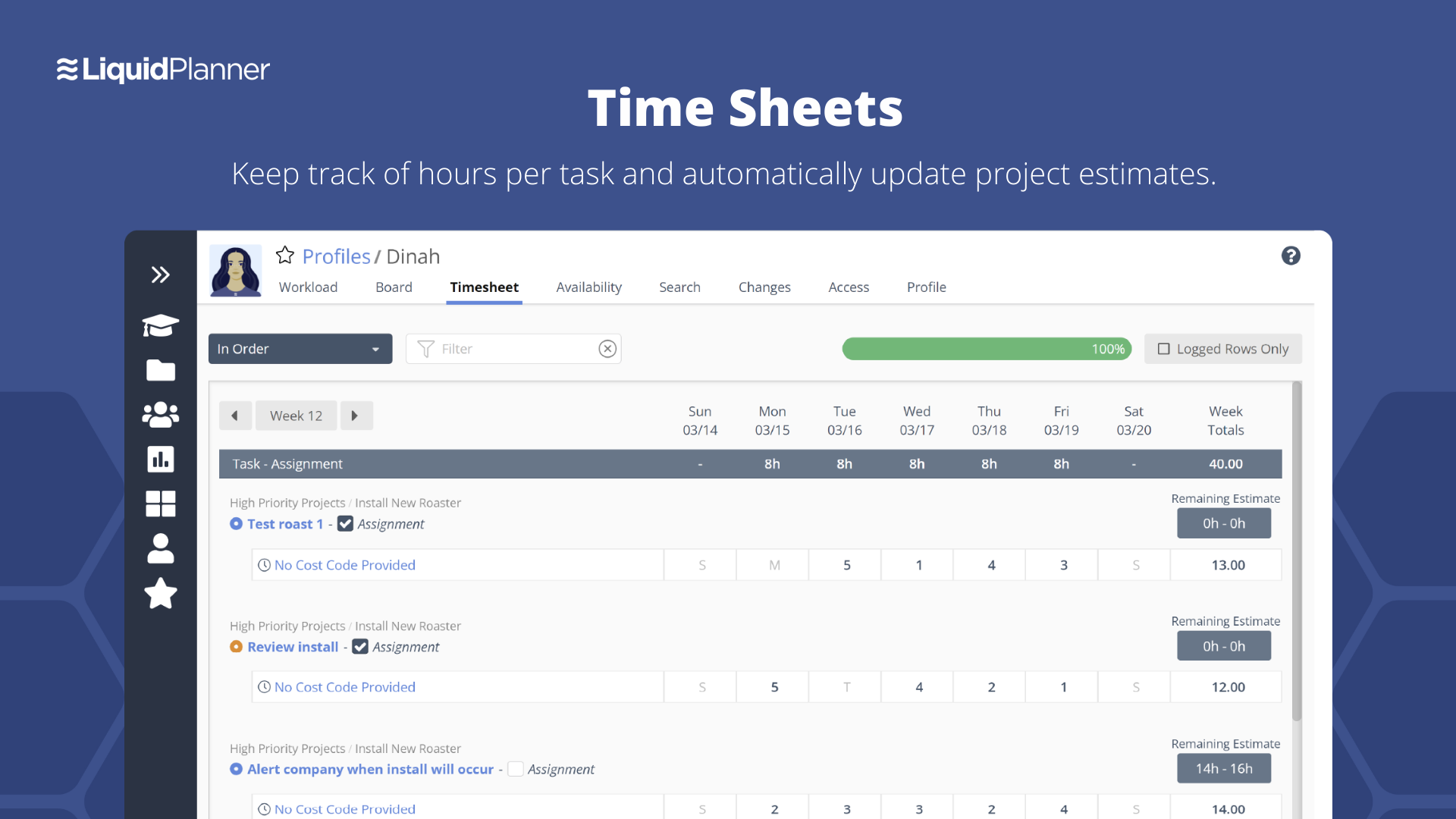
Time Sheets keep track of hours per task and automatically update project estimates.
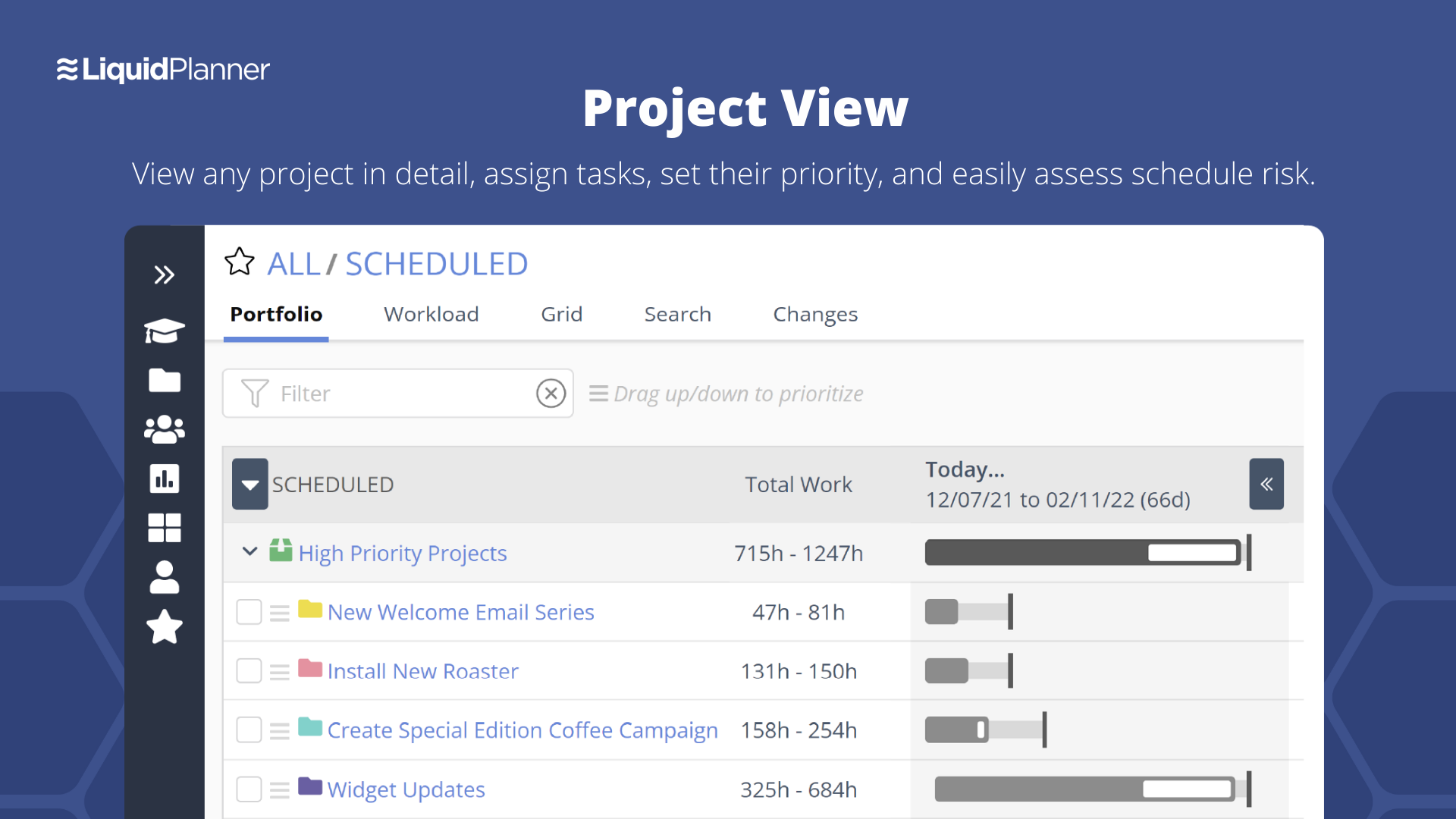
Project View allows users to view any project in detail, assign tasks, set their priority, and access schedule risk.
My Work View is a personalized view of all work to always know what to work on next.

1 / 5

Top Performing Features

  • Document Management

    Document management provides for centralized management of all project documents.

    Category average: 7.9

  • Team Collaboration

    Team collaboration capabilities let team members work directly with each other and provide team updates.

    Category average: 9

  • Scheduling

    Scheduling capabilities allow users to set schedules on tasks, and create timelines and milestones.

    Category average: 8.2

Areas for Improvement

  • Budget and Expense Management

    Budget and expense management provides the capability to track all expenses by employee or department and link them back to department. It also enables hourly rates to be set.

    Category average: 8.5

  • Timesheet Tracking

    Timesheet tracking is the ability to track all billable and non-billable hours for each project.

    Category average: 8.4

  • Mobile Access

    Mobile access is the ability to access the software from a smartphone or tablet.

    Category average: 8

Project Management Made Easy

Use Cases and Deployment Scope

We use LiquidPlanner as the project organizer where we structure each project and the specific tasks that need to be completed by the various teams. LiquidPlanner helps us to organize all of the small details and tasks that need to be taken care of in a specific order for the products we make to be completed correctly. We have a design team, development team and a writing team that all have to coordinate their efforts to create the marketing materials we produce. LiquidPlanner helps us coordinate where everyone is at with their specific tasks and allows us to see what still needs to be done. We are much more organized because we have a clear "map" of what work has happened and what work still needs to happen on a project. LiquidPlanner is something we use daily and something we need to keep our projects moving between teams.

Pros

  • LiquidPlanner lets you organize to an insane degree, you can create packages, folders, packages, sub-packages and tasks and even more things to organize projects.
  • LiquidPlanner allows you to set up dependent actions meaning a task can be assigned to someone but they won't see it until a task the needs to be done first is marked as done. This allows you to keep things in order so tasks don't get out of order of when they need to be completed.
  • LiquidPlanner lets you assign tasks with a certain amount of hours it's expected to take. This is super helpful because it helps you keep track of how much you've assigned a team or specific person so you don't assign them more than then could do in a week. We are able to track how many hours tasks take and to make sure everyone has a healthy work load.

Cons

  • One thing that can be frustrating with LiquidPlanner is the search function. The search area will populate with results, but once you click on a task, project or folder, it won't let you expand the item if there is more underneath it. This is frustrating because sometimes you want to see what is included in a project, but you have to search and then clear the search bar before it lets you look more into something.
  • LiquidPlanner is so expansive and has so much potential that is can be overwhelming to a new user or to someone who doesn't use it often. This is hard because it take a lot of training to get someone familiar with the software-- the up side it that once they are familiar with it, it is really helpful to use.
  • Sometimes the software can get glitchy and jump around or kick you out of an active task you are editing. This is frustrating if you haven't saved your work because it will lose all the work you've added. I've seen this improve over the last few years I've used the software, but it comes up every now and again.

Return on Investment

  • It helps us save time tracking down details and tasks. Something that might take an hour to email up we are able to create a template for and copy each time we need a member of our team to do it. It saves us hours of work.
  • Another huge impact is being able to track how much work we have to do. Because we enter all of our projects and the outstanding tasks into LiquidPlanner it allows us to track if we are staying on top of our work or if we need to hire more help.
  • We are able to coordinate between teams much more efficiently than before we used LiquidPlanner. We don't waste time in meetings trying to see what people have done for the week or what they have left to do-- we just have to look in LiquidPlanner to see what tasks are marked done and what are still active.

Other Software Used

Slack, Daylite

LiquidPlanner produces a higher degree of visibility into the progress of our team.

Use Cases and Deployment Scope

Extremely positive experience. The LiquidPlanner project management tool allows me and my work team to monitor the status of our goals at a high level, keeping us informed about the progress of projects since it offers certain management capabilities that make collaboration in projects more efficient and precise.

Pros

  • GANTT charts.
  • Multiple integrations.
  • Creation of schedules based on project priorities.
  • Powerful functions oriented to task management and team collaboration.

Cons

  • It is difficult to visualize projects through a mobile phone.
  • The user interface is not attractive.
  • The "search" function is not that powerful, it needs to be improved.

Return on Investment

  • Ease of use and intuitiveness from day one.
  • Accessible.
  • Multiple integrations.
  • There is no complex implementation, it can be connected with different software.

Other Software Used

Asana, Trello, R.O. Writer

LiquidPlanner - Good Planner

Use Cases and Deployment Scope

We use Liquid Planner to manage the in-house projects. The tool is very good for what it is designed to do. It has the greatest asset of set reporting information that allows for customization to meet our needs. It has done this job for us very well. The support provided has been timely and effective. LiquidPlanner helped with capacity planning, tracking and utilization. The dashboard was quite simple and intuitive and made our collaboration fun

Pros

  • Ease of use
  • Great Tech support
  • Dynamic scheduling of work
  • Reports can be exported in CSV format
  • Integration with Drive ,Dropbox

Cons

  • Need a training to use it effectively
  • Little expensive
  • Its helpful only for Project Management
  • Reports can't be exported in PDF
  • accessing LP on mobile is tiresome
  • Some link mostly external doesn't open

Return on Investment

  • Team collaboration was awesome with fun and work
  • Had to spend lot time to understand tool
  • Freemium versions could be helpful

Alternatives Considered

Trello and Atlassian Jira Align (formerly AgileCraft)

Other Software Used

Trello, Atlassian Jira Align (formerly AgileCraft), Teams Manager for Microsoft Teams

For effective project management, LiquidPlanner.

Use Cases and Deployment Scope

Thanks to LiquidPlanner we can create, manage and carry out absolute control of the company's projects and tasks. It can be easily integrated with various calendars, with Google Drive, Dropbox, and Box. In our case, we use it with Zapier to add the appropriate applications to integrate. Because we handle all the basic tasks and projects for the company, for unlimited general storage we use the BOX integration to manage large files.

Pros

  • Intuitive UX/UI.
  • Integration with Google Drive, Dropbox, and Box.
  • Reports, customized with the ability to export them as CSV files.

Cons

  • Reports cannot be exported in PDF format.

Return on Investment

  • It is a valuable integration tool, ideal for working with large files.
  • Effective collaborations and efficient file transfer.
  • Coordinating projects, schedules, and tasks is easy.
  • Multiple interactions.

Alternatives Considered

monday.com

Other Software Used

monday.com, Basecamp

Powerful, useful, and slightly cumbersome.

Pros

  • Manages a huge amount of information related to projects and tasks.
  • Offers different views and search options to get the information you're looking for.
  • Estimation and time tracking work well and help keep everyone on the same page.

Cons

  • The interface is messy and cluttered. The best way to find things and see what you actually want to see is the main Projects view which is also the most cluttered and hardest to maneuver in.
  • Clicking an external link someone posted in a comment or task description doesn't open in a new window by default, so we are constantly having to go back to get to LiquidPlanner again.
  • The way that the interface saves your state globally (rather than per tab instance) means that if you click a link from someone else to a task that's not yours, then it adjusts your filters on the Projects page. Then if you refresh another LiquidPlanner window where you were on the Projects tab, suddenly all of its filters are updated and what you were looking at may no longer be there.
  • It might just be the way that we use the system, but the Home and My Work tabs are fairly useless for us. They typically don't show the tasks we're actually looking for.

Return on Investment

  • LiquidPlanner has improved everybody's visibility into tasks, decreasing the communication load required and increasing client communication and status updates, effectively increasing client satisfaction and likely helping to generate more business.
  • LiquidPlanner has improved our estimation and communication about changing estimates. Allowing us to keep a running estimate of the remaining work lets our account managers bill appropriately for overages ahead of time, preventing issues with customers who may not want to pay for work that was done.
  • LiquidPlanner sometimes takes time to navigate, find the right tasks, etc. and in this way, it may have added time to our day that we are not getting paid for. However, this is fairly negligible.

Alternatives Considered

Trello, Asana, Pivotal Tracker and Basecamp

Other Software Used

Basecamp, G Suite, Loggly