TrustRadius: an HG Insights company

LinkPoint Connect

Score9 out of 10

4 Reviews and Ratings

What is LinkPoint Connect?

LinkPoint Connect promises to streamline data entry and access by enabling users to instantly view CRM data within their email client. This sales intelligence solution integrates Salesforce and Microsoft Dynamics CRM data in Outlook or IBM Notes.

According to the vendor, key capabilities include:

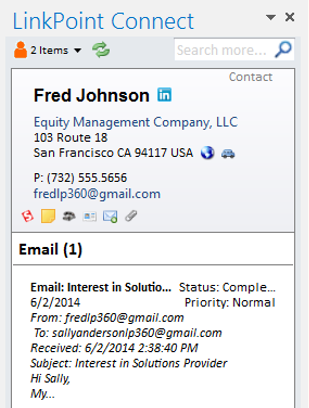
  • View real-time Salesforce data without ever leaving your email. Click on an email, and the LinkPoint Connect Side Panel instantly displays that contact’s information directly from Salesforce.
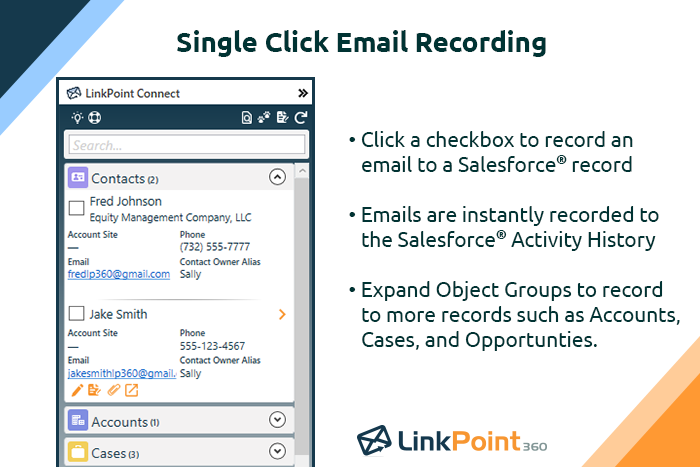
  • Record emails to Salesforce when sending or receiving messages. LinkPoint Connect makes it easy to associate emails with the right contacts and opportunities with just a few clicks.
  • Create new records with ease…and without the hassle of copy and paste actions between your email and CRM. Drag and drop email signatures or leverage Smart Forms to create new records.
  • Sync calendars, contacts, and tasks with one-way or two-way sync between email and the CRM with independent rules.
  • And with an upgraded Desktop Plus Edition, users have the added capability to log meeting notes that map directly to Salesforce fields. Choose the questions or data that mean the most to your organization's workflow, and LinkPoint Connect will prompt you team to input their meeting feedback.
  • PC installation and web cloud access.

Media

Record emails to your CRM when sending messages via your email application. LinkPoint Connect makes it easy to associate emails with the right contacts and opportunities with just a few clicks in your email.
View real-time CRM data without ever leaving your email. Click on an email, and the LinkPoint Connect Side Panel instantly displays that contact’s information directly from the CRM.

1 / 8

LinkPoint Connect: Works So Well I Don't Even Know it's There

Pros

  • Setup is pretty seamless, at least from an end-user point of view. Essentially you open both Outlook and Salesforce, and then click on the LinkPoint Connect button in Outlook. You are then asked to sign in (provide username/password) to Salesforce. That's all--once my login information was accepted it was set up and syncing emails and calendar items from Outlook to Salesforce. Pretty painless!
  • Recording/syncing emails to client records is, from my standpoint at least, the core functionality, and LinkPoint does this pretty much flawlessly and with little to no effort or input on my part. This is incredibly important to me as it creates the documentation record I need in Salesforce to provide excellent service to my clients as well as for compliance reasons.
  • The LinkPoint interface also makes it very easy and efficient to perform additional actions in Salesforce without ever leaving Outlook. New Salesforce tasks, events, follow up reminders, etc. are all easy to set up from the LinkPoint sidebar directly in Outlook with just a few clicks of the mouse. And, in those cases where you need to go a little deeper there is a link in the sidebar that will open up the client record directly in Salesforce in a single action, bypassing the multi-step process normally required (i.e. open the program, search for the client, select and open the record, etc.). This ease of interaction between the two programs has removed barriers and has helped me be more consistent in fully utilizing what Salesforce has to offer. No longer do I move on to the next item on my to-do list with scribbled note that will hopefully remind me to update Salesforce later, when I have a chance...

Cons

  • I don't really have any areas where I think LinkPoint as room for improvement. Perhaps this is because I've only been using it a couple of months and haven't yet experienced anything problematic.

Return on Investment

  • As mentioned before, LinkPoint's seamless interface and ease with which I am able to enter Salesforce items directly from Outlook has led to my being much more consistent (as well as timely and accurate) in my utilization of Salesforce in complete and wholistic way, and reaping the benefits that result.

Other Software Used

Microsoft 365 (formerly Office 365), Dropbox, OneDrive, Google Drive, Zoom, Cisco Webex Meetings, Microsoft Teams, PDF Xchange Viewer and Editor, Adobe Acrobat DC, OneNote, GoToMeeting, Evernote, Streamlabs, LastPass for Business, Skype for Business (formerly Lync), Sibelius, GarageBand, Remember the Milk, Epic MyChart, Citrix ShareFile, Dropbox Business, Audacity, Nuance Dragon Speech Recognition

If you think Salesforce for Outlook is fine because it’s free, you need to look at LinkPoint

Pros

  • Adding emails is a breeze.
  • Creating contacts/leads from outlook is as simple as highlight, drag and drop.
  • Additional customization to allow you to bring in associates custom objects.

Cons

  • Installation is a bit tricky for non tech savvy users.
  • Ability to sort/filter search results when looking for additional records.
  • The ability to mass create multiple contacts/leads from an email would be nice.

Return on Investment

  • Activity history tracking. Our users send most of their emails from outlook.
  • Contact and lead creation.
  • Visibility of all associated records.

Alternatives Considered

Cirrus Insight

Other Software Used

RingDNA, Marketo, DiscoverOrg

Simple and great to use

Pros

  • Very easy to use.
  • Easy to tag to contacts, accounts, and opportunities separately and at the same time.
  • Minimally invasive into the rest of my workflow.

Cons

  • The plug-in for Outlook needs to be reset every couple of months.
  • It does not tag e-mails sent from mobile devices (or we haven't figured out how to do that yet).

Return on Investment

  • It provides transparency into your outbound communication with customers.

Other Software Used

Microsoft Power BI, Tableau Online, Slack