TrustRadius: an HG Insights company

KCM GRC Platform

Score7.3 out of 10

9 Reviews and Ratings

What is KCM GRC Platform?

The KCM GRC Platform was developed to save users the maximum amount of time getting GRC done. According to the vendor, KCM GRC has a simple, intuitive user interface, easy to understand workflows, a short learning curve, and can be fully functional in a matter of days.

With KCM, users can manage risk and compliance within their organization and across their third-party vendors, while obtaining analytics nto gaps within their security program

The KCM GRC platform consists of the following modules:

    • Compliance Management - Manage and automate compliance and audit cycles.

    • Policy Management - Manage policy distribution and attestation through campaigns.

    • Risk Management - Identify, assess, and monitor risk.

    • Vendor Risk Management - Manage third-party risk and understand at a glance, what items need to be addressed to reduce risk.


Features include:

  • Centralized controls, requirements and evidence libraries

  • Over 30 managed compliance templates

  • Vendor questionnaire and assessment templates

  • Role-based access

  • Automated email reminders for task completion

  • Unlimited support and no cost implementation


Categories & Use Cases

Screenshots
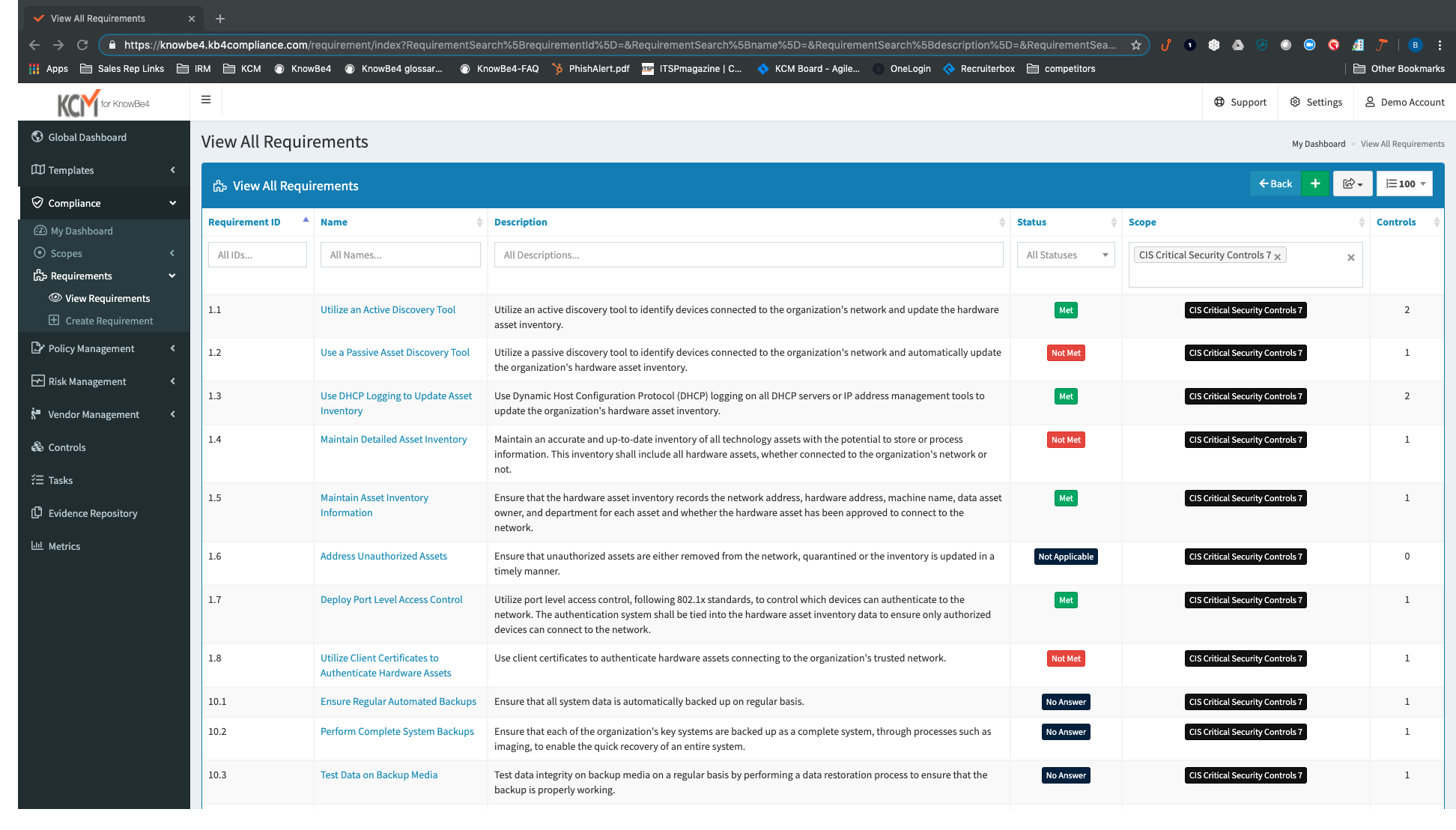
Screenshot of View All Compliance Requirements: View all your compliance requirements with details, descriptions, status, scope, and controls for each requirement.
Screenshot of View All Compliance Tasks: The “My Dashboard” view narrows focus to tasks assigned to an individual end user, allowing your entire organization to work together towards compliance.
Screenshot of View by Scope and Scope Status Report: Scopes enable you to track multiple projects in one place simultaneously allowing you to provide granular user permissions across each project.
Screenshot of View Policy Campaign: See all campaign details and easily keep track of your policy campaign completion percentage and user acknowledgments.
Screenshot of View Risk Breakdown and Risk Categories: The Risk Dashboard gives you high-level details on your risk categories and risk score associated with these categories.
Screenshot of Easily Add Risks: The Risk Wizard makes it easy for you to create unique organizational risks or import risks from existing spreadsheets to your risk register.
Screenshot of Use Pre-built and Customizable Questionnaire Templates: Ensure standard and consistent vendor assessments with pre-built and customizable questionnaire templates. You have the ability to generate assessments in HTML or CSV, depending on your preferred workow.
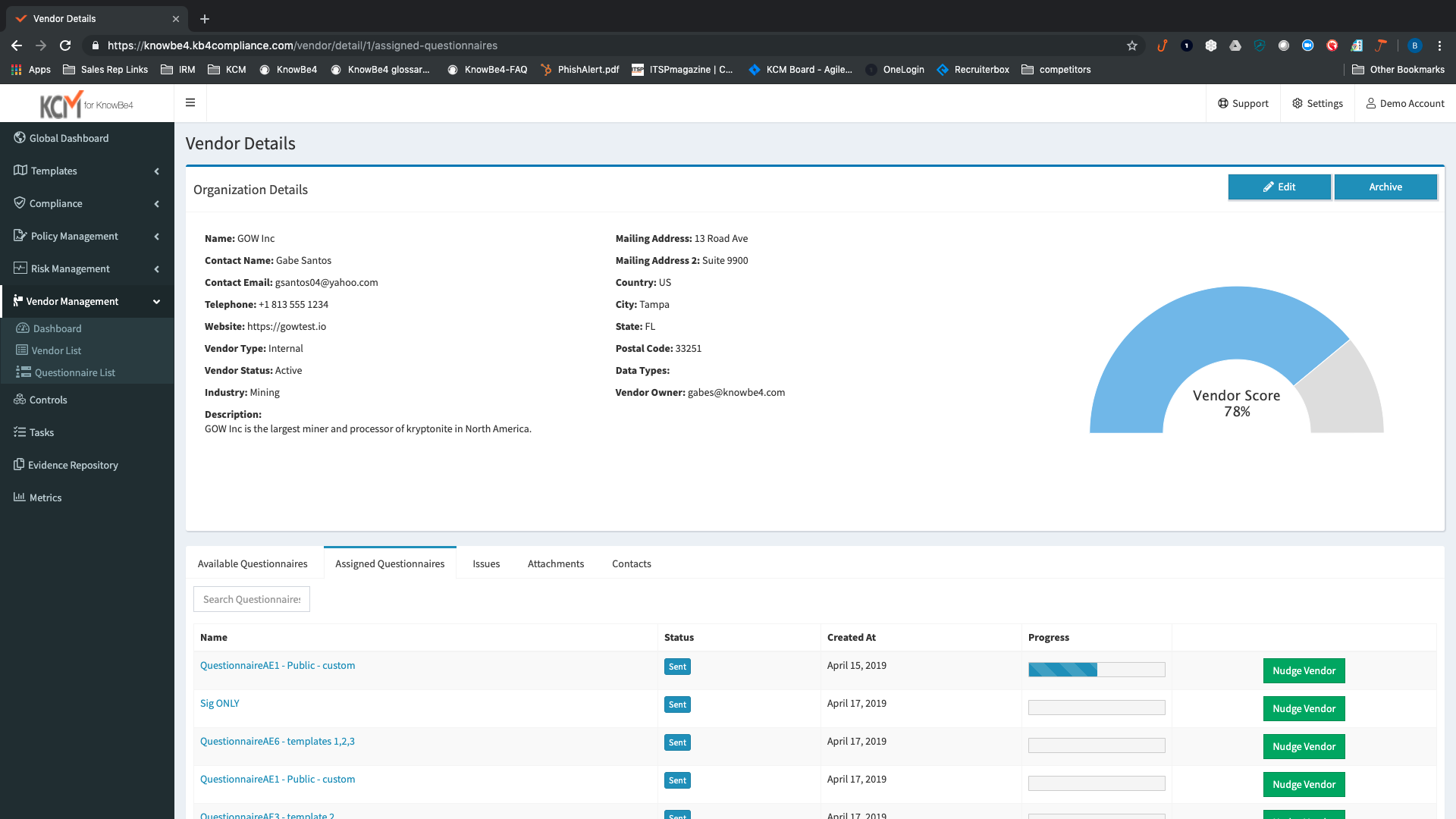
Screenshot of Vendor Details: View all your vendor details in one place to assess and monitor compliance and risk requirements for all your third parties.
Screenshot of Vendor Login: Your vendors login to an intuitive portal to upload, import, and complete required questionnaires or to provide their evidence controls.
Screenshot of Controls Information and Controls Library: Assign responsibility to individual users, manage testing schedules setting specic dates, and track evidence and requirements in the Controls view.
Screenshot of KCM’s Evidence Repository is a central location of all the files and DocuLinks (URLs) created within your account. You have the option to upload evidence directly to KCM (AES256 encrypted) or to provide DocuLinks back to evidence you host on your intranet.
Screenshot of Dashboards – Global, by Scope, and User: The global dashboard shows all tasks across the entire organization allowing you to see at-a-glance how your entire organization is doing as you work towards getting compliant and staying compliant. This view can be limited by Scope as well. Each module within KCM has its own dashboard as well.
Screenshot of Role-Based Access Control: KCM leverages RBAC for user administration. Your users only get access to the information needed based on different role types. Users can have multiple roles, depending on the implemented modules. There are even auditor roles to provide to outside consultants to review evidence and controls.

1 / 13

Screenshot of View All Compliance Requirements: View all your compliance requirements with details, descriptions, status, scope, and controls for each requirement.

Technical Details

Technical Details
Deployment TypesSaaS
Mobile ApplicationNo

FAQs

What is KCM GRC Platform?
KnowBe4 headquartered in Clearwater offers their governance, risk, compliance platform, the KCM GRC Platform.
What are KCM GRC Platform's top competitors?
LogicManager, LogicGate, and Riskonnect IRM are common alternatives for KCM GRC Platform.