TrustRadius: an HG Insights company

iSpring Suite

Score8.1 out of 10

174 Reviews and Ratings

What is iSpring Suite?

iSpring Suite helps users build courses that are mobile-ready and adaptive. It’s integrated with PowerPoint, so users can create the content in the familiar PPT interface without spending time on specific training. The toolkit supports the creation of professional courses, video lectures, role-play simulations, and a range of assessments that display and work on any device.

Read more details.

Categories & Use Cases

Media

Screenshot of iSpring Suite
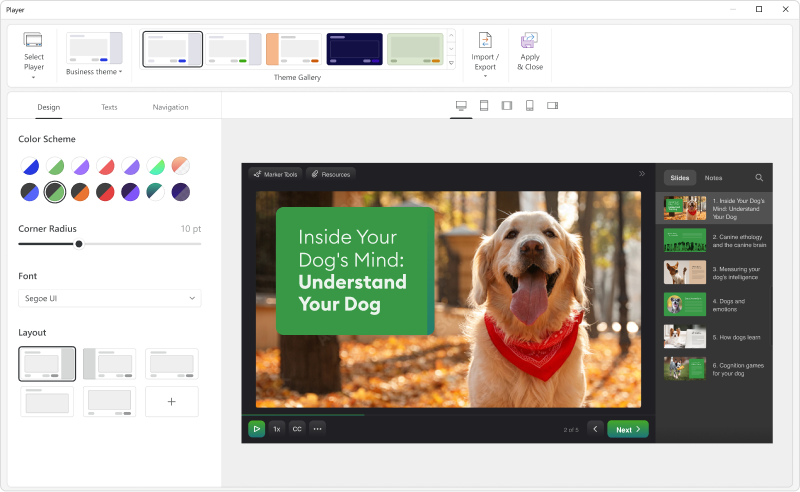
Screenshot of the customizable course player — the layout can be changed as desired.
Screenshot of a role-play
Screenshot of course interactions
Screenshot of the online collaboration tool
Screenshot of Video lessons and screencasts
Screenshot of Quizzes for training and assessment

1 / 7

Screenshot of iSpring Suite

Who Buys & Uses iSpring Suite

Pros

  • Seamless integration with PowerPoint for e-learning conversion
  • Robust tools for creating interactive quizzes and custom interactions
  • Intuitive interface and ease of use for content development

Cons

  • Limited variety and relevance of content library assets
  • Need for more diverse quiz types and smoother quiz integration
  • Workflow complexities in component navigation and course preview

Intuitive Powerpoint-based course creation

Use Cases and Deployment Scope

I have created several cyber security trainings for our employees in multiple languages using iSpring Suite and found it quite intuitive and easy to use.

Pros

  • smooth integration into PowerPoint
  • text-to-speech function for easy creation of multilingual courses
  • SCORM export for publishing in an LMS (e.g. Moodle)
  • different quiz formats for interactive user experience
  • good quality of answers to support requests and good responsiveness of the iSpring Suite support team

Cons

  • it is a bit tricky to find out where the quiz you are editing is stored
  • while an iSpring Suite dialog is open, you cannot switch back to PowerPoint to lookup something

Return on Investment

  • we now rather create our own course material instead of buying standard SCOM courses
  • cost savings possible, if you primarily create own courses and do not have many authors

Usability

Other Software Used

Moodle

Good tool and TOP customer service

Use Cases and Deployment Scope

[...] uses iSpring Suite to support eLearnings. The training courses can be created efficiently and easily. It offers many options for customising presentations

Pros

  • Creation of a quiz
  • Individual design of presentations
  • Insertion of sound recordings, video, web elements possible

Cons

  • Quiz MUST be passed and presentation must not be shown as completed if not passed

Return on Investment

  • With iSpring Suite, we can comply with prescribed guidelines for eLearning and training courses for employees

Usability

Great Product and Great Team!

Use Cases and Deployment Scope

We use this to make training quizzes and courses for our staff. Mostly for warehouse and driver positions.

Pros

  • User friendly power-point based quiz making
  • AI document summarizing and quick quiz-making
  • Easy to make engaging content.

Cons

  • Sometimes going between the main iSpring Suite, the powerpoint add-on and the web site depending on what your current need is can be confusing at first.

Return on Investment

  • Haven't used it long enough to have hard figures but I already know it's going to cut the time spent on making courses for our staff in half - and have a better result at the end.

Usability

Alternatives Considered

Google Forms

Other Software Used

Google Forms, NetSuite ERP, Asana

Great tool for our training needs

Use Cases and Deployment Scope

We use iSpring Suite to enhance our Powerpoint Training Modules

Pros

  • Provides excellent Quiz and Assessment capabilities

Cons

  • the use of AI and avatars as presenters

Return on Investment

  • Enables us to construct training modules internally savings us thousands of dollars on outsourcing this function.

Usability

Other Software Used

Microsoft Powerpoint

The best e-learning program.

Use Cases and Deployment Scope

I use iSpring to create e-learning courses for my clients - these complement the classroom training courses I deliver. Participants do them in between classroom training. In this way, they repeat the knowledge. In addition, I create training courses here, quizzes that I use as a competition during organised safety days. iSpring is updated frequently, new characters and templates appear, which is important to me. I hope that new quiz types will be added soon.

Pros

  • easy to learn
  • quizzes and interactions are very important for me

Cons

  • I would need more types of quizzes
  • more figures and photos from the safety area, e.g. forklift operator, machine operator, driver

Most Important Features

  • possibility to add videos
  • easy creation of training courses
  • quizes

Return on Investment

  • At the moment, due to its price, I don't have much profit. Creating e-learning is not my only job. If it was cheaper, I could make money from it. However, at the moment I am more profitable doing most of my training live.

Usability

Other Software Used

Microsoft 365, Genially, Joomla!