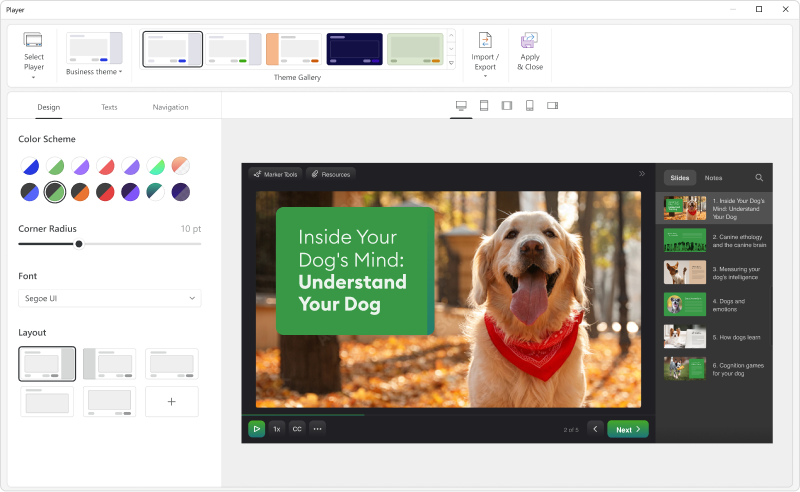
Adobe Captivate is an elearning authoring and course design tool (or LCMS). It supports mobile HTML5 content. Captivate’s users are commonly midsized businesses to enterprises. Adobe Captivate includes some prebuilt assets as well as customizable workflows.
$33.99
per month
iSpring Suite
Score8.1 out of 10
N/A
iSpring Suite helps users build courses that are mobile-ready and adaptive. It’s integrated with PowerPoint, so users can create the…
$970
per year per user
Pricing
Adobe Captivate
iSpring Suite
Editions & Modules
Subscription
$33.99
per month
Student & Teacher Edition
$399
one-time fee
Upgrade
$499
one-time fee
Pereptual License
1,299
one-time fee
No answers on this topic
Offerings
Pricing Offerings
Adobe Captivate
iSpring Suite
Free Trial
Yes
Yes
Free/Freemium Version
No
Yes
Premium Consulting/Integration Services
No
No
Entry-level Setup Fee
No setup fee
No setup fee
Additional Details
—
Academic, non-profit, government and volume discounts are available.
More Pricing Information
Community Pulse
Adobe Captivate
iSpring Suite
Considered Both Products
Adobe
Verified User
Chose Adobe Captivate
We are looking for easier templates, automated features, simulations, interactivity activities, and collaboration features.
A de minimis incentive was given to thank the reviewer for their time. The incentive was not used to bias or drive a particular response, nor was the incentive contingent on a positive endorsement. More Info
Verified User
Chose Adobe Captivate
Articulate currently has some benefits over Captivate in flexibility and responsive design, but I think these are being addressed in the next version of Captivate. Articulate is also more fiddly. Mac support is important to our users, who are majority Mac users.
A de minimis incentive was given to thank the reviewer for their time. The incentive was not used to bias or drive a particular response, nor was the incentive contingent on a positive endorsement. More Info
Verified User
Chose Adobe Captivate
Captivate for us is another tool, overall is slower than the competition but it has a version specifically for the Macs we used, it's a very powerful tool that matches the competition apps.
A de minimis incentive was given to thank the reviewer for their time. The incentive was not used to bias or drive a particular response, nor was the incentive contingent on a positive endorsement. TR verified that a representative sample of customers was invited. More Info
Founder in Corporate at Learn About Green LLC (E-Learning, 1-10 employees)
Chose Adobe Captivate
Adobe Captivate has so many features and advantages that other competitors don't have. That is why I chose it. Captivate authoring can be purchased monthly - LOVE that! Captivate is by far the best solution for small business on a limited budget.
A de minimis incentive was given to thank the reviewer for their time. The incentive was not used to bias or drive a particular response, nor was the incentive contingent on a positive endorsement. More Info
A de minimis incentive was given to thank the reviewer for their time. The incentive was not used to bias or drive a particular response, nor was the incentive contingent on a positive endorsement. More Info
iSpring Solutions, Inc
Verified User
Chose iSpring Suite
We find Adobe Captivate looks outdated, is clunky, has a terrible user interface and is not flexible.
A de minimis incentive was given to thank the reviewer for their time. The incentive was not used to bias or drive a particular response, nor was the incentive contingent on a positive endorsement. More Info
A de minimis incentive was given to thank the reviewer for their time. The incentive was not used to bias or drive a particular response, nor was the incentive contingent on a positive endorsement. More Info
CEO & Teacher at FE Colleges, UK (E-Learning, 201-500 employees)
Chose iSpring Suite
Therer are several other interactive video creation tools out there, such as Camtasia, Adobe Captivate and even PowerPoint on its own, but none of them come close to offering the galaxy of features that is served up by iSpring Suite, and it's the easiest to learn and use with …
A de minimis incentive was given to thank the reviewer for their time. The incentive was not used to bias or drive a particular response, nor was the incentive contingent on a positive endorsement. More Info
Verified User
Chose iSpring Suite
The ability to update data independently is the best feature. It saves a lot of time.
A de minimis incentive was given to thank the reviewer for their time. The incentive was not used to bias or drive a particular response, nor was the incentive contingent on a positive endorsement. More Info
Verified User
Chose iSpring Suite
If you know PowerPoint, you know iSpring Suite. Not only is there a big learning curve with the other software, it also meant to us to start from scratch with our PowerPoints, which would have taken weeks to do. I can't state enough how big of a deal it is that it's all within …
A de minimis incentive was given to thank the reviewer for their time. The incentive was not used to bias or drive a particular response, nor was the incentive contingent on a positive endorsement. More Info
Verified User
Chose iSpring Suite
Captivate was, I feel, for my experienced users and for a more professional level of course that our organisation did not require at this time. It was too daunting to learn it all to create simple courses fast Easy Generator - too expensive for our needs. iSpring Suite has a …
A de minimis incentive was given to thank the reviewer for their time. The incentive was not used to bias or drive a particular response, nor was the incentive contingent on a positive endorsement. More Info
Verified User
Chose iSpring Suite
We need Powerpoint compatibility because we can develop the training modules faster. Compared to all the authoring tools we have tried, iSpring is the most Powerpoint-friendly.
A de minimis incentive was given to thank the reviewer for their time. The incentive was not used to bias or drive a particular response, nor was the incentive contingent on a positive endorsement. More Info
Verified User
Chose iSpring Suite
I think iSpring Suite is just soooo much easier to learn and use than Captivate. It just adds a plugin to PowerPoint and is very intuitive to use. I found Captivate difficult to figure out, and a lot more expensive.
A de minimis incentive was given to thank the reviewer for their time. The incentive was not used to bias or drive a particular response, nor was the incentive contingent on a positive endorsement. More Info
Verified User
Chose iSpring Suite
iSpring Suite is wayyyy easier to use and does all I need.
A de minimis incentive was given to thank the reviewer for their time. The incentive was not used to bias or drive a particular response, nor was the incentive contingent on a positive endorsement. More Info
Verified User
Chose iSpring Suite
Is less words the offline system presents only these having to generate the scorm files which had conflicts and upload them and test them and test and test and test, while the creation of the scorm offers a feasibility to preview the scorm without the need to upload it to the …
A de minimis incentive was given to thank the reviewer for their time. The incentive was not used to bias or drive a particular response, nor was the incentive contingent on a positive endorsement. More Info
Verified User
Chose iSpring Suite
Captivate is too complicated to use, you need a lot of knowledge in this tool to get good results, it is also quite expensive and you need a very powerful computer for it to work. Articulate is easier to use than Captivate, but it is also expensive and the learning curve is …
A de minimis incentive was given to thank the reviewer for their time. The incentive was not used to bias or drive a particular response, nor was the incentive contingent on a positive endorsement. More Info
Verified User
Chose iSpring Suite
Ultimately, I selected iSpring Suite because of the ease of use and small learning curve. I needed to be able to start creating content immediately, and after doing trial periods with iSpring as well as some of the other options, it was clear that I could be up and running the …
A de minimis incentive was given to thank the reviewer for their time. The incentive was not used to bias or drive a particular response, nor was the incentive contingent on a positive endorsement. More Info
A de minimis incentive was given to thank the reviewer for their time. The incentive was not used to bias or drive a particular response, nor was the incentive contingent on a positive endorsement. More Info
A de minimis incentive was given to thank the reviewer for their time. The incentive was not used to bias or drive a particular response, nor was the incentive contingent on a positive endorsement. More Info
A de minimis incentive was given to thank the reviewer for their time. The incentive was not used to bias or drive a particular response, nor was the incentive contingent on a positive endorsement. More Info
eLearning Developer/LMS Administrator in Information Technology at ComNet Technical Solutions, Inc. (E-Learning, 11-50 employees)
Chose iSpring Suite
iSpring is superior in ease of use and speed of development. iSpring is easier to learn and implement. iSpring has the best support of any tool I have used.
A de minimis incentive was given to thank the reviewer for their time. The incentive was not used to bias or drive a particular response, nor was the incentive contingent on a positive endorsement. More Info
A de minimis incentive was given to thank the reviewer for their time. The incentive was not used to bias or drive a particular response, nor was the incentive contingent on a positive endorsement. More Info
Verified User
Chose iSpring Suite
iSpring Suite is much easier to use. It is compatible with all other systems we are using for learning.
A de minimis incentive was given to thank the reviewer for their time. The incentive was not used to bias or drive a particular response, nor was the incentive contingent on a positive endorsement. More Info
Verified User
Chose iSpring Suite
So much easier to get up and running. The video editing I think is better. The only thing I think was better in Captivate was the graphics and clip art.
A de minimis incentive was given to thank the reviewer for their time. The incentive was not used to bias or drive a particular response, nor was the incentive contingent on a positive endorsement. More Info
A de minimis incentive was given to thank the reviewer for their time. The incentive was not used to bias or drive a particular response, nor was the incentive contingent on a positive endorsement. More Info
VP for Education Operations in Professional Services at American Road & Transportation Builders Association (Non-profit Organization Management, 11-50 employees)
Chose iSpring Suite
Producing e-learning is a member service, and not a core objective of our association, so we have a small staff and a limited budget. iSpring Suite costs less than other premium products that build e-learning. It's much easier to learn how to use. We can also take PowerPoint …
A de minimis incentive was given to thank the reviewer for their time. The incentive was not used to bias or drive a particular response, nor was the incentive contingent on a positive endorsement. More Info
Engineering Director in Professional Services at Synergie Training/SigmaPM (Construction, 1-10 employees)
Chose iSpring Suite
Slightly cheaper, maybe not so powerful but easy to use straight away on day 1. We had to make a quick decision and so didn't have time or resources to test and compare products. We looked at reviews and decided to try one on a free trial basis. It worked well so we bought it.
A de minimis incentive was given to thank the reviewer for their time. The incentive was not used to bias or drive a particular response, nor was the incentive contingent on a positive endorsement. More Info
Verified User
Chose iSpring Suite
Articulate 360 offers Storyline in their suite, which is a much better tool for customized and advanced e-learning development, iSpring could compete with them in the field of responsive authoring tool (iSpring Page) and tools for stakeholder's reviewing.
A de minimis incentive was given to thank the reviewer for their time. The incentive was not used to bias or drive a particular response, nor was the incentive contingent on a positive endorsement. More Info
Online Course Designer and Content Manager at University of Connecticut (E-Learning, 5001-10,000 employees)
Chose iSpring Suite
During the pandemic, iSpring seemed the most understanding of the difficulties facing the education industry and they made their SasS products either a) reasonably priced or b) extended the period of time over which one could receive the education discount. It was simply a …
A de minimis incentive was given to thank the reviewer for their time. The incentive was not used to bias or drive a particular response, nor was the incentive contingent on a positive endorsement. More Info
Learning and Development Officer in Human Resources at Wellington Shire Council (Government Administration, 501-1000 employees)
Chose iSpring Suite
We found that the price point comparison was vastly different from some competitors. iSpring is a relatively cheap authoring tool but delivers so much capability for the price. It may not have the capability of some other tools, but it also has a very small learning curve, …
A de minimis incentive was given to thank the reviewer for their time. The incentive was not used to bias or drive a particular response, nor was the incentive contingent on a positive endorsement. More Info
iSpring Suite gives me a platform to easily create training courses for any number of subjects, custom-designed to fit my workplace. I can include quizzes that allow me to track both the completion rate of the course and the success rate of the training. Its user-friendliness stands out and makes my role as Training Director much easier on a day-to-day basis.
Quickly adding in graphics, text, and interactive buttons.
Has extensive variables and branching for additional customization, beyond the competition.
Has 360 degree capability which competitors don't offer (I have not used this feature).
High degree of customization and personalization.
True responsive screen display on all devices, viewable as you are creating the training. This is different than some competitors - some just shrink the screen, but Adobe Captivate allows actually removing or moving or changing items at different screen sizes.
If you like Flash, it has Flash output, although it's going away in 2020. Personally, I think this is an outdated technology.
Many advanced capabilities. I chose this product due to the capabilities.
Comes with assets, templates, people, head shots, and full body—excellent.
Adobe Captivate is the authoring tool. It integrates with Adobe Captivate Prime - which I highly recommend if you want to truly take advantage of all of its features in reporting, administration, compliance, and social learning. (I didn't use Prime because you essentially need 100+ students to affordably use Prime.) If you look at my chart of what Captivate is capable of, I can't say that Captivate has a lot of the reporting features because they are part of Prime/SCORM, although, with Captivate's customization, you might be able to do most of them if you are up to it, but I did not.
A de minimis incentive was given to thank the reviewer for their time. The incentive was not used to bias or drive a particular response, nor was the incentive contingent on a positive endorsement. More Info
A de minimis incentive was given to thank the reviewer for their time. The incentive was not used to bias or drive a particular response, nor was the incentive contingent on a positive endorsement. More Info
Adobe Captivate does take some getting used to. There are features that are much more convoluted than they need to be, but overall it is a great product with a some excellent features. Being in a pretty small market, Adobe Captivate and Articulate Storyline dominate the space. They are not the same software, but allow for eLearning authoring. Each has their benefit and their downside, but, for me, Adobe Captivate edges out Storyline.
A de minimis incentive was given to thank the reviewer for their time. The incentive was not used to bias or drive a particular response, nor was the incentive contingent on a positive endorsement. More Info
It is difficult to get in touch with Adobe Captivate support. With a seemingly limited number of resources, mostly outsourced, getting in contact with someone to help troubleshoot an issue is challenging. Typically wait times are long, and the desired path to resolution is to use an existing knowledge base or a self-help guide. It is certainly not a user-friendly experience.
A de minimis incentive was given to thank the reviewer for their time. The incentive was not used to bias or drive a particular response, nor was the incentive contingent on a positive endorsement. More Info
Great software is only exceeded by their fantastic support. Prompt responses, complete with clearly outlined steps to follow, are just the beginning. There are tremendous resources and continual webinars to challenge what we think we know about the iSpring Suite. I often use PowerPoint to lay out marketing slides, add music and narration, then publish them as an MP4 video. I can count on iSpring support to assist me when I need help.
I think that Articulate360 is more user-friendly and has a cleaner, more updated look. If you can edit a PDF, then you can use Articulate 360. Adobe Captivate may be more challenging for the designer, but it has more features. We chose Adobe Captivate because we want the option to create interactive learning environments. Adobe Captivate plays well with the other Adobe design products including Photoshop, Illustrator, and Premier. Additionally, Adoe Captivate is highly compatible with Cornerstone, our preferred Learning Management Systems.
A de minimis incentive was given to thank the reviewer for their time. The incentive was not used to bias or drive a particular response, nor was the incentive contingent on a positive endorsement. More Info
It has enhance my reputation personally within the organization. This has led to other departments requesting me by name to head up eLearning development projects, even delaying their own deadlines to ensure that I am involved.
Other than a few duds (I let some inexperienced vocal talent slip thru in the heat of multiple conflicting deadlines), learner feedback has skyrocketed over that developed before I became involved and standardized the effort on iSpring