TrustRadius: an HG Insights company

InEight

Score8.3 out of 10

53 Reviews and Ratings

What is InEight?

InEight's modular project controls software connects complex project data to improve visibility and delivery in capital construction.

Media

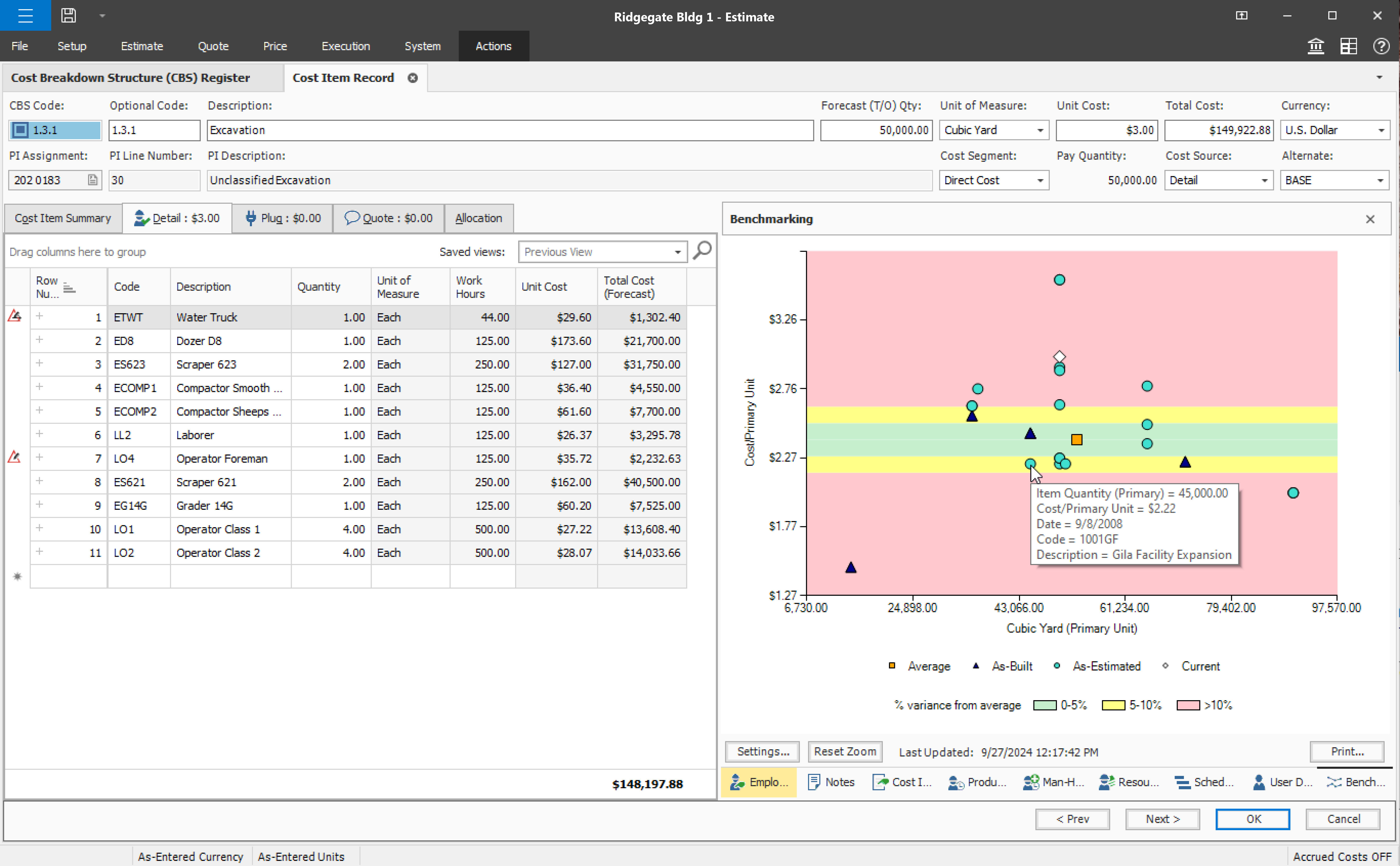
Screenshot of InEight Estimate’s Benchmarking feature, which allows users to compare high, low, and average costs, as well as productivity rates from past projects, to visually assess whether current estimates fall within a realistic range. With historical performance data at their fingertips, estimators can bid more strategically and deliver more reliable, data-driven estimates.
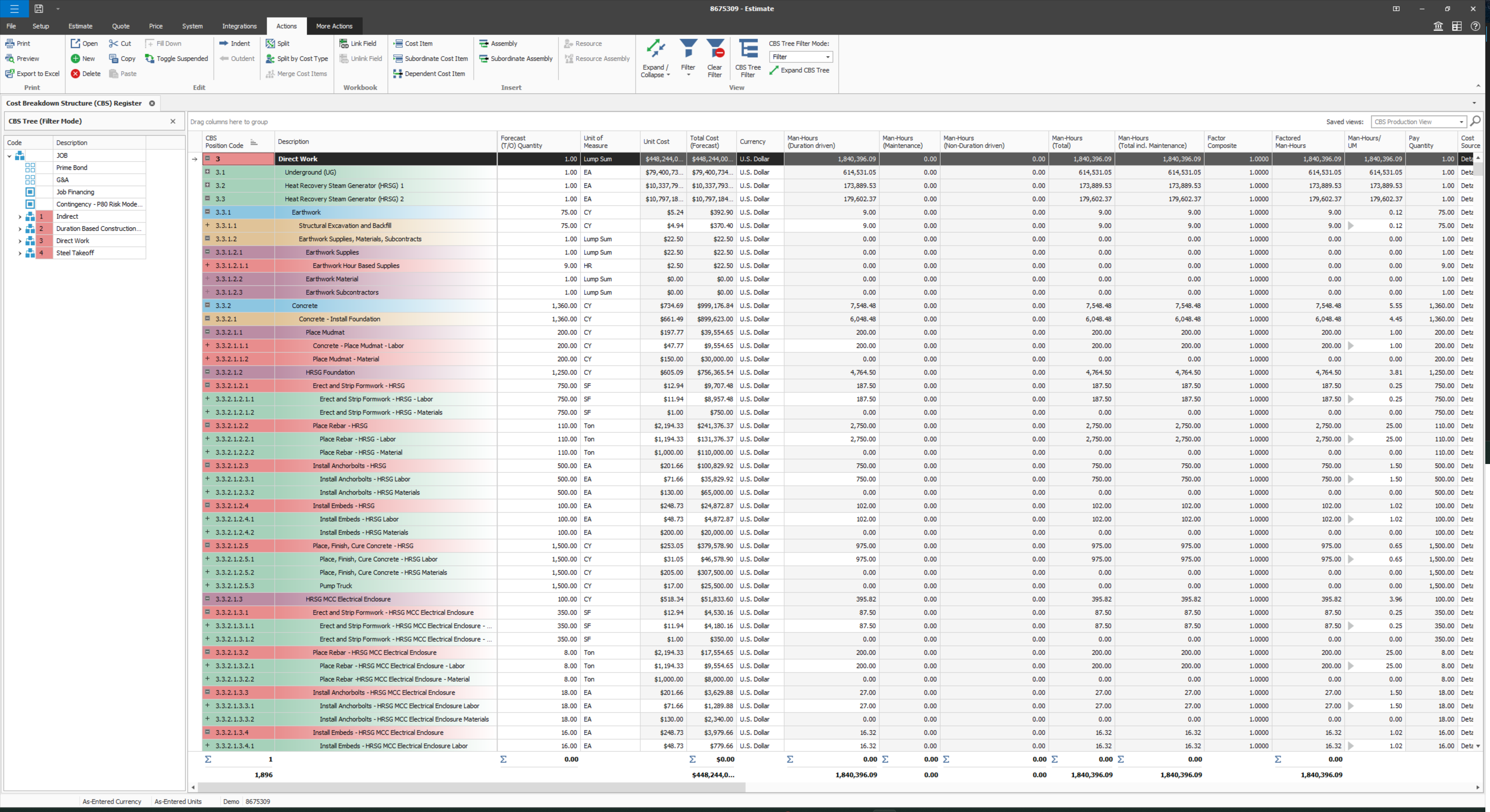
Screenshot of InEight Estimate’s CBS Register, which provides a user-specific view of an estimate, allowing users to create unlimited WBS structures and custom rollups. With parametric cost item assemblies, estimators can generate more accurate, reliable, and data-driven estimates.
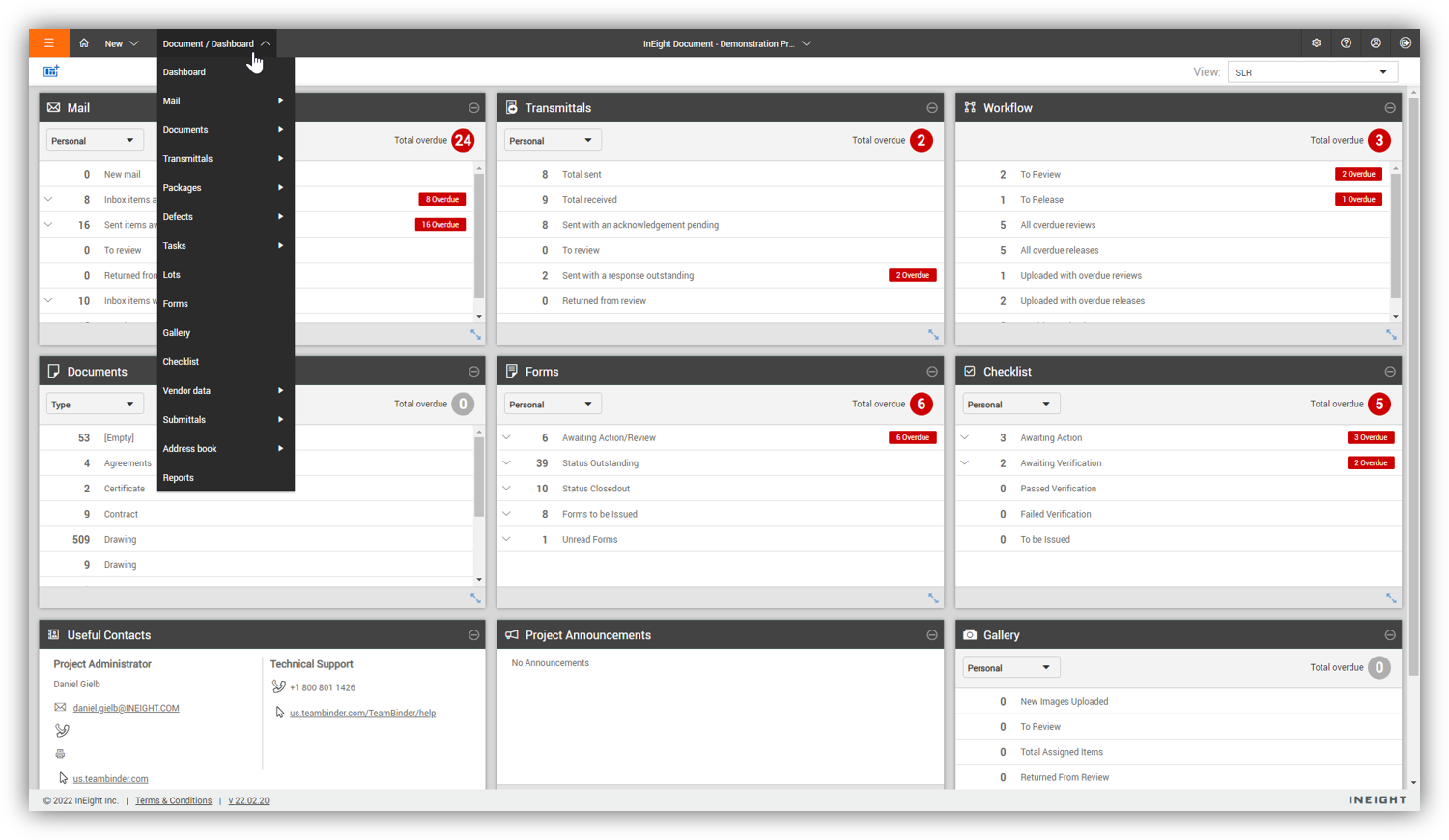
Screenshot of InEight Document’s Dashboard, that delivers a centralized, visual view of project information across all modules. Interactive dashboard tiles make it easy to track document activity and maintain visibility into project performance.
Screenshot of InEight Document’s Gallery, which offers a comprehensive visual library of all project-related files—including drawings, photos, and documents—so teams can quickly access and manage the content they need from one intuitive location.
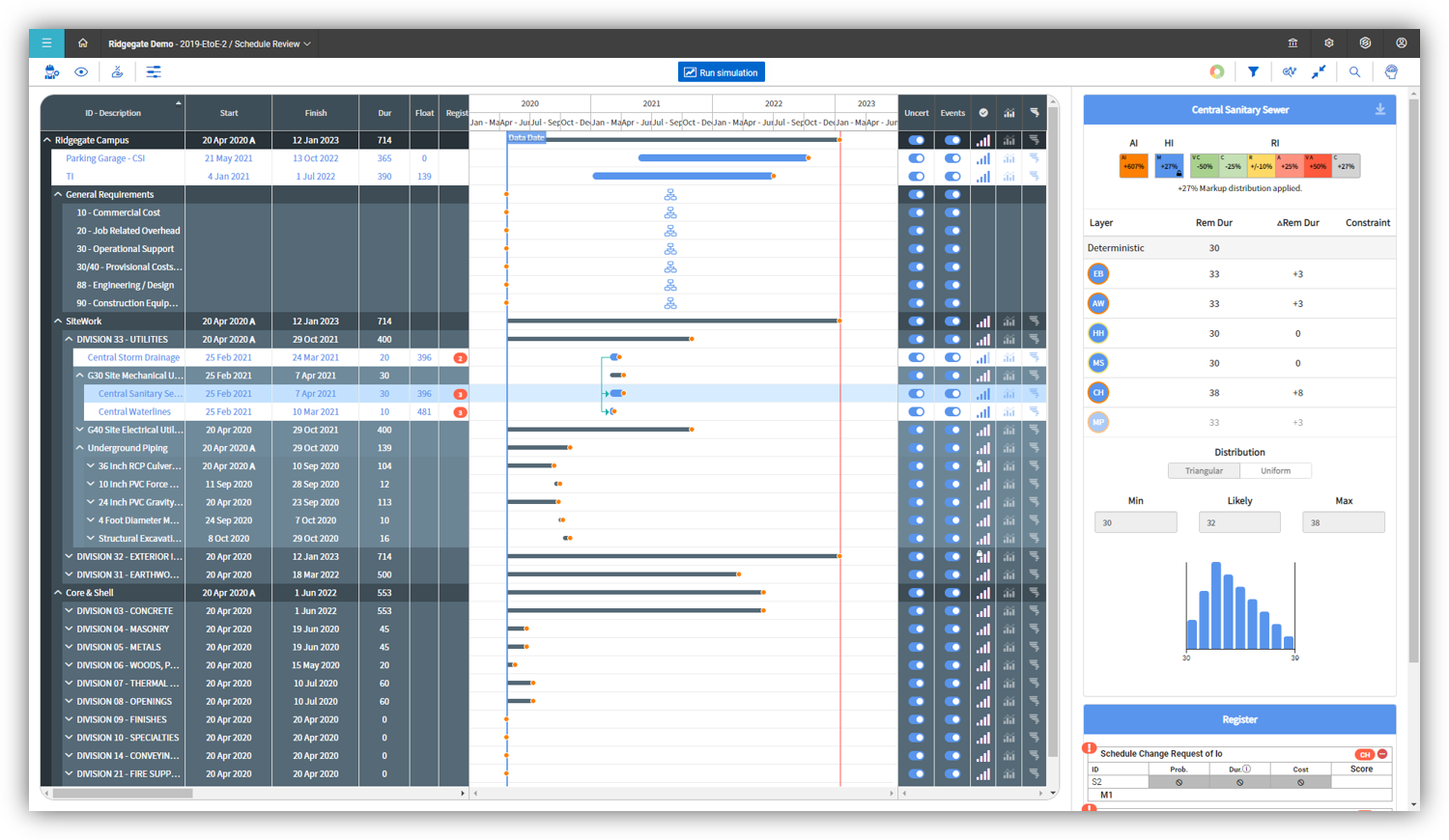
Screenshot of InEight Schedule’s Risk Management feature, which enables project teams to evaluate schedules through a risk-adjusted lens. By visualizing scenarios with varying confidence levels, teams can anticipate potential impacts and plan with greater certainty.
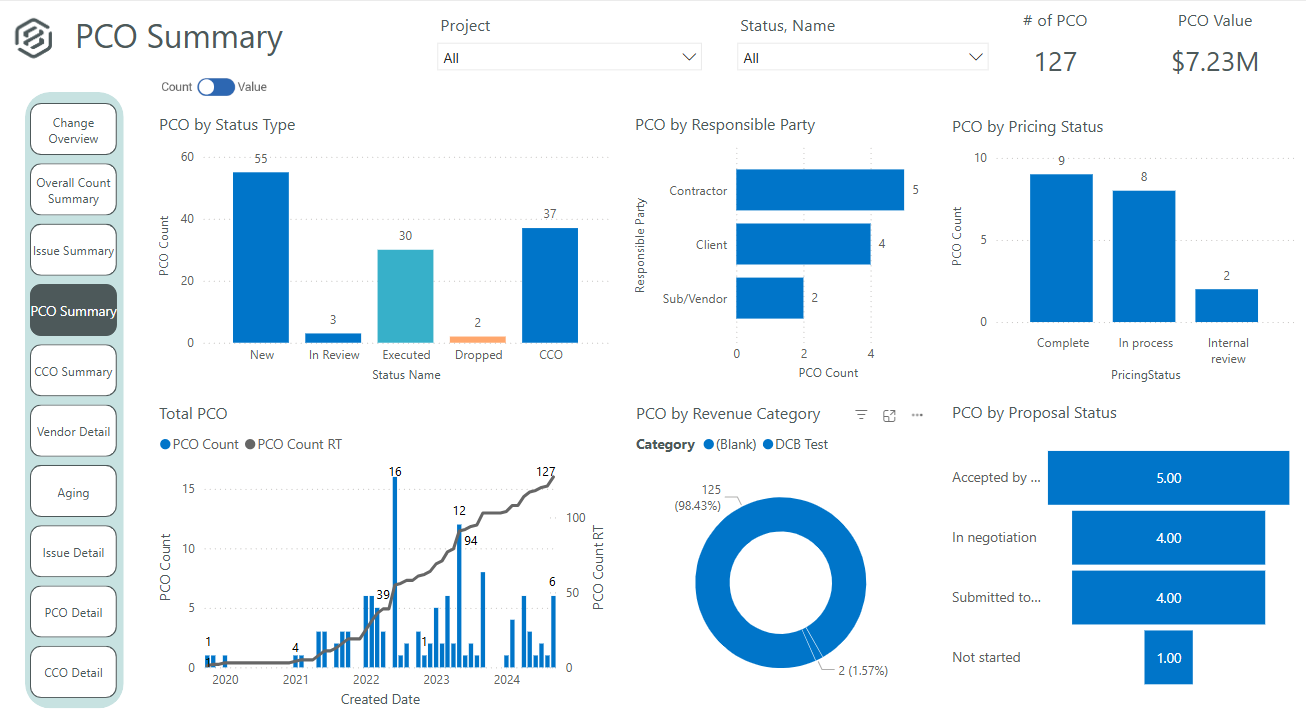
Screenshot of InEight Change’s PCO Summary dashboard that delivers a visual summary of all potential change orders. This helps project teams evaluate impacts, track approvals, and manage changes proactively for better cost and scope control.
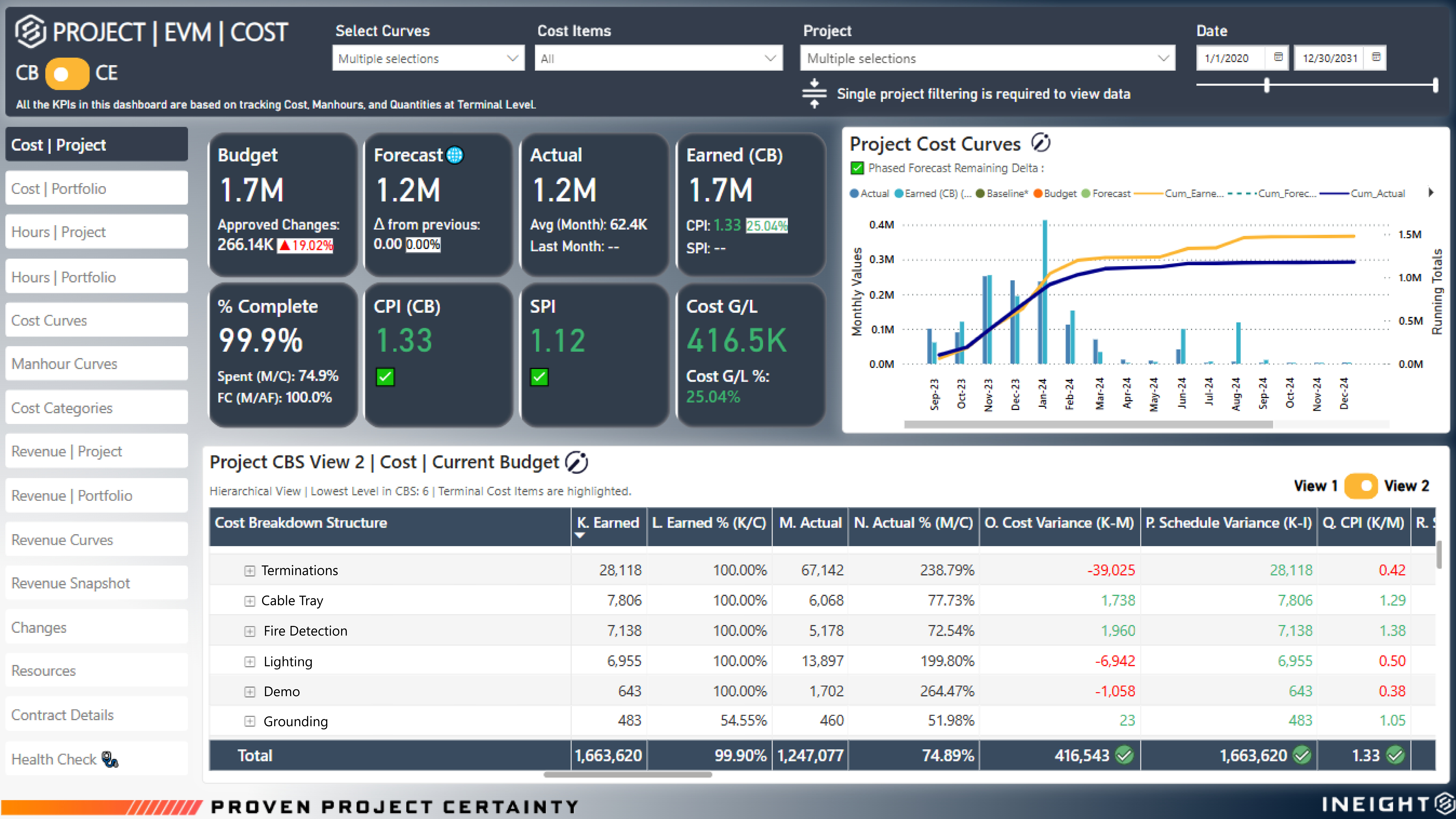
Screenshot of InEight Project Controls’ EVM Dashboard that provides real-time earned value insights, showing the true percent complete of a project. With accurate cost and schedule performance data, teams can identify variances early and keep projects on track.
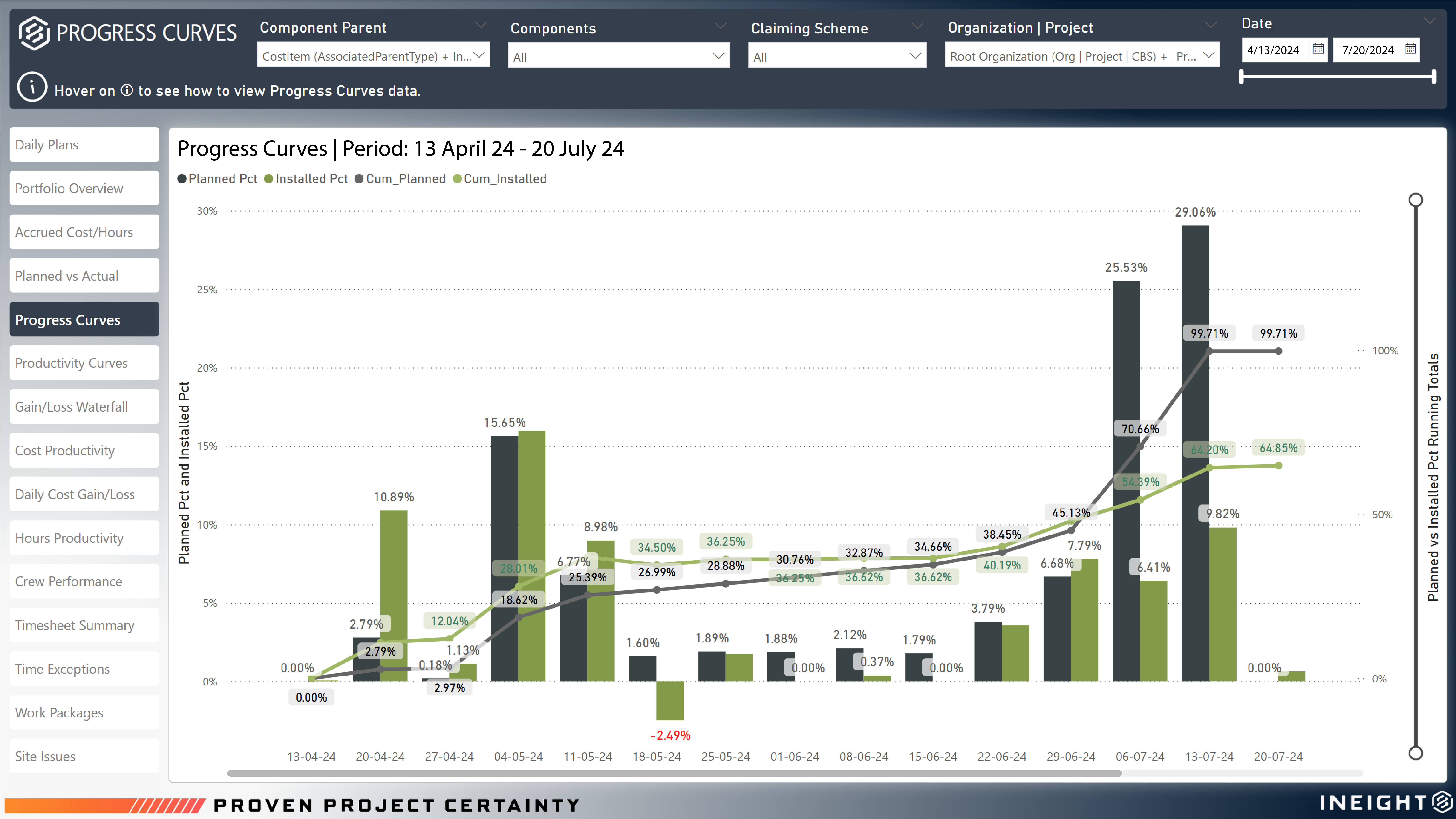
Screenshot of InEight Project Controls’ Progress Curves that visualize planned versus actual performance across project execution. With clear progress trends based on installed and planned quantities, teams gain actionable insights to drive productivity and performance.
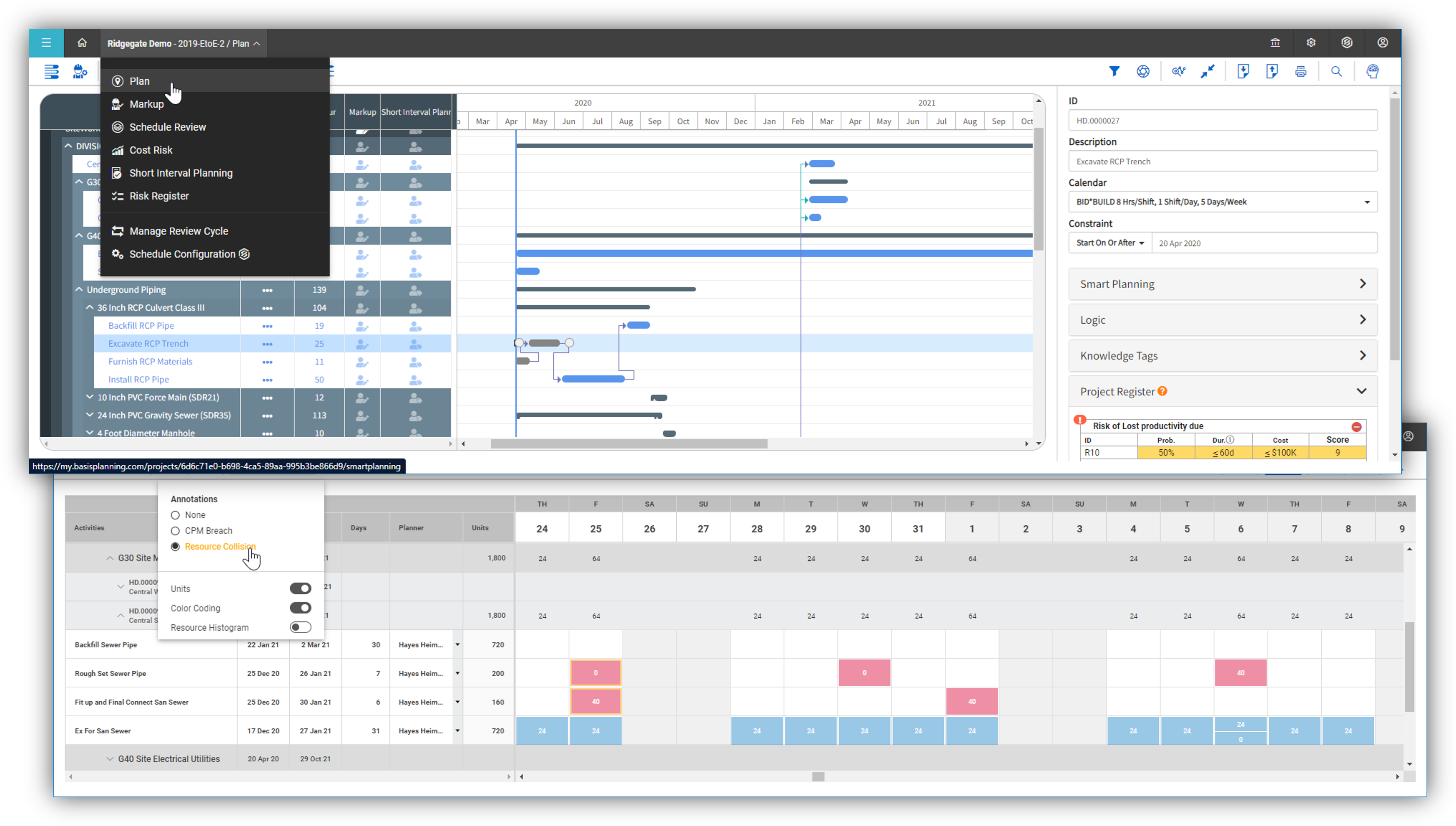
Screenshot of InEight Schedule’s Short Interval Planning, used to empower teams to break down high-level CPM schedules into detailed daily or weekly task plans. This granular view enhances coordination, resource allocation, and field execution efficiency.

1 / 9

Screenshot of InEight Estimate’s Benchmarking feature, which allows users to compare high, low, and average costs, as well as productivity rates from past projects, to visually assess whether current estimates fall within a realistic range. With historical performance data at their fingertips, estimators can bid more strategically and deliver more reliable, data-driven estimates.

Top Performing Features

  • Job costing

    Tracking and monitoring of the costs of all materials, labor, subcontractors, & equipment required for a given construction project. Allows users to compare actual costs to estimated costs, see how the job is progressing, identify which parts of the job are using the largest parts of the budget.

    Category average: 7.3

  • Cost calculator

    Application that calculates cost of estimated quantities and materials, typically within spreadsheets.

    Category average: 7.7

  • Bid creation

    Allows users to use bid packages or templates to quickly and efficiently create bids based off of cost estimates.

    Category average: 7.7

Areas for Improvement

  • Custom reports

    Users can create custom reports.

    Category average: 7.5

  • Document sharing

    Users can share/attach other documents related to construction projects, such as specifications, contracts, drawings, etc.

    Category average: 8.3

  • RFI tools

    Users can create, send, receive, and archive Requests for Information (RFIs), to record exchanges with subcontractors, vendors, and other suppliers.

    Category average: 8.4

Impressed by the performance

Use Cases and Deployment Scope

I was very impressed with the performance of the application. Versatile in its use due to holding plenty of forms and options. Quick access to my information is excellent, especially when I need to pull information from the field. The ability to support my forms by adding attachments is excellent!

Pros

  • Stores information when I just want to save and come back later
  • Quickly adding pictures to submit forms is amazing
  • Never had any troubleshooting issues beyond an app restart

Cons

  • Pulling up submitted date is not possible
  • Requires a bit of explaining at start
  • Can be overwhelming for new commers

Return on Investment

  • bueno [good]
  • bonito [nice]
  • barato [cheap]

Using InEight in a daily basis

Use Cases and Deployment Scope

I'm a project controls manager here in the company, I'd say the most important usage of the system is the capacity to track quantities via components and their respective claiming schemes, connect them with the actual hours via daily plans and REPORT. I kept reporting in caps since it's my main role as part of this team. Recently, InEight gave me the opportunity to get into OData, and I'm discovering a new world over there, integrating all tables and providing good information throughout the company.
I'm also responsible for setting a new job into InEight, and share this knowledge with people that does not do that too often. I also support the user management as well as operational resources. Another new feature (at least for us) is the usage of Billing Classes and Rates, and we are getting deeper on it, it's working well. We are going to start a better understanding on schedule and estimate in the near future, to expand the usage on the tool and ourselves as well. Excited about that.

Pros

  • Quantity Tracking
  • Daily Plans
  • Billings Class
  • Work Packaging

Cons

  • Forecast
  • Integration Between Modules
  • Controls Setup (maybe improving the upload file with more options)
  • Rates (we are not able to change a rate code as we do for billing class)
  • Forecast quantity inside the component (its sometimes very time consuming)

Return on Investment

  • Standardization
  • All in one
  • Friendly user

Alternatives Considered

SAP Business One

Other Software Used

SAP Concur

InEight user summary

Use Cases and Deployment Scope

We use InEight mainly for timesheets and basic hour tracking. We code our hours to certain business groups, and it makes it easy to track the hours worked. It helps us keep accurate records of work hours, which simplifies payroll and project cost tracking. While our use is limited to straightforward time management tasks, it still plays a key role in improving efficiency and reducing manual errors.

Pros

  • Timesheet coding
  • straightforward dashboard
  • easy to use and learn for new users

Cons

  • A little clunky and so many tools but not the best training on how to use the software to the fullest extent.

Return on Investment

  • everything is in one place and easy to share within different business groups

InEight is the future

Use Cases and Deployment Scope

InEight was brought in to replace toolbox the existing ERP used for end-to-end project management. I use it primarily for invoice processing and i find it to be very straightforward and easy to understand. The main issue I have with InEight during invoice processing is that it cannot detect errors in the invoice and only when you submit to SAP do you see a parked invoices error which then has to be deleted, and a new invoice created as the failed payment form cannot be reused. This is very time consuming & inefficient.

Pros

  • Tracking history of contract
  • Checking correctness of GST calculation
  • Itemize expenses through Schedule of Values

Cons

  • HB cannot be processed directly in in Eight
  • It fails to catch rounding error in quantities
  • Payment form cannot be reused after failed submission

Return on Investment

  • It has definitely made cost forecasting more cumbersome
  • Terminal items are too few
  • Front loaded and back loaded isnt enough forecast categorization

Alternatives Considered

SAP BPC (Business Planning and Consolidation)

Other Software Used

SAP HANA Cloud, DocuSign, SAP BPC (Business Planning and Consolidation)

InEight Review Construction Supervisor

Use Cases and Deployment Scope

I use InEight on a day by day basis. I use it for daily planning of tasks to be performed. Also, to keep track of up to date quantities and remaining quantities for tasks being performed. Run reports to make sure we are advancing the project at a good performance rate. I use InEight for document control, compliance, and completion of tasks being performed.

Pros

  • Daily planning is made easy for day by day use.
  • Document control is easy to use and very detailed to find documents needed.
  • Keeping track of progress is easily available and controlled by filters to search for specific tasks.

Cons

  • Something I would change is making easier filters for quantity tracking.
  • The speed of running report for performance factor.

Return on Investment

  • It has had a positive impact in tracking time.
  • Tracking quantities is made more effective.
  • over all unit rates to man power needed for tasks.