TrustRadius: an HG Insights company

FileInvite

Score1.1 out of 10

11 Reviews and Ratings

What is FileInvite?

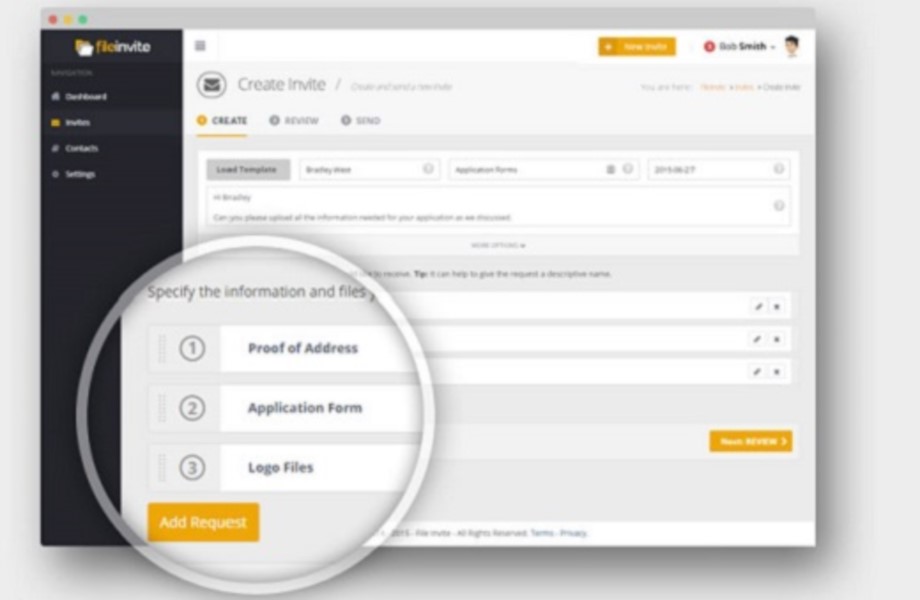
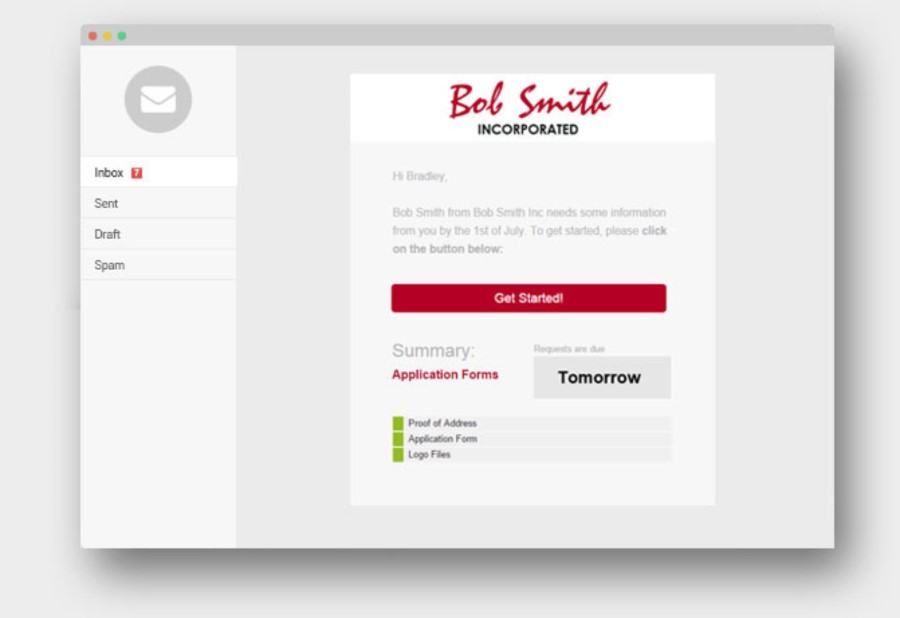
FileInvite automates the process of collecting information and documents from your clients. The vendor says the process is simple, and the interface is secure. All you have to do is create and send a FileInvite with the information you require. The client then uploads the files to a secure portal where you can approve or decline the information that has been submitted. FileInvite also allows you to set up reminders, templates and sync with your cloud storage like Google Drive.

The vendor says key features & capabilities include:

  • Templates for regularly requested sets of documents from client and and easy to use client interface helps thousands of companies close more customers by rapidly.
  • Collecting multiple documents from a stream of new clients, approving, managing and storing the files for action or compliance.
  • Automated reminders that take care of the the awkward follow up messages as your specified due date arrives.
  • PDF conversion means any document a client submits, conveniently saves in PDF format for retrieval from your cloud drive.
  • Large file support
  • Audit trail and history of interactions is also recorded for regulatory purposes.

Categories & Use Cases

Media

1 / 6

Dont expect any support or the system to impress

Use Cases and Deployment Scope

Used Fileinvite successfully for a few years.

Pros

  • It collects files
  • I think it is overpriced for what it does
  • See complaint issues

Cons

  • Better user interface

Most Important Features

  • Doc collection

Return on Investment

  • Saves time with file collection
  • Wish we had looked elsewhere.

Usability

No more chasing clients for incomplete forms and documents! FlieInvite does the work for you.

Use Cases and Deployment Scope

We purchased this software at the start of our summer season to help us with registration for our summer campers. We require anywhere from 5-8 forms and documents from parents and even more from our seasonal staff, alongside numerous vendors that we contract with throughout the summer and into the fall. Handling these various files and forms via email had become quite cumbersome so we we made the decision to try and streamline our document collection process.

Pros

  • Intuitive collection process for required documents and forms
  • E-sign for single and multiple parties is a breeze!
  • Outstanding integration with our existing data server to manage complete vs incomplete documents and forms

Cons

  • Our organization requires paper copies in addition to e-files and mass printing functionality just isn't there.
  • Steep learning curve on managing due dates as some clients still persist in procrastinating.
  • Back-door file collaboration with clients who insist on signing physical paper is a bit challenging when you can't complete forms online for the user.

Most Important Features

  • Automation!
  • Auto PDF conversion for our printing requirements
  • Integration with our existing data server and ability to quick-capture response performance

Return on Investment

  • Close to 40% decrease in document return turnaround
  • High satisfaction response from both organizational users and clients
  • Increased frustration from our elderly and/or less tech savvy clients who cannot or do not wish to fill out electronic forms

A Huge time saver and error avoidance tool ! But not reliable

Use Cases and Deployment Scope

It helps to keep everyone involved in the transaction with a status of what documents are still outstanding. Easy to use, they have a great and responsive support team. The client interface allows for an easy way for clients to upload documents.

Pros

  • Nice and simple software.
  • Fairly simple from the user side.
  • Easy to use and communicate with clients.
  • Very easy to work with, excellent customer service and always available when needed.

Cons

  • It takes forever to delete unwanted document in my experience.
  • The signature never appears on the right spot and the box can't be resized.
  • Our problem has always been to collect dozens of documents to submit an application.

Most Important Features

  • More secure professional way to collect documents.
  • Once you load your requests, FileInvite follows up the client by email or sms.
  • You get regular updates as to the progress.
  • Clients are happy knowing that their information is being uploaded in a secure environment.

Return on Investment

  • It is not available and the site is not mobile friendly.
  • Initial set up and learning how to use it took some time.
  • There were some minor issues with some of the Live Form.

Alternatives Considered

Zoho CRM and Accelo

Other Software Used

Zoho CRM, LeadSquared, SmartVault

FileInvite, signup for the free trial and see if it will work for you.

Use Cases and Deployment Scope

We leverage FileInvite to help with client document collection. It helps cut down on how much time we have to spend following up with the clients, but some clients complain about the automatic email reminders.

Pros

  • Secure file transfer service
  • Templates and automation are easy to use
  • Great reports and notification systems

Cons

  • Some clients complain about the number of emails they receive from the automated system.
  • Some tasks are more complicated than they should be.
  • Some clients have voiced their concerns about how complicated the system is on their end.

Most Important Features

  • Document automation
  • Templates for document requests
  • Secure file transfer

Return on Investment

  • The biggest concern is the monthly fee, I wish it was a little lower and therefore it would be more attractive to small businesses.
  • Limited invites on the basic plan.
  • No unlimited plan option.

Alternatives Considered

SignNow

Fantastic FileInvite has greatly improved communication for clients and coworkers!

Use Cases and Deployment Scope

Used for document transfer and sharing with clients and others teams within the organization.

Pros

  • Templates are fantastic and take very little time to create a file invite.
  • Ease and simplicity of communication.
  • Ability to send reminders to ensure needs tasks are completed.

Cons

  • As with many "add-on" type products that some parties may not be used to, sometimes the emails get lost and it can be hard for people who aren't used to the product to get used to a new format of communication. That said, I think it has a fairly quick learning curve for people who are even remotely tech-savvy.
  • Have had trouble with documents syncing from time to time.
  • Inability to default to different date format. This one is small, but frustrating when we need it to be in a different format.

Most Important Features

  • Document signing/ file sharing
  • Easy template creation
  • Ability to manage, get updates, and set reminders

Return on Investment

  • Positive feedback from clients and employees who have used this vs Docusign.
  • Not sure about the exact ROI, however, I know that this has had significant cost savings vs the previous software.

Alternatives Considered

DocuSign

Other Software Used

NetSuite SuiteCloud Platform, DocuSign, GoTo Meeting