TrustRadius: an HG Insights company

D2L Brightspace

Score8.5 out of 10

78 Reviews and Ratings

What is D2L Brightspace?

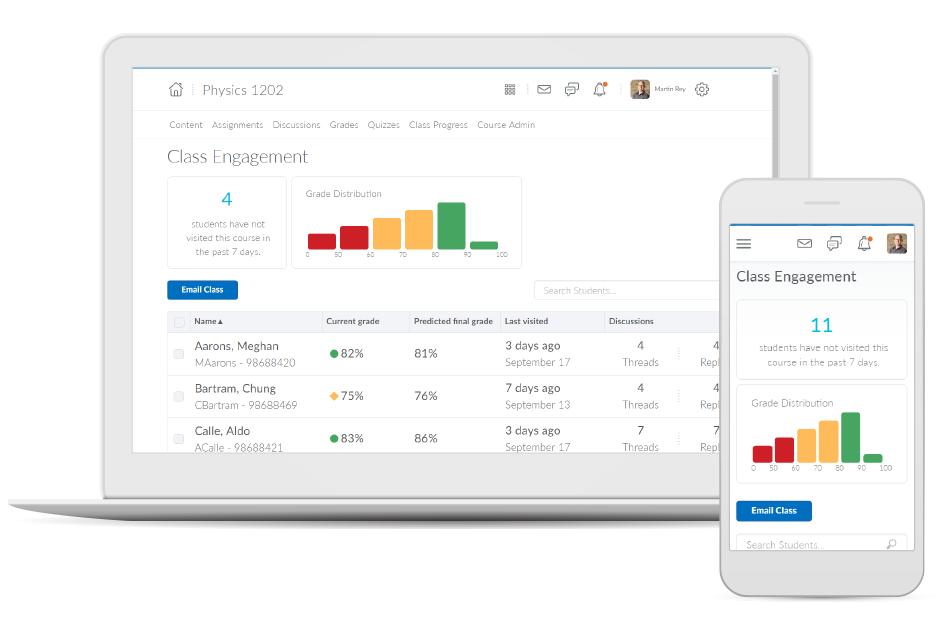
Brightspace is an academic and corporate learning management platform. It provides core e-learning features, as well as mobile accessibility and granular personalization and analytics insights.

Media

1 / 6

Top Performing Features

  • Course catalog or library

    Learning content is organized into a course catalog or browsable library.

    Category average: 8.2

  • Player/Portal

    Students or employees can engage with content and take courses using this interface, which may be called a player or portal.

    Category average: 8.7

  • Learning content

    The vendor offers high quality pre-made courses or assets. These may be specific to certain industries or technologies.

    Category average: 7.2

Areas for Improvement

  • Learning administration

    Administrators can manage the content and people (students/employees, course authors, instructors, etc.) on the platform.

    Category average: 7.5

  • Learning reporting & analytics

    Provides insights into course completion, engagement with learning content, etc.

    Category average: 7.7

  • Mobile friendly

    Students or employees can access content from mobile devices. Course authors can develop responsive learning content.

    Category average: 7.1

Brightspace - It's the whole package and more!

Pros

  • Provide an online platform for education/training.
  • Serve as a institution-wide communication channel.
  • Allow for customization to institutional needs.

Cons

  • Consistency across the platform.
  • May take time to customize to best fit institutional needs.

Most Important Features

  • Individual/customizable sites that can be used for specific purposes.
  • Organization-wide communication tools.
  • User/Group-based roles/permissions.
  • Integrations with other products.

Return on Investment

  • Increased customer/student retention.
  • Increased ability for service offerings to customer/student.
  • Improved data gathering ability of customer/student behavior, interest, etc.

Alternatives Considered

Canvas, Blackboard Learn, Moodle and Google Classroom

Other Software Used

Microsoft Teams, Microsoft 365 (formerly Office 365), MS SharePoint, Zoom, Adobe Acrobat Reader DC, Adobe PhotoShop, Microsoft Power BI, Kaltura, Google Analytics

And the award for best LMS ever goes to Brightspace!

Pros

  • The layout is amazing! Students who have used other LMS's have often commented on the ease of navigability Brightspace offers.
  • The annotation features for course assignments are easy to follow.
  • The layout of the homepage is very user-friendly and places focus on course announcements.
  • Brightspace email is also a bonus feature!

Cons

  • I wish there was a way that we could block students from their courses and provide notification as to why they have been locked out of their accounts.
  • I wish there was a way to change the order of pinned course in the my courses widget.
  • The instant messenger features in Brightspace are not really that great. I wish there was a way to link it to your phone or that it would provide a different alert. It currently works pretty similar to email.

Most Important Features

  • The announcements widget.
  • Brightspace email.
  • Integration capabilities with 3rd party softwares such as Evaluation Kit, Concourse Syllabus Management, Teaching tools (Cengage, Pearson, etc.), and Respondus.
  • The fact that they are constantly finding ways to improve their software!

Return on Investment

  • Since moving to Brightspace we have seen an increase in students returning to take our online courses.
  • We have a higher satisfaction rate among our faculty members where LMS is concerned.

Alternatives Considered

Blackboard Collaborate, Blackboard Learn, Moodle and Canvas

Other Software Used

Zoom, Harmonize, Microsoft 365 (formerly Office 365), Blackboard Collaborate

Brightspace LMS Review

Pros

  • Creating and organizing assignments
  • Able to upload files of all types
  • Manage calendar
  • Student reminders of work due via built in calendar

Cons

  • Editing assignments: too many steps, can be more streamlined
  • Courses are presented the same for instructors and learners. Instructors have to use 'student view' to see course from learners' point of view. Must click a button to deactivate
  • Using the built in course management system to create modules can be challenging

Return on Investment

  • Students and instructors can get confused with the interface. There might be a slight learning curve
  • Not everything is intuitive. Therefore some instructors are slow to adopt.
  • Grading features may have a slight learning curve for instructors new to LMS.

Other Software Used

Schoology, a PowerSchool Unified Classroom product, Google Classroom

I think it's a clunky platform that feels like it is was made in 2003.

Use Cases and Deployment Scope

We use D2L Brightspace to teach online courses. I think in comparison to CANVAS it is very clunky and counter intuitive. Grading an assignment, for instance, requires you to manually open the grade book, find the ungraded assignments one by one, open them as pop ups, and choose the attempt number. I don't understand why there isn't a simple 'to-do' list like in Canvas. Part of the problem might be my institution randomly restricting user abilities to prevent people from messing up their course pages, but I spent hours trying to streamline my page and nothing works well. I will quit my job primarily because I hate working with this platform.

Pros

  • Make you click a thing to click a thing to click a thing to get what you are looking for.
  • Make you click a thing to click a thing to click a thing to get what you are looking for.
  • Make you click a thing to click a thing to click a thing to get what you are looking for.

Cons

  • Create a to-do list.
  • Let users customize course page layouts.
  • Embedded videos take forever to even appear on a page when you get there. This gives me the false impression that content is missing.
  • I think Gradebook sucks. It has question marks and weird icons all over, but there is no tooltip explaining what they mean.
  • In my experience, grading is clunky and takes a lot of clicks to get to an assignment.

Most Important Features

  • Online teaching
  • Course design
  • Course delivery
  • Instructional media hosting

Return on Investment

  • It will make me quit my job

Alternatives Considered

Canvas, Blackboard Assessment & Accreditation Solution, Blackboard Collaborate and Blackboard Learn by Anthology

Other Software Used

Canvas, Python IDLE, Microsoft 365, Adobe Premiere Pro, Microsoft Powerpoint

Employee-Tailored LMS Tool That Offers Unparalleled Customization for Improved Engagement

Pros

  • File sharing capability between users is largely unparalleled in the LMS space (from my experience).
  • The user interface has continued to receive valuable updates that have created an incredibly efficient platform to navigate.
  • Brightspace offers a single source of truth for standardized learning outcomes based on company objectives.

Cons

  • One can feel a bit rushed on the Brightspace platform during the log-out period. Security requirements may require this, but it makes end-users more conscious about getting through content than taking notes.
  • From my experience, there is not a direct connection between the platform and Outlook.
  • Some content on the platform can feel redundant.

Return on Investment

  • Brightspace offers tailored learning outcomes for employees to further their organization knowledge.
  • There are significant analytical benefits that enable administrators to view engagement data and cultivate organizationally-specific content.
  • Brightspace enables a consistent and single-source of truth channel for learning but still does not fit all levels of employees.

Alternatives Considered

Skillsoft Leadership Development Program, Skillport, Showpad, Blackboard Learn and Canvas

Other Software Used

Skillport, Skillsoft Leadership Development Program, Blackboard Learn