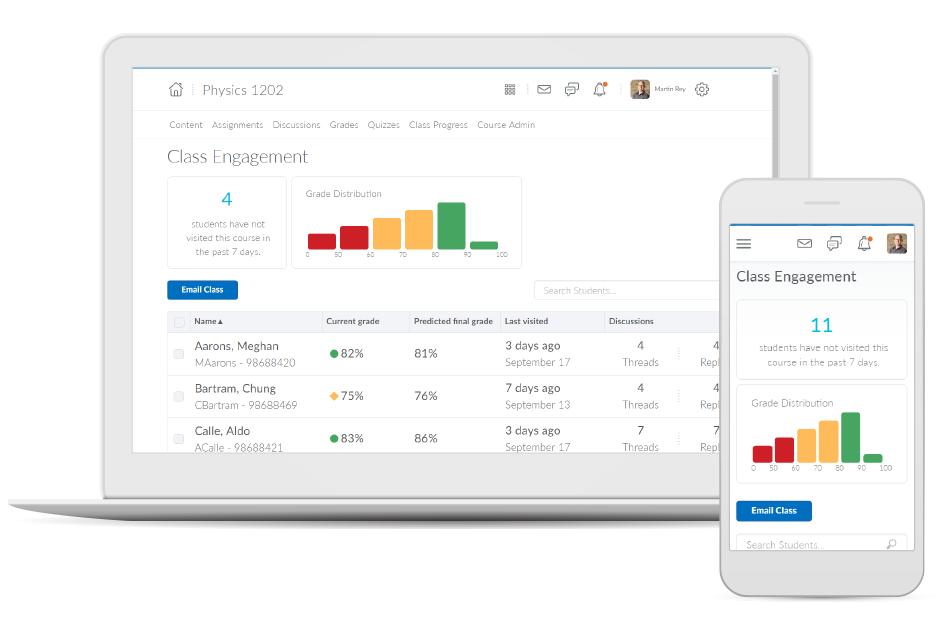
Brightspace is an academic and corporate learning management platform. It provides core e-learning features, as well as mobile accessibility and granular personalization and analytics insights.
N/A
Canvas
Score8.2 out of 10
N/A
Instructure is an educational software company based in Sandy, Utah. It is the developer of the Canvas learning management system, which is a comprehensive software package that competes with such systems as Blackboard Learning System, SumTotal and Saba.
N/A
Pricing
D2L Brightspace
Canvas
Editions & Modules
No answers on this topic
No answers on this topic
Offerings
Pricing Offerings
D2L Brightspace
Canvas
Free Trial
Yes
Yes
Free/Freemium Version
No
Yes
Premium Consulting/Integration Services
Yes
No
Entry-level Setup Fee
No setup fee
No setup fee
Additional Details
Must contact vendor for pricing information. 30-day free trial is available.
Must contact vendor for pricing information.
More Pricing Information
Community Pulse
D2L Brightspace
Canvas
Considered Both Products
D2L
Verified User
Chose D2L Brightspace
In my opinion, D2L Brightspace is inferior to CANVAS and Blackboard. I didn't choose it. It was selected by my employer.
A de minimis incentive was given to thank the reviewer for their time. The incentive was not used to bias or drive a particular response, nor was the incentive contingent on a positive endorsement. More Info
Vice President for Technology Innovation and Consumer Experience in Information Technology at Thomas Jefferson University (Higher Education, 10,001+ employees)
Chose Canvas
Canvas does not compare well against Corporate Learning LMSs like HealthStream and Absorb Anywhere LMS, but it does well against Blackboard, WebCT (no longer around), Desire2Learn, etc. It also does well against MOODLE, but MOODLE is very versatile - can be used as a corporate …
A de minimis incentive was given to thank the reviewer for their time. The incentive was not used to bias or drive a particular response, nor was the incentive contingent on a positive endorsement. More Info
Instructional Designer / Mobile Product Manager at University of Central Florida (Higher Education, 10,001+ employees)
Chose Canvas
Blackboard and Desire2Learn offer good products, but are almost too large and not as intuitive to implement, learn, and support. Canvas offers a simpler product that is just as powerful.
A de minimis incentive was given to thank the reviewer for their time. The incentive was not used to bias or drive a particular response, nor was the incentive contingent on a positive endorsement. More Info
Verified User
Chose Canvas
Simple design interface combines with powerful functionality within the platform.
A de minimis incentive was given to thank the reviewer for their time. The incentive was not used to bias or drive a particular response, nor was the incentive contingent on a positive endorsement. More Info
Manager, Systems Administration in Information Technology at Orbis Education (Education Management, 201-500 employees)
Chose Canvas
Canvas's ease of use and ease of administration were huge deciding factors in the decision to use Canvas as our preferred LMS. We found that on average Canvas took 1/3 the clicks to accomplish the same tasks as Blackboard, and the structure of data in Canvas is far superior to …
A de minimis incentive was given to thank the reviewer for their time. The incentive was not used to bias or drive a particular response, nor was the incentive contingent on a positive endorsement. More Info
Manager of Academic Enterprise Systems in Information Technology at HomeGate Real Estate® An Innovative Cloud-Based Brokerage (Higher Education, 1001-5000 employees)
Chose Canvas
Canvas was the very first cloud-based Learning Management System. This was one of the key factors in our selection of Canvas. Canvas’s open platform and out-of-the-box ability to integrate with 3rd party vendors was also critical to its success on our campus.
A de minimis incentive was given to thank the reviewer for their time. The incentive was not used to bias or drive a particular response, nor was the incentive contingent on a positive endorsement. More Info
Verified User
Chose Canvas
Canvas is easier to use, navigate, and explain. Most of our customers prefer Canvas over the other learning management systems. The only challenge they find is linking non-app integrated content. Thus we set this up for them.
A de minimis incentive was given to thank the reviewer for their time. The incentive was not used to bias or drive a particular response, nor was the incentive contingent on a positive endorsement. More Info
A de minimis incentive was given to thank the reviewer for their time. The incentive was not used to bias or drive a particular response, nor was the incentive contingent on a positive endorsement. More Info
Assistant Professor in Information Technology at Brigham Young University (Higher Education, 1001-5000 employees)
Chose Canvas
Canvas provides a nice blend of intuitive, simple interfaces with strong functionality. Other products will often try to do too much and become bloated (e.g., BB) or are not mature enough to provide reliable functionality in key areas without extensive support (e.g., Moodle). …
A de minimis incentive was given to thank the reviewer for their time. The incentive was not used to bias or drive a particular response, nor was the incentive contingent on a positive endorsement. More Info
Director of Online Learning at University of Bridgeport (Higher Education, 201-500 employees)
Chose Canvas
We felt that Canvas had the most modern interface, was the simplest to use, offered the best support, and offered the most features. The others products are all very good, but for our needs Canvas offered the most value for an institution our size and with our set of needs.
A de minimis incentive was given to thank the reviewer for their time. The incentive was not used to bias or drive a particular response, nor was the incentive contingent on a positive endorsement. More Info
Executive Director of Adult Education, Online Learning, and Learning Architecture in Information Technology at Rappahannock Community College (Higher Education, 201-500 employees)
Chose Canvas
I have evaluated Blackboard, Desire to Learn, Moodle, and Canvas. I felt that Canvas provides the best overall experience for all users with its ease of use, ease of learning the new system, and customer support.
A de minimis incentive was given to thank the reviewer for their time. The incentive was not used to bias or drive a particular response, nor was the incentive contingent on a positive endorsement. More Info
Professor in Professional Services at Harrison College (E-Learning, 501-1000 employees)
Chose Canvas
I have used many other Learning Management Systems as an online instructor, including Angel, Blackboard, Desire2Learn, and Moodle, but Canvas is by far the most faculty-friendly and student-focused. With an array of technology tools available to incorporate for stronger and …
If you're an educational institution (K-12, Higher Ed, etc.), this is an amazing tool, and it will provide you all the functionality to support anything you may want and need it to do. If you are looking at Brightspace as a tool for corporate training, I'm not sure exactly how good or bad it will be for you. My guess would be that it likely depends on your organization's size. Along that line, what I can speak to is how we use it for our customized training and in-house professional development/training, and it works fantastically for that. While we primarily use it for normal higher ed coursework, we regularly do training and professional development for all of our employees and I manage those along with our HR department. Because we use it for many other things as well, all of our employees are familiar with the product, which makes our trainings go that much smoother and makes my job that much easier.
A de minimis incentive was given to thank the reviewer for their time. The incentive was not used to bias or drive a particular response, nor was the incentive contingent on a positive endorsement. More Info
It is really well suited for school situations like knowing what [assignments] need to be done when, getting feedback, getting points, finding the slides that the teacher used for explaining an [assignment] or theory. I think It would be less suited in business situations because it's [primarily] made to be a [one-way] communication tool for schools. Businesses need more control on individual levels I think[.]
A de minimis incentive was given to thank the reviewer for their time. The incentive was not used to bias or drive a particular response, nor was the incentive contingent on a positive endorsement. More Info
Allowing users to embed content links from YouTube or Google Drive enables learners to experience a richer lesson.
Providing a powerful editor that allows developers to also include content from Adobe Stock as well as textbook publishers and cloud storage companies gives more power and creative ability to instructors.
Providing scaling for mobile and traditional computer systems ensures students will not have issues on the go.
The customization of home pages and groups enable courses to be used for small training sessions with breakout groups, large courses with separate sections, and even just more engaging courses that present themed icons and logos.
Creativity options for teachers to create a virtual space that still has fun graphics and accessibility options.
Canvas has versatility in viewing options for assignment due dates such as the calendar built in feature as well as the dashboard options to display upcoming and due assignments.
Allowing teachers to create community with each other and collaborate in each-other's space.
Discussion platforms within classrooms for students to communicate with each-other and with their teachers.
Easy messaging portal within each virtual classroom.
A de minimis incentive was given to thank the reviewer for their time. The incentive was not used to bias or drive a particular response, nor was the incentive contingent on a positive endorsement. More Info
One can feel a bit rushed on the Brightspace platform during the log-out period. Security requirements may require this, but it makes end-users more conscious about getting through content than taking notes.
From my experience, there is not a direct connection between the platform and Outlook.
A de minimis incentive was given to thank the reviewer for their time. The incentive was not used to bias or drive a particular response, nor was the incentive contingent on a positive endorsement. More Info
A de minimis incentive was given to thank the reviewer for their time. The incentive was not used to bias or drive a particular response, nor was the incentive contingent on a positive endorsement. More Info
I would never give any system a perfect score. In the technology environment today we need to be constantly looking at ways to improve the user experience and LMS companies like Desire2Learn need to know that we have options today with other systems and they need to stay current with features and listen to their customers.
The other LMS tools have fallen behind. One reason is they are not able to update their systems, features, toolsets in a timely manner. While other LMS providers release bug fixes and new features several times a year, schools struggle to install and implement them in a timely manner. It is not uncommon for a school to take 6 months to a year to fully install and implement new releases on other LMS platforms. With Canvas, those features are released every 3 weeks, and there is nothing for a school to do other than choose to turn them on once released. This has allowed Instructure to innovate faster, and get new features and tools to customers quicker. Other factors include great pricing, customer support, and the innovative way in which LTI is implemented in the tool.
A de minimis incentive was given to thank the reviewer for their time. The incentive was not used to bias or drive a particular response, nor was the incentive contingent on a positive endorsement. More Info
Overall, the learning environment works as expected. However, there are plenty of bugs. For example, for a few versions, trying to print out a PDF from the Content screen in several browsers would produce a blank page. We inform D2L support about these issues, most of which are known issues. However, they are very slow to respond. D2L seems to spend more time selling than actually coding and testing their product. Most of the issues are not major -- however, there have been a few that are unbelievable. In fact, this past week we had a sudden issue where the "Submit" button in quizzes would not appear if users had a certain browser/operating system combination. This is a major problem, if students cannot submit their exams! D2L is slow to respond to these kinds of situations, which do occur more often than I would like.
The functions in Canvas are well integrated and consistent across the application, and mostly intuitive. Overall navigation and setup is streamlined through integrated features and navigation. The feedback we've gotten from our program participants is that it is easy to learn to use. It also integrates well with third party software like Google Docs and Blackboard Collaborate web conferencing software
A de minimis incentive was given to thank the reviewer for their time. The incentive was not used to bias or drive a particular response, nor was the incentive contingent on a positive endorsement. More Info
Both students and instructor enjoy the 24-hoiur access. After, all isn't that the point of online learning. As an instructor located in an Eastern time zone state it is great to connect with students located in a Pacific time zone state. I have gotten comments about the early hours I am in the course room grading assignments . . . 4:00 a.m. PST; 7:00 a.m. EST So, it's sleep time for my students and "first cup of coffee" time for me.
I have had excellent support from Desire2Learn. Any ticket that I submit is acknowledged immediately and the correction is usually almost as quick. We use this for thousands of classes and it is pretty well liked by both faculty and students. We have been using it for almost 4 years now and most of our instructors have become pretty proficient with it.
I do not personally use Canvas support since we have a central office that helps us. However, our central office always has the answers we need and are always able to solve our issues - so I would assume that get great support from the Canvas team on their end. They also offer great training, which uses materials directly from Canvas
A de minimis incentive was given to thank the reviewer for their time. The incentive was not used to bias or drive a particular response, nor was the incentive contingent on a positive endorsement. More Info
A de minimis incentive was given to thank the reviewer for their time. The incentive was not used to bias or drive a particular response, nor was the incentive contingent on a positive endorsement. More Info
The training provided online did not, necessarily, fit the version of the system that I was using. Screens were somewhat different and not all options were readily available. This could have been due to customization on the part of my institution however, I rather believe it was due to version changes and training materials not yet being updated.
A de minimis incentive was given to thank the reviewer for their time. The incentive was not used to bias or drive a particular response, nor was the incentive contingent on a positive endorsement. More Info
Once you purchase and sign the contract there is nothing to install or hardware to buy. You can almost immediately start using it and have courses up and going within weeks. We signed in December and had pilot courses online ready to go for the start of school in January
A de minimis incentive was given to thank the reviewer for their time. The incentive was not used to bias or drive a particular response, nor was the incentive contingent on a positive endorsement. More Info
I have used Blackboard Learn 8 and 9. I am currently learning about Canvas. Blackboard is overall much clunkier and lacks the intuitive feel in some parts of D2L. Its grade book is much harder to control and manipulate than D2L's. Its navigation menu can be more radically modified from the default than D2L's, but this doesn't seem that useful to me. Discussions in Blackboard can be more easily reorganized than in D2L, but no grading of discussions is possible. Blackboard Assignments is a good innovation which allows markup directly in the students' submissions, but it displays student work in a confusing manner that doesn't allow for any customization, and its markup options need further tweaking. Furthermore, no rubrics can be used in Blackboard in any way to grade any kind of work (that I am aware of). Overall, I would choose D2L over Blackboard.
Canvas is more secure, has a cleaner design, and has more features. For the features, they have in common canvas still stacks up against [Smart school] by going for the extra mile. Besidfor e that, [the] canvas looks a lot more [professional] than [Smart school]. I didn't make the decision myself to get canvas instead of [Smart school] but I'm happy they did.
During my first semester working with Desire2Learn the integrated learning management system was more down than up. This meant reconfiguring assignment due dates, frustration for both the instructor, students, and help desk staff. After an upgrade, Desire2Learn has been reliable.
I cannot speak to whether this system is less expensive than the more fully featured Blackboard, but employees are far less efficient, frustrated, and require frequent calls to the help center to set up fairly simple course templates.
I have been asked to consider teaching courses which will be completely online at my current institution. I have done such online courses several times at other universities, but I have decided Desire2Learn is too frustrating and cumbersome to do so. I am now exploring using Google Drive to teach a course online. Otherwise, I will not teach online until required or I find an alternate system.
A de minimis incentive was given to thank the reviewer for their time. The incentive was not used to bias or drive a particular response, nor was the incentive contingent on a positive endorsement. More Info