TrustRadius: an HG Insights company

Bento for Business

Score10 out of 10

5 Reviews and Ratings

What is Bento for Business?

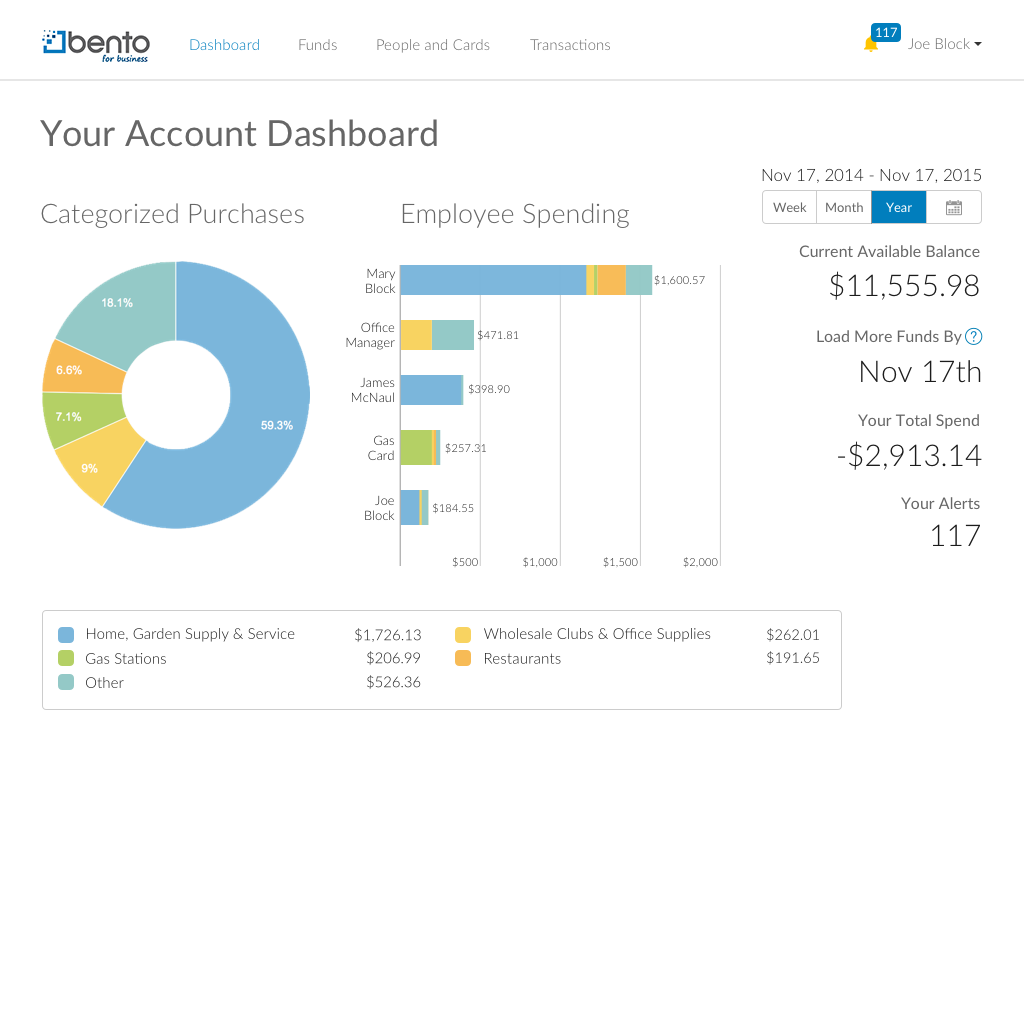
Bento for Business provides employee expense cards with spend controls that allow business owners to control where, when and how much employees can spend. This solution includes a dashboard that pivots data by employee, card, category, date and tag.

Categories & Use Cases

Media

Screenshot of Create Employee cards or Utility cards with spend limits (e.g. $500/month)
Screenshot of Dashboard provides a snapshot of spending activity across all cards.
Screenshot of See transactions in real-time.  Add tags, notes and upload receipts.

1 / 3

Screenshot of Create Employee cards or Utility cards with spend limits (e.g. $500/month)

Bento for Business - Simple Employee Expense Tracking and Funds Disbursement

Pros

  • Track expenses by employee
  • Restrict purchases based on amount and category
  • Import transactions directly into QuickBooks

Cons

  • All of the money on the cards is shared by everyone and can't be assigned to just one card
  • They are improving classifying transactions, but sometimes they are misclassified and employees have transactions declined
  • Limits are based on a day/month/week. It'd be nice if they were limited based on a single transaction too

Return on Investment

  • Less time spent on expense reports
  • Employees don't have to spend their own money and then get reimbursed, which can cause friction with management
  • We don't have to use petty cash, which is hard to track and promotes theft
  • Saves a lot of time importing expenses directly into QuickBooks
  • It does take time to get used to how long transfer take and when to initiate them. Setting up auto replenishments can get expensive if you don't pay attention

Alternatives Considered

Concur Expense, Expensify and ExpenseWire

Other Software Used

QuickBooks Online, RUN Powered by ADP, Google Ads (formerly AdWords), GoToMeeting, Dropbox Business

Easy solution for managing staff spending

Pros

  • Easily setting up new cardholders
  • Tracking receipts in the app
  • Setting limits & card controls
  • Setting up auto-refill from our bank account

Cons

  • Sometimes takes a couple weeks to get a new card in the mail once ordered

Return on Investment

  • Saving time by eliminating reimbursements
  • Allowing many staff to have a card to make purchases without worrying about financial control/risk of too many people having a company card
  • Efficiently synchs with Quickbooks

Other Software Used

Zenefits, QuickBooks Online, QReserve

Bento for Business

Pros

  • Detailed reporting
  • Reporting by Card
  • Has a mobile app

Cons

  • easier way for employees to access their statements without setting them up as admins
  • monthly statements generated by card
  • monthly fee needs to be added to one of the card statements

Return on Investment

  • less stress about paying credit card bills on time
  • more buy-in for employees - they are more willing to use the company card since it's not tied to their SS#
  • easy reporting

Alternatives Considered

Citi and Chase

Other Software Used

QuickBooks Online, iATS Payments, Vantiv, Dropbox Business, Google Drive