TrustRadius: an HG Insights company

Bonterra Apricot

Score9.5 out of 10

290 Reviews and Ratings

Watch a Demo

Contact about Bonterra Apricot

Please fill out the form below to get in touch.

Bonterra

Connect with Bonterra

What are you interested in?

Already have an account?

You hereby consent to have TrustRadius share the information supplied on this form with Bonterra so that Bonterra and TrustRadius may contact you in regard to the information requested.

What is Bonterra Apricot?

Bonterra Apricot is a cloud-based solution for nonprofits of all sizes. It's designed to bring data to the forefront in order to bolster a nonprofit organization’s impact. Apricot helps organizations to save time and resources because the tool makes managing data more efficient, so that users increase the time spent delivering the mission.


Apricot offers configurable forms and fields so organizations can customize their experience to their clients and mission. It allows nonprofit organizations to track what matters and follow clients throughout their entire lifecycle in a single, unduplicated record. With the case management solution, nonprofits can ensure data integrity through functionality that tracks whether the data in the system is complete, entered correctly, and unduplicated. The application gives users get real-time access to their data to facilitate collaboration and insights into program performance. Those insights can then be shared by creating reports within the system to present to organization stakeholders, board members, and funders.


Categories & Use Cases

Media

a display of a participant's profile to see important information about that individual at-a-glance.
the "My Workspace" area of Bonterra Case Management, that allows users to see upcoming cases, appointments, events, and other notifications in one place.
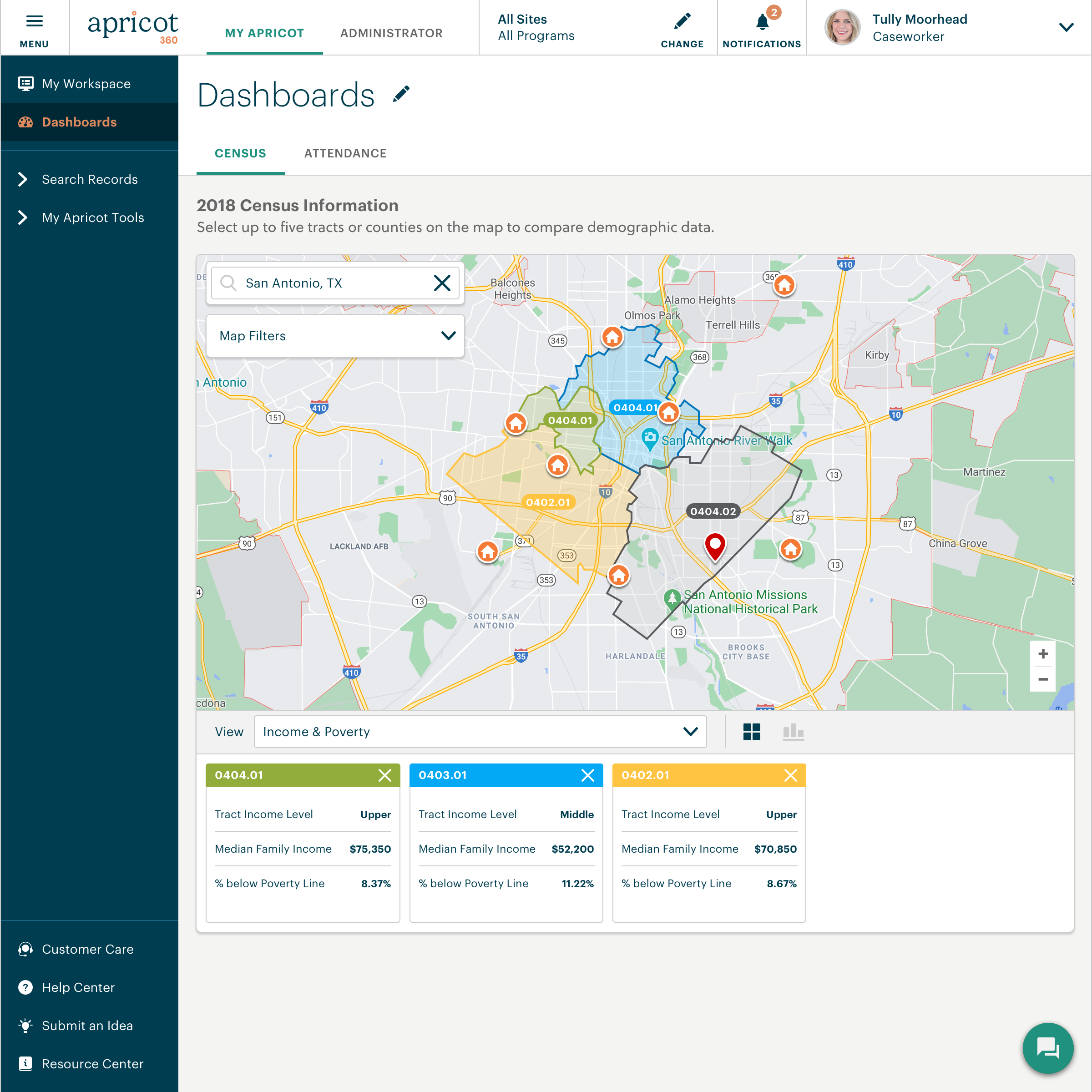
the dashboards that provide at-a-glance insights, while Census data integrations allows users to view demographics of the communities served.
the streamlined intake process that helps serve more individuals and ensure they are aligned with the correct services to help them succeed.
information, kept secure by assigning users specific roles and permissions to specify access levels.
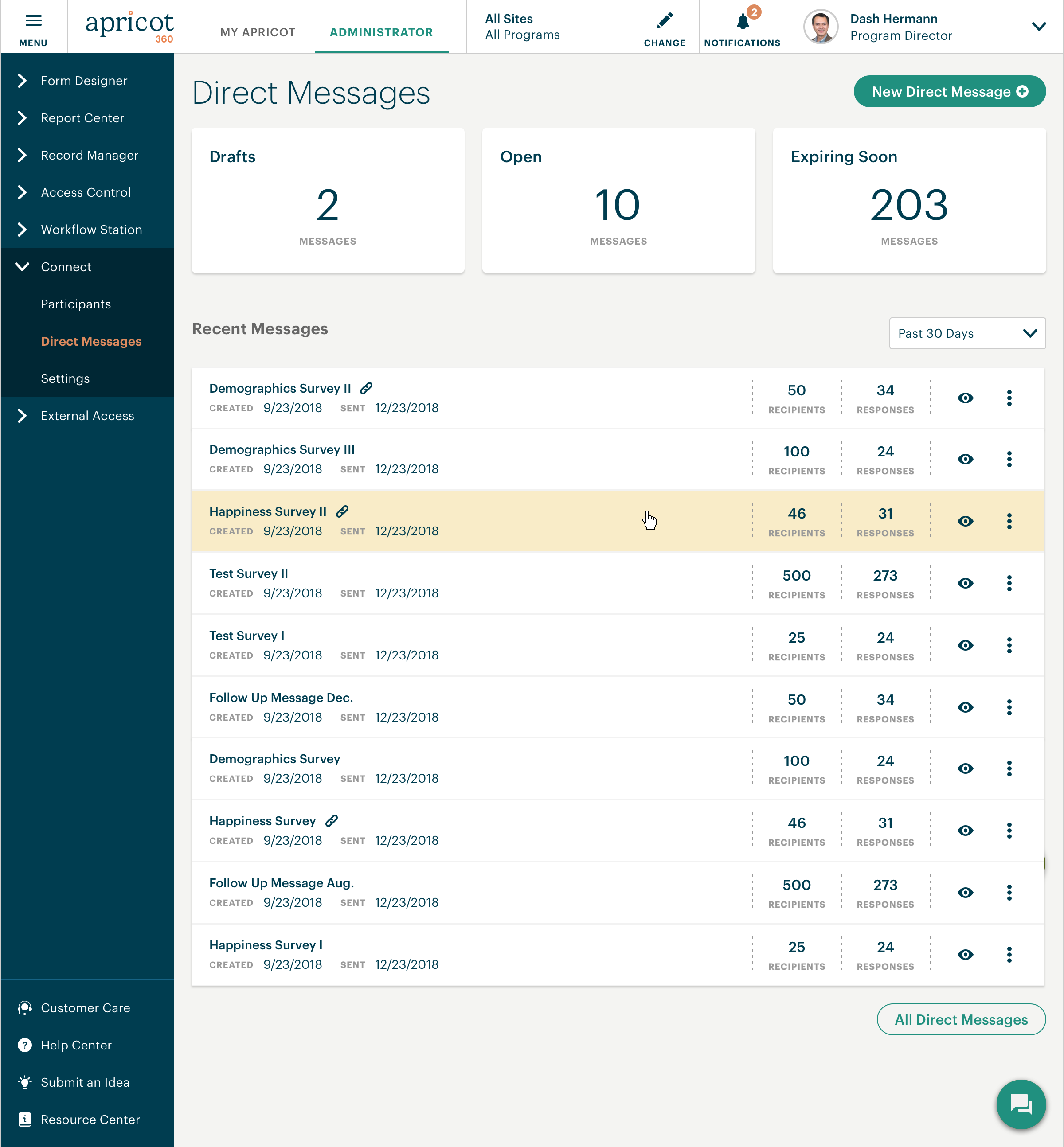
communication with participants to keep them engaged.

1 / 6

HIGHLY RECOMMEND Bonterra Apricot - Just Use It.

Use Cases and Deployment Scope

Our organization utilizes Bonterra Apricot to manage Case Notes, Client Dashboards, track direct financial assistance, perform Data Reporting, and log dates of significant importance for clients, among many other tasks. The product has addressed problems with other software we've used, which frequently had errors in data reporting or very slow times waiting for reports to generate. At times, these reports would run for hours before giving an error notification and needing to be rerun. Bonterra Apricot is the exact opposite. Numbers are accurate, and reports are generated and updated immediately.

Pros

  • Ease of navigation combined with plenty of user-friendly tips located on each page.
  • Fast and accurate data reports.
  • Multiple field search options to ensure a client or case can be located.
  • Very strong security measures to protect users' credentials.

Cons

  • More color!

Return on Investment

  • Consistent, accurate financial records of program spending are to be provided to Grant Funders.
  • One-stop shop for all program records, including past, current, and waitlisted clients.
  • Continued partnership with Grant Funders due to the ease on both sides with the Bonterra Apricot Software.

Alternatives Considered

Bonterra ETO

Other Software Used

Bonterra ETO

It works for Us.

Use Cases and Deployment Scope

We use the program to keep track of our clients and the services we provide. We created a program that logs attendance in classes, tracks the services provided, and reports on the statistics of what we offer and the volume of work we do. We need to be able to prove the services provided, so the information entered can be used in reporting for grants.

Pros

  • Allows for us to customize what we are doing and what the output is.
  • Addresses problems swiftly. Good support.

Cons

  • There are several things in the "suggestion" area that have been there for a while. For instance, to be able to see the client's age instead of just the birthdate. Many people want this, but I don't understand why it can't be done for us.
  • Luckily, whenever an issue arises, it's not there for long, as you have a fairly quick turnaround for resolving them.
  • Being able to view notes and other information sources with just a drop-down, instead of opening the entire note, would be preferred.
  • There are times when the system is just slow or doesn't work at all and it takes a little extra time for it to be resolved. This causes some stress.

Return on Investment

  • Reporting! We are now able to create charts with lots of color and accuracy. The impact from these is great for us and for the donors. We have to see the impact of our services.
  • Statistics - we can rely on our results because of the ease of inputting the information.
  • Wish I had some good numbers to share. It's not my lane, apologies.

Other Software Used

Google Drive, ChatGPT, Canva

Derek Sprague review 2025.

Use Cases and Deployment Scope

I work for a non-profit ministry, and all of our resident files and records are entered and kept in Apricot. A couple of the challenges to this record keeping are that there are many and often changes to this information, and the Bonterra Apricot system can be tailored to meet these demands. Troubleshooting can also be a challenge, but help has been readily available whenever it has been required. We are able to keep track of all the information generated by a one-year stay in our program and have it available and current at all times. I have been a blessing to this ministry in many ways.

Pros

  • Tailors to our specific needs using language I create.
  • Keeps and categorizes all sorts of information.
  • Provides support and technical assistance.

Cons

  • Spell check.
  • Easier set up.
  • Simple and safe sign in.

Return on Investment

  • Ease of recording information.
  • Streamlined our intake and outtake process.
  • Eased the process of applying for grants and tracking intake fees.

Other Software Used

1Password, Excellor

Apricot for Nonprofits

Use Cases and Deployment Scope

We are a nonprofit. We use Bonterra Apricot to do intake information for the families we serve. It helps us keep track of our services. We use secure webforms to allow families to request our services more easily. It helps us track different programs, trainings, and events. It also helps us pull reports and track data for our grants.

Pros

  • Reporting
  • Linking Records.
  • Tech Support.
  • Forms are easy to create.

Cons

  • More intuitive features.
  • Better guides and self-help built in.
  • Allow forms to change depending on what is clicked.

Return on Investment

  • Easier reporting for staff and grants.
  • Quickly create needed forms.
  • Increased access to our services for families through secure webforms.
  • Efficiently share information between staff.
  • Decrease time spent on intakes and other administrative tasks with automations.

Other Software Used

Constant Contact, Canva, Microsoft Excel

User Friendly Tracking Software

Use Cases and Deployment Scope

We utilize Bonterra Apricot in our Resource Center organization. The business problems this product addresses are the tracking that is much needed to ensure clients are receiving the services they are inquiring about.

Pros

  • Tracking Client Classes
  • Tracking Client specific Interactions
  • Tracking Client Outcomes

Cons

  • I like the way it is nothing to complain about

Return on Investment

  • Customer metrics improve higher retention
  • Customer satisfaction in classes being offered
  • Tracking group sizes of each class to determine what is being utilized more

Other Software Used

Tasks for Zendesk, Microsoft 365 Business Premium, Tableau Desktop