TrustRadius: an HG Insights company

Altair SmartSight

Score8.4 out of 10

9 Reviews and Ratings

What is Altair SmartSight?

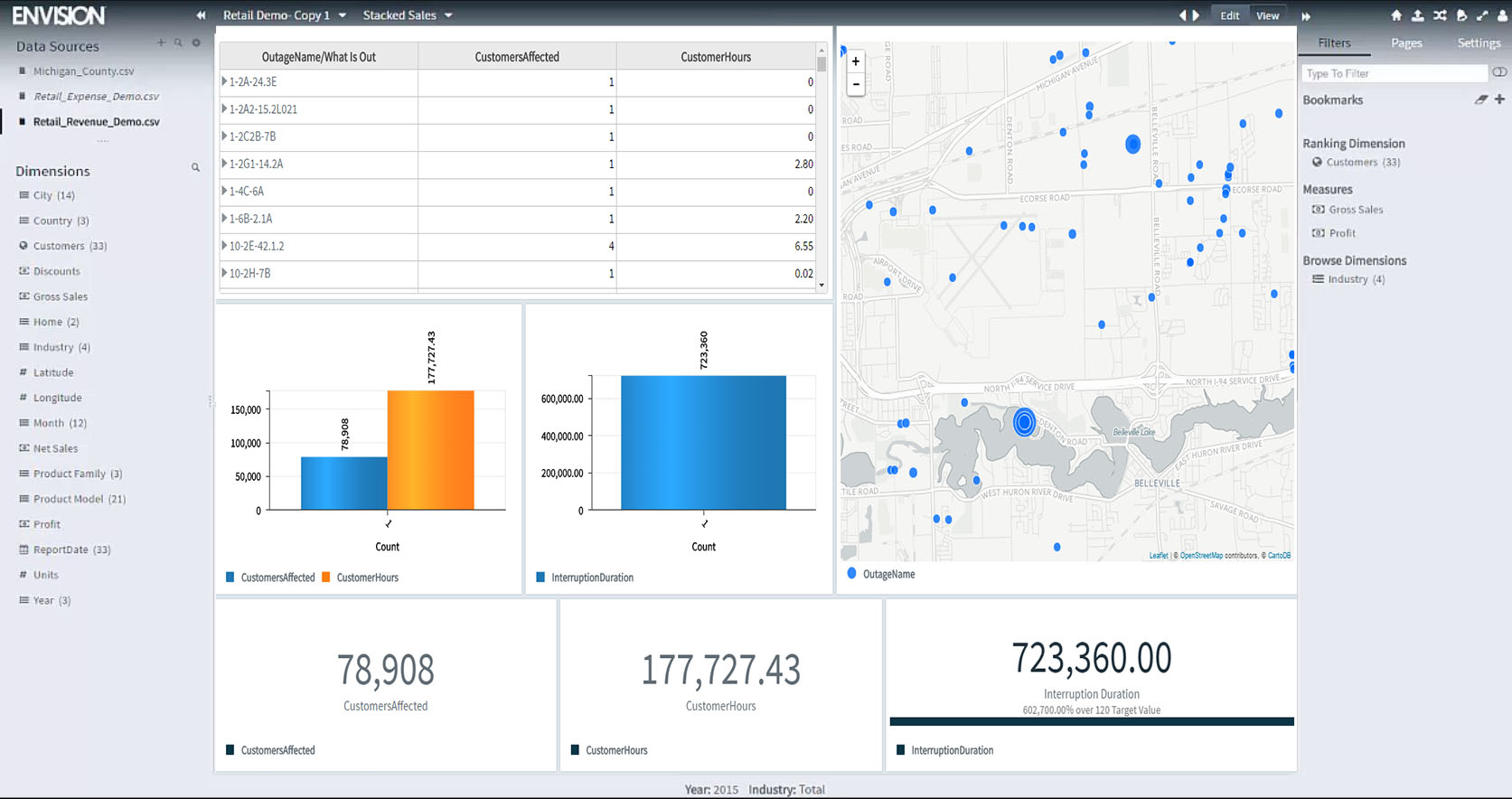
Altair SmartSight (formerly Carriots Analytics) is a cloud data analytics platform for embedded, Big Data, and IoT applications. It provides secure and rapid free-form data visualization and exploration, scalable throughout the enterprise in real time.

Read more details.

Media

Altair SmartSight
Altair SmartSight

1 / 2

One of Best Analytics Tool With Great User Experience.

Use Cases and Deployment Scope

Altair SmartSight is one of the best companies available in the market to provide services related to Analytics, BigData, IoT, and multiple use cases. Altair SmartSights provides the cloud-based analytics platform to embed the different software, products, and analysis under one platform with high-performance systems, great user experience, and so on. Altair Smart Sight provides the platforms for every organization that want to avoid the headache of managing multiple servers, maintenance, and other things.

Pros

  • Big Data Analytics
  • IOT Services
  • Single platform for multiple use cases
  • Great UI

Cons

  • One of the first thing they should allow students to explore and learn the platform.
  • Altair SmartSight is really a good product but they should include the Automation Services with it.
  • Altair SmartSight should have a feature to send the automatic Email whenever there is a change.

Return on Investment

  • According to market positioning Altair SmartSight really increased its market.
  • Good in case of ROI
  • On overall business objectives its really good and continuously performing well.

Alternatives Considered

Tableau CRM (formerly Einstein Analytics), Logi Composer (Zoomdata) and Microsoft Power BI

Other Software Used

Tableau CRM (formerly Einstein Analytics), Microsoft Power BI, Logi Composer (Zoomdata)

Usability

Great tool for workflow and collaborative work

Use Cases and Deployment Scope

It provides us with a governed and secure environment. Where users can share workflows, with an enhanced service and models with an easy to use visual interface. Logging in takes us to the library where we see workflows of folders and sets of objects that we have created and uploaded, as well as objects that other users have shared with us to work collaboratively.

Pros

  • The global navigation bar with links to the library for easy access and management within the platform.
  • Simplified task viewer where we can find the profile, performance, help, resources and a link also to manage your account.
  • System administrators can define profiles for task execution.

Cons

  • For better decision making, the connection with other applications can be developed.
  • The ability to handle large datasets can be improved, as it sometimes crashes
  • It is sometimes blocked, which hinders results and deadlines.

Return on Investment

  • The workflow interface consists of the workflow canvas where we do our actual pipeline and workflow execution log, display information and each process.
  • You can use it to create a workflow and the available execution profiles in which to run them.
  • We currently have one session running for each workflow.

Other Software Used

Adobe Analytics, Google Analytics, Advanced Application Analyser

Usability

Useful and Ideal

Use Cases and Deployment Scope

It is a very useful software to analyze any type of data. It possesses tools like the creation of dashboards that facilitate the visualization of data and permits a better resource to make decisions about any type of process concern.

Pros

  • Dashboards
  • Visual representation of data
  • Data report generation

Cons

  • Ability to handle huge data
  • Interaction with other software

Return on Investment

  • Quick decision making
  • Identification of improvement areas
  • Daily data reporting

Usability

Great usability, poor integration with data sources

Use Cases and Deployment Scope

We needed to enhance our decision-making process by analyzing data coming from different sources in our company. The focus was on Sales analytics and our objective was to extract actionable insight to present to CxO for yearly strategy planning sessions. Moreover, we need to integrate different sources like CRM and compensation management tools.

Pros

  • Data visualization is clear
  • Great user experience
  • Great performances

Cons

  • Integration with other systems could be better.
  • Ability to handle large amount of data.
  • Expertise services might be better.

Return on Investment

  • +30% in successful business decision.
  • Improvement in quota performance precision.
  • Operational efficiency increase.

Alternatives Considered

Tableau CRM (formerly Einstein Analytics)

Other Software Used

Tableau CRM (formerly Einstein Analytics), Astrato, Microsoft Power BI

Usability

Good tool to use when on a budget

Use Cases and Deployment Scope

It helps us create dashboards and reports using data from various sources. It helps us make smart and data-driven decisions within our organization.
It has helped me in creating on the multi-platform based reports that can be easily shared. Although it's support for AI can be improved and scaled to use of large data efficiently.

Pros

  • Easy to use UI
  • Good visual representation
  • Good interactive dashboards
  • It can perform ETL flawlessly and perform data cleaning.

Cons

  • Integration with different sources
  • Large data handling can be improved

Return on Investment

  • Good tool but lacks some advanced and AI based insights
  • Integration with other software needs to worked upon
  • Lacks huge data handling capacity
  • It can helps us in identifying anomalies in the data like outliers, trend deviation etc.

Alternatives Considered

Tableau Desktop

Other Software Used

Tableau Desktop

Usability