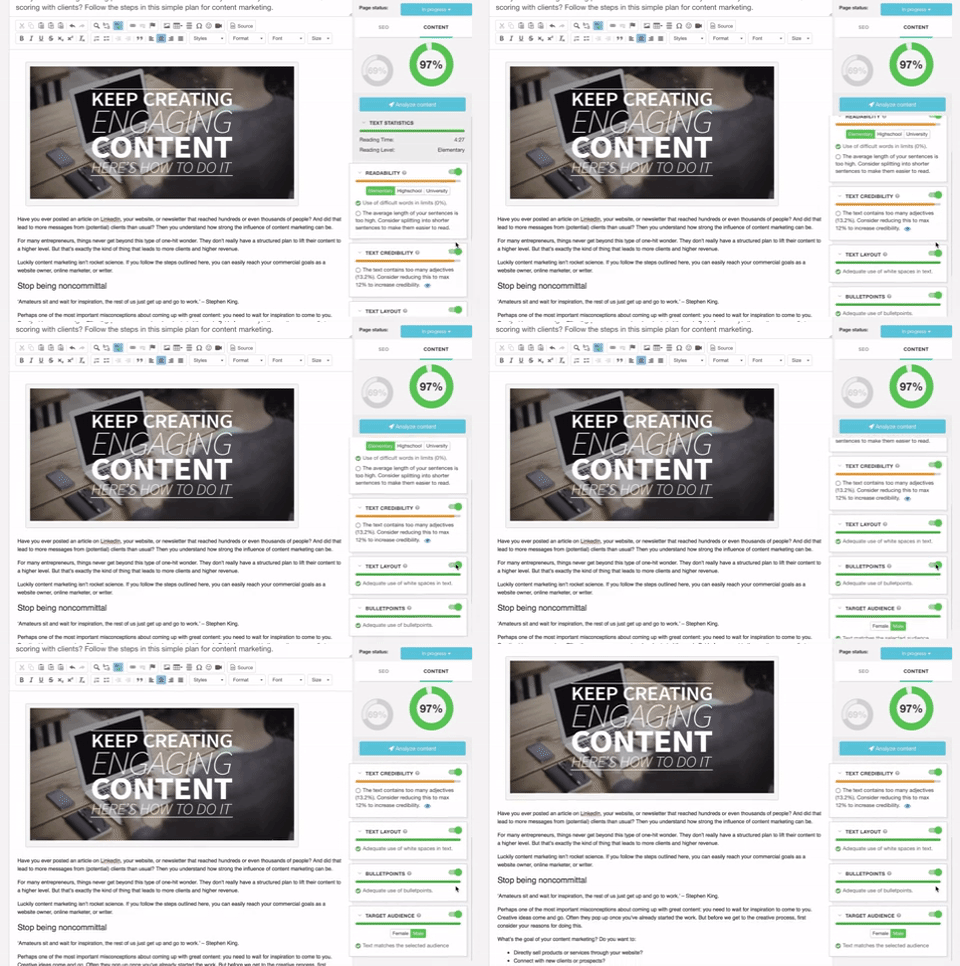
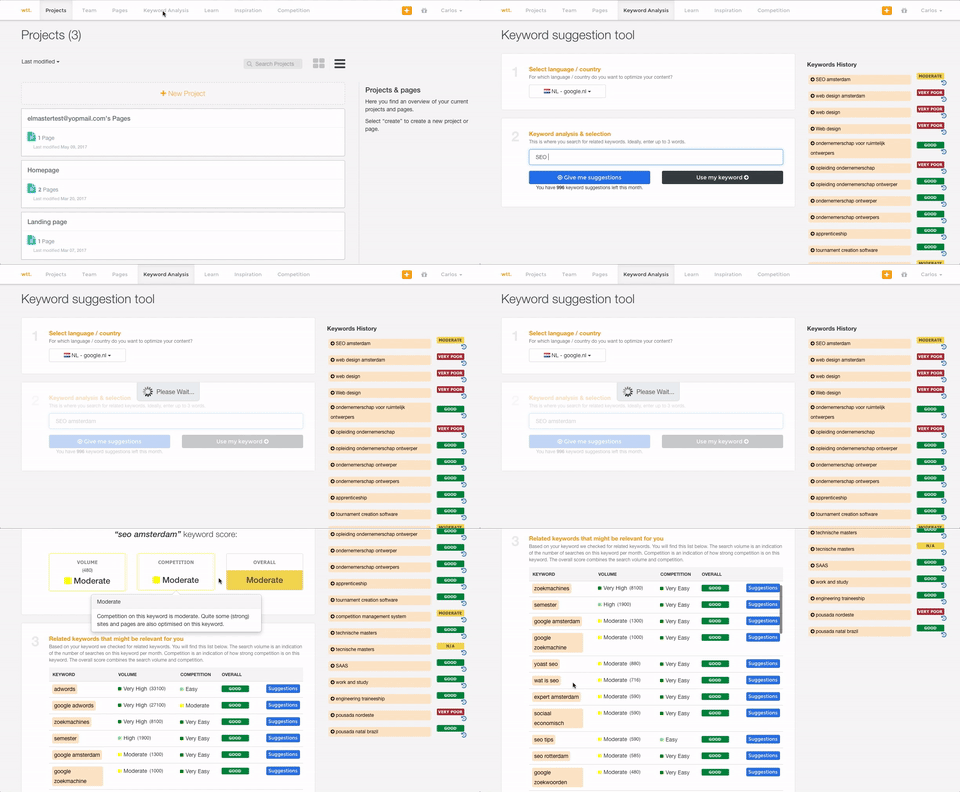
Textmetrics (formerly Webtexttool) aims to help content creators create rank-boosting web content. The tools key differentiator is big data Textmetrics creates predictive data, by analyzing the data of users (anonymously). 20.000+ user generated texts are analyzed and compared to real-world outcomes. The best performing outcomes are used to better its real-time optimization tips. Value prop: More website…
N/A
Yoast
Score9.3 out of 10
N/A
Yoast offers a set of tools developed by Joost de Valk and team, founder of yoast.com and Wordpress enthusiast. These tools are designed to help content rank higher and are subsumed under the Yoast Complete pack, which includes Video SEO for rank climbing with embedded videos in a Wordpress site, WooCommerce SEO for the WP ecommerce plugin, News SEO for rank climbing in Google news, Local SEO for (as the name implies) climbing in local listings with more complete information so can be located…
A de minimis incentive was given to thank the reviewer for their time. The incentive was not used to bias or drive a particular response, nor was the incentive contingent on a positive endorsement. More Info
I honestly can't think of a scenario where WebTextTool (TextMetrics) would not be valuable for anyone writing content intended for publishing either online or in print media. If the intent is for print media, then even if you completely ignore the SEO section of the analysis, all of the other analysis tools intended for content are incredibly insightful and helpful. These days, even print media almost always ends up online in some form or another on the publisher's website or in a digital format of the publication. So the SEO tools can still give a little boost in reworking or rewording some parts to make sure they will be effective not only in print but online as well.
A de minimis incentive was given to thank the reviewer for their time. The incentive was not used to bias or drive a particular response, nor was the incentive contingent on a positive endorsement. More Info
Yoast Wordpress SEO Plugins is really great for any application - home pages, blogs, etc. It saves a lot of time researching keywords, but it is time-consuming crafting content, which I think is a necessary evil. I wasn't really seeing the immediate results I had hoped for, but there could be a variety of reasons for that (cookies, caches, etc.). Overall, if you have the time to dedicate and utilize the tool, it's awesome!
A de minimis incentive was given to thank the reviewer for their time. The incentive was not used to bias or drive a particular response, nor was the incentive contingent on a positive endorsement. More Info
A de minimis incentive was given to thank the reviewer for their time. The incentive was not used to bias or drive a particular response, nor was the incentive contingent on a positive endorsement. More Info
A de minimis incentive was given to thank the reviewer for their time. The incentive was not used to bias or drive a particular response, nor was the incentive contingent on a positive endorsement. More Info
WebTextTool (TextMetrics) assumes that each uploaded or typed in the article is intended for online publishing, mostly in a blog type environment. While this is a perfectly understandable assumption in this day and age, it shouldn't be so difficult to ask the question of whether the content is intended for online or print media.
The "Credibility" section tends to be a little too harsh for my taste. Depending on the style of writing and the type of content, "too many adjectives" is too subjective a metric to apply to all writing ( still, I do get why they try to do it).
This is a little nitpicky, but I'd prefer to see how many projects and credits I have left to use on the dashboard page as opposed to having to click over to my account. A dashboard should show everything that a user needs to see in one shot.
A de minimis incentive was given to thank the reviewer for their time. The incentive was not used to bias or drive a particular response, nor was the incentive contingent on a positive endorsement. More Info
Density: Because even the free, basic Yoast SEO tool has SO MANY FEATURES, if you're brand new to SEO as a concept/practice, you might feel a little overwhelmed at first. Just go watch the training videos!
Bulk Title Editing: I'm sure this tool can be useful, but I've never found it to be particularly intuitive or helpful.
Limitations: I'm grasping at straws here, but it would be nice if some of the premium (paid) features- specifically the social media previews- were available in the free version. Like I said, grasping.
A de minimis incentive was given to thank the reviewer for their time. The incentive was not used to bias or drive a particular response, nor was the incentive contingent on a positive endorsement. More Info
A de minimis incentive was given to thank the reviewer for their time. The incentive was not used to bias or drive a particular response, nor was the incentive contingent on a positive endorsement. More Info
It's super easy to use. Really, it requires little-to-know tutorials or walkthroughs at all — it explains everything you need to know in the description and tooltips built straight into the tool. I've never had to google a how-to or tutorial to use Yoast — it just works, and it works well
A de minimis incentive was given to thank the reviewer for their time. The incentive was not used to bias or drive a particular response, nor was the incentive contingent on a positive endorsement. More Info
I only had to reach out to TexMetrics once when initially getting my account setup after signing up. The response was swift, and they addressed my question completely. I've had no other issues since I began using TextMetrics, so based on that one interaction, I have to give them a great score. I assume that it is still the same as when I reached out that one time (at least I hope it is!).
A de minimis incentive was given to thank the reviewer for their time. The incentive was not used to bias or drive a particular response, nor was the incentive contingent on a positive endorsement. More Info
There are plenty of amazing articles published on their site, however, I don't rate their actual support team as being particularly helpful. I made multiple points of contact regarding the internal link counter not working and even though they began troubleshooting I think when it became too hard it was just forgotten about and so is still unresolved.
A de minimis incentive was given to thank the reviewer for their time. The incentive was not used to bias or drive a particular response, nor was the incentive contingent on a positive endorsement. More Info
A de minimis incentive was given to thank the reviewer for their time. The incentive was not used to bias or drive a particular response, nor was the incentive contingent on a positive endorsement. More Info
This is my go-to plugin for SEO. It is easy, and I trust Yoast will give me solid results. In a short time period, our website has seen measurable results in organic search traffic. Our previous website didn't use page level SEO tools to this extent. We are systematically updating each page using the Yoast WordPress SEO Plugin. We are pleased with the results
A de minimis incentive was given to thank the reviewer for their time. The incentive was not used to bias or drive a particular response, nor was the incentive contingent on a positive endorsement. More Info
A de minimis incentive was given to thank the reviewer for their time. The incentive was not used to bias or drive a particular response, nor was the incentive contingent on a positive endorsement. More Info
Yoast Wordpress SEO Plugin along with other SEO investments we have made with our new website has extremely paid off on new business opportunity creation. Since August 2018 we have added over $100K of new business opps solely sourced from SEO searches on pages and posts that Yoast has helped us optimize.
Yoast Wordpress SEO Plugin saves our marketing team a lot of time. Since the plugin lives in WordPress and provides live tips we can make to the page or post, our team doesn't have to guess on what keyword, or meta-tag, or how many internal and external links a page or post should have using an additional platform. It is just conveniently there for us to use regularly.
Yoast Wordpress SEO Plugin cannot be the only piece of software your website relies on to obtain SEO optimization with search engines. It is a piece of the puzzle, and you can only maximize its' value by making sure your website is scam free, the code under the hood is healthy, and the load time and page weight is light.
A de minimis incentive was given to thank the reviewer for their time. The incentive was not used to bias or drive a particular response, nor was the incentive contingent on a positive endorsement. More Info