Salesbook vs. VanillaSoft

Overview
ProductRatingMost Used ByProduct SummaryStarting Price
Salesbook
Score 8.2 out of 10
Small Businesses (1-50 employees)
Salesbook is a platform that processes and automates work of mobile sales reps, with the goal of boosting their effectiveness by 53%. Salesbook covers the end-to-end sales channel: from meeting the customer, through CRM up to hard data and decision support. The solution helps to bring automation and analytics to a classic sales approach, brining it closer to e-commerce performance.N/A
VanillaSoft
Score 3.8 out of 10
Small Businesses (1-50 employees)
VanillaSoft is a lead optimization platform designed to assist fast-response sales teams in maximizing their conversion rates. By providing a structured and efficient approach to lead management, VanillaSoft aims to ensure that every potential customer receives the attention they deserve. This platform is beneficial for sales teams that operate in high-pressure environments where timely follow-ups can significantly impact sales outcomes. The primary audience for VanillaSoft…N/A
Pricing
SalesbookVanillaSoft
Editions & Modules
No answers on this topic
Offerings
Pricing Offerings
SalesbookVanillaSoft
Free Trial
YesNo
Free/Freemium Version
NoNo
Premium Consulting/Integration Services
NoNo
Entry-level Setup FeeOptionalNo setup fee
Additional DetailsVanillaSoft offers several add-ons to use in conjunction with our base platforms including: Auto Dialing Call Recording VoIP SmartCaller ID SMS
More Pricing Information
Community Pulse
SalesbookVanillaSoft
Best Alternatives
SalesbookVanillaSoft
Small Businesses
Salesflare
Salesflare
Score 6.0 out of 10
Salesmate
Salesmate
Score 10.0 out of 10
Medium-sized Companies
Lead411
Lead411
Score 9.1 out of 10
HubSpot Sales Hub
HubSpot Sales Hub
Score 8.5 out of 10
Enterprises
Dialpad Sell
Dialpad Sell
Score 9.5 out of 10
Outreach
Outreach
Score 8.5 out of 10
All AlternativesView all alternativesView all alternatives
User Ratings
SalesbookVanillaSoft
Likelihood to Recommend
8.2
(0 ratings)
8.3
(0 ratings)
Likelihood to Renew
-
(0 ratings)
9.0
(0 ratings)
Usability
-
(0 ratings)
9.0
(0 ratings)
Availability
-
(0 ratings)
9.0
(0 ratings)
Performance
-
(0 ratings)
9.0
(0 ratings)
Support Rating
-
(0 ratings)
8.9
(0 ratings)
In-Person Training
-
(0 ratings)
9.0
(0 ratings)
Online Training
-
(0 ratings)
9.0
(0 ratings)
Implementation Rating
-
(0 ratings)
9.0
(0 ratings)
Configurability
-
(0 ratings)
9.0
(0 ratings)
Ease of integration
-
(0 ratings)
9.0
(0 ratings)
Product Scalability
-
(0 ratings)
9.0
(0 ratings)
Vendor post-sale
-
(0 ratings)
9.0
(0 ratings)
Vendor pre-sale
-
(0 ratings)
9.0
(0 ratings)
User Testimonials
SalesbookVanillaSoft
Likelihood to Recommend
The most important thing is definitely the tablet app. It has the entire sales process built into it - from making a presentation, preparing an offer (and even comparing competitors' offers) to signing a contract and sending a follow up to the customer. The implementation went very smoothly, but you also have to put some effort into it. For what it's worth afterwards, the savings in time and money are invaluable.
Read full review
VanillaSoft is well suited for the call center scenarios, it helps the representatives to keep all the leads information well organized and in one single place to speed up daily tasks efficiently and effectively. VanillaSoft is easy to set up, even someone who is new can have it up and running in minutes.
Read full review
Pros
  • The detailed reports help a lot in analyzing sales.
  • Thanks to the tablet app, I don't have to enter the data into another system after the meeting with the client. I can do it during the meeting.
  • Smooth integration with external tools.
Read full review
  • One of my favorite features is the ability to customize routing. Quite often a caller is told by a prospect to call back at a certain date and time, the caller can set that and the record will pop up in the front of the database on that date and time letting you know that you have a call to make.
  • We also send out information on behalf of our clients to prospects, which we do directly out of VanillaSoft. After the information is emailed the system will actually let us know when it was opened and moved that prospect record to the front of the database to be a priority in call rotation.
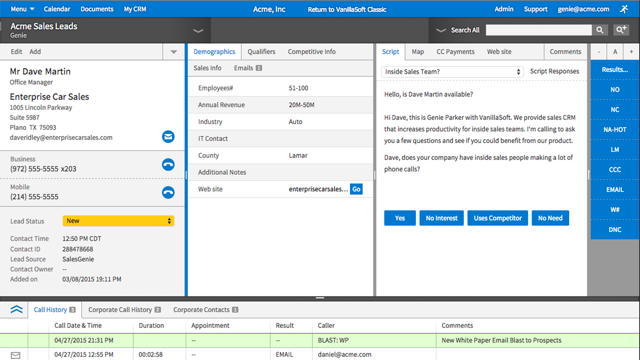
  • I also love that we were able to customize it so that the callers have everything they need to see right in front of them. We have a area that has the prospects information, name and address, then an area that has required information fields with questions the caller needs to ask and place answers in the appropriate fields, then we have an area with a notepad, an area to access the calendar, and an area that gives the caller all the previous activity on the record.
  • These are considered strengths for us as all of these examples make my job and the callers job much easier and saves us a ton of time and money.
Read full review
Cons
No answers on this topic
  • Telephone numbers should contain dialing code in same column when exporting.
  • Should be easier to import dialing code for telephone numbers by country code.
  • Data should automatically mark other contacts closed when an appointment is scheduled with that company (should say 'having appt').
Read full review
Likelihood to Renew
No answers on this topic
We have no reason not to renew. VanillaSoft has been the best CRM (for us) that we have ever used. The value is great, we love the system, and it's easy to get assistance from VanillaSoft team when needed. Our team is so used to the calling and admin functions there is no desire to change.
Read full review
Usability
No answers on this topic
The entire system is set up so perfectly. It makes training callers much quicker, and admin tools are so easy to navigate when you get used to using it. Also, if there is ever something I cannot figure out, I can get support from VanillaSoft very quickly to resolve and get my task accomplished.
Read full review
Reliability and Availability
No answers on this topic
It is very rare that we have system issues. Maybe a handful of times over the years, we had to contact support about being unable to access. It was always a quick response from the VanillaSoft team, and they would clearly explain the issue and usually give time frame on fixing, or have it fixed immediately.
Read full review
Performance
No answers on this topic
I work on all aspects for VanillaSoft for our company. The pages overall do load very quickly. Reports are amazing, I can get quick report, customized reports, and anything I may need to present to client in very little time. It has made my job so much simpler. As far as I know, integration goes smoothly as well.
Read full review
Support Rating
No answers on this topic
Response time was acceptable for the relatively few problems any of our users may have encountered. Fortunately, such occasions were rare.
Read full review
In-Person Training
No answers on this topic
It was very helpful and informative. The learning of the tool is something anyone can do, as the setup is so well thought out.
Read full review
Online Training
No answers on this topic
It was very thorough. VanillaSoft team did not rush us. They explained the various functions clearly and were open to any and all questions we had as we began to learn the system. Also, once training completed, if we encountered anything we could not figure out, the support team was fantastic in helping us out.
Read full review
Implementation Rating
No answers on this topic
Our implementation was very easy.
Read full review
Alternatives Considered
No answers on this topic
VanillaSoft has very similar offerings to Outreach in terms of usability and opportunities for streamlined prospect engagement. The main differences lie with their user experience, customer service, and how information is presented through the platform in terms of knowledge base and analytics. Both are suitable tools, the differentiation comes down to preference of interface and data presentation.
Read full review
Scalability
No answers on this topic
VanillaSoft has been great. The flexibility of the system is wonderful. The scalable software options are impressive as well. I would strongly support VanillaSoft's capabilities in this area. You really can do just about anything to get the setup and or integrations you may desire for your company needs.
Read full review
Return on Investment
No answers on this topic
  • Ability to contact more clients each day.
  • The ability to save my correspondence and notes on each interaction allowing for the appearance to the customer that I am very engaged when we are speaking.
  • Increased sales from the calendar setting and saving my notes.
Read full review
ScreenShots

Salesbook Screenshots

Screenshot of Sales revolution for the automotive industry.Screenshot of The built-in configurator allows you to present the vehicle with different packages and in different color variants. The program also suggests optimal accessories and a dedicated interior line. The offer with the financing calculation gets created automatically, and the shipment takes place right after the meeting. Relieve your salespeople and give them more time to contact the customer.Screenshot of Screenshot of Get to know the customer's needs, obtain the information necessary to present a tailored product.Screenshot of Screenshot of Monitor sales meetings, analyze their quality and sales opportunities. Duplicate best practices.

VanillaSoft Screenshots

Screenshot of the VanillaSoft Call Activity Dashboard, used to to monitor sales campaigns.Screenshot of where to build reports using the VanillaSoft Web Reports Wizard.Screenshot of where VanillaSoft offers the ability to arrange modules into four panels for access to almost everything in one screen.Screenshot of VanillaSoft's caller screens, which can be displayed in three panels.