PTC offers Creo, the company's line of computer-aided design (CAD) products that support the product lifecycle management (PLM) process with 2D and 3D design kits (Creo Elements and Creo Direct), an augmented reality module, Creo Illustrate for technical illustrations, Creo Sketch, Creo Schematics and Creo View for diagramming and sharing information, Creo simulate for running simulations, and other modules.
$2,480
Teamcenter
Score 8.1 out of 10
N/A
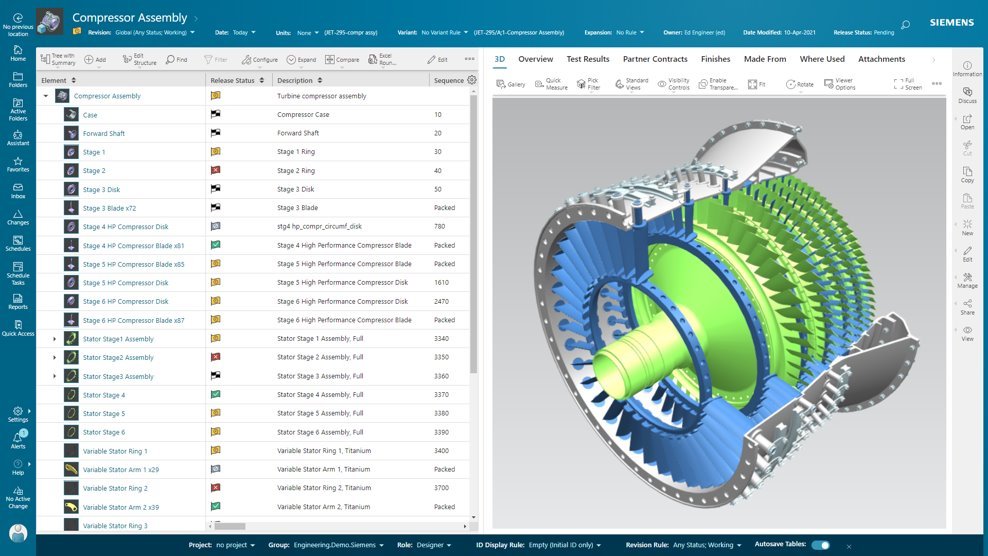
Teamcenter is a product lifecycle management system designed to help organizations integrate and standardize product development processes across functional silos.
N/A
Pricing
PTC Creo
Teamcenter
Editions & Modules
Design Package
$2,480.00
No answers on this topic
Offerings
Pricing Offerings
PTC Creo
Teamcenter
Free Trial
No
Yes
Free/Freemium Version
No
No
Premium Consulting/Integration Services
No
No
Entry-level Setup Fee
No setup fee
No setup fee
Additional Details
—
—
More Pricing Information
Community Pulse
PTC Creo
Teamcenter
Features
PTC Creo
Teamcenter
Computer-Aided Design Software
Comparison of Computer-Aided Design Software features of Product A and Product B
I wouldn't suggest it to my worst enemy. My colleagues worked with other CADs and, in my experience, complain every day about this CAD, about how much things it doesn't have or do, etc. One of them keeps telling me, in their opinion, how even CREO Direct is far superior, easy to use, faster and better. In my opinion, it's a CAD that requires constant attention at what you do, how you do, when you do because it doesn't do it for you.
Teamcenter is perfect for working in large-scale projects related to manufacturing and engineering where collaboration and management of data are crucial. It is evident where the complexity of the products is high such as in automobile and aerospace industries. Some of its features may seem too elaborate for the small business with a less complex process and therefore too expensive. It is less useful in organizations that do not have complex PLM needs or have less IT capacity to implement the system.
Data Management: your Parts divided into Item Types.
Data Management: You can easily add pseudo folders to segregate data inside. You don't have to look for anything now.
Change Management: Use the built-in or customize it. Now, you have workflows and can decide who is responsible for every task. It's done automatically.
Project Management - built-in MS Project, can manage tasks and still have a Gantt chart from it.
CAD integration - a lot of time saved when single source of true.
Providing guidance through using tools is lacking in Creo. There is a small area where the text is displayed at the bottom that is supposed to help guide you, but many times the guidance doesn't make sense.
Layers are a hassle in Creo. Unless you know how to set up your config file to do it automatically, you have to add each item to the appropriate layer.
There is a lack of automation in Creo. In some other CAD packages, you can add holes or the like on a pattern of features. Not so in Creo.
I'm going to be a little blunt here. So the way how MPP and bombs are getting separated out, that is creating some issues when we want to implement end-to-end processes. The bomb team, the manufacturing or the sector manager kind of team, tries to give various features for the materials and bombs related to them, but all of those features are not available for BOP. For example, solution variant creation. When we have a variant based structure, I can create a solution variant for bombs, but I cannot create a solution variant for BOPs and this is, I would say something of a gap that Siemens should address and get it fixed. We have to do customization, but if the product is itself giving us then this is an elegant way to push it further. This is what I would say is the issue.
Because of our current customer needs, we will most likely maintain use of Siemens PLM products for some time. Aside from the initial software cost, we pay for yearly maintenance. Maintaining our yearly maintenance licensing with Siemens, we receive access to all of the latest software releases, as well as premier technical support
As previously mentioned, due to the intense amount of features and modules present in the software, the usability of the software suffers greatly. Many of the features are not used in our context, and many of the modules are not purchased, but the options are still present on the interface leading to a lot of clutter, much of which is never used. The interfaces suffer from a lack of design and tend to feel like a conglomerate of Windows 98 elements.
I liked the training manuals I used to learn some, as I didn’t have CAD background in college or before this job. My coworkers were able to share with me what they learned in PTC training and I was able to get support online and through reading.
In the time that we have used Teamcenter we have received a good response from the support team, they have great customer service, we have solved the problems that have arisen very quickly, and they are attentive and answer us if we have any questions.
PTC Creo is much better than other software at allowing collaboration across multiple users, even multiple plants/locations. We went from an older non-parametric industry standard software to PTC Creo because we could save massive amounts of time by using the parametric assembly features of PTC Creo along with the the Windchill drawing organization functions.
Earlier, some of the companies acquired by my organization were using PTC Windchill, but the overall stability, user experience and depth of functionality which are provided by Teamcenter doesn't match with any other PLM software and thus, all the acquired companies which were earlier using PTC Windchill has now slowly started into moving towards Teamcenter.
Teamcenter is easily on the best scalable solution. The single source of product information allows us to collaborate more effectively on the product lifecycle. Also, being a cloud solution, it is pretty straightforward to scale as the maintenance required is quite low . In addition, the overall cost is also easily manageable for businesses like ours.
Having PTC Creo as our primary tool positions us as forward thinking and creative in the eyes of our clients.
PTC Creo constantly evolves in the ability to increase our productivity; new capabilities and features are added, which reduce our level of effort for some tasks.
We chose Teamcenter because of its cost-effectiveness, and we can say that it has lived up to our expectations because we have been able to save in other more expensive tools to do what we can do in this one. The ROI has been over 40% because we have integrated it across multiple teams and it has allowed us to reduce the amount of errors in our processes and create a more centralized environment.