Predicte.com vs. Qualtrics XM for Strategy and Research

Overview
ProductRatingMost Used ByProduct SummaryStarting Price
Predicte.com
Score 0.0 out of 10
Small Businesses (1-50 employees)
Predicte offers real-time predicive insights from product, sales, and client data. By unifying disparate data sources within its Data Platform (Analytics), Predicte empowers distributors, wholesalers and manufacturers to forecast sales with greater accuracy, detect churn risks before they escalate, and deliver tailored recommendations. The platform’s analytics framework helps teams optimize product usage, enhance sales performance, and continuously improve client outcomes through its…N/A
Qualtrics
Score 7.3 out of 10
N/A
Qualtrics is software for advanced quantitative and qualitative research to design products that satisfy customers, increase market share, and build enduring brands. The platform brings sophisticated quant and qual research together with analytics in a single platform.
$1,500
per user/per year
Pricing
Predicte.comQualtrics XM for Strategy and Research
Editions & Modules
No answers on this topic
Research Core 1
1,500
per user/per year
Offerings
Pricing Offerings
Predicte.comQualtrics
Free Trial
NoYes
Free/Freemium Version
NoYes
Premium Consulting/Integration Services
NoNo
Entry-level Setup FeeRequiredOptional
Additional Details
More Pricing Information
Community Pulse
Predicte.comQualtrics XM for Strategy and Research
User Ratings
Predicte.comQualtrics XM for Strategy and Research
Likelihood to Recommend
-
(0 ratings)
3.9
(0 ratings)
Likelihood to Renew
-
(0 ratings)
9.4
(0 ratings)
Usability
-
(0 ratings)
2.5
(0 ratings)
Availability
-
(0 ratings)
9.0
(0 ratings)
Performance
-
(0 ratings)
5.5
(0 ratings)
Support Rating
-
(0 ratings)
1.6
(0 ratings)
Online Training
-
(0 ratings)
8.0
(0 ratings)
Implementation Rating
-
(0 ratings)
9.0
(0 ratings)
User Testimonials
Predicte.comQualtrics XM for Strategy and Research
Likelihood to Recommend
No answers on this topic
I think Qualtrics CoreXM can be used in nearly every scenario. It is best suited for internal or external gathering of the voice of the customer through product/service satisfaction surveys, disenrollment surveys, net promoter scores, post-meeting satisfaction surveys, comparison surveys (conjoint studies), etc. It also works well as a knowledge-transfer assessment tool (for tests or quizzes). Also, as a way to capture registrations or RSVPs. It is not as well suited for managing an online community forum that relies on participants to see and react to comments/responses from other members of the online community (like social media). There are other products better suited for that use case.
Read full review
Pros
No answers on this topic
  • Qualtrics offers a wide range of question formats. This feature allows for uniquely styled questions that keep a students interest.
  • Qualtrics is very useful for sending out surveys on a particular schedule at a good time to not overload our campus IT system. The reminder feature is great in that I can set up all four reminders for the entire survey when I set up the survey.
  • I most value the immediate support when I run into a problem. A problem stops my work in its tracks. It is very important that I get the issue resolved quickly so I can get on with my work.
Read full review
Cons
No answers on this topic
  • The collaborate feature can be clunky and sometimes we have to remove access and add a person back in for them to see the survey in their lists
  • We have a contract through our university and more than one person has created their account in the wrong place, causing some administrative headaches as that is fixed so that we can collaborate on surveys with them.
  • I wish it was easier to organize my surveys into folders, there should be a more efficient way to do that.
Read full review
Likelihood to Renew
No answers on this topic
I was impressed a couple years ago when two heads of market research at Fortune 500 companies told me about them, and I've been even more impressed with the advancements I've seen in the last year. I like where the company is headed, and I look forward to using them again in a future role.
Read full review
Usability
No answers on this topic
All the menus are very user friendly and intuitive. I can always find exactly what I'm looking for and can change anything I need to with ease. All the elements of the survey are adjustable with very little effort and without confusion.
Read full review
Support Rating
No answers on this topic
Whenever we have had an issue with trying to figure out how to do something (even though the documentation is incredibly well put together) we have asked Qualtrics support and have always received our answer nearly immediately (I think in maybe 10 times, only once did a support person need to call us back). Qualtrics support is dedicated to solving customer issues right, and in the first contact, if at all possible
Read full review
Online Training
No answers on this topic
I still use it. It does everything you need an online survey to do. From heat mapping to complex skip logic and display logic. I use it weekly and it never disappoints
Read full review
Implementation Rating
No answers on this topic
I like being able to easily integrate new colleagues by simply giving them a log in user name and password
Read full review
Alternatives Considered
No answers on this topic
My institution at the time was using the free version of Qualtrics. We use UserTesting at work currently since we have licenses paid for. Qualtrics isn't bad at with the institution level of license but it could be better. Overall, the interface is not as exciting or eye catching but it does the job.
Read full review
Return on Investment
No answers on this topic
  • Increased productivity due to the highly intuitive user-interface and template saving capabilities.
  • Reporting and analytics are extremely valuable. Our team can track responses and share feedback/results extremely quickly.
  • If a user has created a great template, they can share to external teams quite easily. It helps other departments!
Read full review
ScreenShots

Predicte.com Screenshots

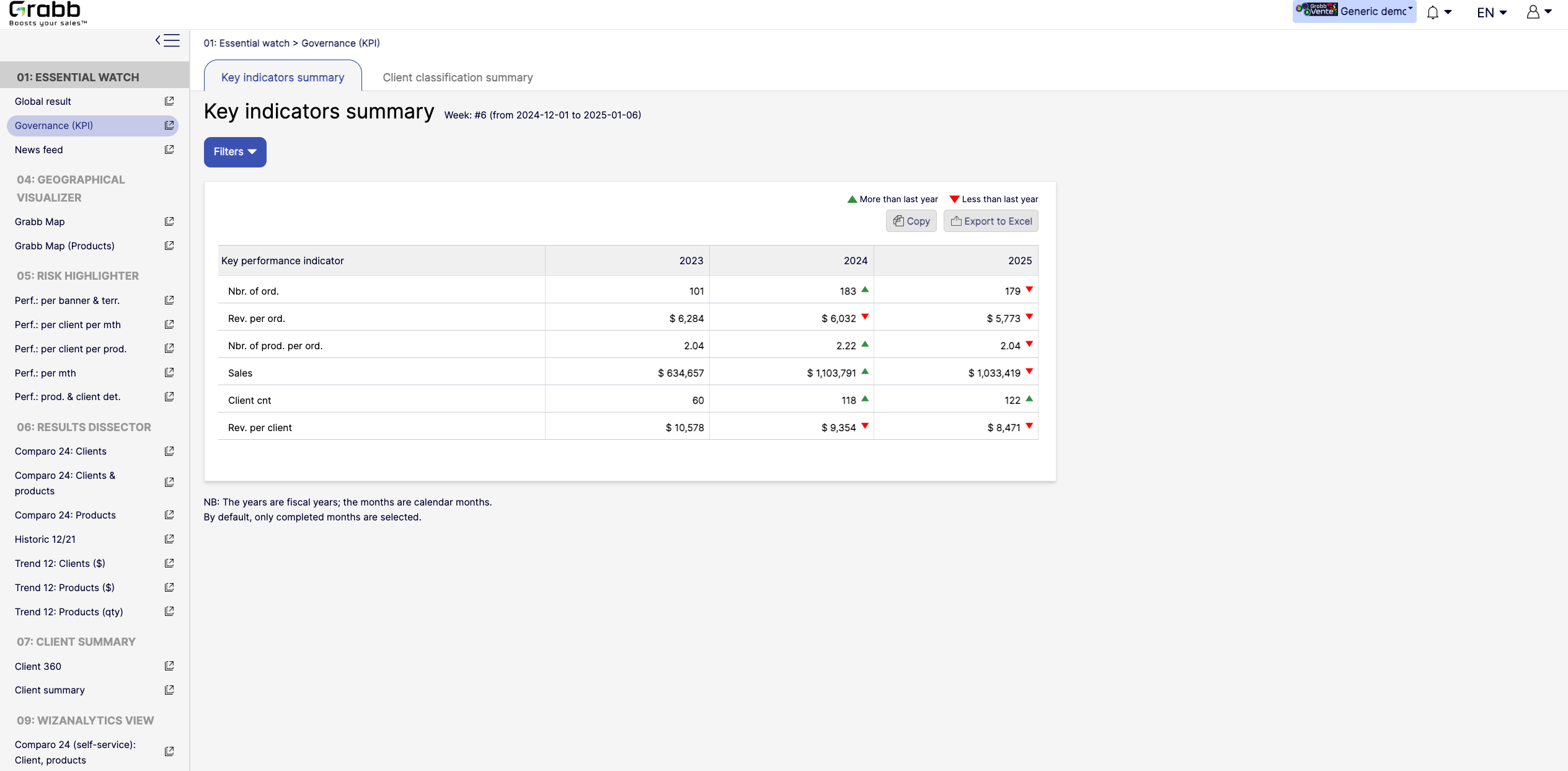
Screenshot of the dashboard for executives and managers, with various performance metrics:

High‐Level KPIs: Summarizes top metrics (e.g., total sales, revenue per client, average products per order) all in one table, making it easier to spot whether the company is trending up or down.
Year‐to‐Year Comparison: Displays data for each fiscal year, with green/red arrows to show improvement or decline since the previous year.
Immediate Visibility of Trends: Simplifies strategic decision‐making by illustrating whether overall performance is improving or if corrective measures are needed.
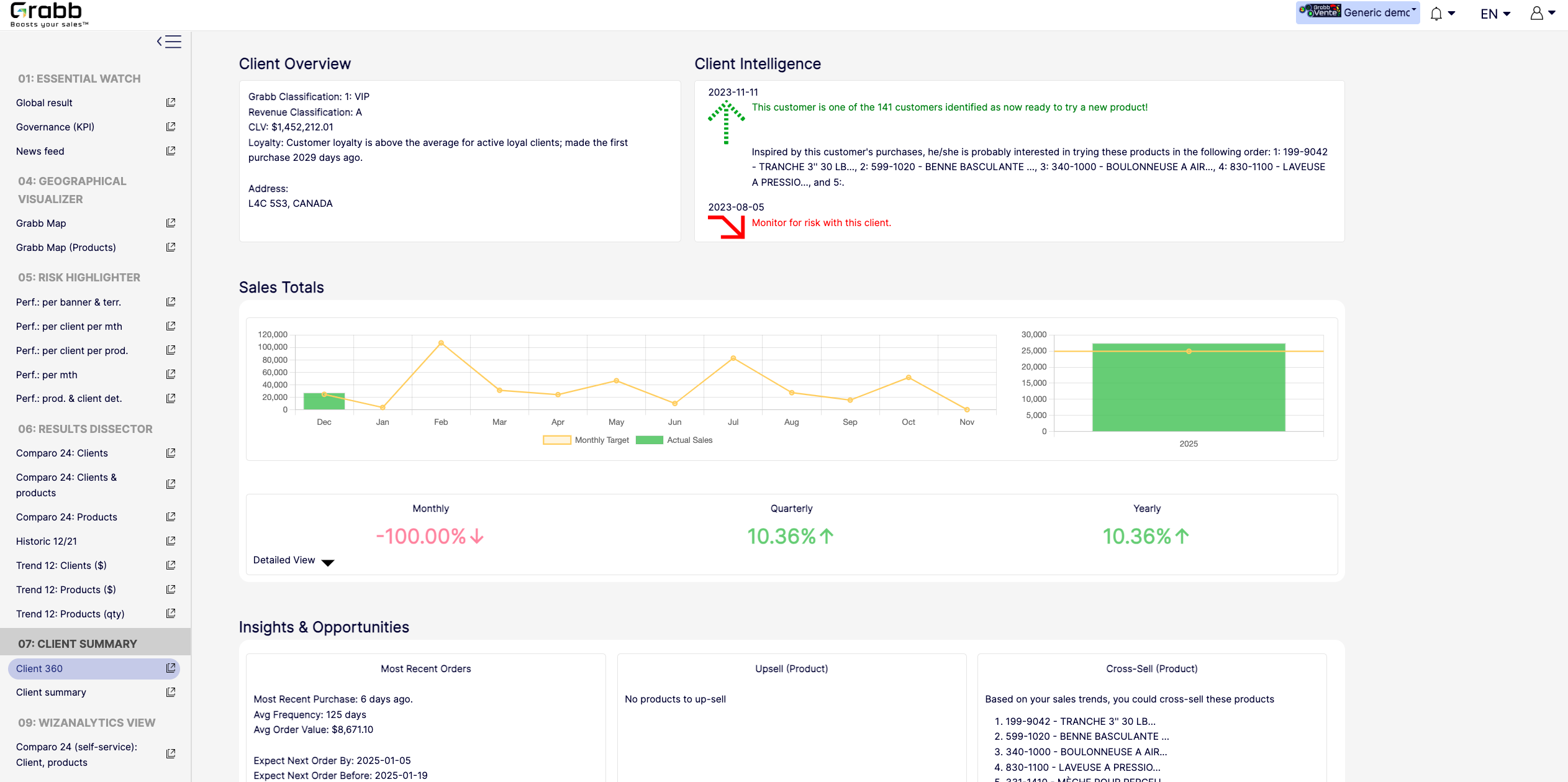
It’s a quick, executive‐friendly scoreboard of the organization’s health, ensuring leaders have the clarity to plan next steps.Screenshot of an at‐a‐glance understanding of a single client’s status, loyalty level, buying behavior, and next best actions that includes data about up‐selling, cross‐selling, and churn risk is often siloed or not immediately visible. This provides:

A Centralized Client Snapshot: Shows the client’s classification (e.g., VIP), revenue category, and CLV, ensuring everyone quickly sees the client’s overall value.
Predictive Intelligence: Highlights whether the client is “ready to try a new product,” or if there’s any “monitor for risk” alert, taking the guesswork out of deciding the next sales move.
Sales Trend & Graphs: Displays monthly, quarterly, and yearly sales to pinpoint performance patterns and quickly identify dips/spikes.
Upsell/Cross‐Sell Suggestions: Automatically suggests which products the client is most likely to buy next, helping reps act on potential revenue opportunities immediately.
Insights & Opportunities: Offers quick reference points such as “Most Recent Purchase,” average order value, frequency, and predicted next order date so you can plan proactive outreach.
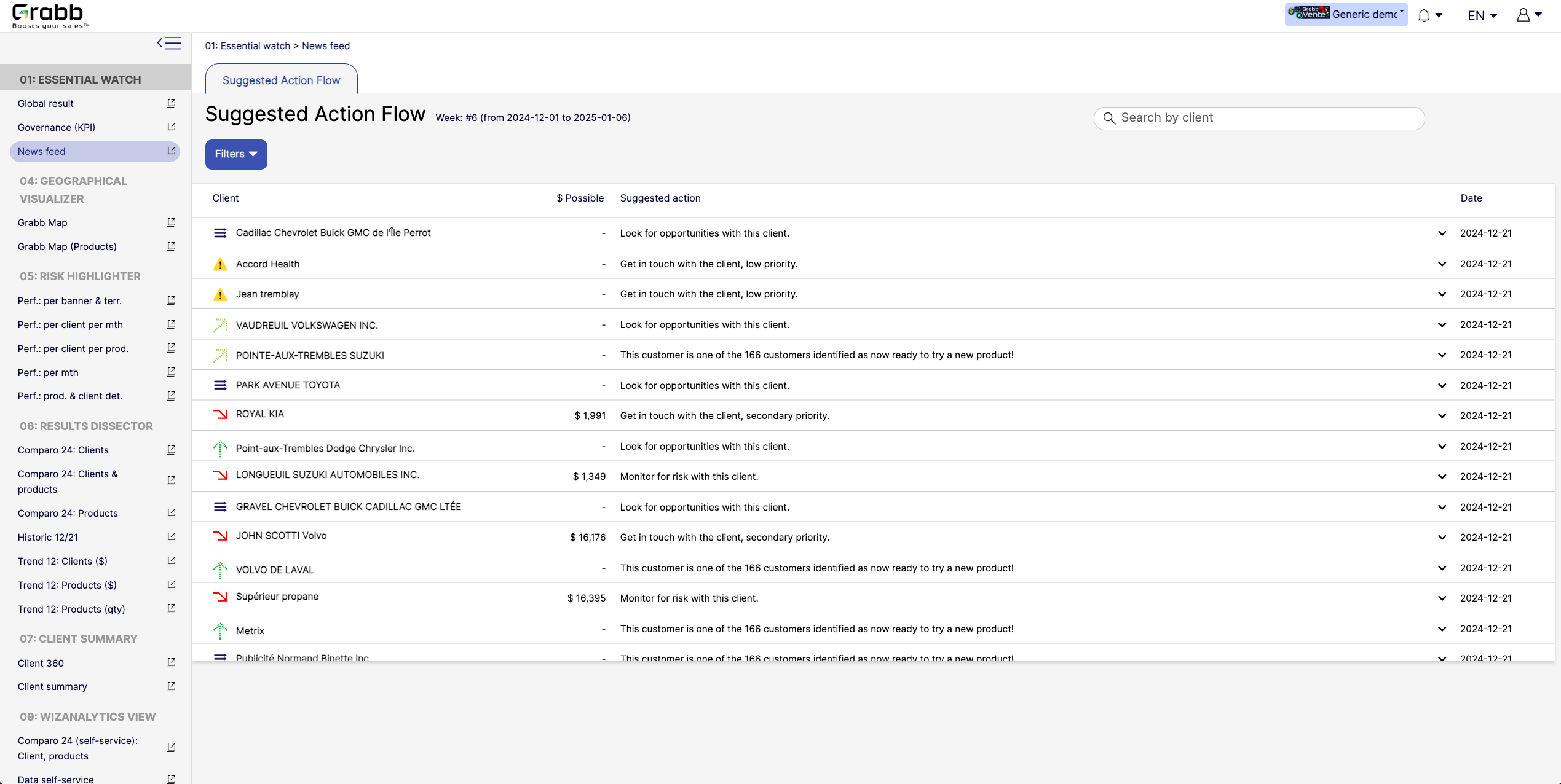
This holistic view enables data‐driven decisions—whether to focus on strengthening loyalty, pitching new products, or preventing churn.Screenshot of A visualization for sales reps and managers, providing:

Prioritized Recommandations: Provides a dynamic feed of next best actions—whether it’s “Look for opportunities with this client” or “Monitor for risk,” ensuring no lead or account slips through the cracks.
Opportunity & Risk Indicators: Quickly flags which clients are “ready to try a new product” versus those at higher risk, so teams can focus their energy where it matters most.
Estimated Upside ($ Possible): In some cases, the screen shows potential revenue if successful, helping reps evaluate the ROI of their outreach efforts.
Search & Filter Capabilities: Salespeople can easily locate a specific client in the list and see suggested actions, which speeds up daily planning and follow‐ups.
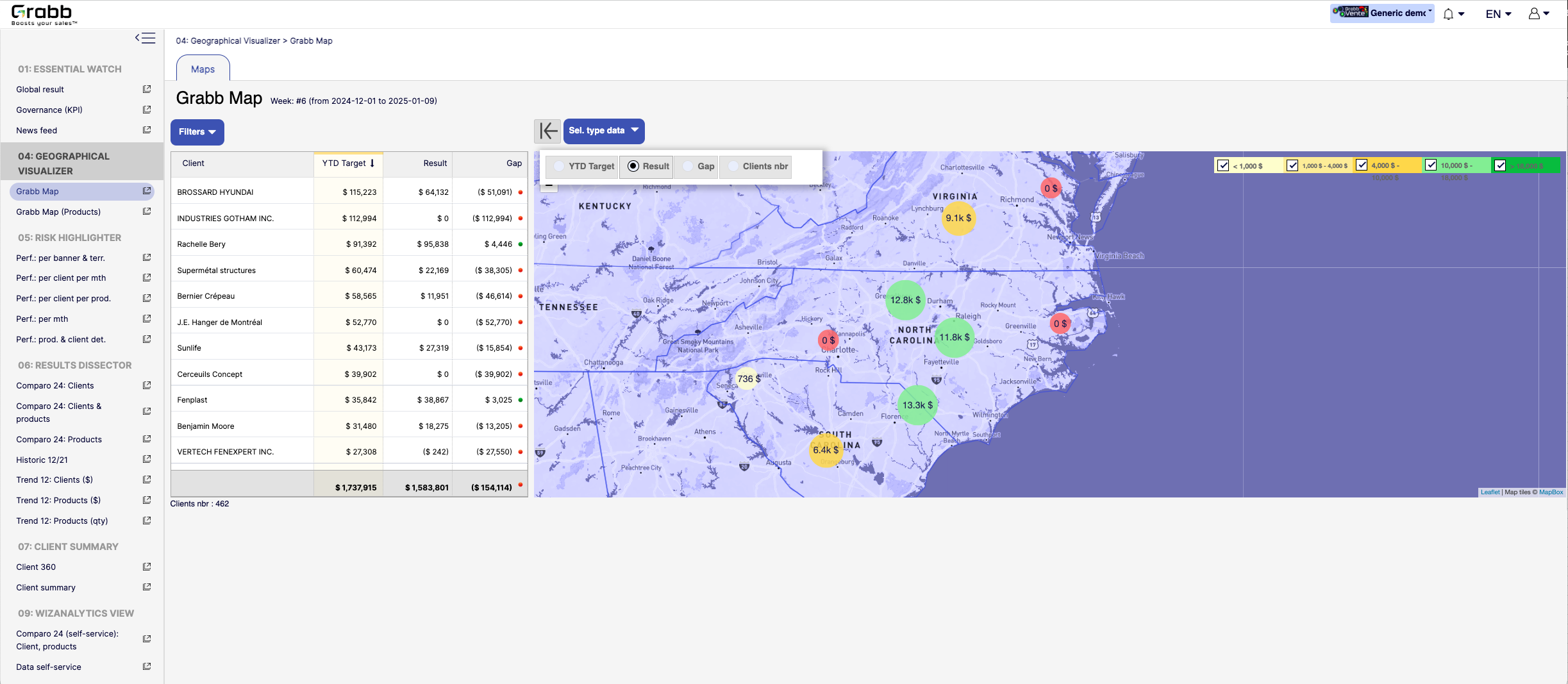
By centralizing these recommended “next steps,” the Suggested Action Flow turns raw data into a practical to‐do list—making each sales call or client interaction more purposeful and timely.Screenshot of a visualization for sales teams that helps them understand how their performance is distributed across different territories or locations. Without geographic context, managers can overlook local trends, regional opportunities, or problem areas.

Solution Provided:

Interactive Territory Overview: Displays each client’s Year‐to‐Date (YTD) target, actual results, and any gap in a color‐coded map, quickly revealing where the biggest mismatches lie.
Client‐Level Details: The list alongside the map allows you to see real‐time data—such as current gap amount or sales performance—sorted by region or client.
Visual Clustering: Bubbles on the map show consolidated sales amounts or gaps for clusters of clients, making it easier to spot hot‐spots or underperforming zones.
Target & Result Comparison: By toggling between metrics (e.g., “YTD Target,” “Result,” “Gap,” “Clients nbr”), managers can instantly pivot the view to see how the team is tracking.
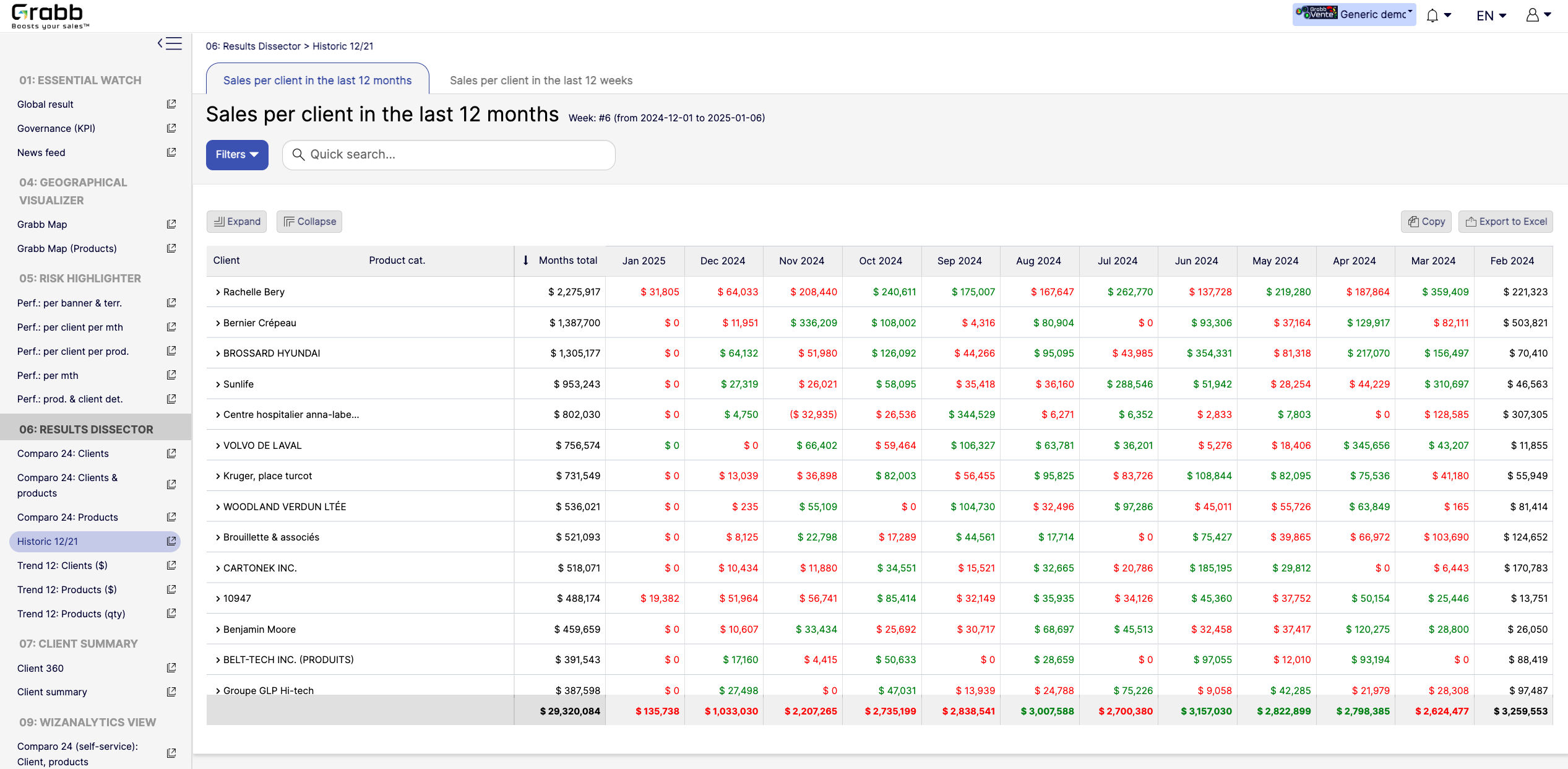
With this map‐based dashboard, leaders can optimize travel routes, allocate resources effectively, and prioritize outreach in areas where the potential impact is greatest.Screenshot of monthly sales trends at the individual‐client level. The visualization provides:

Month‐by‐Month Breakdown: Lists each client with color‐coded monthly sales (green and red), allowing you to see exactly when sales surge or drop off.
Total and Monthly Views: A “Months total” column plus each month’s figure helps you quickly gauge each client’s cumulative performance versus their monthly fluctuations.
Trend Spotting & Seasonality: By laying out 12 consecutive months, it becomes easier to see recurring patterns—helpful for forecasting, inventory planning, and targeted campaigns.
Actionable Insights: Identify which clients need re‐engagement (red cells or big drops) and which clients might be ready for expansion (consistently green or strong increases).
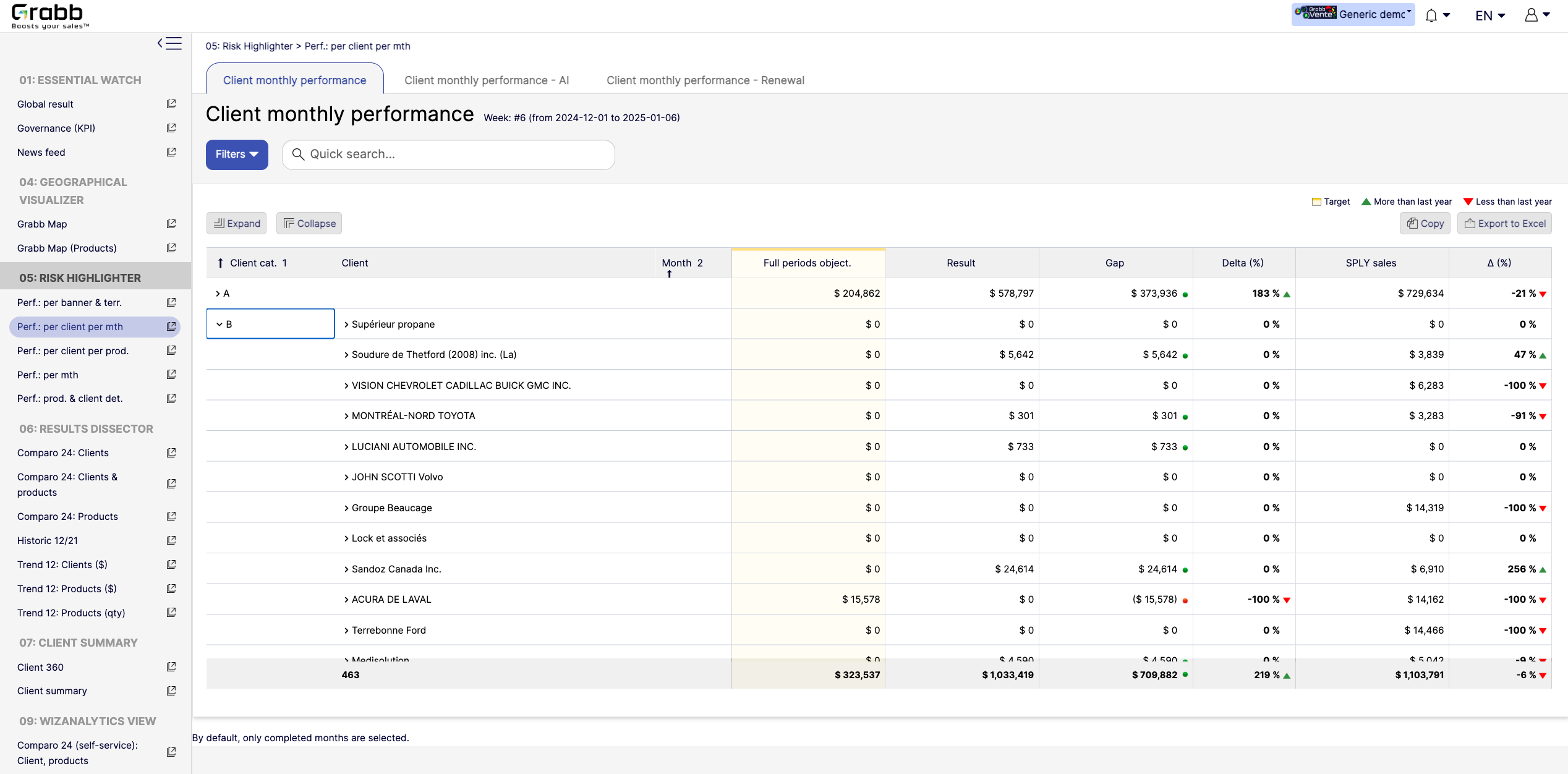
By visualizing an entire year in detail, sales teams can preemptively address potential downturns and capitalize on positive trends.Screenshot of a visualization tracking how each client performs on a month‐to‐month basis, and across accounts. This information provides:

Side‐by‐Side Comparisons: Displays each client’s monthly objectives versus actual results, so sales teams see immediately whether targets are met or missed.
Delta & Gap Analysis: Automatically calculates the variance between the goal and real outcomes—highlighting where shortfalls or over‐performance exist.
Year‐Over‐Year Comparison: “More than last year” or “Less than last year” labels provide quick trend context, guiding strategy for retention or growth.
Easy Filtering & Sorting: Users can filter by client category or name, then expand or collapse details to focus only on accounts that need attention.
With this screen, managers can prioritize which clients need immediate support and which are on track—using precise data rather than guesswork.

Qualtrics Screenshots

Screenshot of