Pragmatic Workbench (discontinued) vs. SolarWinds Database Performance Analyzer

Overview
ProductRatingMost Used ByProduct SummaryStarting Price
Pragmatic Workbench (discontinued)
Score 8.5 out of 10
Enterprise companies (1,001+ employees)
Pragmatic Workbench Enterprise was a suite that combined four Pragmatic Works products: BI xPress, DBA xPress, DOC xPress and LegiTest. It was acquired by SentryOne in April 2018, and has reached its EOL phase. After the summer of 2022 it will likely no longer be available, and unsupported.
$2,490
per seat
SolarWinds Database Performance Analyzer
Score 5.5 out of 10
N/A
SolarWinds Database Performance Analyzer (DPA) enables deep visibility into database performance and expert advice for performance optimization and tuning. What can you monitor with DPA? Oracle Oracle Exadata Oracle EBS Microsoft SQL Server Azure SQL Database Azure SQL Database Managed Instance MySQL DB2 SAP ASE Aurora MariaDB DPA monitors physical, virtual,…N/A
Pricing
Pragmatic Workbench (discontinued)SolarWinds Database Performance Analyzer
Editions & Modules
Workbench Client Edition
2,490
per seat
Workbench Server Edition
8,995
per server
Workbench Enterprise Edition (Client + Server)
9,995
1 user / 1 server
No answers on this topic
Offerings
Pricing Offerings
Pragmatic Workbench (discontinued)SolarWinds Database Performance Analyzer
Free Trial
YesYes
Free/Freemium Version
YesNo
Premium Consulting/Integration Services
NoNo
Entry-level Setup FeeNo setup feeOptional
Additional DetailsWorkbench Enterprise combines all of the functionality within Workbench Client (local install) and Workbench Server (server install).
More Pricing Information
Community Pulse
Pragmatic Workbench (discontinued)SolarWinds Database Performance Analyzer
Features
Pragmatic Workbench (discontinued)SolarWinds Database Performance Analyzer
Database Development
Comparison of Database Development features of Product A and Product B
Pragmatic Workbench (discontinued)
9.0
Ratings
5% above category average
SolarWinds Database Performance Analyzer
-
Ratings
Test data generation9.00 Ratings00 Ratings
Best Alternatives
Pragmatic Workbench (discontinued)SolarWinds Database Performance Analyzer
Small Businesses
DBeaver
DBeaver
Score 9.2 out of 10

No answers on this topic

Medium-sized Companies
DBeaver
DBeaver
Score 9.2 out of 10
LogicMonitor
LogicMonitor
Score 8.4 out of 10
Enterprises
DBeaver
DBeaver
Score 9.2 out of 10
LogicMonitor
LogicMonitor
Score 8.4 out of 10
All AlternativesView all alternativesView all alternatives
User Ratings
Pragmatic Workbench (discontinued)SolarWinds Database Performance Analyzer
Likelihood to Recommend
8.0
(0 ratings)
8.9
(0 ratings)
Likelihood to Renew
-
(0 ratings)
8.6
(0 ratings)
Usability
-
(0 ratings)
9.0
(0 ratings)
Availability
-
(0 ratings)
9.1
(0 ratings)
Performance
-
(0 ratings)
9.1
(0 ratings)
Support Rating
6.0
(0 ratings)
9.3
(0 ratings)
Implementation Rating
-
(0 ratings)
7.3
(0 ratings)
Configurability
-
(0 ratings)
7.3
(0 ratings)
Ease of integration
-
(0 ratings)
8.2
(0 ratings)
Product Scalability
-
(0 ratings)
8.2
(0 ratings)
Vendor post-sale
-
(0 ratings)
9.1
(0 ratings)
Vendor pre-sale
-
(0 ratings)
9.1
(0 ratings)
User Testimonials
Pragmatic Workbench (discontinued)SolarWinds Database Performance Analyzer
Likelihood to Recommend
Workbench Enterprise is consistent across devices and users so far. It works the same, and access is easy. I have a problem with its security. If you use an enterprise password to access databases, it's very easy to click the show password on the connection page and expose the enterprise password. You shouldn't allow users to use the same accounts to access the database because that means all users are sharing the same password.
Read full review
I believe that SolarWinds Database Performance Analyzer is a great choice for an organization that does not have a specific DBA or one that is still growing into the role. SolarWinds Database Performance Analyzer is filled with hints, tips, and explanations of the various readings and metrics. This is very useful to help understand what is happening and why, what it means, and what some potential solutions are towards remediating any issues. This is extremely valuable for our development team, allowing them to be more proactive with the queries they write in viewing how they perform and where bottlenecks might be.
Read full review
Pros
  • Querying is easy and quick.
  • Updating tables is very easy.
  • It gives us very accurate error messages.
Read full review
  • Ability to drill down to wait for the issue and have a clear path as to what may be causing the issue.
  • Ability to quickly add a new target and the ease of installation and upgrades.
  • Reporting features to group my most troublesome customers into a daily report in one email.
  • Excellent customer support on any issues I can't immediately solve.
Read full review
Cons
  • It has autocompleted, but I find it difficult to use or get to use.
  • It doesn't automatically complete table names or field names.
Read full review
  • Resiliency of the Monitoring checks after the server underwent maintenance reboot. My experience is the monitor (Action) needs to be started manually. If possible it can automatically detect service/server then start to monitor again when system is back up.
  • Much lighter UI.
  • Granularity up to minutes.
Read full review
Likelihood to Renew
No answers on this topic
We have relied on this product for a very long time and it continues to exceed expectations. The product is a vital part of our organization at this point, it would not be very ideal for us to abandon it. We use it almost every day and depend on its alerts for critical parts of our business
Read full review
Usability
No answers on this topic
I don't want to think about managing clusters of SQL servers in the future without this tool. We have demoed other tools and SolarWinds Database Performance Analyzer is the gold standard for usability and insight into what your servers are doing. The UI is a bit dated, but everything is laid out in a logical manner and drilling down into queries or timeslices is extremely intuitive.
Read full review
Support Rating
Our team does the support for us. Sometimes we see download related issues that can easily be fixed by our team. Most issues you will see with one user in your org will probably happen to others, so keep a log and track those issues. Then have a fix for them somewhere that everyone has access to. This will save you a lot of time troubleshooting.
Read full review
I have had to use their support on a few occasions, for reasons that I am not clear about until recently I have always had problems upgrading the software (although the last 2 updates have gone without issue which I am very pleased to say). On those unfortunate occasions, the support has been brilliant with either excellently documented guides on how to resolve the issue by myself or have been hands-on with calls and screen sharing to remotely fix the issue. Every time the problem was sorted and more importantly, nothing was lost (apart from a bit of time). And as I stated above whatever the problem was that was causing my upgrade issues appears to have been resolved in the last 2 updates.
Read full review
Implementation Rating
No answers on this topic
Follow the guidelines for the capacity of the servers. We found that the DPA databases were getting rather large and also that there are ways to reduce their size built into some of the options.
Read full review
Alternatives Considered
No answers on this topic
I have used Spotlight (for Oracle on RAC) but it has been several years. The dashboard was crisp, clean, and intuitive, but the tool had a significant overhead. However, no competitor made a tool that met our needs at the time. I have also used Idera's SQL Diagnostic Manager in more than one company. That tool is helpful for a larger environment than we currently have. But I think it is better at alerting than DPA but worse at just about everything else. The good thing is you can flag an alert as acknowledged, so you stop getting emails. The bad thing is I don't think I could use it to troubleshoot issues like I do with DPA. I do not have enough experience to provide helpful feedback on the others selected.
Read full review
Return on Investment
  • I personally like Workbench Enterprise, and I can do everything I need to do using it.
Read full review
  • Paid for itself in days. We had a stored procedure that could not meet its SLA, DPA highlighted the issue and contributed to the resolution.
  • We had a stored procedure that we were able to calculate as running in 9 milliseconds, unfortunately, we had transactions coming in 7 milliseconds, resulting in duplicate transactions, indicating that a mutex function was needed.
Read full review
ScreenShots

Pragmatic Workbench (discontinued) Screenshots
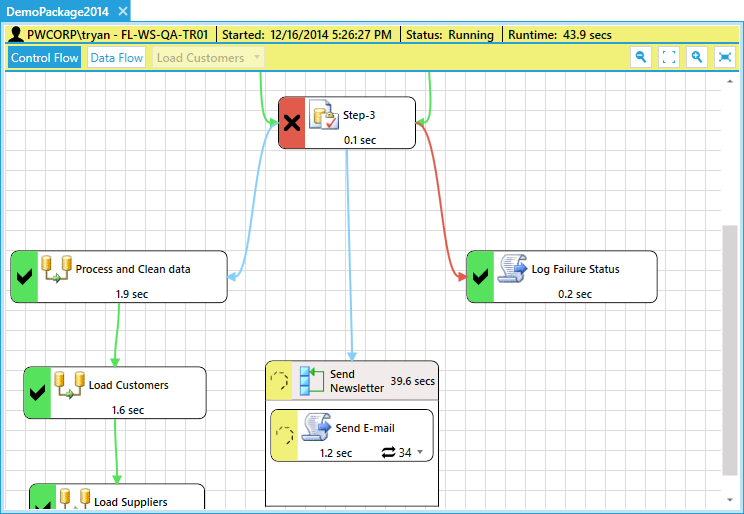
Screenshot of Real-Time SSIS Execution DiagramScreenshot of Visual Object LineageScreenshot of Data Validation Testing DesignerScreenshot of Data Validation Testing -  Performance DashboardScreenshot of Workbench Launch Dashboard

SolarWinds Database Performance Analyzer Screenshots

Screenshot of DashboardScreenshot of Alerts and reportsScreenshot of Application-centric view of DPAScreenshot of Blocking deadlock analysisScreenshot of Collaboration across teamsScreenshot of Intuitive performance monitoring