Playvox vs. Zoom Contact Center

Overview
ProductRatingMost Used ByProduct SummaryStarting Price
Playvox
Score 7.0 out of 10
N/A
Playvox, headquartered in Sunnyvale, California, offers their call center agent monitoring, coaching and QA platform, designed to motivate and improve the performance of call center agents and reps.N/A
Zoom Contact Center
Score 8.2 out of 10
N/A
Zoom Contact Center helps businesses deliver prompt, accurate, and highly personalized customer experiences that drive loyalty. It includes intelligent self-service and routing, a unified communications and contact center, and video optimized high-touch engagements.
$69
per month per user
Pricing
PlayvoxZoom Contact Center
Editions & Modules
No answers on this topic
Essentials
$69
per month per user
Premium
$99
per month per user
Elite
$149
per month per user
Offerings
Pricing Offerings
PlayvoxZoom Contact Center
Free Trial
YesNo
Free/Freemium Version
NoNo
Premium Consulting/Integration Services
NoNo
Entry-level Setup FeeNo setup feeNo setup fee
Additional Details
More Pricing Information
Community Pulse
PlayvoxZoom Contact Center
Features
PlayvoxZoom Contact Center
Contact Center Software
Comparison of Contact Center Software features of Product A and Product B
Playvox
-
Ratings
Zoom Contact Center
7.5
Ratings
10% below category average
Agent dashboard00 Ratings7.70 Ratings
Validate callers00 Ratings7.10 Ratings
Outbound response00 Ratings7.80 Ratings
Call forwarding00 Ratings7.00 Ratings
Click-to-call (CTC)00 Ratings7.90 Ratings
Warm transfer00 Ratings8.40 Ratings
Predictive dialing00 Ratings7.40 Ratings
Interactive voice response00 Ratings8.30 Ratings
REST APIs00 Ratings6.90 Ratings
Call scripts00 Ratings7.20 Ratings
Call tracking00 Ratings7.30 Ratings
Multichannel integration00 Ratings8.20 Ratings
CRM software integration00 Ratings6.80 Ratings
Workforce Optimization (WFO)
Comparison of Workforce Optimization (WFO) features of Product A and Product B
Playvox
-
Ratings
Zoom Contact Center
7.8
Ratings
5% below category average
Inbound call routing00 Ratings8.50 Ratings
Omnichannel inbound routing00 Ratings7.90 Ratings
Recording00 Ratings8.60 Ratings
Quality management00 Ratings8.00 Ratings
Call analytics00 Ratings7.50 Ratings
Historical reporting00 Ratings7.30 Ratings
Live reporting00 Ratings7.30 Ratings
Customer surveys00 Ratings8.20 Ratings
Customer interaction analytics00 Ratings7.00 Ratings
Best Alternatives
PlayvoxZoom Contact Center
Small Businesses
8x8 Contact Center
8x8 Contact Center
Score 7.5 out of 10
CloudTalk
CloudTalk
Score 7.2 out of 10
Medium-sized Companies
Zoom Contact Center
Zoom Contact Center
Score 8.2 out of 10
CloudTalk
CloudTalk
Score 7.2 out of 10
Enterprises
Calabrio WFM
Calabrio WFM
Score 8.5 out of 10
Bright Pattern Contact Center
Score 9.1 out of 10
All AlternativesView all alternativesView all alternatives
User Ratings
PlayvoxZoom Contact Center
Likelihood to Recommend
1.0
(0 ratings)
8.0
(0 ratings)
Likelihood to Renew
8.5
(0 ratings)
-
(0 ratings)
Usability
2.0
(0 ratings)
-
(0 ratings)
Availability
9.1
(0 ratings)
-
(0 ratings)
Support Rating
3.8
(0 ratings)
-
(0 ratings)
Implementation Rating
8.5
(0 ratings)
-
(0 ratings)
Configurability
6.4
(0 ratings)
-
(0 ratings)
Product Scalability
6.4
(0 ratings)
-
(0 ratings)
Vendor post-sale
8.1
(0 ratings)
-
(0 ratings)
Vendor pre-sale
9.0
(0 ratings)
-
(0 ratings)
User Testimonials
PlayvoxZoom Contact Center
Likelihood to Recommend
Playvox is excellent for a team who knows exactly what they need in order to get better. You have full control to set your metrics, track the data and provide feedback. If you're a team looking for software that will create the solutions for you, look elsewhere. Playvox is a fantastic tool, but a terrible genie
Read full review
Perfect for companies that have agents all over the place, e.g., different offices or WFH. Also good for companies that aren't big enough to have a "phone guy" as this platform allows IT to do the phone work as it doesn't require esoteric knowledge like other phone systems.
Read full review
Pros
  • It's easy to start evaluating since it pulls up all the data automatically.
  • It is easy to generate reports as all the data is stored in its servers and we just download it.
  • Filters make it easy to see our Associates' areas of opportunity and strengths.
Read full review
  • Customer service - Whether for sales, setup, or technical assistant, their team is always patient, informed, and helpful.
  • Cutting Edge - Every month there are a plethora of new or enhanced features that are well thought, tested, and ready for implementing.
  • Stability - Our uptime is important to our clients. As a 24/7 365 day/year contact center, having confidence that Zoom's systems are up and running means our clients have trust in our abilities to service their calls.
Read full review
Cons
  • The speed of loading the chat that I am evaluating for the customer service representative because sometimes it shows that there is an error in the load.
  • Keep a lot of information
  • It should have more languages for ease of control
Read full review
  • The Teams dashboard for monitoring agents needs some customization options.
  • Friendly names, I would like to be able to name a number and when it rings you can see the name of the number.
  • Point flows at flows would be nice, instead of flows to queues only.
Read full review
Likelihood to Renew
I do not think my organization has and 2nd thought of changing the Playvox because I am sure they cannot find another option that is as easy and smooth. There is no other option at all. Playvox is being used here in every department and the company cannot run without this. Now it is a basic need of this business
Read full review
No answers on this topic
Usability
Playvox is an easy-to-use platform, all features are intuitive, which makes navigation easy. I never found navigation problems, I was always able to find all the items I needed, all the information is well separated, what could improve is the possibility of moving some items, putting the ones that I use the most in evidence.
Read full review
First and foremost for our results, the omnichannel approach and ease of use on the internal side (agents, supervisors and administrators) have made adoption very simple, we have managed to reduce response times (SLA) and internal communication has become very fluid. We get good feedback from our clients for having implemented ZCC in the company to serve them.
Read full review
Reliability and Availability
I don't think I've encountered software problems before
Read full review
No answers on this topic
Performance
do pages load quickly? yes / Do reports complete in a reasonable time frame, given their complexity? yes i think / If Playvox integrates with any other software or systems, does it tend to slow them down? i don't know
Read full review
No answers on this topic
Support Rating
We have had multiple live trainings (Zoom). The training at the beginning of the set up was top notch. We had some additional questions about coaching and they jumped on the opportunity to help us. We have a designated trainer and account manager.
Read full review
No answers on this topic
Implementation Rating
From the day first, we were active on Playvox and happy with the features. It does not take much time to understand its features and its performance. A few training sessions with 'How to use' and we are experts using Playvox.
Read full review
No answers on this topic
Alternatives Considered
As far as my usage allows me to say, Scorebuddy did not open room for a dispute; in case the person evaluated does not agree with the rating she/he received, there is no possibility to document coaching and follow up on development or do the quiz for knowledge check. (I used Scorebuddy 2 years ago).
Read full review
Microsoft Teams was very difficult. Many third-party providers didn't understand the integration and capabilities of the systems. The Teams app is very clunky, and you can get very different capabilities and compatibility when using it between Mac and PC environments. Zoom had a local team that could help with the transition directly, which is very valuable

Read full review
Scalability
I think it is the best rating based on my experience
Read full review
No answers on this topic
Return on Investment
  • Positive return motivation and learning[.]
  • Negative return not continuous update[.]
  • Positive return Guidance and assistance in my work[.]
  • Negative return There are no pages to explain and facilitate access[.]
  • Positive return Training to get back to better performance and learn from mistakes[.]
  • Negative return no abbreviation[.]
Read full review
  • Intuitive, Easier and almost effortless to maintain.
  • Lesser Operational Expenses that the alternative we also have
  • We wish it has a better integration with Zoom Phone, in terms of channels integration (Voice and Chat) to quick identify callers.
  • It is missing "modular" programming to "reuse" Existing Flows and call them from other flows then return to the main flow.
  • It is missing the capability to compartmentalizing different teams/groups related to reporting, admin, and global parameters.
Read full review
ScreenShots

Playvox Screenshots

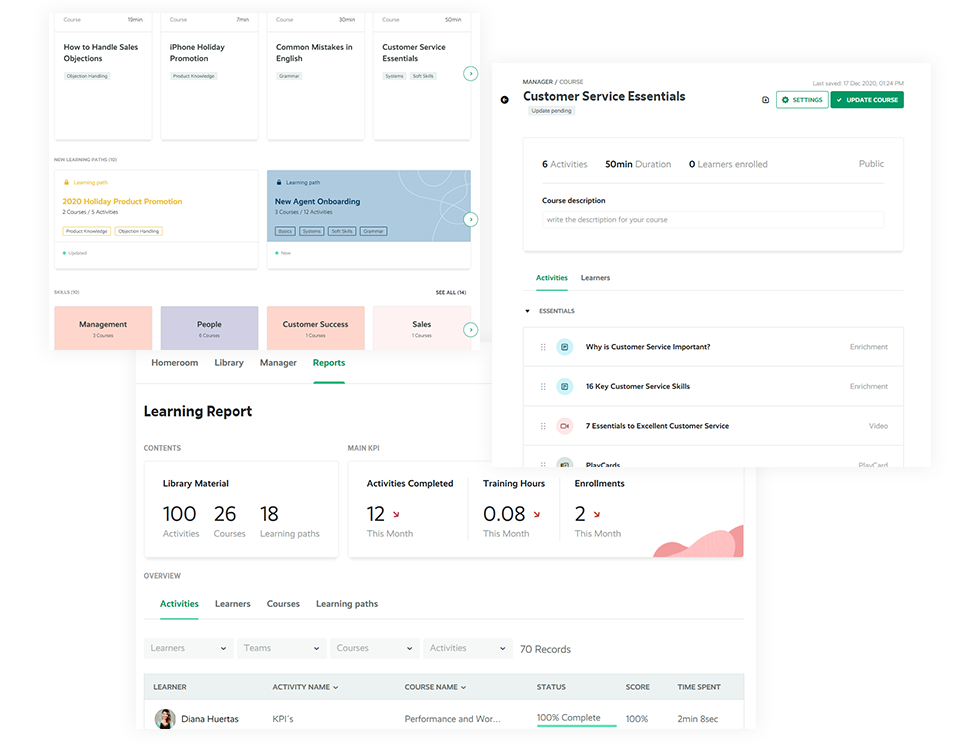
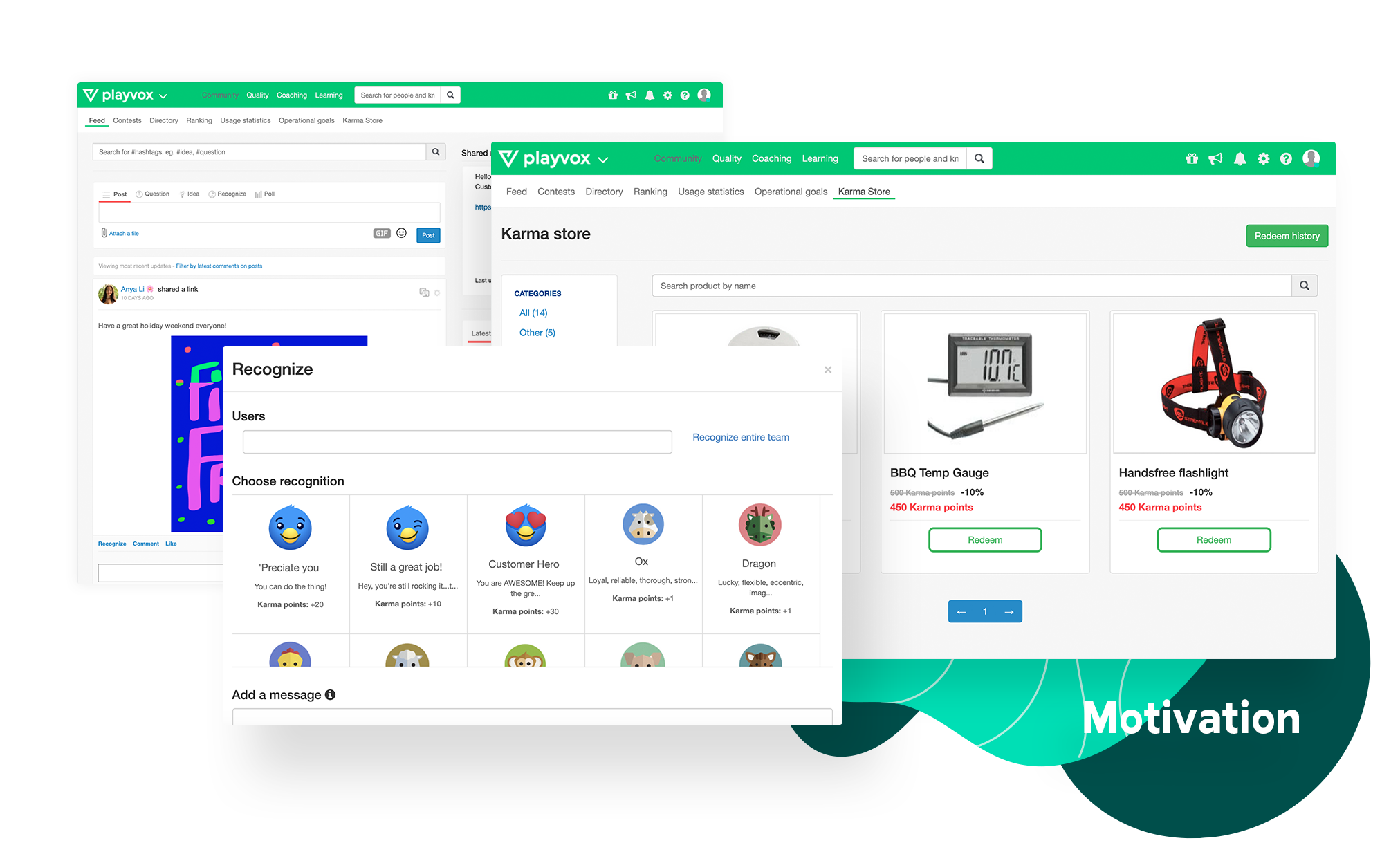
Screenshot of Give your team real-time feedback and allow them to discuss evaluation results with our built-in collaboration messaging. Generate advanced reports based on agent evaluations. Quickly identify areas of improvement and add personalized agent dashboards to give them visibility of their results. Conduct quality calibrations, to measure and identify areas for improvement. Help your team deliver consistency in their QA evaluation process.Screenshot of Provide your customer service team with all the educational information they need and allow them to take courses and paths in the learning topics they want to improve on. Identify areas in which your agents need to be trained on, send them targeted learning courses and easily track their results. Review your team’s progress and evaluate their knowledge by creating quizzes and comprehension checks.Screenshot of Connect data, measure and consolidate your agents’ KPIs such as NPS, CSAT, AHT, among many others. Detect problems when they occur. Track team progress. Give visibility. Easily measure where your team members stand and identify the KPIs they need to improve on. Create dashboards for your team to view, customize your objectives and keep track of your teams’ progress.Screenshot of Customize your online store with rewards and gift cards for team members to exchange based on their results. Reward your team with Karma Points and allow them to redeem their points in your customized online store. Publicly recognize peer with badges, based on their quality results and performance. Access our social community wall where your team can exchange ideas, ask questions and share relevant information.Screenshot of Coach agents based on the identified customer service problems, as quality is achieved by driving continuous improvement. Create coaching sessions based on your team’s quality and performance results. Based on recurring customer service problems. Tailor all sessions to your needs. Create interactive coaching cards with goals and dates of achievement to easily organize and keep track of all your sessions.

Zoom Contact Center Screenshots

Screenshot of the video-optimized CCaaSScreenshot of the Zoom Workspace video room experienceScreenshot of the analytics used to optimize contact center performance