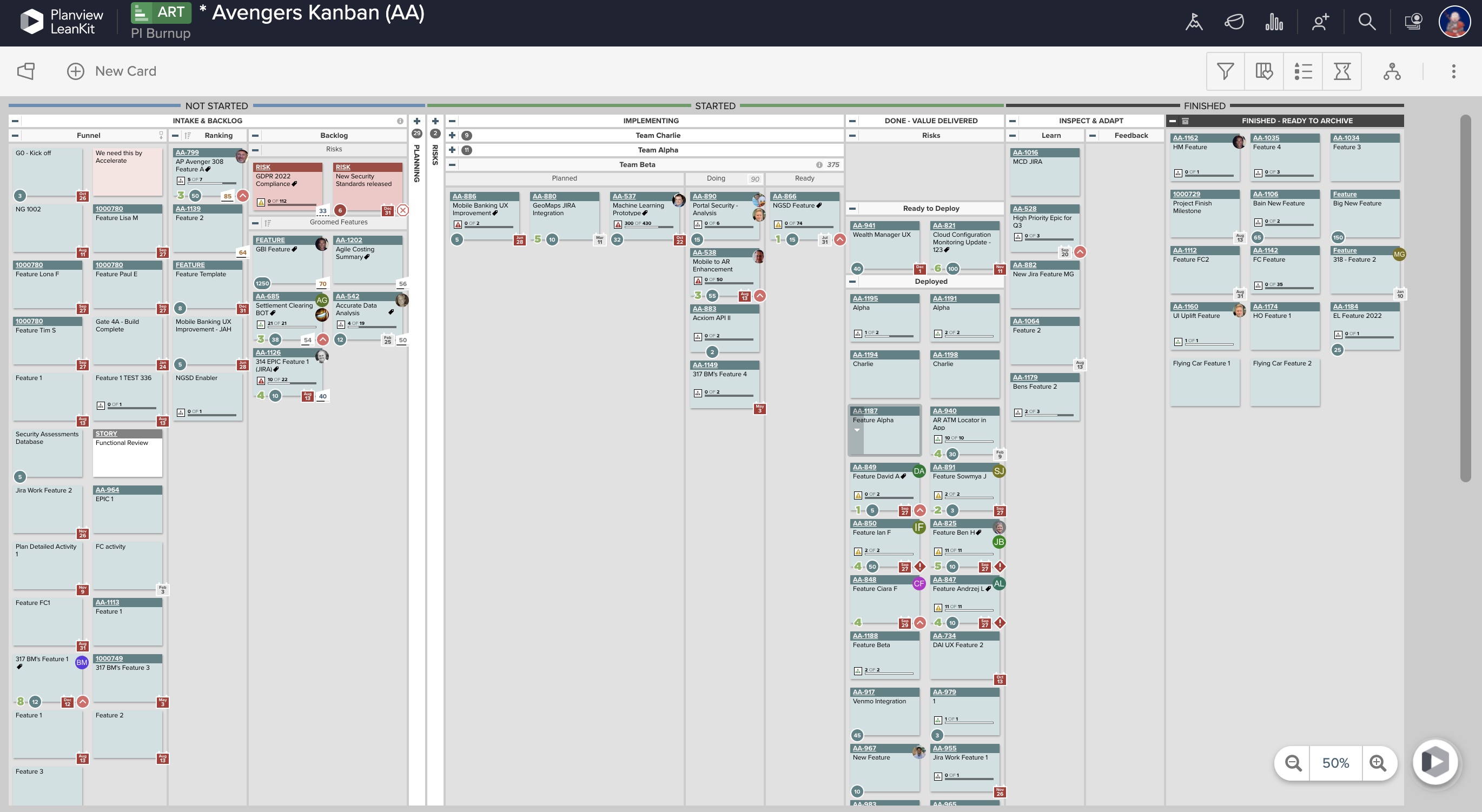
AgilePlace is a project management solution built around flexibility, data-driven analytics, and workflow automation. The software was acquired by Planview in December 2017 to expand that company's capabilities.
$19
per user, per month
TaskRay
Score 8.0 out of 10
N/A
TaskRay is a project management platform for managing project within Salesforce. It enables work to be planned quickly and efficiently, across geographically distributed teams.
It supports collaboration using Chatter groups, and file sharing.
$25
per month
Pricing
Planview AgilePlace
TaskRay
Editions & Modules
Teams
$19
per user, per month
Scaled Teams
$29
per user, per month
Custom
Contact Sales for Quote
per user, per month
TaskRay
$25.00
per month
Offerings
Pricing Offerings
Planview AgilePlace
TaskRay
Free Trial
Yes
Yes
Free/Freemium Version
No
No
Premium Consulting/Integration Services
No
No
Entry-level Setup Fee
No setup fee
No setup fee
Additional Details
All editions include unlimited boards.
—
More Pricing Information
Community Pulse
Planview AgilePlace
TaskRay
Features
Planview AgilePlace
TaskRay
Project Management
Comparison of Project Management features of Product A and Product B
Planview AgilePlace
7.4
Ratings
3% below category average
TaskRay
8.6
Ratings
12% above category average
Task Management
10.00 Ratings
8.70 Ratings
Resource Management
9.90 Ratings
8.30 Ratings
Gantt Charts
10.00 Ratings
9.30 Ratings
Scheduling
9.90 Ratings
10.00 Ratings
Support for Agile Methodology
9.30 Ratings
8.30 Ratings
Support for Waterfall Methodology
4.00 Ratings
8.00 Ratings
Document Management
6.50 Ratings
6.30 Ratings
Email integration
7.30 Ratings
9.00 Ratings
Mobile Access
2.10 Ratings
9.00 Ratings
Timesheet Tracking
6.40 Ratings
10.00 Ratings
Change request and Case Management
7.20 Ratings
8.00 Ratings
Visual planning tools
7.30 Ratings
00 Ratings
Workflow Automation
00 Ratings
9.00 Ratings
Team Collaboration
00 Ratings
9.00 Ratings
Budget and Expense Management
00 Ratings
8.00 Ratings
Agile Development
Comparison of Agile Development features of Product A and Product B
Planview AgilePlace
8.8
Ratings
7% above category average
TaskRay
-
Ratings
DevOps Tool Integrations
8.10 Ratings
00 Ratings
Dependencies and Blockers
9.60 Ratings
00 Ratings
Professional Services Automation
Comparison of Professional Services Automation features of Product A and Product B
AgilePlace is a great way for teams, or individuals, to bring visibility to the work in process and in their backlog. The color coding and icon use helps to quickly analyze the type of work or status of the work. The product team is doing a good job at listening to their user's feedback and implementing improvements. Where it falls short is when reporting needs to occur.
Okta Integration: We love using SSO for all our SaaS apps, and as new team members join, they can be automatically joined to the appropriate LeanKit boards.
Filtering and viewing: Can filter and refine by several fields as well as custom fields. Assigned Users, Tagged, Card Type, Date, etc
Their analytics and reporting can be helpful for PMs, especially if they have several teams they oversee.
During my use, I would at times get responsive issues in regards to tasks opening, editing task details, or moving from stage to stage. This didn't occur for quite some time until we started loading the system with extensive projects and hundreds of tasks to each project. While unfortunate to run into these performance issues, many applications run into similar issues when working many simultaneous tickets at the same time.
Customization to the task layouts is a bit cumbersome.
If you are running a lot of stages, 8 - 12, moving tasks from one side of the board to the other can take a little bit of work. At the time there were no quick close capabilities on the tasks to redirect the task to its final stage.
It's hands-down the best PM tool we have ever used. Nothing compares in ease of use and being easy to learn. It also looks great and makes sense immediately
LeanKit isn't the best designed Kanban system I've seen, but overall it's pretty usable. The boards I've used are pretty complex, so it can be difficult to find things. I found that searching and filtering for specific cards was somewhat of a challenge. Dragging a card from one lane to another is kind of a fun way to get things done though.
Every time I have reached out to the AgilePlace support team I have received a timely response in addition to professional & personal feedback. Their consultants are knowledgeable and the management team is happy to jump in and help when needed.
Originally, we had evaluated two other tools next to Planview LeanKit: Kanbantool and Kanbanflow. The latter was a close contestant for productive use, as it was also very customizable and a joy to work with and look at. It also had lower user fees and a mobile integration. In the end, we picked Planview LeanKit because of several reasons: Aesthetics: The look was much more clean and professional. Reporting: It was obvious from the start that we could use Planview LeanKit as a tool for improvement. API: We needed to integrate the Kanban into our central systems and Planview LeanKit API was (and still is) a way to do it. Card Headers: This sounds like a simple thing, but the headers above the titles fit our work perfectly and looked perfect, which helped the decision.
TaskRay is a simple solution to install and get moving with. Project creation, stage setup, and task creation are just a few great features that are simple to set up. Remedyforce & Service Manager are a more enterprise type application for more service desk type environments. JIRA is a highly used and close favorite with project management. At the end of the day, simplicity for setup and configuration as well as day to day usability went hands down to TaskRay over JIRA.
The cost of TaskRay is much less than other project management solutions. Other solutions require you to upgrade for premium features such as Gantt charts or calendar views. It costs $21/month per user.
They offer volume (number of users) discounts as well as contract length discounts.