PingPlotter vs. Preseem

Overview
ProductRatingMost Used ByProduct SummaryStarting Price
PingPlotter
Score 9.3 out of 10
N/A
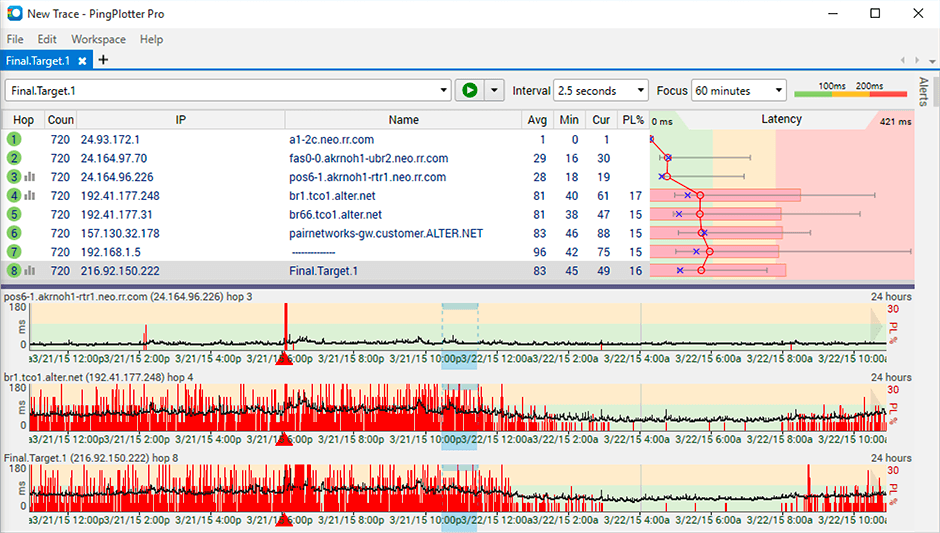
PingPlotter is a graphical traceroute and ping tool that visualizes network performance in a way that makes identifying the source of problems quicker and easier for everyone from online gamers and video streamers to VoIP admins and IT pros. Features for remote deployment, network monitoring, scripting, and a web interface are included along with several additional capabilities.
$0
per user
Preseem
Score 8.8 out of 10
N/A
Preseem is Proactive Growth, Customer Support, and Network Operations for regional ISPs, whether they're fixed wireless, fiber, or hybrid. Growth Preseem helps to uncover acquisition and upsell opportunities, deliver great customer experiences, and increase customer loyalty. Customer Loyalty: Preseem helps subscribers achieve a reliable, low-latency internet experience without buffering, lag, or slow internet. Preseem's AP Subscriber…N/A
Pricing
PingPlotterPreseem
Editions & Modules
PingPlotter Free
$0.00
per user
PingPlotter Free
$0.00
per user
PingPlotter Standard
$6.99
per user per month
PingPlotter Professional
$29.00
per user per month
PingPlotter Standard
$39.99
per user
PingPlotter Professional
$349.00
per user
No answers on this topic
Offerings
Pricing Offerings
PingPlotterPreseem
Free Trial
YesYes
Free/Freemium Version
YesNo
Premium Consulting/Integration Services
NoNo
Entry-level Setup FeeNo setup feeNo setup fee
Additional DetailsPreseem pricing is based on a per subscriber per month basis. Prices start at $0.60 per subscriber per month, with volume discounts available. The minimum monthly subscription is $200.
More Pricing Information
Community Pulse
PingPlotterPreseem
Features
PingPlotterPreseem
Network Performance Monitoring
Comparison of Network Performance Monitoring features of Product A and Product B
PingPlotter
8.2
Ratings
0% above category average
Preseem
8.7
Ratings
6% above category average
Automated network device discovery9.30 Ratings00 Ratings
Network monitoring8.80 Ratings9.10 Ratings
Baseline threshold calculation6.90 Ratings9.00 Ratings
Alerts9.20 Ratings00 Ratings
Customizable reports6.80 Ratings00 Ratings
Network capacity planning00 Ratings9.10 Ratings
Packet capture analysis00 Ratings6.90 Ratings
Network mapping00 Ratings9.00 Ratings
Wireless infrastructure monitoring00 Ratings8.90 Ratings
Best Alternatives
PingPlotterPreseem
Small Businesses
NinjaOne
NinjaOne
Score 9.0 out of 10
NinjaOne
NinjaOne
Score 9.0 out of 10
Medium-sized Companies
SolarWinds NetFlow Traffic Analyzer (NTA)
Score 9.0 out of 10
PingPlotter
PingPlotter
Score 9.3 out of 10
Enterprises
SolarWinds NetFlow Traffic Analyzer (NTA)
Score 9.0 out of 10
PingPlotter
PingPlotter
Score 9.3 out of 10
All AlternativesView all alternativesView all alternatives
User Ratings
PingPlotterPreseem
Likelihood to Recommend
9.6
(0 ratings)
8.8
(0 ratings)
Usability
8.4
(0 ratings)
-
(0 ratings)
Support Rating
9.0
(0 ratings)
-
(0 ratings)
User Testimonials
PingPlotterPreseem
Likelihood to Recommend
The best scenario and best results are seen when the path does not reuse the same device for the "next hop". It is less well suited in situations where the path is being tricked by the re-use of devices for the next interface. This is seen required in many networks where the proper type of connection is not on an end device and the core device is used to provide a fiber to copper sort of "pass-through" connection.
Read full review
For any ISP that wants to know the QoE their customers experience while using their service, Preseem is an excellent choice. The rate plan shaping also makes sure the connection feels fast, even if the speeds are being 100% utilized by the customer. This is not a DPI service though, so you can't classify or shape certain services over others. All traffic is treated fairly, and small flows are moved to the front of the queue to make sure interactive traffic like VOIP, DNS, and gaming is working well ahead of large downloads.
Read full review
Pros
  • Monitor traffic in network
  • Measure stops when contacting network locations such as websites
  • Measures the lag and latency it takes to contact network locations
  • Gives you both induvidual measurements as well as good oversight
  • identifies when network lag or disconnect occurs
Read full review
  • Excellent web interface that shows all the relevant performance data
  • Great customer service
  • Fair pricing
  • Great rate plan shaping to maintain low latency
  • API integration with our billing systems and many others
Read full review
Cons
  • Its a little confusing to see which targets are currently running pings and which ones are displayed in the plots.
  • Starting and stopping pings requires a right click and that would be better with a play/pause button I think.
  • Ability to drag and drop the graphs to reorder them.
  • more columns to show which targets are running and which are displayed. Currently this is done with symbols so you cant sort by just the running targets for example I've found.
Read full review
  • The tool could stand to be a little less engineered, but really the ROI isn't there for them to do so. I don't think most of us care about how pretty it looks, more so does it work and can I figure it out in relatively short order.
Read full review
Usability
I installed it and it just started working. I realized I could then tweak it to show what I needed but didn't have to spend a long time configuring it before use, editing YAML files etc. Maybe that's fine for a network professional, but I only need this software if something goes wrong, and then need it to work quickly out of the box.
Read full review
No answers on this topic
Support Rating
I have not had much contact with the PingPlotter support, only one time have I went to them and it was a positive experience. The questions I had were answered quickly and professionally. I have no issue with the experience I had with the Support team. This was from before and after the purchase of the product.
Read full review
No answers on this topic
Alternatives Considered
PingPlotter has better visualizations and a stronger ability to capture historical data than other tools I've used. This makes it easier to find the root cause by looking back in the log data to find where latency or packet loss occurred.
Read full review
Any Amplifi product can show client infrastructure usage and date. the Dream Machine is perfect because it has built-in everything for the client to manage his local network.
Read full review
Return on Investment
  • Great ROI, troubleshooting time has been reduced by 90%
  • Network Discoveries used to take 2 to 3 hours and were inconsistent - now it is a matter of minutes
  • lacks integration into our MSP toolkit, and we now use it as a stand alone product
Read full review
  • Preseem has increased our ability to service our end users without hiring additional staff.
  • Well worth the cost - less frustration for network managers.
  • Runs in the background with little to no input from network manager.
  • Very reasonable cost to operate.
Read full review
ScreenShots

PingPlotter Screenshots

Screenshot of Screenshot of Screenshot of

Preseem Screenshots

Screenshot of Access Point DiagnosticsScreenshot of Access Points OverviewScreenshot of Preseem Deployment Diagram