TrustRadius: an HG Insights company

PaperCut vs. Zetadocs Delivery

Save this comparison

Save this comparison

Add Product

Recommended Comparisons

    Overview
    ProductRatingMost Used ByProduct SummaryStarting Price

    PaperCut

    Score8.4 out of 10
    N/APaperCut Software headquartered in Melbourne offers their suite of print and output management solutions including PaperCut NG as well as embedded software to supply hardware integration.

    $425

    One Time Fee

    Zetadocs Delivery

    N/AN/AZetadocs Delivery emails batches of personalized documents from within Microsoft Dynamics 365 Business Central or NAV, to save finance team time in sending documents such as orders, invoices and statements, using ready to go templates. Finance processes Zetadocs Delivery helps make more efficient include sales order processing, collections management and remittance advice.N/A
    Pricing
    PaperCutZetadocs Delivery
    Editions & Modules
    25 Users
    $425.00
    One Time Fee
    75 Users
    $605.00
    One Time Fee
    150 Users
    $840.00
    One Time Fee
    No answers on this topic
    Offerings
    Pricing Offerings
    PaperCutZetadocs Delivery
    Free Trial
    NoNo
    Free/Freemium Version
    NoYes
    Premium Consulting/Integration Services
    NoYes
    Entry-level Setup FeeNo setup feeOptional
    Additional Details——
    More Pricing Information
    User Ratings
    PaperCutZetadocs Delivery
    Likelihood to Recommend
    7.6
    (5 ratings)
    -
    (0 ratings)
    Support Rating
    9.3
    (2 ratings)
    -
    (0 ratings)
    User Testimonials
    PaperCutZetadocs Delivery
    Likelihood to Recommend
    PaperCut Software
    PaperCut has replaced our pharos system which was a huge project. PaperCut manages all of our printers extremely well and does have lots of options for setting them up the way you want to.
    Incentivized
    Read full review
    Equisys
    No answers on this topic
    Pros
    PaperCut Software
    • Schedule print jobs.
    • Environmentally friendly.
    • History recall.
    Incentivized
    Read full review
    Equisys
    No answers on this topic
    Cons
    PaperCut Software
    • Integration with Google Cloud Print never really worked for us.
    • Sometimes the job log reports are hard to follow.
    • The PaperCut application sometimes requires a machine reboot when connection to the print server is lost.
    Incentivized
    Read full review
    Equisys
    No answers on this topic
    Support Rating
    PaperCut Software
    The user community for PaperCut is smaller than other products we use in HR, IT, marketing and project management. We had an account manager assigned to us. Whenever we had any issues we would email him. The account manager was acting as an interface with the developers and other teams. The response times were reasonable.
    Incentivized
    Read full review
    Equisys
    No answers on this topic
    Alternatives Considered
    PaperCut Software
    Print Audit is a similar set-up that boasts about server-based architecture and how they are using a reputable and current business model (you can google the articles to see the propaganda), but ultimately it falls short when compared to PaperCut. PaperCut is just easier to use once everything has been installed. You don't even think about it anymore and it becomes part of your entire computer, which is exactly what I want when printing. This is something that is a no-brainer and doesn't get in my way. Print Audit got in my way and wasn't worth the hassle.
    Incentivized
    Read full review
    Equisys
    No answers on this topic
    Return on Investment
    PaperCut Software
    • Cost effective
    • Better managing of costs to print.
    Incentivized
    Read full review
    Equisys
    No answers on this topic
    ScreenShots

    Zetadocs Delivery Screenshots

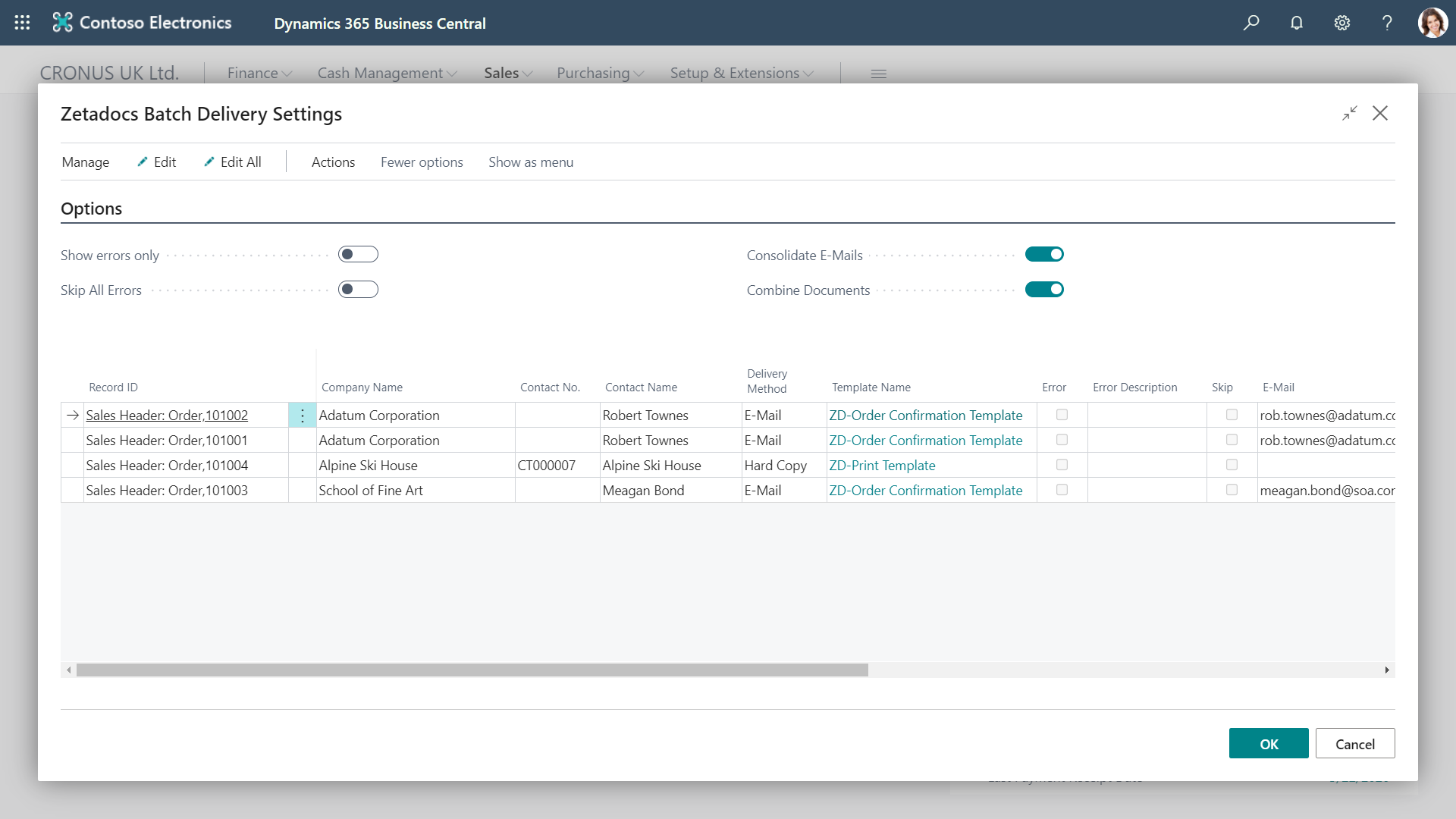
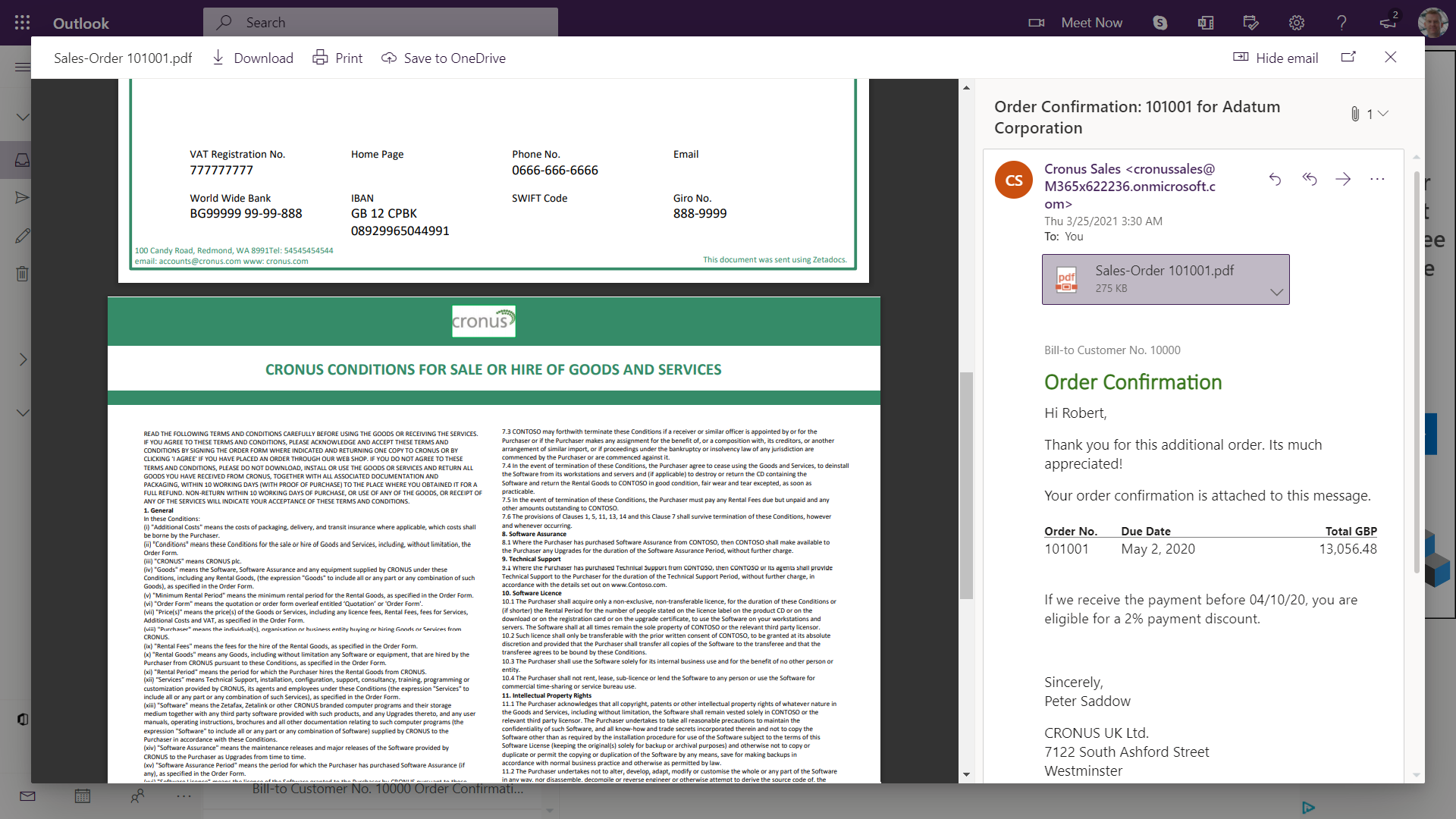
    Screenshot of Batch management: Send out documents in batches, setting the sending email address for replies, and including attachments such as standard terms & conditionsScreenshot of Edit before send: Each email is automatically prepared for its recipient using a template, then you can personalize it further at the preview stageScreenshot of Consolidated batches: Multiple emails in a batch to the same person can be combined into a single email to save overloading their inboxScreenshot of Combined attachments: Make your suppliers and customers' lives easier by combining all the attached documents into one, easy-to-consume PDF