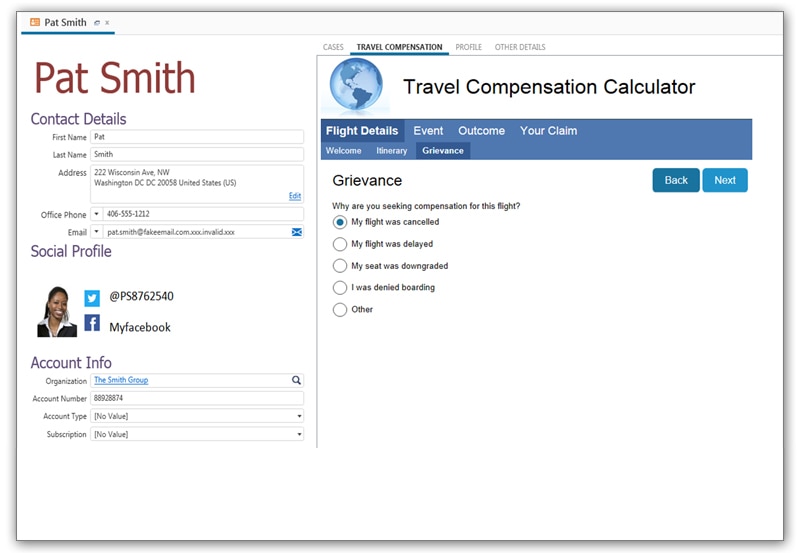
Oracle Service is the help desk and customer experience management platform from Oracle. The technology was developed and supported by RightNow Technologies as RightNow CX for cloud-based call center automation, until that company's acquisition by Oracle in 2011 for about $1.5 billion.
N/A
Salesforce Service Cloud
Score8.4 out of 10
N/A
Service Cloud is a customer service platform that helps businesses manage and resolve customer inquiries and issues. It provides tools for case management, knowledge base, omni-channel support, automation, and analytics, enabling companies to deliver exceptional customer service experiences.
Information Technology Analyst in Customer Service at Tata Consultancy Services (Telecommunications, 11-50 employees)
Chose Oracle Service
Oracle Service is the best fit for companies already using other Oracle products. Though Salesforce Service Cloud is equally good in most aspects, Oracle is once again an ecosystem of products like Oracle EBS where seamless integration is possible. Most of our clients were …
A de minimis incentive was given to thank the reviewer for their time. The incentive was not used to bias or drive a particular response, nor was the incentive contingent on a positive endorsement. TR verified that a representative sample of customers was invited. More Info
Business Development Director - TCS Oracle Practice, Americas in Sales at Tata Consultancy Services (Information Technology and Services, 10,001+ employees)
Chose Oracle Service
TCS' customers who also selected Oracle Service Cloud over Salesforce Service Cloud and GE's ServiceMax in the Mfg. vertical in which I work, did so because of the robust ability of Oracle Service Cloud and its APIs to integrate with other value-add solutions for manufacturers …
A de minimis incentive was given to thank the reviewer for their time. The incentive was not used to bias or drive a particular response, nor was the incentive contingent on a positive endorsement. More Info
Verified User
Chose Oracle Service
Oracle Service is a powerful service where the customers or clients can be evaluated in-depth. It provides a unified way where the customers can also raise complaints that can further be evaluated or resolved by the monitoring team to enhance the product. Also, it offers a lot …
A de minimis incentive was given to thank the reviewer for their time. The incentive was not used to bias or drive a particular response, nor was the incentive contingent on a positive endorsement. More Info
Chief of Operations in Manufacturing at Klein Tools (Consumer Goods, 1001-5000 employees)
Chose Oracle Service
Oracle Service Cloud offers a wide range of communication channels that optimize and innovate the company's communication process and management with our customers.
A de minimis incentive was given to thank the reviewer for their time. The incentive was not used to bias or drive a particular response, nor was the incentive contingent on a positive endorsement. TR verified that a representative sample of customers was invited. More Info
A de minimis incentive was given to thank the reviewer for their time. The incentive was not used to bias or drive a particular response, nor was the incentive contingent on a positive endorsement. TR verified that a representative sample of customers was invited. More Info
A de minimis incentive was given to thank the reviewer for their time. The incentive was not used to bias or drive a particular response, nor was the incentive contingent on a positive endorsement. TR verified that a representative sample of customers was invited. More Info
A de minimis incentive was given to thank the reviewer for their time. The incentive was not used to bias or drive a particular response, nor was the incentive contingent on a positive endorsement. More Info
Director, Solutions Consulting in Professional Services at eVerge Group (Computer Software, 201-500 employees)
Chose Oracle Service
When we chose Service cloud it was because of the robust offerings it had for service, marketing, opportunity tracking and knowledge. These are still very true today. I think without a double the ease of configuration is the number one reason we selected Oracle Service cloud.
A de minimis incentive was given to thank the reviewer for their time. The incentive was not used to bias or drive a particular response, nor was the incentive contingent on a positive endorsement. More Info
A de minimis incentive was given to thank the reviewer for their time. The incentive was not used to bias or drive a particular response, nor was the incentive contingent on a positive endorsement. More Info
A de minimis incentive was given to thank the reviewer for their time. The incentive was not used to bias or drive a particular response, nor was the incentive contingent on a positive endorsement. More Info
Oracle Right (Oracle Service Cloud) was an important evolution in the group's ombudsman channel management processes. We brought the Oracle Service Cloud to digitize the processes for capturing and managing the group's ombudsman channel, no longer operating manually (MS Excel).
Oracle Service Cloud (Right Now) brought about an important evolution in the management processes of the group's ombudsman channel, where activities that were performed manually, repetitively and with risk of errors, are now operated by the Right Now platform itself, whether by API, or by automation of the tool.
A de minimis incentive was given to thank the reviewer for their time. The incentive was not used to bias or drive a particular response, nor was the incentive contingent on a positive endorsement. More Info
It is a helpful tool, but it can be a bit cumbersome to manage. It is also a bit expensive, but we already use CRM for Salesforce and it is convenient to be able to immediately tag contacts and accounts when the tickets come into the system and tie them directly to the account. I do know an integration with Jira is possible (we use Jira internally for our engineering team to escalate issues) but it is not configured right now so managing the connection between support tickets and Jira tickets is manual and hard to keep up with
A de minimis incentive was given to thank the reviewer for their time. The incentive was not used to bias or drive a particular response, nor was the incentive contingent on a positive endorsement. More Info
A de minimis incentive was given to thank the reviewer for their time. The incentive was not used to bias or drive a particular response, nor was the incentive contingent on a positive endorsement. TR verified that a representative sample of customers was invited. More Info
A de minimis incentive was given to thank the reviewer for their time. The incentive was not used to bias or drive a particular response, nor was the incentive contingent on a positive endorsement. TR verified that a representative sample of customers was invited. More Info
Oracle Service Cloud needs a better built in integration with Oracle Social Cloud or it needs to build in more Social network capabilities.
SMS is handle via a third party application but could be built in as part of the product.
The knowledge foundation product needs a better way to handle multiple languages. Currently you have to purchase an additional interface for each language. You can purchase the more expensive Knowledge Advance which does have a better language feature.
A de minimis incentive was given to thank the reviewer for their time. The incentive was not used to bias or drive a particular response, nor was the incentive contingent on a positive endorsement. TR verified that a representative sample of customers was invited. More Info
Although RightNow is extremely flexible, the flexibility comes with a price. It is often not intuitive which settings you need to change (and under which menus these setting are buried) to enable the system to do what you want. Also, sometimes the system can do things you need, but you don't initially realize it. When RightNow sells a system to a new customer, I think it should come with X hours of consulting time with a RightNow expert. The customer should be able to consult with this expert over the next year to get advice concerning how to configure the system to achieve desired needs. Often RightNow Support would just answer "no" when I asked if I could do something, but then I would find another way to achieve my goals after talking with other companies using RightNow.
Professional edition works best for a small company with lower call volumes and is very useful but as you grow exponetially I think it has limited ability to do all the things we want to - SLA management, defect, release management to name a few. Reports and dashboards being available in real time.
The learning curve is fairly steep; but for something that has this much capability, it's nearly impossible to make it "easy". The layout and organization are at least reasonably intuitive. The hardest part-- the "weakest link"-- is the portal development (where you can build help centers and other end-user pages.) The capabilities there are significant, but the learning curve for that part is especially steep and it takes a fair amount of expertise to be able to update it.
I had Salesforce experience prior to using Service Cloud which made it a little easier to learn and navigate, but overall my team (some who had no Salesforce experience) caught on very quickly and found Service Cloud to be easy to use.
A de minimis incentive was given to thank the reviewer for their time. The incentive was not used to bias or drive a particular response, nor was the incentive contingent on a positive endorsement. More Info
A de minimis incentive was given to thank the reviewer for their time. The incentive was not used to bias or drive a particular response, nor was the incentive contingent on a positive endorsement. TR verified that a representative sample of customers was invited. More Info
Salesforce's Trust Center clearly communicates occasional issues to anyone who subscribes, down to an organization's cloud instance. Bundled sandboxes ease updates, and seasonal upgrades are seamless, scheduled well in advance with plenty of information about what's coming. Support agents have noticed intermittent Omni-Channel disconnects due to internet connections, and these are clearly notified.
We use a lot of tabs and fields on our incident workspace, which should slow the system down, but it's still quite fast, and we continue to optimize whatever is possible.
A de minimis incentive was given to thank the reviewer for their time. The incentive was not used to bias or drive a particular response, nor was the incentive contingent on a positive endorsement. TR verified that a representative sample of customers was invited. More Info
The Salesforce Service Cloud generally has very good performance, however the overall new Lightning user experience can bring that down. For example, if you have too many tabs open, then it can take a while for the Lightning UI to load. This UI is probably not well equipped to handle loading of all of that information at once, but Users tend to leave their tabs open all day long. It can also be fickle depending on which browser you use, what extensions you have installed, and whether you've cleared your cache. This can be the downfall with any software as a service though, not just Salesforce
A de minimis incentive was given to thank the reviewer for their time. The incentive was not used to bias or drive a particular response, nor was the incentive contingent on a positive endorsement. More Info
Technicians seem to be assessed based solely on how quickly they close the issues. I've had to reopen requests multiple times because they didn't actually solve my problem. Also, when the issue has even a moderate amount of complexity, the technicians often instruct me to "open another SR" to handle the other issue. I'm the customer, I shouldn't have to follow their processes, they should handle that for me. But even when I create the new SR, it seems like their right hand isn't talking to their left - they aren't reading back to the previous issue for context. So I get bounced around a lot, and I have to tell them how to do their job
A de minimis incentive was given to thank the reviewer for their time. The incentive was not used to bias or drive a particular response, nor was the incentive contingent on a positive endorsement. More Info
Salesforce offers support, although it generally gets routed to overseas support teams first, and once they are unable to help, it gets escalated up the chain to higher tiers. Frequently, the answer back from support is that there is no native solution, and we either have to turn to the AppExchange for some solution provided by another developer, or custom build our own solution.
Most of our training was given while doing user acceptance testing, and getting the system approved by the market. When ever we were in doubt, our implementer helped us along. Later on we started exploring by our selves.
A de minimis incentive was given to thank the reviewer for their time. The incentive was not used to bias or drive a particular response, nor was the incentive contingent on a positive endorsement. TR verified that a representative sample of customers was invited. More Info
Our in-person training was provided by our implementation partner and it was quite good. This was in part because we were already working with them and so it naturally leant itself to a good training relationship. And because they were building our customizations and configuring things, they could then provide training on those things naturally.
A de minimis incentive was given to thank the reviewer for their time. The incentive was not used to bias or drive a particular response, nor was the incentive contingent on a positive endorsement. TR verified that a representative sample of customers was invited. More Info
Trailheads are great but it was often unclear what actually applied to our organization. This made it difficult to get a whole lot out of it. Part of it is that because the basic Salesforce features didn't quite work for us, we had to add customizations, which then nullified a lot of the training.
A de minimis incentive was given to thank the reviewer for their time. The incentive was not used to bias or drive a particular response, nor was the incentive contingent on a positive endorsement. TR verified that a representative sample of customers was invited. More Info
Work with a RightNow expert during the implementation. Explain features that would you like to have. Often, somebody who really knows the system can show you what you need to do to achieve the desired results. Where a RightNow support engineer or a consultant might say "the system can't do that," a RightNow application engineer will listen to what you need, and often come up with an alternate path to achieve it
I would go through an implementation very differently knowing what I know now. It was difficult coming from systems we liked in post-sales service and having to adapt to the clunky and underwhelming feature set in Salesforce. I would trim back our expectations
A de minimis incentive was given to thank the reviewer for their time. The incentive was not used to bias or drive a particular response, nor was the incentive contingent on a positive endorsement. TR verified that a representative sample of customers was invited. More Info
TCS' customers who also selected Oracle Service Cloud over Salesforce Service Cloud and GE's ServiceMax in the Mfg. vertical in which I work, did so because of the robust ability of Oracle Service Cloud and its APIs to integrate with other value-add solutions for manufacturers such as IoT applications, Big Data Analytics, and Field Service applications.
A de minimis incentive was given to thank the reviewer for their time. The incentive was not used to bias or drive a particular response, nor was the incentive contingent on a positive endorsement. More Info
Salesforce service cloud is more configurable than Zendesk and Freshdesk. It has its own inbuilt AI chatbot also which further improves service agent efficiency. Salesforce is more integration agnostic and has pre-built connectors with multiple 3rd party systems. However, in terms of pricing it is priced at a premium compared to the other solutions
A de minimis incentive was given to thank the reviewer for their time. The incentive was not used to bias or drive a particular response, nor was the incentive contingent on a positive endorsement. TR verified that a representative sample of customers was invited. More Info
A de minimis incentive was given to thank the reviewer for their time. The incentive was not used to bias or drive a particular response, nor was the incentive contingent on a positive endorsement. TR verified that a representative sample of customers was invited. More Info
A de minimis incentive was given to thank the reviewer for their time. The incentive was not used to bias or drive a particular response, nor was the incentive contingent on a positive endorsement. TR verified that a representative sample of customers was invited. More Info
Because this is a cloud service, the security, implementation framework and feature list is very mature and you don't have to develop these during implementation.
The larger the implementation programme the better the licensing arrangements
Free developer toolkit for proof of concepts or showcasing features
A de minimis incentive was given to thank the reviewer for their time. The incentive was not used to bias or drive a particular response, nor was the incentive contingent on a positive endorsement. More Info