GoTo Webinar vs. ON24

Overview
ProductRatingMost Used ByProduct SummaryStarting Price
GoTo Webinar
Score 8.0 out of 10
N/A
GoToWebinar is GoTo’s webinar and online conferencing solution, and offers features like audience polling and Q&A, flexible scheduling experiences, and webinar templates. It offers CRM integrations and reporting & analytics tools to help engage clients’ audiences.
$49
per month per organizer
ON24
Score 8.8 out of 10
N/A
ON24 is an intelligent engagement platform, that enables customers to continuously engage audiences with AI-powered, hyper-personalized webinar, virtual event and content experiences.N/A
Pricing
GoTo WebinarON24
Editions & Modules
Lite
$49/month
per month per organizer
Standard
$99/month
per month per organizer
Pro
$199/month
per month per organizer
Enterprise
$399/month
per month per organizer
No answers on this topic
Offerings
Pricing Offerings
GoTo WebinarON24
Free Trial
YesNo
Free/Freemium Version
YesNo
Premium Consulting/Integration Services
NoNo
Entry-level Setup FeeNo setup feeNo setup fee
Additional Details
More Pricing Information
Community Pulse
GoTo WebinarON24
TrustRadius Insights
GoTo WebinarON24
Highlights

TrustRadius
Research Team Insight
Published

GoToWebinar and ON24 are both webinar software designed to support businesses hosting large video conferences.  GoToWebinar provides pricing and features that support businesses of all sizes, making it a popular choice with small to mid-sized businesses.  ON24 provides simple to join webinars for large groups of people, making it a popular choice for larger enterprises.

Features

GoToWebinar and ON24 both support large webinars, but they also have a few standout features that set them apart from each other.

GoToWebinar allows for simple creation of webinars, but it also provides video channels that users can use to watch webinars or training videos after they go live.  Additionally, GoToWebinar provides a desktop and mobile application that allows users to attend webinars from any device. In addition to providing easy access to webinars, administrators will have an easy time learning GoToWebinars user interface.

ON24 allows users to attend webinars without downloading anything through a browser.  This makes it easy for new users to access webinars from any internet connected device without making any kind of commitment.  Additionally, ON24 provide detailed analytics on webinar registrant tracking, as well as attendance and viewer drop-off rates.

Limitations

Though GoToWebinar and ON24 both help businesses host and record webinars, they also have some limitations that are important to consider.

GoToWebinar provides applications for desktop and mobile devices, but it isn’t as simple to use as ON24’s browser based webinars. Businesses that are aiming to make the webinar experience as smooth as possible for users may prefer ON24.  Additionally, On24 provides highly customizable branding options, compared to GoToWebinars more limited branding functionality.

ON24 allows users to join meetings through a browser, and provides a simple user experience, but its administration features are more difficult to use compared to other options.  Users should expect to need some training to use the program efficiently.  Additionally, ON24 doesn’t provide video channel pages, which can make it worse for training videos compared to GoToWebinar.

Pricing

GoToWebinar offers several pricing plans starting at $49.00 per month for the Lite option which supports up to 100 webinar participants.  As prices increase, the amount of participants and storage also increases.  Higher pricing tiers can support up 3,000 participants for $399.00 per month.

On24 pricing is not detailed publicly, but businesses can reach out to vendors for a detailed quote.

Features
GoTo WebinarON24
Reporting & Analytics
Comparison of Reporting & Analytics features of Product A and Product B
GoTo Webinar
7.1
Ratings
5% below category average
ON24
-
Ratings
Dashboards7.20 Ratings00 Ratings
Data exportability7.10 Ratings00 Ratings
Performance & Compatibility of Online Events Software
Comparison of Performance & Compatibility of Online Events Software features of Product A and Product B
GoTo Webinar
7.6
Ratings
5% below category average
ON24
-
Ratings
High quality audio8.20 Ratings00 Ratings
Mobile support7.60 Ratings00 Ratings
Online Meetings / Events
Comparison of Online Meetings / Events features of Product A and Product B
GoTo Webinar
7.2
Ratings
11% below category average
ON24
7.3
Ratings
16% below category average
Calendar integration7.70 Ratings8.30 Ratings
Record meetings / events8.40 Ratings8.50 Ratings
Slideshows8.50 Ratings8.70 Ratings
Event registration8.60 Ratings9.10 Ratings
Meeting initiation00 Ratings7.00 Ratings
Integrates with social media00 Ratings2.00 Ratings
Online Events Collaboration
Comparison of Online Events Collaboration features of Product A and Product B
GoTo Webinar
8.2
Ratings
1% below category average
ON24
8.5
Ratings
3% above category average
Audience polling7.90 Ratings9.40 Ratings
Q&A8.60 Ratings9.10 Ratings
Live chat00 Ratings7.00 Ratings
Online Events Security
Comparison of Online Events Security features of Product A and Product B
GoTo Webinar
7.9
Ratings
4% below category average
ON24
8.3
Ratings
1% below category average
Participant roles & permissions7.80 Ratings8.40 Ratings
Confidential attendee list8.00 Ratings8.50 Ratings
User authentication00 Ratings8.00 Ratings
Online Events Marketing
Comparison of Online Events Marketing features of Product A and Product B
GoTo Webinar
8.1
Ratings
5% above category average
ON24
8.2
Ratings
3% below category average
Branding options8.10 Ratings8.80 Ratings
Integration to Marketing Automation8.00 Ratings7.80 Ratings
Attendee list export00 Ratings8.10 Ratings
Mobile Capabilities
Comparison of Mobile Capabilities features of Product A and Product B
GoTo Webinar
-
Ratings
ON24
7.9
Ratings
6% below category average
Responsive Design for Web Access00 Ratings8.20 Ratings
Mobile Application00 Ratings7.30 Ratings
Dashboard / Report / Visualization Interactivity on Mobile00 Ratings8.20 Ratings
Virtual Event
Comparison of Virtual Event features of Product A and Product B
GoTo Webinar
-
Ratings
ON24
8.0
Ratings
4% below category average
Email marketing00 Ratings7.80 Ratings
Audience engagement00 Ratings8.20 Ratings
Event analytics00 Ratings8.10 Ratings
User Ratings
GoTo WebinarON24
Likelihood to Recommend
7.6
(0 ratings)
8.8
(0 ratings)
Likelihood to Renew
9.2
(0 ratings)
7.5
(0 ratings)
Usability
8.6
(0 ratings)
5.7
(0 ratings)
Availability
9.0
(0 ratings)
6.9
(0 ratings)
Performance
7.9
(0 ratings)
2.3
(0 ratings)
Support Rating
7.3
(0 ratings)
5.5
(0 ratings)
In-Person Training
-
(0 ratings)
9.1
(0 ratings)
Online Training
-
(0 ratings)
3.9
(0 ratings)
Implementation Rating
7.0
(0 ratings)
1.0
(0 ratings)
Configurability
5.8
(0 ratings)
2.7
(0 ratings)
Ease of integration
-
(0 ratings)
1.0
(0 ratings)
Product Scalability
7.8
(0 ratings)
8.9
(0 ratings)
Vendor post-sale
7.9
(0 ratings)
9.0
(0 ratings)
Vendor pre-sale
7.0
(0 ratings)
1.0
(0 ratings)
User Testimonials
GoTo WebinarON24
Likelihood to Recommend
It is great for big events like training or product demos. It's good for marketing webinars with features like polls and Q&A. It's not ideal for small, casual meetings. It can be too expensive for some businesses. For smaller events, other tools might be better.
Read full review
Having a platform where you can engage customers. It’s not only about the presentation, the polling, and customer engagement allows us to get feedback from customers. A major win for us is that it requires zero software to be downloaded. Running it within the browser window is such a huge impact. When webinar providers have software involved there could be issues with the end user trying to install and run it due to security settings or software.
Read full review
Pros
  • We launched a product for a mass and more than 500 people attended the webinar and it was seamless.
  • Recording capability for the later usage
  • Setup is very simple for both admins and end users
  • Polls are helpful in assessing the engagement of the customers
Read full review
  • Webinars hosted in ON24 run smoothly and never lag, and the help desk is very responsive.
  • Detailed analytics in every field include surveys, unique clicks, and downloads.
  • Registration details and multi-registration links in ON24 are very helpful and allow us to add additional registration fields and restrict certain domains.
Read full review
Cons
  • Dashboard for control are mostly intuitive but in some menus like the webcasting section can be cluttered
  • The current polling and survey capabilities are too simple. More advanced features, such as branching logic and real-time results, would make engagement more dynamic and insightful.
  • Although it's easy for organiser to use goto webinar, users have reported issues and long wait time on their end and they don't have much control over the session
Read full review
  • ON24 sometimes does not work well with some of our clients firewall and VPN if they are attempting to join from their office.
  • ON24 can sometimes freeze and our trainers are unable to resolve the issue and are forced to reschedule the session or move to another platform available.
  • ON24 does not track the correct data for our number of registrants for forums events. So, the analytics component is not valuable to us.
Read full review
Likelihood to Renew
GoTo Webinar is not boring at all. Its design is extremely intuitive and specific for what its name serves. It is a great software for webinars which have become the trend of "continuous learning". I like the way we can manage participants in the webinars, interacting with them while they cannot disturb the flow of the speech by intruding with the mic.
Read full review
Our Marketing team has seen significant time savings with the number of webinars we produce since using ON24. It's very scalable, and the onboarding and training for a new team member is fairly easy. The customer support of the ON24 team has also been impressive. They also release new feature on a fairly regular basis, and the webinars they do focused on customers are beneficial.
Read full review
Usability
GoTo Webinar's User Interface is simple and straightforward, which is what I, as an end user, prefer to interact with when I only use a software once or twice a month; I don't want to have to remember extra steps just to attend a webinar.
Read full review
97% of our attendees say it is the best trainings they have every attended. But they other 3% have a horrible experience (while watching the event live) interesting fact. On24 uses two different encoders for live vs OnDemand. I have never had issues with the On-Demand experience. My only complaints come during live events
Read full review
Reliability and Availability
I rated GoTo Webinar a 9 out of 10 for availability because it generally performs reliably, with minimal application errors or unplanned outages. The platform’s high uptime ensures that it’s usually accessible when needed, supporting a seamless experience for scheduling and conducting webinars. While occasional minor issues may arise, they are infrequent and typically well-managed, contributing to a strong overall rating for availability.
Read full review
ON24 is always available when I have a question about a new feature, if I'm having issues during a live webinar, or if I'm having issues with a webinar on the backend. Our client support specialist, Heather Haines, has always been incredibly consistent with getting me the answers I need when I need them.
Read full review
Performance
I rated GoTo Webinar an 8 out of 10 for performance due to its generally robust capabilities. Pages load quickly, and reports are generated efficiently, even for complex data sets. The platform’s integration with other systems typically doesn’t introduce significant latency or performance issues. However, during peak usage times or when handling very large data volumes, there can be occasional slowdowns. Despite these instances, GoTo Webinar consistently provides strong performance and reliability in its core functions.
Read full review
Loading depends on how large the files in the webinar for us - sometimes it takes up to an hour to upload and that impacts the loading when the webcast is playing. Overall I'm happy with the performance, however if integrated with other systems it does tend to slow down the process
Read full review
Support Rating
I was always able to get someone on the phone when I needed to. They were very thorough and ensuring my questions were answered. And if I was asking for a solution or request that they didn't offer, they told me so I could at least stop trying to search for it.
Read full review
ON24 support is really good with the 24/5 support chat line, where someone actually responds within 30 seconds. The customers success team is also really good and our rep is very helpful with all our questions. Whenever we have more technical questions, she will bring on a IT designer or a tech specialist on our calls for additional comments and help.
Read full review
In-Person Training
No answers on this topic
Most points of relevance were covered as far as I can remember.
Read full review
Online Training
No answers on this topic
On24 has amazing ON-Demand trainings that you can use at anytime and they walk you through step by step on different topics/ they are always updating and innovating and putting out new trainings. I would highly reccomend the trainings and reading the documents they have created. They also do live webinars on a rolling basis that are filled with so much knowledge and Information
Read full review
Implementation Rating
I didn't participate in the implementation nor did my company. As far as I know we have an IT office running alla these projects and we just use the final products for our educational purposes. I also didn't notice implementation at any level while using the desktop interface, but would immediately recognize it, if so.
Read full review
We had a few training's, which were broken up, and focused on specific areas of how to use the platform. Mostly though, a lot of it is just dedicating your time to learning and exploring what the possibilities are for enhancing your webinars
Read full review
Alternatives Considered
Zoom scores well above GoTo and ON24 in brand recognition across mid to large enterprises. But GoTo scores well in SMBs. Regarding value for money and ROI, it's better than ON24. We selected GoTo because of the price point and to ensure that our partner-sourced SMB stacks do not end up not engaging with us because of a lack of a proper medium.
Read full review
We selected ON24 due to organizational alignment and tool consolidation but I am more than happy with the decision to move over to this tool. It has been by far the easiest and least frustrating webinar tool I have used in 5+ years of digital marketing. It allows me to bring the product marketers asks closer to reality.
Read full review
Scalability
I rated GoTo Webinar an 8 out of 10 for scalability because it effectively supports deployment across multiple departments and sites with its flexible features. It allows for easy management of large-scale webinars and integration with various systems, accommodating a growing number of users and sessions. However, some users might find limitations in advanced customization or specific integration needs as their requirements become more complex. Overall, its robust capabilities and adaptability make it a strong choice for scalable webinar solutions.
Read full review
The ON24 platform is straightforward to use and train clients on, which is a huge plus. Clients appreciate its features and simplicity. Internally, we receive valuable analytical data from webinar events, enabling the organization to make data-driven decisions. This helps us optimize strategies and drive success for B2B businesses effectively.
Read full review
Return on Investment
  • Good: We've been able to keep various client teams trained up on our product
  • Good: It helps us automate communication about the webinars, as well as follow-ups
  • Bad: There is a time suck that shouldn't exist surrounding the recurring scheduler which needs to be rethought and retooled with more than the most basic real world use cases in mind
Read full review
  • By holding more webinars (and promoting them beyond our existing client database), we have generated thousands of new contacts.
  • The ease of use has enabled us to add an additional tool to our marketing toolbox without having to hire deep webinar/events specialists.
  • The integration with Salesforce has enabled our relationship owners to see how engaged their client contacts are.
Read full review
ScreenShots

GoTo Webinar Screenshots

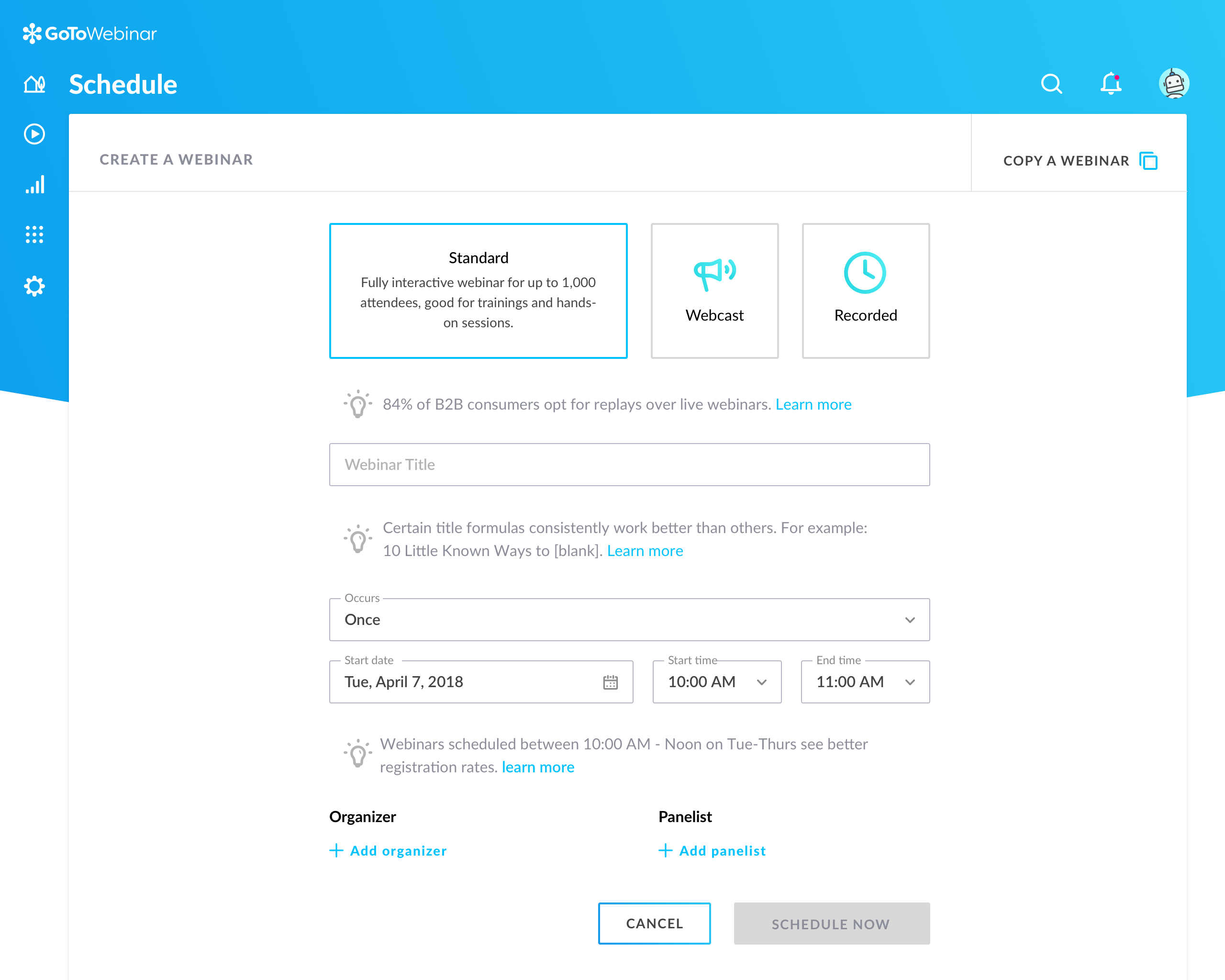
Screenshot of Setup flow for a new webinar in GoTo Webinar.Screenshot of Organizer's Control Panel and in-session experience

ON24 Screenshots

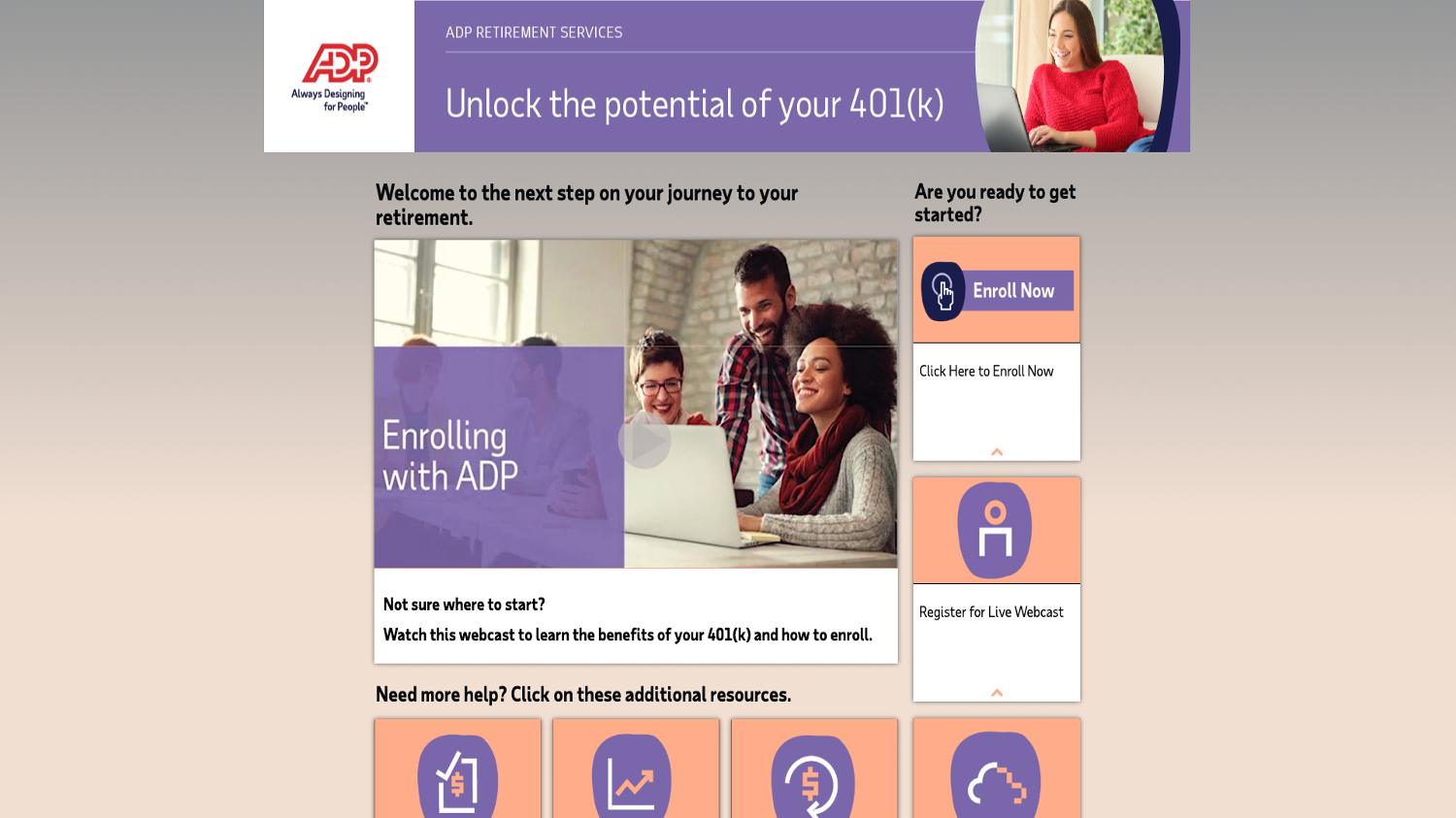
Screenshot of Red Whale creates webinar series, Deep Dives, to engage General Practitioners.Screenshot of SAP Concur takes its customer activation workshops virtual with ON24.Screenshot of Atheanhealth broadcasts an authentic conversation with industry thought leaders to its audience.Screenshot of SAS creates webinar series, Analytics in 20, to education product best practices in short amount of time.Screenshot of NVIDIA creates always-on content library filled with webinars with ON24 Engagement Hub, segmented by different languages and geo-locations.Screenshot of ADP, using ON24 Target, creates personalized landing pages to encourage and accelerate ADP benefit enrollment.  This resource page has on-demand webinars, help articles and ways to immediately enroll.