Nvoicepay headquartered in Beaverton offers accounts payable automation, and vendor payment data management to enterprises.
N/A
Yooz
Score8.5 out of 10
Small Businesses (1-50 employees)
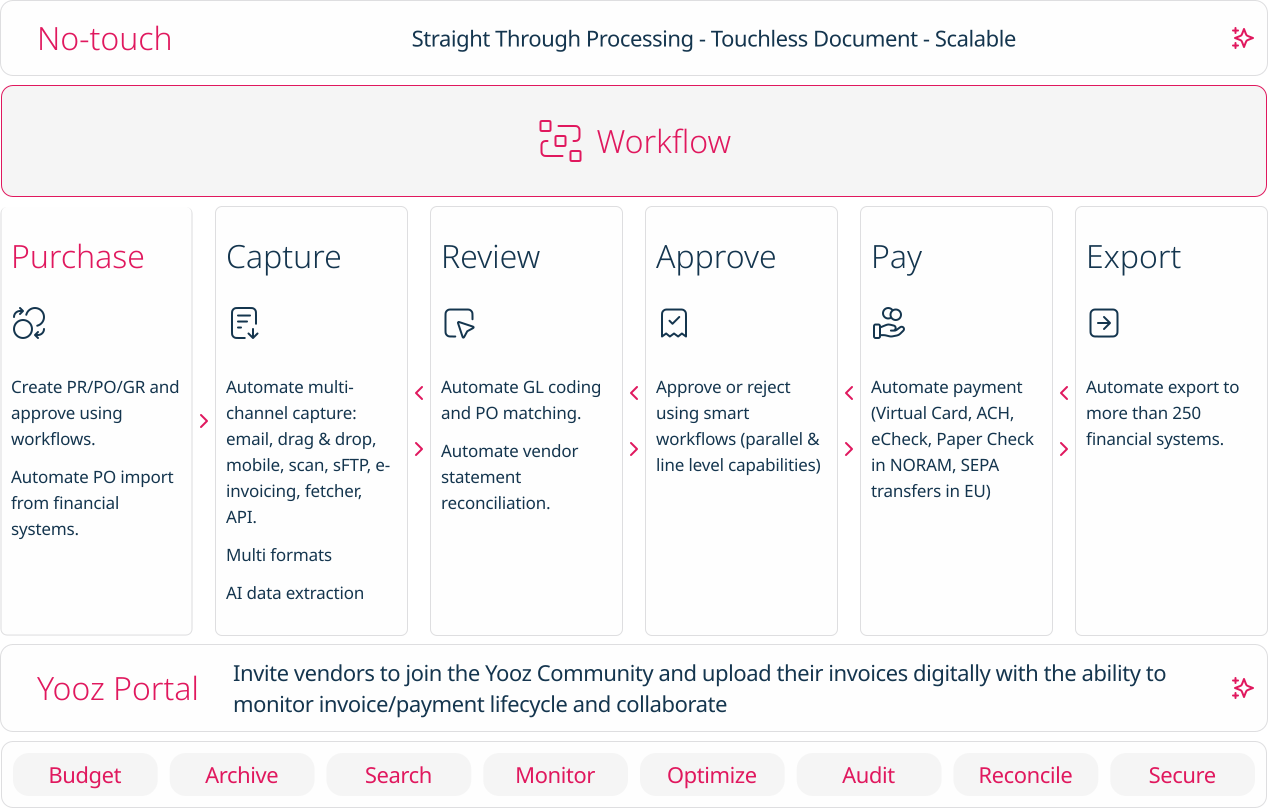
Yooz delivers intelligent financial operations automation that aims to reduce waste, mitigate risk, prevent fraud, and eliminate errors from the AP process. Yooz provides Lean Financial Operations™ for companies of all sizes, offering clarity and control in the most complex environments. The Yooz platform combines a workflow engine, real-time applied AI, and transparency, with advanced fraud detection. Boasting over 7,000 customers worldwide and processing more than 300 million…
N/A
Pricing
Nvoicepay
Yooz
Editions & Modules
No answers on this topic
No answers on this topic
Offerings
Pricing Offerings
Nvoicepay
Yooz
Free Trial
No
Yes
Free/Freemium Version
No
No
Premium Consulting/Integration Services
No
No
Entry-level Setup Fee
No setup fee
No setup fee
Additional Details
—
Subscription price based on the volume of documents processed. Unlimited number of users. 4 hours of complimentary service to start.
Nvoicepay is super helpful for organizations that want to run lean and have a lot of accounts payable going out each day/week/month. The cost of having Nvoicepay vs having an employee process payments for each of our vendors is a massive cost savings. I believe it would be less appropriate for organizations that are only sending a few payments each month or have a lot of recurring payments instead of unique bills each month. Recurring payments are easily booked and memorized in most accounting systems and setting up autopay takes care of having to actually make the transaction manually.
A de minimis incentive was given to thank the reviewer for their time. The incentive was not used to bias or drive a particular response, nor was the incentive contingent on a positive endorsement. More Info
Yooz is perfect for reoccurring invoices, such as utilities, as you can search by account# to show a list of entries allowing consistency across the board. Color coding can be used to differentiate between utilities or responsibilities. This also helps when exporting specific items. I can select one by one or by group.
A de minimis incentive was given to thank the reviewer for their time. The incentive was not used to bias or drive a particular response, nor was the incentive contingent on a positive endorsement. TR verified that a representative sample of customers was invited. More Info
A de minimis incentive was given to thank the reviewer for their time. The incentive was not used to bias or drive a particular response, nor was the incentive contingent on a positive endorsement. More Info
A de minimis incentive was given to thank the reviewer for their time. The incentive was not used to bias or drive a particular response, nor was the incentive contingent on a positive endorsement. More Info
Perhaps the most frustrating part of Nvoicepay is the reporting. Simply working through the filtering to find a transaction in the history is extremely difficult. If you don't select the filters in the correct order you will typically find zero results.
The formatting for the upload is also a little tricky. Since you are uploading an excel file, any zip codes with leading zeros typically have the zeros removed and result in a failed upload. So having to place an apostrophe in front of any leading zeros is kind of pain especially when you have 100 plus lines of transactions.
The main dashboard is also something to be desired. I understand the concept of providing the dashboard, but what use is it if I can't dig in and see what the numbers and graphs are made of? If Nvoicepay was able to hyperlink to the transactions that make up each category it would make the dashboard far more useful.
A de minimis incentive was given to thank the reviewer for their time. The incentive was not used to bias or drive a particular response, nor was the incentive contingent on a positive endorsement. More Info
A de minimis incentive was given to thank the reviewer for their time. The incentive was not used to bias or drive a particular response, nor was the incentive contingent on a positive endorsement. TR verified that a representative sample of customers was invited. More Info
It has helped me with invoices and able to see if i have a duplicate and to see how many times vendor has been processed in the system and also to see who is late if it has been in yooz and it needs to get paid soon and also how many coding i have used
A de minimis incentive was given to thank the reviewer for their time. The incentive was not used to bias or drive a particular response, nor was the incentive contingent on a positive endorsement. TR verified that a representative sample of customers was invited. More Info
We used Zevez in the past to make credit card payments but NVoicepay is a much more robust system which also allows for ACH and check payments. Also, they were able to contact vendors for us and sign them up with their preferred payment methods. Easy to implement and easy to use.
A de minimis incentive was given to thank the reviewer for their time. The incentive was not used to bias or drive a particular response, nor was the incentive contingent on a positive endorsement. More Info
Chrome River is slow and full of inconsistencies. Capturing invoices is confusing, as you have to assign approvers and coding at that time. No time to save it and research those details. It has multiple screens labeled inbox but are for different stages in the approval process that aren't specified unless you go into the invoice and review. When you go to exit the invoice, it takes you back to the main menu instead of the inbox you were currently working in. It is live, but the updates are every 10-15 minutes as opposed to immediately.
A de minimis incentive was given to thank the reviewer for their time. The incentive was not used to bias or drive a particular response, nor was the incentive contingent on a positive endorsement. TR verified that a representative sample of customers was invited. More Info
Nvoicepay has had only a positive impact on our overall business objectives. Since it takes care of remedial tasks of processing payments we are able to concentrate on more complex tasks such as prepping for close, creating schedules, and improving other processes.
A de minimis incentive was given to thank the reviewer for their time. The incentive was not used to bias or drive a particular response, nor was the incentive contingent on a positive endorsement. More Info