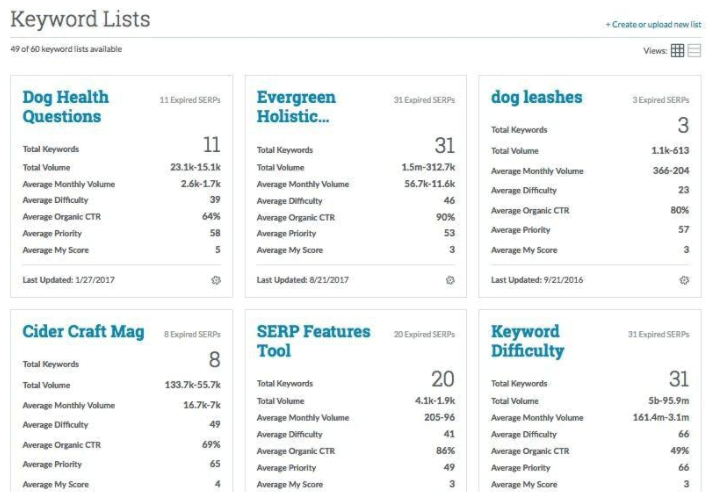
MozPro , from Moz in Seattle, Washington, is an SEO platforms for tracking the performance of all inbound marketing efforts comprehensively. It reveals how content is being shared through social channels and how that drives traffic to a website, and features a broad toolset for search engine optimization: rank tracking, link opportunites, site audit via Moz Analytics, prospective keyword analysis and content grading, as well as a crawl test to find broken or poorly designed site elements.
Moz…
$99
per month
Yoast
Score9.3 out of 10
N/A
Yoast offers a set of tools developed by Joost de Valk and team, founder of yoast.com and Wordpress enthusiast. These tools are designed to help content rank higher and are subsumed under the Yoast Complete pack, which includes Video SEO for rank climbing with embedded videos in a Wordpress site, WooCommerce SEO for the WP ecommerce plugin, News SEO for rank climbing in Google news, Local SEO for (as the name implies) climbing in local listings with more complete information so can be located…
Freelancer in Marketing at CBS (Writing and Editing, 1-10 employees)
Chose Moz Pro
To be totally honest, the user-interface with Google Analytics is so terrible that I could hardly ever figure out what it was communicating. Moz was easy to use from day one and I can feel like I understand SEO a bit after using the site for just a short time.
A de minimis incentive was given to thank the reviewer for their time. The incentive was not used to bias or drive a particular response, nor was the incentive contingent on a positive endorsement. More Info
Senior Content Marketing Manager in Marketing at Keyhole Content LLC (Marketing & Advertising, 1-10 employees)
Chose Yoast
Yoast is different from other SEO tools because it's the most simple, user-friendly tool and its built straight into WordPress. It belongs there! You don't have to do any copy/pasting or using any other third-party tools. You just draft your content, and Yoast gives you all the …
A de minimis incentive was given to thank the reviewer for their time. The incentive was not used to bias or drive a particular response, nor was the incentive contingent on a positive endorsement. More Info
Co-Founder / Marketing Chief in Marketing at New Why (Internet, 1-10 employees)
Chose Yoast
The only other plugin I've used that's similar is the all-in-one SEO pack, but it wasn't visible in the options above. Yoast Wordpress SEO Plugin is different from Moz because it's on your website and will actually make edits to your website, whereas Moz contains external tools …
A de minimis incentive was given to thank the reviewer for their time. The incentive was not used to bias or drive a particular response, nor was the incentive contingent on a positive endorsement. More Info
Verified User
Chose Yoast
Yoast is unique in the sense that it makes implementing SEO recommendations that we pull from the other comparable tools a real breeze! It's simple to use and saves hours that would ordinarily be used for training and can be used for the implementation of recommendations. No …
A de minimis incentive was given to thank the reviewer for their time. The incentive was not used to bias or drive a particular response, nor was the incentive contingent on a positive endorsement. More Info
Founder & Executive Director at Technology Aloha (Marketing and Advertising, 1-10 employees)
Chose Yoast
Yoast is much easier to use than many of the more advanced SEO tools. That being the case, it is a perfect solution for beginner and intermediate users. Since most of our clients fall into that category, Yoast SEO is a tool that they can feel confident using to optimize their …
A de minimis incentive was given to thank the reviewer for their time. The incentive was not used to bias or drive a particular response, nor was the incentive contingent on a positive endorsement. More Info
Content Marketing Manager in Marketing at Jemully Media (Marketing and Advertising, 1-10 employees)
Chose Yoast
Yoast is less robust than the standalone pay services that stand on their own outside of WordPress. Moz is a great research tool, especially for agencies like ours. It gives us access to insights for several clients with ease. That said, it is expensive, and once you get the …
A de minimis incentive was given to thank the reviewer for their time. The incentive was not used to bias or drive a particular response, nor was the incentive contingent on a positive endorsement. More Info
Verified User
Chose Yoast
Yoast WordPress SEO Plugins are the best-in-class tools. They are better than what we have used before because they are more robust and have greater capabilities. In today's fast-paced business world, our company doesn't have time to utilize a bunch of different SEO tools and …
A de minimis incentive was given to thank the reviewer for their time. The incentive was not used to bias or drive a particular response, nor was the incentive contingent on a positive endorsement. More Info
Businesses looking to keep track of their web presence and utilize a tool to identify areas of opportunity. The trends tracking and competitor modeling allow businesses to be able to build an SEO strategy that they can track progress over time and fill in content gaps. This is used by our company in conjunction with our marketing automation tool and Google's web presence suite (eg. Google Analytics, Search Console, Tag Manager).
A de minimis incentive was given to thank the reviewer for their time. The incentive was not used to bias or drive a particular response, nor was the incentive contingent on a positive endorsement. More Info
Yoast Wordpress SEO Plugins is really great for any application - home pages, blogs, etc. It saves a lot of time researching keywords, but it is time-consuming crafting content, which I think is a necessary evil. I wasn't really seeing the immediate results I had hoped for, but there could be a variety of reasons for that (cookies, caches, etc.). Overall, if you have the time to dedicate and utilize the tool, it's awesome!
A de minimis incentive was given to thank the reviewer for their time. The incentive was not used to bias or drive a particular response, nor was the incentive contingent on a positive endorsement. More Info
A de minimis incentive was given to thank the reviewer for their time. The incentive was not used to bias or drive a particular response, nor was the incentive contingent on a positive endorsement. More Info
A de minimis incentive was given to thank the reviewer for their time. The incentive was not used to bias or drive a particular response, nor was the incentive contingent on a positive endorsement. More Info
Some of the auto-gen visual tables aren't all that useful for smaller companies. For instance on the Search Visibility tab, many of my clients have a tiny % of keywords in the top-10, so the table shows basically 4 overlaid flat lines. I wish we had some options to customize this table or expand the range or something.
I wish there were some more tools relating to the technical aspects of the site/pages. The whole tool is very keyword-oriented, which is fine, but I feel like over time this has become and will continue to be less important than technical aspects, site speed, voice search, etc.
There's an Anchor Text tab, but it only looks at Inbound links—I wish this feature was for on-site anchor text—this could be a much better optimization tool. Because there's nothing you can do about inbound link text.
A de minimis incentive was given to thank the reviewer for their time. The incentive was not used to bias or drive a particular response, nor was the incentive contingent on a positive endorsement. More Info
Density: Because even the free, basic Yoast SEO tool has SO MANY FEATURES, if you're brand new to SEO as a concept/practice, you might feel a little overwhelmed at first. Just go watch the training videos!
Bulk Title Editing: I'm sure this tool can be useful, but I've never found it to be particularly intuitive or helpful.
Limitations: I'm grasping at straws here, but it would be nice if some of the premium (paid) features- specifically the social media previews- were available in the free version. Like I said, grasping.
A de minimis incentive was given to thank the reviewer for their time. The incentive was not used to bias or drive a particular response, nor was the incentive contingent on a positive endorsement. More Info
We've been paying monthly for Moz for at least four years. We rely heavily on it for our daily work, and would need to re-engineer many of our processes if we were to cancel our subscription. I suspect we'll continue to use Moz as long as we are in business (assuming they maintain their quality).
A de minimis incentive was given to thank the reviewer for their time. The incentive was not used to bias or drive a particular response, nor was the incentive contingent on a positive endorsement. More Info
it's easy to use once you get the hang of it and most people with any sort of background in using online tools and analytics systems can figure it out. it's just not as intuitive as it could be like google webmaster tools or Adobe (Site Catalyst)
It's super easy to use. Really, it requires little-to-know tutorials or walkthroughs at all — it explains everything you need to know in the description and tooltips built straight into the tool. I've never had to google a how-to or tutorial to use Yoast — it just works, and it works well
A de minimis incentive was given to thank the reviewer for their time. The incentive was not used to bias or drive a particular response, nor was the incentive contingent on a positive endorsement. More Info
As I have mentioned before, if you have enterprise subscription, the staff are super helpful. Moz also participated in the marketing tech conferences especially moz in seattle. These sessions are super useful in helping digital marketing analyst like me to investigate new marketing techniques, tracking leads and conversions and eventually monetize them. Their staff is not only knowledgeable in their own product but they have been around. For example Dr Peter from moz always publishes his insights and I have relied somewhat on his opinions.
A de minimis incentive was given to thank the reviewer for their time. The incentive was not used to bias or drive a particular response, nor was the incentive contingent on a positive endorsement. More Info
There are plenty of amazing articles published on their site, however, I don't rate their actual support team as being particularly helpful. I made multiple points of contact regarding the internal link counter not working and even though they began troubleshooting I think when it became too hard it was just forgotten about and so is still unresolved.
A de minimis incentive was given to thank the reviewer for their time. The incentive was not used to bias or drive a particular response, nor was the incentive contingent on a positive endorsement. More Info
Moz emerged as an industry leader with a great reputation for driving optimal SEO performance and ROI for customers. Moz' thought leadership on all things SEO gave us a lot of confidence to invest and partner with them. The wide array of product features was also something that was important to us relative to Moz' competitors. In the end, we felt there wasn't anything we couldn't do with Moz. We were also impressed with the on demand platform training and tools provided from day 1. Lastly, Moz was one of the more expensive platforms, but it wasn't the most expensive, so we felt we received great value for the overall price.
A de minimis incentive was given to thank the reviewer for their time. The incentive was not used to bias or drive a particular response, nor was the incentive contingent on a positive endorsement. More Info
This is my go-to plugin for SEO. It is easy, and I trust Yoast will give me solid results. In a short time period, our website has seen measurable results in organic search traffic. Our previous website didn't use page level SEO tools to this extent. We are systematically updating each page using the Yoast WordPress SEO Plugin. We are pleased with the results
A de minimis incentive was given to thank the reviewer for their time. The incentive was not used to bias or drive a particular response, nor was the incentive contingent on a positive endorsement. More Info
Here I can easily find competitor's ranking keywords and their backlinks. It also gives you another exciting feature where you can compare two domains at the same time.
The thing that I don't like about this software is, that sometimes your page can take too much time for crawling.
A de minimis incentive was given to thank the reviewer for their time. The incentive was not used to bias or drive a particular response, nor was the incentive contingent on a positive endorsement. More Info
Yoast Wordpress SEO Plugin along with other SEO investments we have made with our new website has extremely paid off on new business opportunity creation. Since August 2018 we have added over $100K of new business opps solely sourced from SEO searches on pages and posts that Yoast has helped us optimize.
Yoast Wordpress SEO Plugin saves our marketing team a lot of time. Since the plugin lives in WordPress and provides live tips we can make to the page or post, our team doesn't have to guess on what keyword, or meta-tag, or how many internal and external links a page or post should have using an additional platform. It is just conveniently there for us to use regularly.
Yoast Wordpress SEO Plugin cannot be the only piece of software your website relies on to obtain SEO optimization with search engines. It is a piece of the puzzle, and you can only maximize its' value by making sure your website is scam free, the code under the hood is healthy, and the load time and page weight is light.
A de minimis incentive was given to thank the reviewer for their time. The incentive was not used to bias or drive a particular response, nor was the incentive contingent on a positive endorsement. More Info