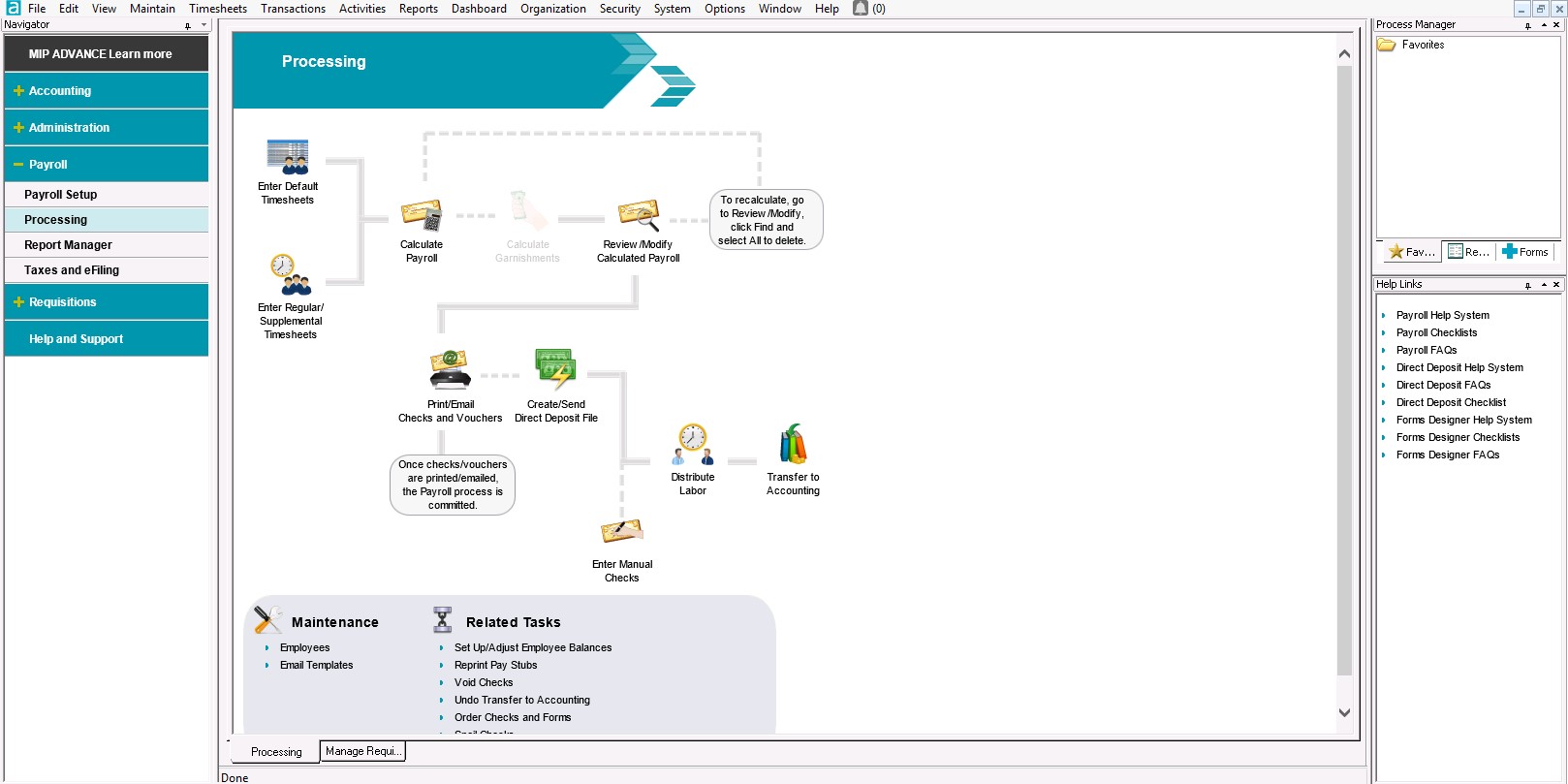
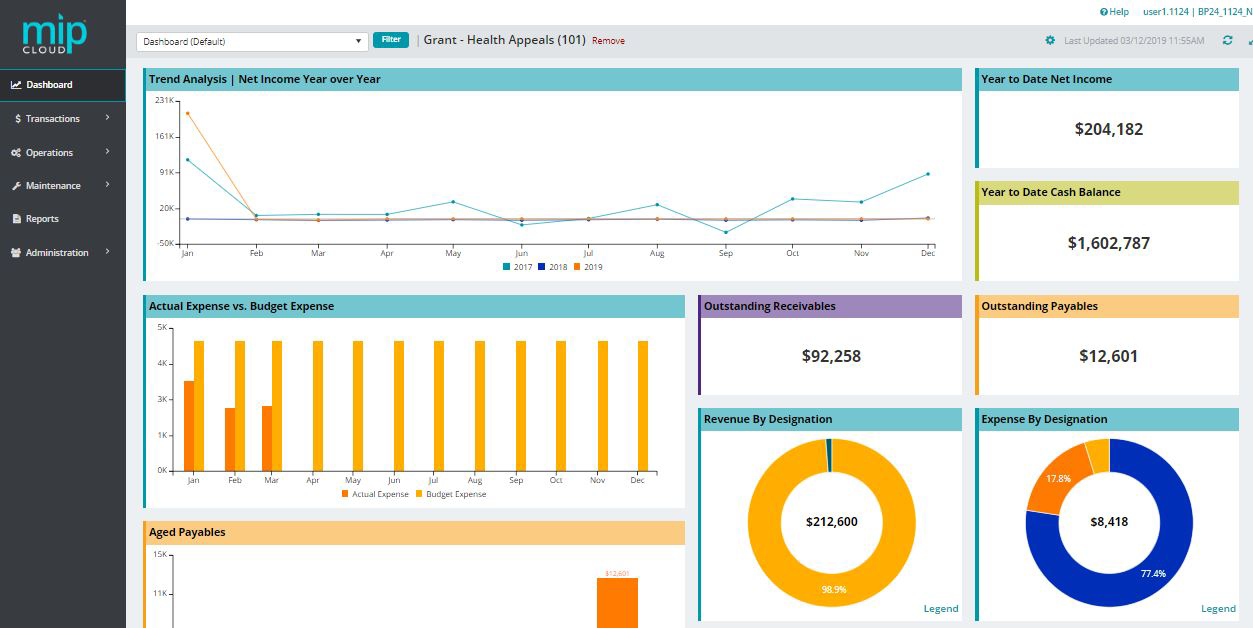
MIP Fund Accounting™ is a configurable fund accounting solution. The solution includes functionality for fund accounting, procurement, budgeting, payroll, human resources, timekeeping, fixed asset management, grant management, and dashboards for nonprofits and government agencies.
N/A
QuickBooks Desktop Pro
Score7.8 out of 10
N/A
Quickbooks Desktop Pro is accounting software from Intuit, Inc. It includes core accounting features, plus analytics and exportable reports. It is offered in on-premise and SaaS forms.
A de minimis incentive was given to thank the reviewer for their time. The incentive was not used to bias or drive a particular response, nor was the incentive contingent on a positive endorsement. TR verified that a representative sample of customers was invited. More Info
Administrative Supervisor in Finance and Accounting at Dept of Community Health (Health, Wellness and Fitness, 11-50 employees)
Chose MIP Fund Accounting
Our county still has EDEN - we use MIP for our grant and contract tracking because MIP is much more flexible to track the Data and run reports from. EDEN is impossible to do the kind of tracking that we need to track and bill our grants and contracts.
A de minimis incentive was given to thank the reviewer for their time. The incentive was not used to bias or drive a particular response, nor was the incentive contingent on a positive endorsement. TR verified that a representative sample of customers was invited. More Info
Verified User
Chose MIP Fund Accounting
MIP Fund Accounting is the only financial software program that I have used for the purpose of consolidating financial data, and it seems to perform that function with a minimal learning curve. My employer is a non-profit entity. MIP Fund Accounting is built to function for …
A de minimis incentive was given to thank the reviewer for their time. The incentive was not used to bias or drive a particular response, nor was the incentive contingent on a positive endorsement. TR verified that a representative sample of customers was invited. More Info
CFO (Chief Financial Officer) in Finance and Accounting at Cabun Rural Health Services Inc (Health, Wellness and Fitness, 51-200 employees)
Chose MIP Fund Accounting
Compared to other software I've used, MIP is by far the most user friendly and easiest to operate that've I've seen. Reports are easy to run, and I love being able to narrow down the information to only pull specific items.
A de minimis incentive was given to thank the reviewer for their time. The incentive was not used to bias or drive a particular response, nor was the incentive contingent on a positive endorsement. TR verified that a representative sample of customers was invited. More Info
A de minimis incentive was given to thank the reviewer for their time. The incentive was not used to bias or drive a particular response, nor was the incentive contingent on a positive endorsement. TR verified that a representative sample of customers was invited. More Info
A de minimis incentive was given to thank the reviewer for their time. The incentive was not used to bias or drive a particular response, nor was the incentive contingent on a positive endorsement. TR verified that a representative sample of customers was invited. More Info
Verified User
Chose MIP Fund Accounting
This is the first time I've worked in the non-profit world. Accounting is somewhat different so I am very glad to be using a product designed specifically for non-profits. Many accounting processes are similar of course, but it is nice to have them tailored to fit the …
A de minimis incentive was given to thank the reviewer for their time. The incentive was not used to bias or drive a particular response, nor was the incentive contingent on a positive endorsement. More Info
CFO (Chief Financial Officer) in Finance and Accounting at Area Agency on Aging of Southwest Arkansas, Inc. (Non-profit Organization Management, 11-50 employees)
Chose MIP Fund Accounting
QB didn't give enough security or division for the grants.
A de minimis incentive was given to thank the reviewer for their time. The incentive was not used to bias or drive a particular response, nor was the incentive contingent on a positive endorsement. TR verified that a representative sample of customers was invited. More Info
Finance Director in Finance and Accounting at Headwaters Regional Development Commission (Government Administration, 11-50 employees)
Chose MIP Fund Accounting
I feel like MIP Fund Accounting (formerly Abila MIP) has more features and options for customization. I can get the exact report I want showing the exact information and data I need for just about everything. Sometimes it takes a while to find the correct report but I always …
A de minimis incentive was given to thank the reviewer for their time. The incentive was not used to bias or drive a particular response, nor was the incentive contingent on a positive endorsement. TR verified that a representative sample of customers was invited. More Info
A de minimis incentive was given to thank the reviewer for their time. The incentive was not used to bias or drive a particular response, nor was the incentive contingent on a positive endorsement. TR verified that a representative sample of customers was invited. More Info
Verified User
Chose MIP Fund Accounting
We have not started using Fund Accounting. The accounting dept still uses Mas 90.
A de minimis incentive was given to thank the reviewer for their time. The incentive was not used to bias or drive a particular response, nor was the incentive contingent on a positive endorsement. TR verified that a representative sample of customers was invited. More Info
Verified User
Chose MIP Fund Accounting
QuickBooks and Peachtree just didn't have the multi-user environment depth that MIP has. As such, our clients transitioned over the years. From the Sage days onwards we have used MIP to great effect. Sure there have been bumps in the road but it is an intuitive product. With an …
A de minimis incentive was given to thank the reviewer for their time. The incentive was not used to bias or drive a particular response, nor was the incentive contingent on a positive endorsement. TR verified that a representative sample of customers was invited. More Info
Verified User
Chose MIP Fund Accounting
MIP is barely functional. Even QuickBooks would have been a better choice. The only functionality that MIP has is the ability to track by year across multiple year ends. There are no functional financial statement templates. Cash management is a nightmare. The work arounds to …
A de minimis incentive was given to thank the reviewer for their time. The incentive was not used to bias or drive a particular response, nor was the incentive contingent on a positive endorsement. TR verified that a representative sample of customers was invited. More Info
Fiscal Director in Finance and Accounting at Coastal Bend Center for Independent Living (Non-Profit Organization Management, 11-50 employees)
Chose MIP Fund Accounting
When our company first started, we used QuickBooks Pro. I felt it worked fine for the organization when we had just one funding stream. As the organization grew, we decided to move to MIP but I was hesitant as it was new to me, more detailed transactions and overall a more …
A de minimis incentive was given to thank the reviewer for their time. The incentive was not used to bias or drive a particular response, nor was the incentive contingent on a positive endorsement. TR verified that a representative sample of customers was invited. More Info
Verified User
Chose MIP Fund Accounting
Again, MIP Fund accounting was already in place when I arrived 7 years ago. I had only experienced QuickBooks and some other industry specified accounting systems prior to working at a non-profit.
A de minimis incentive was given to thank the reviewer for their time. The incentive was not used to bias or drive a particular response, nor was the incentive contingent on a positive endorsement. TR verified that a representative sample of customers was invited. More Info
A de minimis incentive was given to thank the reviewer for their time. The incentive was not used to bias or drive a particular response, nor was the incentive contingent on a positive endorsement. TR verified that a representative sample of customers was invited. More Info
A de minimis incentive was given to thank the reviewer for their time. The incentive was not used to bias or drive a particular response, nor was the incentive contingent on a positive endorsement. TR verified that a representative sample of customers was invited. More Info
A de minimis incentive was given to thank the reviewer for their time. The incentive was not used to bias or drive a particular response, nor was the incentive contingent on a positive endorsement. TR verified that a representative sample of customers was invited. More Info
A de minimis incentive was given to thank the reviewer for their time. The incentive was not used to bias or drive a particular response, nor was the incentive contingent on a positive endorsement. TR verified that a representative sample of customers was invited. More Info
A de minimis incentive was given to thank the reviewer for their time. The incentive was not used to bias or drive a particular response, nor was the incentive contingent on a positive endorsement. TR verified that a representative sample of customers was invited. More Info
CFO (Chief Financial Officer) in Finance and Accounting at Nancy G Wallace CPA (Education Management, 11-50 employees)
Chose MIP Fund Accounting
Each not-for-profit is different. If it's an association QuickBooks works fine. Generally once you have restricted funds either blackbaud or MIP becomes the better solution. Many nonprofits use Great Plains Microsoft GP but with its inability to report multiple grant periods …
A de minimis incentive was given to thank the reviewer for their time. The incentive was not used to bias or drive a particular response, nor was the incentive contingent on a positive endorsement. TR verified that a representative sample of customers was invited. More Info
A de minimis incentive was given to thank the reviewer for their time. The incentive was not used to bias or drive a particular response, nor was the incentive contingent on a positive endorsement. TR verified that a representative sample of customers was invited. More Info
Operations Director in Finance and Accounting at Pinal Gila Community Child Services, Inc. (Non-Profit Organization Management, 201-500 employees)
Chose MIP Fund Accounting
This product has delivered reliable data, consistency and is user friendly. Its complexity produces reports needed, fund accounting, cost allocations and accounts payable. We have not needed to vet other software as this meets our needs.
A de minimis incentive was given to thank the reviewer for their time. The incentive was not used to bias or drive a particular response, nor was the incentive contingent on a positive endorsement. TR verified that a representative sample of customers was invited. More Info
Verified User
Chose MIP Fund Accounting
MIP combines the level or functionality that is needed for complex non profits, NGO's with ease of use of intuitive software. MIP provides the ability to customize as much or as little as needed for Fund/ Grant Accounting. You need to be able to produce reports for Program …
A de minimis incentive was given to thank the reviewer for their time. The incentive was not used to bias or drive a particular response, nor was the incentive contingent on a positive endorsement. TR verified that a representative sample of customers was invited. More Info
Verified User
Chose MIP Fund Accounting
MIP Fund Accounting is a user-friendly program - we like the ability to create different reports and track different grants not only by program but by funder or fund.
A de minimis incentive was given to thank the reviewer for their time. The incentive was not used to bias or drive a particular response, nor was the incentive contingent on a positive endorsement. TR verified that a representative sample of customers was invited. More Info
Computer and Information Systems Manager in Information Technology at Dearborn YMCA (Non-profit Organization Management, 11-50 employees)
Chose QuickBooks Desktop Pro
MIP Fund Accounting has better reporting but is lesser used than QuickBooks. The reporting is not as clear when using QuickBooks for example it does not have a drill-down that is available with MIP Fund Accounting from Sage. We purchased QuickBooks Desktop Pro because we have …
A de minimis incentive was given to thank the reviewer for their time. The incentive was not used to bias or drive a particular response, nor was the incentive contingent on a positive endorsement. More Info
Verified User
Chose QuickBooks Desktop Pro
QuickBooks Desktop Pro is easy to use. I can learn it by myself by looking at the demo.
A de minimis incentive was given to thank the reviewer for their time. The incentive was not used to bias or drive a particular response, nor was the incentive contingent on a positive endorsement. More Info
MIP Fund Accounting works very well for general fundraising. The form creation process is easy and allows you to set parameters and add fees, quantities, images, etc. This process is smooth on the customer (forward-facing) side as well. Reports are generated once the transactions have gone through, making tracking and reconciliation with accounting easy.
A de minimis incentive was given to thank the reviewer for their time. The incentive was not used to bias or drive a particular response, nor was the incentive contingent on a positive endorsement. TR verified that a representative sample of customers was invited. More Info
What I think the QuickBooks Desktop Pro is well suited: 1) Easy to use and effective to navigate while satisfying our financial and accounting functions' needs 2) We upgraded the version from the QuickBooks Desktop to Desktop Pro for its advanced functions and the ability to track the different projects/programs that are essential to organization.
A de minimis incentive was given to thank the reviewer for their time. The incentive was not used to bias or drive a particular response, nor was the incentive contingent on a positive endorsement. More Info
A de minimis incentive was given to thank the reviewer for their time. The incentive was not used to bias or drive a particular response, nor was the incentive contingent on a positive endorsement. TR verified that a representative sample of customers was invited. More Info
A de minimis incentive was given to thank the reviewer for their time. The incentive was not used to bias or drive a particular response, nor was the incentive contingent on a positive endorsement. More Info
With the payroll process, if there is an error in sending the stubs through email, there is no option to resend without a restore. That really needs to change.
Being able to void encumbrance at the same time as a PO would be an incredible time saver.
A de minimis incentive was given to thank the reviewer for their time. The incentive was not used to bias or drive a particular response, nor was the incentive contingent on a positive endorsement. TR verified that a representative sample of customers was invited. More Info
QuickBooks Desktop Pro has been around for a few years and after an update[,] they force you to look at the changes/updates before you can use [them] after updating.
QuickBooks Desktop Pro does not have 2FA.
QuickBooks Desktop Pro should offer a way to store backups to a personal cloud without having to map a local network drive.
A de minimis incentive was given to thank the reviewer for their time. The incentive was not used to bias or drive a particular response, nor was the incentive contingent on a positive endorsement. More Info
I give MIP a 10 because Our organization use MIP Fund Accounting ever since I've been there and that's been for over 20 plus years for all of our accounting and payroll. MIP has stayed on the cutting edge of technology, ever evolving to meet the needs of the times, especially post pandemic, while many are working remotely! MIP support staff are very knowledgeable and efficient. Even new users can get up to speed quickly with MIP Fund Accounting.
A de minimis incentive was given to thank the reviewer for their time. The incentive was not used to bias or drive a particular response, nor was the incentive contingent on a positive endorsement. TR verified that a representative sample of customers was invited. More Info
I'd love to keep using it, and do intend to - though we've not been pleased with price increases over the past several years. In fact, we used to subscribe to the payroll service, but QuickBooks priced themselves out of reach for us, so we discontinued that. Currently, pricing would be the primary reason for NOT renewing, if we didn't.
A de minimis incentive was given to thank the reviewer for their time. The incentive was not used to bias or drive a particular response, nor was the incentive contingent on a positive endorsement. More Info
I have used this system for about 12 years now and I still learning how to use it. It always surprises me how there is another report to learn to achieve my data reporting goals. It is great to have a system that you have used long enough to feel comfortable with but also a system that allows you to learn new ways to report and enter data into the system
A de minimis incentive was given to thank the reviewer for their time. The incentive was not used to bias or drive a particular response, nor was the incentive contingent on a positive endorsement. TR verified that a representative sample of customers was invited. More Info
It is a great software that does everything a small business needs it to do, but there are just a few bugs and quirks that make additional software necessary. The slowness of the software occasionally might eventually be overshadowed by the quickness of cloud-based software though.
A de minimis incentive was given to thank the reviewer for their time. The incentive was not used to bias or drive a particular response, nor was the incentive contingent on a positive endorsement. More Info
I have rarely encountered any issues accessing MIP Fund Accounting over the years. On the rare occasions when availability was interrupted, the reasons were always found in-house when using the on-premises version. Since we have migrated to the MIP cloud, we have had no issues with availability. Any maintenance or updates are always communicated to us and are usually done outside of business hours.
A de minimis incentive was given to thank the reviewer for their time. The incentive was not used to bias or drive a particular response, nor was the incentive contingent on a positive endorsement. TR verified that a representative sample of customers was invited. More Info
A de minimis incentive was given to thank the reviewer for their time. The incentive was not used to bias or drive a particular response, nor was the incentive contingent on a positive endorsement. More Info
We have 18 programs and the CFO has the ability through MIP Fund Accounting to generate separate and/or collective reporting for those programs. Each program has its own grant or funding source. Each has its own reporting guidelines that must be met so the ability to run reporting separately or collectively is a plus.
A de minimis incentive was given to thank the reviewer for their time. The incentive was not used to bias or drive a particular response, nor was the incentive contingent on a positive endorsement. TR verified that a representative sample of customers was invited. More Info
I have not reached out to MIP for technical support; however, their website offers great help resources so I can solve an issue on my own. Another team member reached out to MIP for support and was helped quickly. The transition process took longer than expected due to a lag in communication.
A de minimis incentive was given to thank the reviewer for their time. The incentive was not used to bias or drive a particular response, nor was the incentive contingent on a positive endorsement. TR verified that a representative sample of customers was invited. More Info
They are awful. Intuit doesn't spend real money on support. They appear to have typically said, first-level script readers who are sending messages to the senior people for anything even a little bit difficult. Many of them don't speak particularly good English. Considering that they recently doubled (or, if you are paying annually, tripled) their pricing, and touted as one of the benefits that it includes [..] support, it's a real ripoff. However, we have to use the product because it is ubiquitous. I look forward to the day a competitor comes up with something good enough, which has excellent support, that matches all the features QuickBooks Desktop Pro currently has [...] or at least gives us a way to have all the functionality we currently have without excessive sacrifice [...] so that we can switch. I was very satisfied with QuickBooks for many years. This latest [rise] in price, and their sheer gall at touting the benefit of the 100 to 200% increase as being [the] inclusion of support, is what turned me so far against them.
A de minimis incentive was given to thank the reviewer for their time. The incentive was not used to bias or drive a particular response, nor was the incentive contingent on a positive endorsement. More Info
There are no specifics on what happens if you make one choice or another to know which is the best selection. This is true for JVs and AP. In training we were not given specifics of what happens when one possibility is selected over another.
A de minimis incentive was given to thank the reviewer for their time. The incentive was not used to bias or drive a particular response, nor was the incentive contingent on a positive endorsement. TR verified that a representative sample of customers was invited. More Info
Best thing I ever did was to attend a two day training seminar on QuickBooks, I learned an immense amount in a short time with hands on training by experts. I strongly recommend such training for anyone using any part of the software. It will pay for itself in the first month.
Denise O'Malley provided training for the HR module when we added it to our system. Denise also gave us a demo of the EWS module which we were able to see that it would not meet our needs. She was very kind about and understanding regarding the functions we needed with a time clock system.
A de minimis incentive was given to thank the reviewer for their time. The incentive was not used to bias or drive a particular response, nor was the incentive contingent on a positive endorsement. TR verified that a representative sample of customers was invited. More Info
Don't waste your time with MIP. There are plenty of other softwares out there that will do the job better. Do your homework. Get references from actual users. Make sure that what you choose will truly integrate. Make sure that there is local support. Get training. You will be glad that you passed this one by. Trust me.
A de minimis incentive was given to thank the reviewer for their time. The incentive was not used to bias or drive a particular response, nor was the incentive contingent on a positive endorsement. TR verified that a representative sample of customers was invited. More Info
We implemented the software ourselves. The training we received on the software was done by taking a community course teaching us how to use QuickBooks. It allowed me to get started with some basics of how to use the program and have not needed much assistance since completing the course work.
A de minimis incentive was given to thank the reviewer for their time. The incentive was not used to bias or drive a particular response, nor was the incentive contingent on a positive endorsement. More Info
I've utilized other ERP accounting software like Infor, NetSuite, and MS Dynamics, to name a few. MIP Fund Accounting offers flexibility and room for growth while not being overly heavy on your team to maintain it. And, we're now learning more about the add-on's and more advanced capabilities to leverage with our team.
A de minimis incentive was given to thank the reviewer for their time. The incentive was not used to bias or drive a particular response, nor was the incentive contingent on a positive endorsement. TR verified that a representative sample of customers was invited. More Info
Zoho had great end-user support and it was almost as simple to learn and was as easy to use. But its reports were not as [customizable] as QuickBooks Desktop Pro, and its job cost and department accounting [were] more cumbersome than QuickBooks Desktop Pro was. In addition, while I like an underdog (Zoho) the fact is that it is easier to find staff that [is] comfortable with QuickBooks Desktop Pro than anything else on the market.
A de minimis incentive was given to thank the reviewer for their time. The incentive was not used to bias or drive a particular response, nor was the incentive contingent on a positive endorsement. More Info
The flexibility to create certain features are helpful and are designed to be easier on MIP Accounting Cloud. It has been easier than the MIP Accounting classic version. I may have not fully utilized the software to deploy across multiple departments other than generating revenue reports or expenses. As well as developing budget worksheets for our departments. Which are great as it is, but have not gone farther than that.
A de minimis incentive was given to thank the reviewer for their time. The incentive was not used to bias or drive a particular response, nor was the incentive contingent on a positive endorsement. TR verified that a representative sample of customers was invited. More Info
We converted to the cloud version a few years ago to reduce our dependency on a dedicated internal IT server which needed to be replaced. The cost of the product switched to a monthly fee which increased cost somewhat but probably is matched with IT savings over time in doing upgrades.
We have an efficient team of two people doing the transactional work, so we don't really have much incentive to further automate our processes. And with the turnover in the CFO position we have had, has helped us maintain consistency in our processing.
Once I learned how to memorize and recall transactions it was a huge timesaver and increased the accuracy and consistency of our entry.
The cost of training is sometimes prohibitive. Example is my accounting clerk MIGHT benefit from additional training but at about $200 for a lot of the courses, it is more than we have budgeted.
A de minimis incentive was given to thank the reviewer for their time. The incentive was not used to bias or drive a particular response, nor was the incentive contingent on a positive endorsement. TR verified that a representative sample of customers was invited. More Info
QuickBooks Desktop Pro is a no hassle accounting solution that ticks a lot of boxes. It almost never disappoints and organizations will usually keep using it for many years. If anything, the only time I've seen an organization migrate away from it is if they have specific accounting needs, or if the organization has grown to the point that they need a more robust accounting solution. Even then, QuickBooks can usually be maintained within another accounting software system for specific functions, like A/R & A/P for example.
A de minimis incentive was given to thank the reviewer for their time. The incentive was not used to bias or drive a particular response, nor was the incentive contingent on a positive endorsement. More Info