Microsoft SharePoint vs. Terminalfour Digital Engagement and Web Development Platform

Overview
ProductRatingMost Used ByProduct SummaryStarting Price
SharePoint
Score 7.5 out of 10
N/A
Microsoft's SharePoint is an Intranet solution that enables users to share and manage content, knowledge, and applications to empower teamwork, quickly find information, and collaborate across the organization.
$5
Per User Per Month
Terminalfour Digital Engagement and Web Development Platform
Score 7.8 out of 10
Enterprise companies (1,001+ employees)
TerminalFour Site Manager is the principal product from the global software company of the same name, a content management system available for local-hosting or cloud-based, primarily targeted at educational institutions, government and international bodies, but also retail and financial services organizations.N/A
Pricing
Microsoft SharePointTerminalfour Digital Engagement and Web Development Platform
Editions & Modules
Plan 1
$5.00
Per User Per Month
Plan 2
$10.00
Per User Per Month
Office 365 E3
$20.00
Per User Per Month
No answers on this topic
Offerings
Pricing Offerings
SharePointTerminalfour Digital Engagement and Web Development Platform
Free Trial
YesNo
Free/Freemium Version
NoNo
Premium Consulting/Integration Services
NoNo
Entry-level Setup FeeNo setup fee$15,000 organisation per year
Additional DetailsGenerally the initial cost is between $15,000 to $100,000 with ongoing support and hosting subsequent years.
More Pricing Information
Community Pulse
Microsoft SharePointTerminalfour Digital Engagement and Web Development Platform
Features
Microsoft SharePointTerminalfour Digital Engagement and Web Development Platform
Security
Comparison of Security features of Product A and Product B
Microsoft SharePoint
-
Ratings
Terminalfour Digital Engagement and Web Development Platform
8.5
Ratings
5% above category average
Role-based user permissions00 Ratings8.50 Ratings
Platform & Infrastructure
Comparison of Platform & Infrastructure features of Product A and Product B
Microsoft SharePoint
-
Ratings
Terminalfour Digital Engagement and Web Development Platform
5.0
Ratings
41% below category average
API00 Ratings6.00 Ratings
Internationalization / multi-language00 Ratings4.00 Ratings
Web Content Creation
Comparison of Web Content Creation features of Product A and Product B
Microsoft SharePoint
-
Ratings
Terminalfour Digital Engagement and Web Development Platform
7.0
Ratings
10% below category average
WYSIWYG editor00 Ratings8.50 Ratings
Code quality / cleanliness00 Ratings8.00 Ratings
Admin section00 Ratings8.00 Ratings
Page templates00 Ratings8.50 Ratings
Library of website themes00 Ratings6.00 Ratings
Mobile optimization / responsive design00 Ratings4.00 Ratings
Publishing workflow00 Ratings8.00 Ratings
Form generator00 Ratings5.00 Ratings
Web Content Management
Comparison of Web Content Management features of Product A and Product B
Microsoft SharePoint
-
Ratings
Terminalfour Digital Engagement and Web Development Platform
6.7
Ratings
9% below category average
Content taxonomy00 Ratings7.40 Ratings
SEO support00 Ratings7.00 Ratings
Bulk management00 Ratings5.00 Ratings
Availability / breadth of extensions00 Ratings6.00 Ratings
Community / comment management00 Ratings7.90 Ratings
Best Alternatives
Microsoft SharePointTerminalfour Digital Engagement and Web Development Platform
Small Businesses
HCL Connections
HCL Connections
Score 9.0 out of 10
ManageWP
ManageWP
Score 10.0 out of 10
Medium-sized Companies
RWS Tridion Sites
RWS Tridion Sites
Score 9.0 out of 10
RWS Tridion Sites
RWS Tridion Sites
Score 9.0 out of 10
Enterprises
RWS Tridion Sites
RWS Tridion Sites
Score 9.0 out of 10
RWS Tridion Sites
RWS Tridion Sites
Score 9.0 out of 10
All AlternativesView all alternativesView all alternatives
User Ratings
Microsoft SharePointTerminalfour Digital Engagement and Web Development Platform
Likelihood to Recommend
9.4
(0 ratings)
8.0
(0 ratings)
Likelihood to Renew
9.8
(0 ratings)
-
(0 ratings)
Usability
8.2
(0 ratings)
-
(0 ratings)
Support Rating
8.6
(0 ratings)
-
(0 ratings)
In-Person Training
4.5
(0 ratings)
-
(0 ratings)
Online Training
6.4
(0 ratings)
-
(0 ratings)
Implementation Rating
6.0
(0 ratings)
-
(0 ratings)
User Testimonials
Microsoft SharePointTerminalfour Digital Engagement and Web Development Platform
Likelihood to Recommend
SharePoint Document Management excels as a central repository for storing, organising, and retrieving documents. It supports version control, metadata tagging, secure access, and integration with tools like Power Automate. At our organisation, it's used for managing contracts, policies, and supplier documents. SharePoint Workflow Automation integrates with Power Automate to streamline approvals, gather feedback, and automate recurring tasks. This reduces reliance on email chains and manual trackers.
Read full review
It is very good for users because it is simple to use and easy to understand. Although it is nice if users have a background in web design and HTML, it is not necessary in order to make basic updates to a web page
Read full review
Pros
  • Making collaboration easier via a better connection between accounts. You can share anything from a file to events with just a couple of clicks.
  • All services are connected and switching between services is a breeze[.]
  • Solutions to the majority of everyday business problems.
Read full review
  • Ease of use
  • Nice interface
  • Web-based site manager
Read full review
Cons
  • There are far too many good features to choose from, and advanced features are noticeably absent.
  • There is room for improvement in terms of integration with non-Microsoft products, as well as developer Story.
  • It is challenging to provide easier access via file explorer while also granting outside users and guests access.
Read full review
  • It can be a bit buggy with media library management.
  • The html editor can act pretty wonky sometimes with the html it translates things into.
  • The navigation builder tool is pretty confusing.
Read full review
Likelihood to Renew
We have too much invested at this point to do anything different and there are too many reasons as a company our size to keep it. We are heavily licensed out for Microsoft and have 12 years of SharePoint development baked into who we are. Extracting that as a tool at this point would be dumb and devastating. There are no like-kind competitors to it at an enterprise level that scale and integrate as well.
Read full review
No answers on this topic
Usability
No usability issues reported. Individual teams also have allocated areas which replace legacy shared drives on local LANs. Access to Sharepoint resources is fully integrated with corporate Active Directory with additional two-factor authentication required for administrative users. Users have access to Microsoft Services Hub which allows you to create, manage, and track support requests while staying current on Microsoft technologies with access to select self-paced learning paths
Read full review
No answers on this topic
Support Rating
Support for SharePoint is quite good. Microsoft provides good support. Microsoft offers
  • Quick turnaround time for issues
  • A range of support services
  • Access to a network of resources
  • Escalation of issues
  • Ongoing development and commitment to produce enhancement
The majority of support is required for initial installation. Once complete and the system is operating we have had very few support issues.
Read full review
No answers on this topic
In-Person Training
The face to face training I received was on SharePoint Administration. It was rushed as there was a lot of information to cover and the application of the labs weren't that great either. I like to be able to relate what I am learning to what I am currently doing.
Read full review
No answers on this topic
Online Training
I like to learn at my own pace and online training allows for that. Additionally, you can skip through pieces of content that you already know or are already comfortable with. Microsoft actually offers great videos on their website for basic fundamental SharePoint Training. I have used these training videos in some of my own training sessions with end users.
Read full review
No answers on this topic
Implementation Rating
Planning to the last detail would be advised. SharePoint is a very large application that takes a lot of finesse to get operational
Read full review
No answers on this topic
Alternatives Considered
The reasons for selecting MS SharePoint are: SharePoint provides ease of use and web design assistance and support SharePoint helps you schedule your content for publishing. enables users to share documents with external parties and offers a better internal structure of the content and better indexing and searching capabilities.
Read full review
WordPress is obviously a fantastic product. TerminalFour was more appropriate for our needs as determined by a team before my arrival. I think WordPress is better and cheaper but going with TerminalFour offered the opportunity to work with a smaller company to whom we mattered
Read full review
Return on Investment
  • We've recently implemented Microsoft SharePoint access via iPads for our Template teams out on job sites. They can easily upload CAD / Laser files into Microsoft SharePoint for our production team to review in real time. Serious ROI when we don't have to wait for our Template team to get back to the shop!
  • We have multiple physical locations. Microsoft SharePoint allows users at each location to collaborate by working on documents simultaneously. Allowing us to solve multi-site problems & strategize on multi-site initiatives much faster!
  • We can also share key information with external partners. As long as they have a registered MS account (not necessarily an O365 account) we can share our information with them in a variety of ways. This allows consistent & concise communication with our partners.
Read full review
  • Increased employee efficiency.
  • Happier internal customers because changes are much easier than they used to be and we can often empower them to make their own changes to their websites.
  • For our application owner it's become a huge project that consumes all of his time. Not ideal but it's working for now. Knowledge sharing the more intricate pieces can be really difficult.
Read full review
ScreenShots

Terminalfour Digital Engagement and Web Development Platform Screenshots

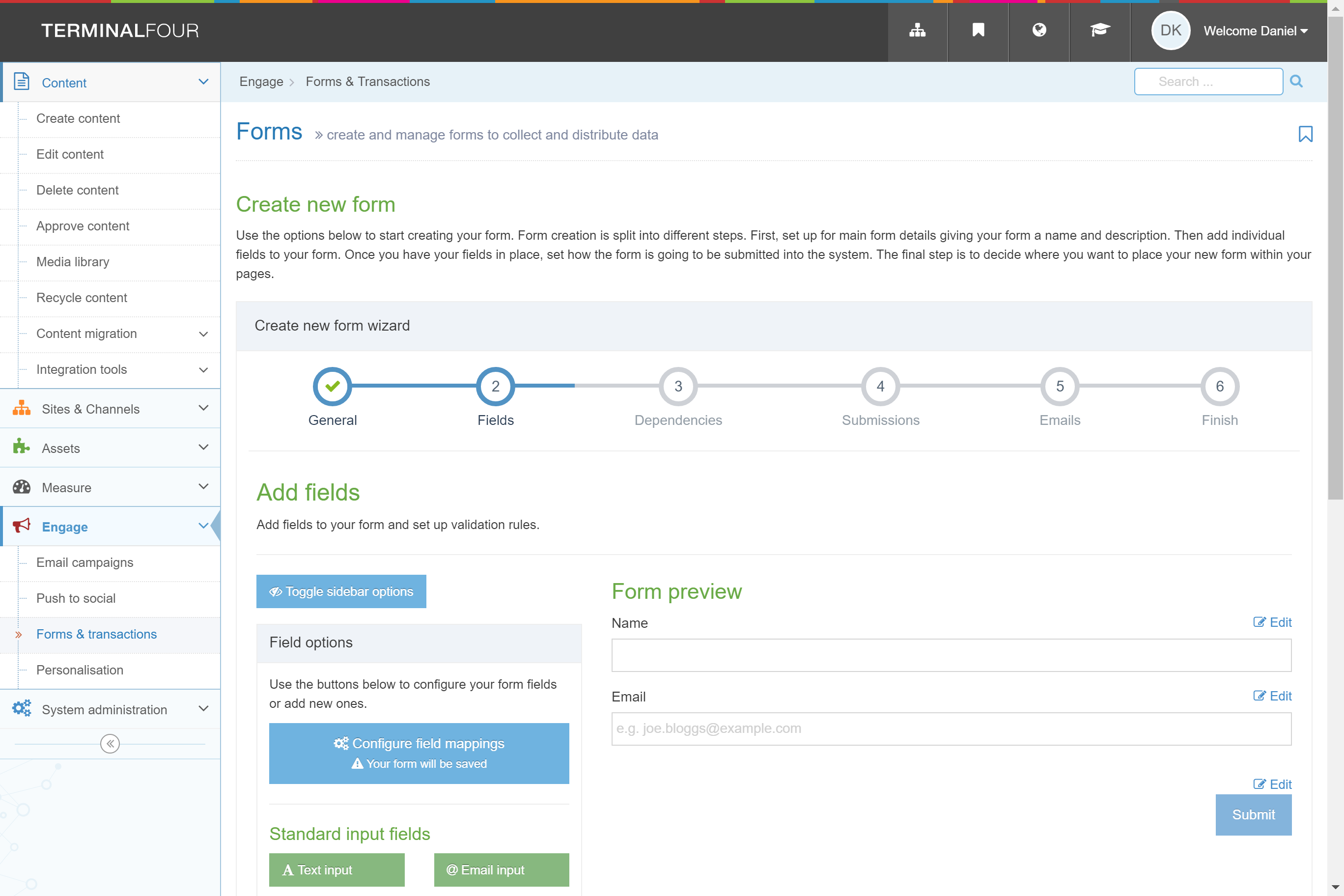
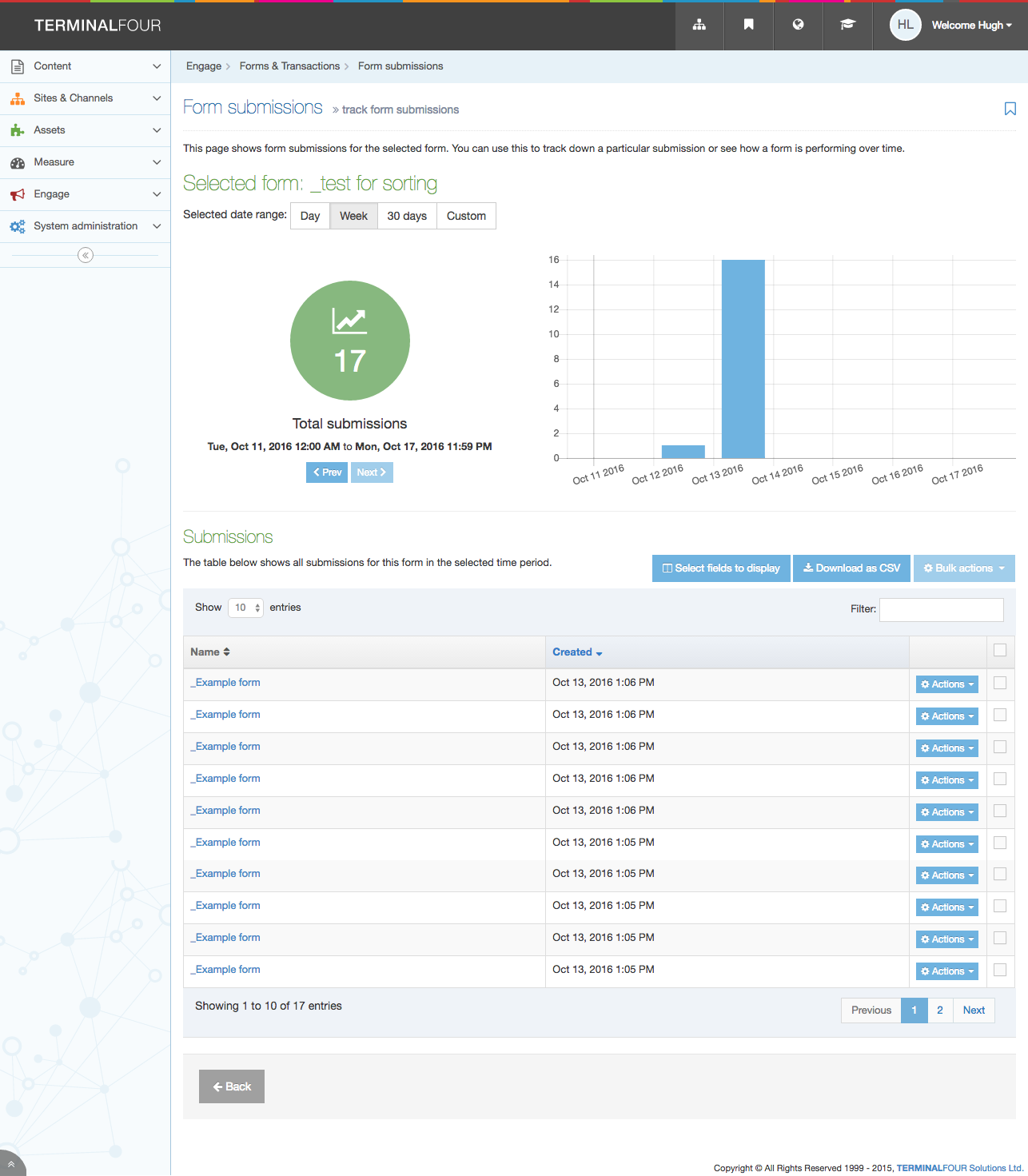
Screenshot of Direct Edit with AnalyticsScreenshot of Login ScreenScreenshot of Media LibraryScreenshot of Form BuilderScreenshot of Form Results ReportScreenshot of Direct Edit