Microsoft Powerpoint Online vs. Reveal Trial Director

Overview
ProductRatingMost Used ByProduct SummaryStarting Price
Microsoft Powerpoint Online
Score 6.9 out of 10
N/A
PowerPoint for the web, or Powerpoint Online (formerly PowerPoint Web App) is similar to the installed version, however it allows users to create presentations directly from a browser, with no need for an installation.N/A
Reveal Trial Director
Score 7.0 out of 10
N/A
A solution to streamline pre-trial, trial, mediation, and other litigation-related presentations. Users can also Share the case and collaborate with colleagues, outside counsel, expert witnesses, and other key stakeholders on a centrally stored case.N/A
Pricing
Microsoft Powerpoint OnlineReveal Trial Director
Editions & Modules
No answers on this topic
Offerings
Pricing Offerings
Microsoft Powerpoint OnlineReveal Trial Director
Free Trial
NoYes
Free/Freemium Version
NoNo
Premium Consulting/Integration Services
NoNo
Entry-level Setup FeeNo setup feeOptional
Additional Details
More Pricing Information
Community Pulse
Microsoft Powerpoint OnlineReveal Trial Director
Best Alternatives
Microsoft Powerpoint OnlineReveal Trial Director
Small Businesses
Canva
Canva
Score 9.1 out of 10
Canva
Canva
Score 9.1 out of 10
Medium-sized Companies
Mentimeter
Mentimeter
Score 7.2 out of 10
Mentimeter
Mentimeter
Score 7.2 out of 10
Enterprises
Mentimeter
Mentimeter
Score 7.2 out of 10
Mentimeter
Mentimeter
Score 7.2 out of 10
All AlternativesView all alternativesView all alternatives
User Ratings
Microsoft Powerpoint OnlineReveal Trial Director
Likelihood to Recommend
6.8
(0 ratings)
8.0
(0 ratings)
Likelihood to Renew
2.0
(0 ratings)
-
(0 ratings)
Usability
7.0
(0 ratings)
-
(0 ratings)
User Testimonials
Microsoft Powerpoint OnlineReveal Trial Director
Likelihood to Recommend
Anyone who needs to use Microsoft PowerPoint collaboratively with team members in different locations would do well to let PowerPoint online take care of the dirty work. If you experience issues related to version control - and who doesn't? - this is a worthwhile investment. Plus, PowerPoint online is really the gold standard. Other online software suites do things similarly, but learning curves are eliminated altogether if you are collaborating with a team member who's already familiar with PowerPoint.
Read full review
This trial presentation software is very well suited for trial, depositions and mediations. The software organizes exhibits and allows for synchronized deposition transcripts to be viewed simultaneously. It allows the attorney to tell the complete story of the case by quickly putting together productions, discovery and any additional documentation needed to build a case.
Read full review
Pros
  • The best part it you can create, share and maintain your presentations online
  • You can access your presentations from anywhere at any time
  • You can include flash files and video objects that will make your presentation even better
  • You can customize your presentation according to your requirements if you don't want to use default templates
Read full review
  • Displays text and video from synchronized deposition transcripts
  • Ability to pull text out of documents to emphasize key points
  • Ability to create specific designations and exhibits quickly
  • Ability to create snapshots and save stages of documents
Read full review
Cons
  • Sometimes formatting is difficult. It is different than formatting in the application.
  • When creating shapes, the shape will not adjust and will be frozen if I want to make it bigger or smaller.
  • Sometimes certain fonts do not show up the same in the application vs online.
Read full review
  • The tools can be hard to locate within each tab/interface
  • The software could provide the ability to create timelines
  • Presentation mode exhibit list does not display the full document name/description
Read full review
Likelihood to Renew
I would rather change to other tool if I could. Microsoft Powerpoint Online was top-down forced without a real technical (maybe financial only) reason, and I think the product itself looks like a poor adaptation of the offline version. In my experience, it cannot be properly used in real time collaboration, can't handle large media (images/videos), has low performance even for a single user, it is a nightmare.
Read full review
No answers on this topic
Usability
It works mostly well, but I usually run into a formatting glitch while using Microsoft PPT Online.
Read full review
No answers on this topic
Alternatives Considered
I have used Prezi also in my last company along with Microsoft Powerpoint Online. But I feel that Prezi has also good features like designs, frames, themes etc but this tool is really complex to use as compared to Microsoft Powerpoint Online
Read full review
I have used TrialPad in the past and found it very user friendly and easy to use. However, functionality is limited as to what you can do or how the data can be manipulated once uploaded to TrialPad. TrialDirector 360 by Ipro gives the user a full array of tools and functionality and in some ways is easier to navigate and control in presentation mode.
Read full review
Return on Investment
  • It has made it easier for the training to be well handled and transitioned to the work-at-home life faster.
  • a lot of people is used to the installed version of PowerPoint, the online version is a familiar look and feels to the times when we were working from the office, which made the transition faster and easier for everyone.

Read full review
  • Our attorneys are able to cut client costs for trial preparation by using this tool
  • We still have to outsource .dvi file creation as needed
Read full review
ScreenShots

Reveal Trial Director Screenshots

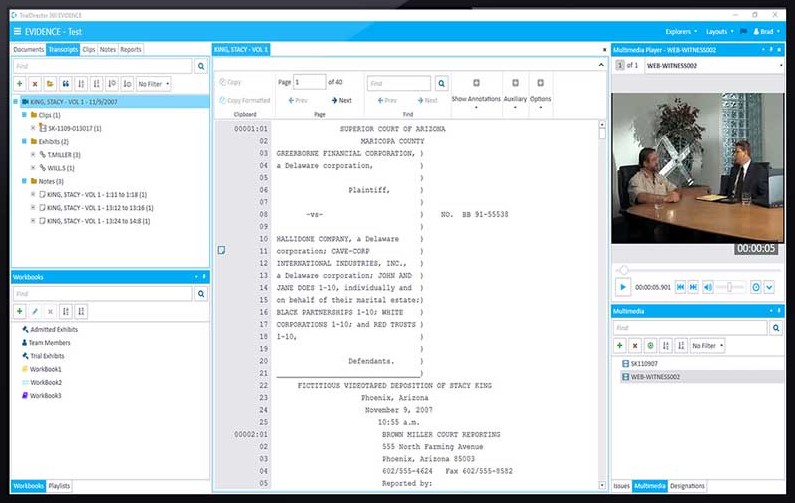
Screenshot of the presentation creation interface.Screenshot of the presentation creation interface.