TrustRadius: an HG Insights company

LinkPoint Connect vs. Revenue Grid

Save this comparison

Save this comparison

Add Product

Recommended Comparisons

    Overview
    ProductRatingMost Used ByProduct SummaryStarting Price

    LinkPoint Connect

    Score9 out of 10
    N/ALinkPoint Connect promises to streamline data entry and access by enabling users to instantly view CRM data within their email client. This sales intelligence solution integrates Salesforce and Microsoft Dynamics CRM data in Outlook or IBM Notes. According to the vendor, key capabilities include: View real-time Salesforce data without ever leaving your email. Click on an email, and the LinkPoint Connect Side Panel instantly displays that contact’s information directly from…

    $192

    per user, per year

    Revenue Grid

    Score8 out of 10
    N/ARevenue Grid is an AI Guided Selling platform that nudges sales teams with step-by-step guidance towards actions that bring the best results, shows deals at risk, and prioritizes tactics with the greatest impact. Guided Selling is a new concept in B2B selling that focuses on the needs and challenges of sales teams. The vendor states their philosophy is to provide step-by-step guidance on each deal reps have in their pipeline and help sales teams be in…N/A
    Pricing
    LinkPoint ConnectRevenue Grid
    Editions & Modules
    LinkPoint Connect for Outlook + Salesforce
    $192
    per user, per year
    LinkPoint Connect for Outlook + Microsoft Dynamics CRM
    $192
    per user, per year
    LinkPoint Connect for IBM Notes + Salesforce
    $228
    per user, per year
    LinkPoint Connect for IBM Notes + Microsoft Dynamics CRM
    $228
    per user, per year
    No answers on this topic
    Offerings
    Pricing Offerings
    LinkPoint ConnectRevenue Grid
    Free Trial
    YesYes
    Free/Freemium Version
    NoNo
    Premium Consulting/Integration Services
    YesYes
    Entry-level Setup Fee$16 per user per yearNo setup fee
    Additional DetailsSubscriptions are billed annually. Discounts available for non-profits. Volume discounts available. LinkPoint Connect Solutions are available for Outlook and IBM Notes users. These include preconfigured implementations for Advologix, Apto, Apttus, FinancialForce.com, Jobscience, Navatar, Pardot, Salesforce Shield, and TaskRay.
    More Pricing Information
    User Ratings
    LinkPoint ConnectRevenue Grid
    Likelihood to Recommend
    9.0
    (3 ratings)
    8.0
    (4 ratings)
    Likelihood to Renew
    -
    (0 ratings)
    8.0
    (1 ratings)
    Usability
    -
    (0 ratings)
    10.0
    (1 ratings)
    Support Rating
    10.0
    (1 ratings)
    7.0
    (1 ratings)
    Online Training
    -
    (0 ratings)
    9.0
    (1 ratings)
    Implementation Rating
    -
    (0 ratings)
    10.0
    (1 ratings)
    Configurability
    -
    (0 ratings)
    7.0
    (1 ratings)
    User Testimonials
    LinkPoint ConnectRevenue Grid
    Likelihood to Recommend
    LinkPoint360
    LinkPoint is well suited to any situation where Outlook is used for email correspondence and calendar items and there is need to have a record of those items and/or perform connected actions (schedule tasks, follow up reminders, etc.) in Salesforce. Automating this process and removing as much duplication of work as possible is the primary goal and the primary benefit that LinkPoint provides. In addition to efficiency, automating the process also provides a pretty substantial increase in accuracy, removing ca. 50% of the chance for human error. It's pretty simple functionality in concept, but extremely valuable in execution.
    Incentivized
    Read full review
    Revenue Grid
    If you are using Office365 and it is within your budget, utilizing SmartCloud Connect as an interface with a CRM is a no-brainer. It remains hidden when Outlook opens, but with an email selected you can open it with a single click. It then allows you to associate the email and even attachments with email addresses that were included in the to, cc, or from sections of the email. It's a very intuitive user interface and saves time in email tracking.
    Incentivized
    Read full review
    Pros
    LinkPoint360
    No answers on this topic
    Revenue Grid
    No answers on this topic
    Cons
    LinkPoint360
    No answers on this topic
    Revenue Grid
    No answers on this topic
    Likelihood to Renew
    LinkPoint360
    No answers on this topic
    Revenue Grid
    No answers on this topic
    Usability
    LinkPoint360
    No answers on this topic
    Revenue Grid
    No answers on this topic
    Support Rating
    LinkPoint360
    No answers on this topic
    Revenue Grid
    No answers on this topic
    Online Training
    LinkPoint360
    No answers on this topic
    Revenue Grid
    No answers on this topic
    Implementation Rating
    LinkPoint360
    No answers on this topic
    Revenue Grid
    No answers on this topic
    Alternatives Considered
    LinkPoint360
    Prior to our move to LinkPoint, we used the Salesforce add-in for Outlook. This required manual syncing of email and calendar items and no easy to use interface between the two programs. It was very cumbersome for me to use, to the point where I quit using it altogether some time ago. I found it far less frustrating to just switch back and forth between Outlook and Salesforce and manually perform the requisite actions, create tasks or other items, enter the required data, etc.
    Incentivized
    Read full review
    Revenue Grid
    Out of all the other utilities we've used, SmartCloud connect seems to be the most stable. The other interfaces sometimes caused glitchy integrations with Outlook, requiring a user to restart the add-in to restore functionality, but so far that has not been the case with SmartCloud Connect. SmartCloud connect also allows you to connect to different CRM's instead of just one, which means you can still use it when migrating between CRM's.
    Incentivized
    Read full review
    Return on Investment
    LinkPoint360
    No answers on this topic
    Revenue Grid
    No answers on this topic
    ScreenShots

    LinkPoint Connect Screenshots

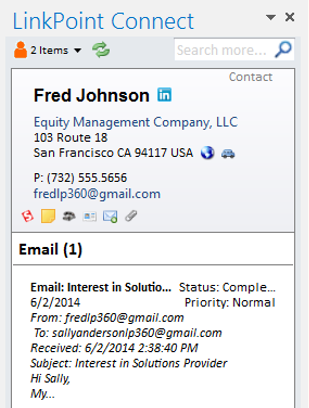
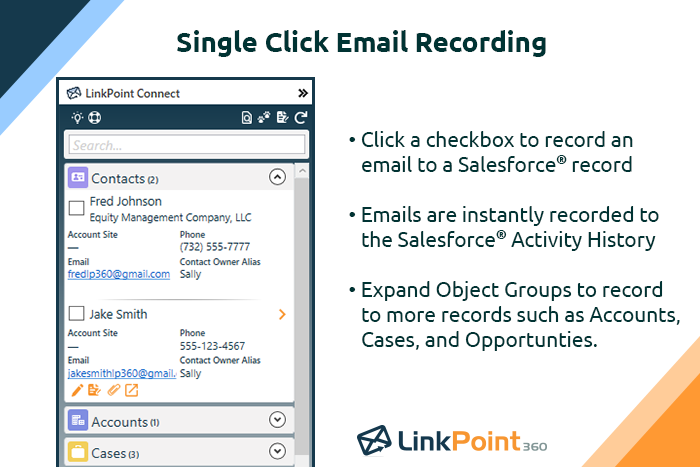
    Screenshot of Record emails to your CRM when sending messages via your email application. LinkPoint Connect makes it easy to associate emails with the right contacts and opportunities with just a few clicks in your email.Screenshot of View real-time CRM data without ever leaving your email. Click on an email, and the LinkPoint Connect Side Panel instantly displays that contact’s information directly from the CRM.Product screenshotProduct screenshotProduct screenshotProduct screenshot

    Revenue Grid Screenshots

    Screenshot of Revenue Guide - signals, guided sellingScreenshot of Revenue Inbox - Email sidebarScreenshot of Real time contextual coachingScreenshot of Relationship intelligenceScreenshot of Complete team visibility