LinkPoint Connect vs. Mailtrack

Overview
ProductRatingMost Used ByProduct SummaryStarting Price
LinkPoint Connect
Score 9.0 out of 10
N/A
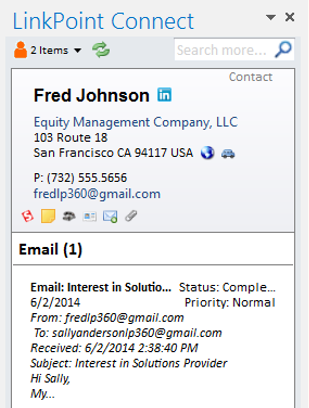
LinkPoint Connect promises to streamline data entry and access by enabling users to instantly view CRM data within their email client. This sales intelligence solution integrates Salesforce and Microsoft Dynamics CRM data in Outlook or IBM Notes. According to the vendor, key capabilities include: View real-time Salesforce data without ever leaving your email. Click on an email, and the LinkPoint Connect Side Panel instantly displays that contact’s information directly from…
$192
per user, per year
Mailtrack
Score 9.6 out of 10
N/A
Mailtrack is a free email tracker for Gmail, boasting over 1,5 million active users. The vendor states users will Ffollow up with more accuracy, find out the moment emails have been read, track the…N/A
Pricing
LinkPoint ConnectMailtrack
Editions & Modules
LinkPoint Connect for Outlook + Salesforce
$192
per user, per year
LinkPoint Connect for Outlook + Microsoft Dynamics CRM
$192
per user, per year
LinkPoint Connect for IBM Notes + Salesforce
$228
per user, per year
LinkPoint Connect for IBM Notes + Microsoft Dynamics CRM
$228
per user, per year
No answers on this topic
Offerings
Pricing Offerings
LinkPoint ConnectMailtrack
Free Trial
YesNo
Free/Freemium Version
NoYes
Premium Consulting/Integration Services
NoNo
Entry-level Setup Fee$16 per user per yearNo setup fee
Additional DetailsSubscriptions are billed annually. Discounts available for non-profits. Volume discounts available. LinkPoint Connect Solutions are available for Outlook and IBM Notes users. These include preconfigured implementations for Advologix, Apto, Apttus, FinancialForce.com, Jobscience, Navatar, Pardot, Salesforce Shield, and TaskRay.
More Pricing Information
Community Pulse
LinkPoint ConnectMailtrack
Best Alternatives
LinkPoint ConnectMailtrack
Small Businesses
Salesflare
Salesflare
Score 6.0 out of 10
Salesflare
Salesflare
Score 6.0 out of 10
Medium-sized Companies
Mailtrack
Mailtrack
Score 9.6 out of 10
HubSpot Sales Hub
HubSpot Sales Hub
Score 8.5 out of 10
Enterprises
Groove, a Clari company
Score 6.2 out of 10
Groove, a Clari company
Score 6.2 out of 10
All AlternativesView all alternativesView all alternatives
User Ratings
LinkPoint ConnectMailtrack
Likelihood to Recommend
9.0
(0 ratings)
9.4
(0 ratings)
Usability
-
(0 ratings)
8.7
(0 ratings)
Support Rating
10.0
(0 ratings)
7.1
(0 ratings)
User Testimonials
LinkPoint ConnectMailtrack
Likelihood to Recommend
LinkPoint is great for people who spend a lot of time working inside outlook. It allows you to update and add records directly from outlook and it has some built-in duplicate prevention which is nice if you don’t have duplicate prevention measures in place. It’s fast and stable. A lot of our users were unable to use SFO due to it crashing outlook.
Read full review
It is critical in Sales to understand if someone received and read the email you sent, and Mailtrack is perfect for this. It is not a critical tool when you are receiving emails but definitely a critical tool when sending emails and you need to know the status and to understand if they even read what you sent.
Read full review
Pros
  • Setup is pretty seamless, at least from an end-user point of view. Essentially you open both Outlook and Salesforce, and then click on the LinkPoint Connect button in Outlook. You are then asked to sign in (provide username/password) to Salesforce. That's all--once my login information was accepted it was set up and syncing emails and calendar items from Outlook to Salesforce. Pretty painless!
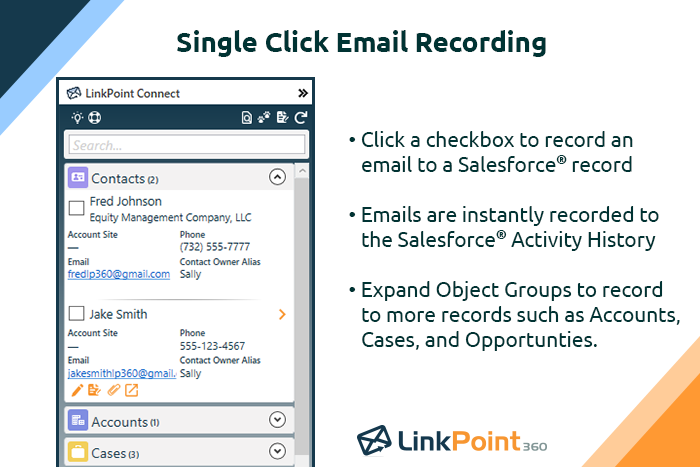
  • Recording/syncing emails to client records is, from my standpoint at least, the core functionality, and LinkPoint does this pretty much flawlessly and with little to no effort or input on my part. This is incredibly important to me as it creates the documentation record I need in Salesforce to provide excellent service to my clients as well as for compliance reasons.
  • The LinkPoint interface also makes it very easy and efficient to perform additional actions in Salesforce without ever leaving Outlook. New Salesforce tasks, events, follow up reminders, etc. are all easy to set up from the LinkPoint sidebar directly in Outlook with just a few clicks of the mouse. And, in those cases where you need to go a little deeper there is a link in the sidebar that will open up the client record directly in Salesforce in a single action, bypassing the multi-step process normally required (i.e. open the program, search for the client, select and open the record, etc.). This ease of interaction between the two programs has removed barriers and has helped me be more consistent in fully utilizing what Salesforce has to offer. No longer do I move on to the next item on my to-do list with scribbled note that will hopefully remind me to update Salesforce later, when I have a chance...
Read full review
  • Immediately you will be notified once any user accesses the email. There is no delay. We have crossed checked and it works awesome.
  • The Mailtrack extension is easy to use. Setting up an account and getting started is smooth and fast.
  • Free version includes unlimited email tracking, this is fab.
Read full review
Cons
  • Installation is a bit tricky for non tech savvy users.
  • Ability to sort/filter search results when looking for additional records.
  • The ability to mass create multiple contacts/leads from an email would be nice.
Read full review
  • Some of the settings can be confusing at first.
  • Some alerts are on by default and can be annoying at times.
  • Good to know if the email was deleted.
  • It would be great to know how much time recipients spent on each email.
Read full review
Usability
No answers on this topic
I would rate Mailtrack's overall usability as a ten out of ten. The reasons for this are actually quite simple. For now, only I have been using Mailtrack. However, looking at the rather easy to use characteristics Mailtrack has to offer, I would not hesitate to recommend it to the rest of my colleagues.
Read full review
Support Rating
Never had to use the support team, which probably means the product works well!
Read full review
This rating is fully deserved for the reasons I mentioned earlier. Namely, firstly, ease of use. Secondly, the reliability and speed of the application. Thirdly, the unobtrusiveness of its functioning. Fourth, the positive effect that the application has on the process of management communication between company employees. Fifth, the overall usability of the application due to the minimum settings.
Read full review
Alternatives Considered
Prior to our move to LinkPoint, we used the Salesforce add-in for Outlook. This required manual syncing of email and calendar items and no easy to use interface between the two programs. It was very cumbersome for me to use, to the point where I quit using it altogether some time ago. I found it far less frustrating to just switch back and forth between Outlook and Salesforce and manually perform the requisite actions, create tasks or other items, enter the required data, etc.
Read full review
The biggest alternatives I've tried are whole email systems - Polymail and Newton. Newton was bar none the best email handling application AND the best email tracker, however, unfortunately, they went out of business at the end of summer 2018. Mailtrack is different because it only does one thing, it tracks email. Without Newton (Polymail is also iOS only, and expensive), Mailtrack is really the only decent solution for email tracking without buying a big system like a CRM. I didn't want to pay $100+/month for user seats, I just wanted to track my own emails for some better intel. That's what Mailtrack does, and that's what Mailtrack is priced to do.
Read full review
Return on Investment
  • It provides transparency into your outbound communication with customers.
Read full review
  • After I started using the Mailtrack, the responses to my emails increased by at least 30%.
  • Once I submitted/sent an important email and got the notification that the email was sent, I feel safe that my email/request has been processed/viewed without being worried that the email went to the spam box.
Read full review
ScreenShots

LinkPoint Connect Screenshots

Screenshot of Record emails to your CRM when sending messages via your email application. LinkPoint Connect makes it easy to associate emails with the right contacts and opportunities with just a few clicks in your email.Screenshot of View real-time CRM data without ever leaving your email. Click on an email, and the LinkPoint Connect Side Panel instantly displays that contact’s information directly from the CRM.Screenshot of Screenshot of Screenshot of Screenshot of

Mailtrack Screenshots

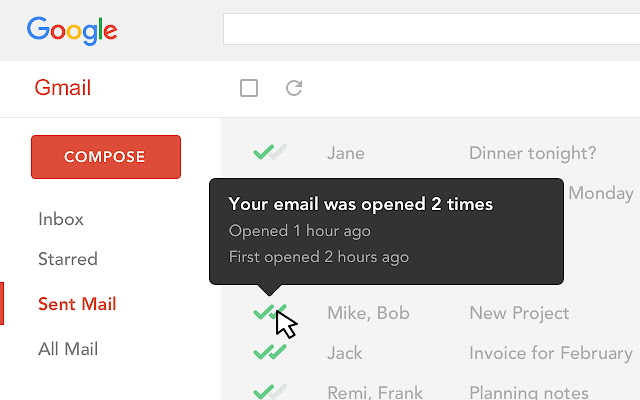
Screenshot of Know when your emails were opened, and how many times.