LinearB vs. Zenhub

Overview
ProductRatingMost Used ByProduct SummaryStarting Price
LinearB
Score 7.8 out of 10
N/A
LinearB is a tool for software development organizations that allows for improved productivity based on objective data driven insights. Founded in 2018, Los Angeles-based LinearB promises a fresh approach to software development project management and metrics, for example helping developer teams correlate project issues with data from their code, Git, projects, and more. LinearB promises to bring context to the metrics, helping engineering leaders understand what is happening across a…
$0
(8 devs included)
Zenhub
Score 8.0 out of 10
N/A
ZenHub is a project management solution that runs native within GitHub with collaboration boards, file sharing, and pipeline selection.
$0
Pricing
LinearBZenhub
Editions & Modules
Free
$0
(8 devs included)
Pro
$10
Per dev per month to start
Enterprise
$45
Per dev per month
Free
$0
Growth
$8.33
per month per user
Growth
$8.33
per month per user
Enterprise
Contact us
Enterprise
Contact us
Offerings
Pricing Offerings
LinearBZenhub
Free Trial
YesYes
Free/Freemium Version
YesYes
Premium Consulting/Integration Services
NoNo
Entry-level Setup FeeNo setup feeNo setup fee
Additional DetailsThe listed prices are per user, per month when billed annually.
More Pricing Information
Community Pulse
LinearBZenhub
Features
LinearBZenhub
Project Management
Comparison of Project Management features of Product A and Product B
LinearB
-
Ratings
Zenhub
6.6
Ratings
15% below category average
Task Management00 Ratings8.00 Ratings
Resource Management00 Ratings7.30 Ratings
Gantt Charts00 Ratings2.00 Ratings
Scheduling00 Ratings9.10 Ratings
Workflow Automation00 Ratings2.00 Ratings
Team Collaboration00 Ratings7.00 Ratings
Support for Agile Methodology00 Ratings8.00 Ratings
Support for Waterfall Methodology00 Ratings1.00 Ratings
Document Management00 Ratings5.40 Ratings
Email integration00 Ratings8.30 Ratings
Mobile Access00 Ratings7.90 Ratings
Timesheet Tracking00 Ratings10.00 Ratings
Change request and Case Management00 Ratings9.70 Ratings
Professional Services Automation
Comparison of Professional Services Automation features of Product A and Product B
LinearB
-
Ratings
Zenhub
9.0
Ratings
18% above category average
Quotes/estimates00 Ratings10.00 Ratings
Project & financial reporting00 Ratings8.00 Ratings
Best Alternatives
LinearBZenhub
Small Businesses
Visual Studio
Visual Studio
Score 9.1 out of 10
Stackby
Stackby
Score 9.0 out of 10
Medium-sized Companies
Visual Studio
Visual Studio
Score 9.1 out of 10
InEight
InEight
Score 8.3 out of 10
Enterprises
Visual Studio
Visual Studio
Score 9.1 out of 10
InEight
InEight
Score 8.3 out of 10
All AlternativesView all alternativesView all alternatives
User Ratings
LinearBZenhub
Likelihood to Recommend
9.0
(0 ratings)
8.0
(0 ratings)
Usability
-
(0 ratings)
7.0
(0 ratings)
Support Rating
-
(0 ratings)
8.3
(0 ratings)
User Testimonials
LinearBZenhub
Likelihood to Recommend
It gives you an amazing dashboard with graphs and data that helps in analyzing our work. Through cycle metric tracking, the throughput of your teams is great as compared to agile metrics such as Scrum Velocity.
Read full review
Zenhub is incredible for the below areas: Burndown Charts, Release Reports, Velocity Tracking, Control Points Charts, Cumulative Flow Diagrams And if there is a bottleneck in your workflow, ZenHub identifies it. The most important aspect is serving as a collaboration tool for areas that are impeding implementation projects. For example when working with non-standard ERPs and having to document ERP integrations this tool is very helpful
Read full review
Pros
No answers on this topic
  • ZenHub continually adds to its reporting suite-- that truly allows you to track forward motion and see what issues may be the cause of any delays.
  • Both our technical and non-technical staff can understand and use the functionality.
  • We like the flexibility of being able to provide labels to our stories that can be customized to the way our company does things--- such as knowing if an epic is part of a module or a stream.
  • We also like the flexibility of the number and labeling of the pipelines--- again, very adaptable to our organization.
  • The filtering is very useful--- with and/or conditions, and allows people on different projects, doing different functions, an easy way to view what is important to them.
Read full review
Cons
  • Tracking work based on Kanban methodology has some glitches and is not fully supported in linear.
Read full review
  • Sometimes, updates to a GitHub project can get lost if they're made through ZenHub. You do need to open the GitHub project occasionally, as you don't have exactly the same ability to modify issues and milestones from within ZenHub.
  • It's great to be able to see your projects from within ZenHub, but sometimes you'll need to check in on the GitHub project itself, as well.
  • I've run into some problems with updates getting lost on occasion. I think this happens when you do the update from within ZenHub instead of from GitHub itself. I also don't have quite as much control over my issues or milestones from within ZenHub.
Read full review
Usability
No answers on this topic
Once it's up and running it's easy to use. It needs a little consideration to get set up perfectly for your own needs, but that is the same for any feature-rich software.
Read full review
Support Rating
No answers on this topic
Support is good, but quite honestly, I haven't needed any support since 2015. As I remember, I was required to open a ticket and had to wait a few days for resolution. I give it a rating of 8 because of the lag in getting a solid resolution, but it was resolved adequately.
Read full review
Alternatives Considered
No answers on this topic
Way better than competition if you use github because it seamlessly integrates without doing anything. You don't need to duplicate your issues, etc. As long as your devs already use github and github issues this will be a no brainer and simple to implement. With JIRA or Trello we were doing everything twice, things got dropped, etc.
Read full review
Return on Investment
No answers on this topic
  • We are now able to determine output potential from our development resources based on points assignment.
  • We were able to successfully implement an Agile methodology in our department.
  • We have been able to better track tasks.
  • We have used the releases feature to group our task to business release expections and easily filter.
Read full review
ScreenShots

Zenhub Screenshots

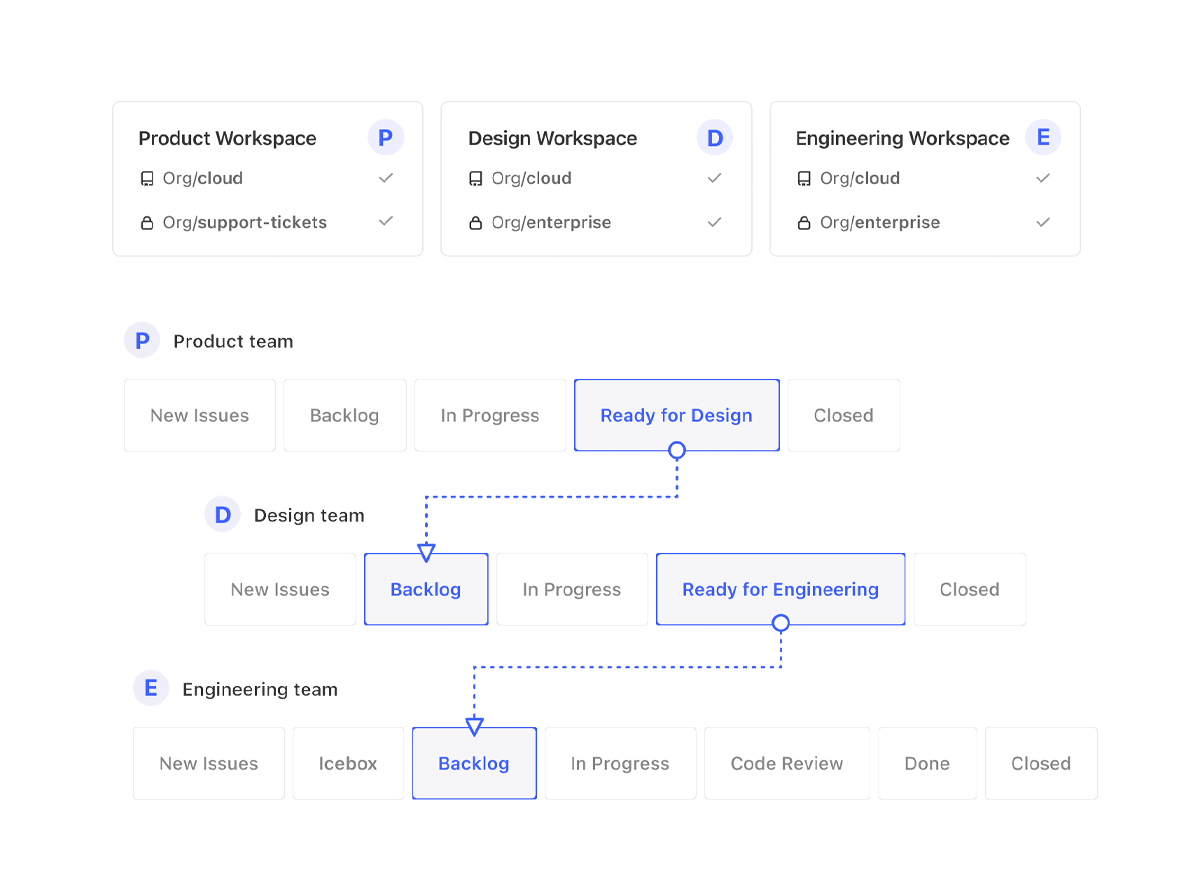
Screenshot of Zenhub boards are similar to Kanban boards but more powerful as it's powered by data and objects from GitHub. You can also add multiple repos and automate issues across multiple boards.Screenshot of Get real-time updates on a teams performance with Zenhub reportsScreenshot of See and share work in flight with Zenhub roadmapsScreenshot of Automate hand offs between teams with workflow automationScreenshot of Get a snapshot of a team's productivity from Zenhub boardScreenshot of Request, provide and review story point estimates right on the issue. Reduce time spent in meetings by allowing team members to estimate on their own time right in Zenhub