TrustRadius: an HG Insights company

iSpring Suite vs. Zywave Client Cloud - Education & Training

Save this comparison

Save this comparison

Add Product

Recommended Comparisons

    Overview
    ProductRatingMost Used ByProduct SummaryStarting Price

    iSpring Suite

    Score8.1 out of 10
    N/AiSpring Suite helps users build courses that are mobile-ready and adaptive. It’s integrated with PowerPoint, so users can create the…

    $970

    per year per user

    Zywave Client Cloud - Education & Training

    Score10 out of 10
    N/AZywave Learning is a learning management solution providing numerous solutions such as employee sexual harassment prevention training, workplace training, and other employee training courses and testing, from Zywave in Milwaukee.N/A
    Pricing
    iSpring SuiteZywave Client Cloud - Education & Training
    Editions & Modules
    No answers on this topic
    No answers on this topic
    Offerings
    Pricing Offerings
    iSpring SuiteZywave Client Cloud - Education & Training
    Free Trial
    YesNo
    Free/Freemium Version
    YesNo
    Premium Consulting/Integration Services
    NoNo
    Entry-level Setup FeeNo setup feeNo setup fee
    Additional DetailsAcademic, non-profit, government and volume discounts are available.
    More Pricing Information
    Community Pulse
    iSpring SuiteZywave Client Cloud - Education & Training
    Considered Both Products
    iSpring Solutions, Inc
    No answer on this topic
    Zywave
    No answer on this topic
    Key User Insights
    Would buy again
    99%
    Would buy again
    115 Answers
    No answers on this topic
    Delivers good value for the price
    98%
    Delivers good value for the price
    106 Answers
    No answers on this topic
    Happy with the feature set
    96%
    Happy with the feature set
    111 Answers
    No answers on this topic
    Lived up to sales and marketing promises
    97%
    Lived up to sales and marketing promises
    101 Answers
    No answers on this topic
    Implementation went as expected
    99%
    Implementation went as expected
    106 Answers
    No answers on this topic
    Features
    iSpring SuiteZywave Client Cloud - Education & Training
    Learning Management
    Comparison of Learning Management features of iSpring Suite and Zywave Client Cloud - Education & Training
    Feature
    iSpring Suite
    -
    Ratings
    Zywave Client Cloud - Education & Training
    10.0
    1 Ratings
    21% above category average
    Course authoring00 Ratings10.01 Ratings
    Course catalog or library00 Ratings10.01 Ratings
    Player/Portal00 Ratings10.01 Ratings
    Learning content00 Ratings10.01 Ratings
    Mobile friendly00 Ratings10.01 Ratings
    Progress tracking & certifications00 Ratings10.01 Ratings
    Assignments00 Ratings10.01 Ratings
    Compliance management00 Ratings10.01 Ratings
    Learning administration00 Ratings10.01 Ratings
    Learning reporting & analytics00 Ratings10.01 Ratings
    Social learning00 Ratings10.01 Ratings
    User Ratings
    iSpring SuiteZywave Client Cloud - Education & Training
    Likelihood to Recommend
    9.0
    (113 ratings)
    10.0
    (1 ratings)
    Likelihood to Renew
    9.1
    (3 ratings)
    -
    (0 ratings)
    Usability
    8.3
    (55 ratings)
    -
    (0 ratings)
    Support Rating
    9.3
    (16 ratings)
    -
    (0 ratings)
    Implementation Rating
    9.1
    (1 ratings)
    -
    (0 ratings)
    User Testimonials
    iSpring SuiteZywave Client Cloud - Education & Training
    Likelihood to Recommend
    iSpring Solutions, Inc
    iSpring Suite gives me a platform to easily create training courses for any number of subjects, custom-designed to fit my workplace. I can include quizzes that allow me to track both the completion rate of the course and the success rate of the training. Its user-friendliness stands out and makes my role as Training Director much easier on a day-to-day basis.
    Read full review
    Zywave
    We have multiple locations across multiple states. Training in person is sometimes impossible. I like that you can assign training that employees can complete at their leisure, and you can track where they are with their tasks.
    Incentivized
    Read full review
    Pros
    iSpring Solutions, Inc
    • Great range of images to use to show real people in the slides across the slideset because of the number of different actions they are doing
    • Support is easy to access and always helpful with easy to understand advice as well as links to further knowledge
    • Recording narration and editing within the iSpring Suite presentation makes it easy to use this function as a novice.
    Incentivized
    Read full review
    Zywave
    No answers on this topic
    Cons
    iSpring Solutions, Inc
    • More facial expressions of the characters.
    • Update independent of my prompting/box checking.
    • Add details on what the customized play includes when the mouse hovers over the icon. It took a bit of time to realize that this was where we could select different layouts.
    Incentivized
    Read full review
    Zywave
    • I wish it would alert you via email when someone hasn't completed an assigned training.
    Incentivized
    Read full review
    Likelihood to Renew
    iSpring Solutions, Inc
    I would give it 10 but I also like to try new solutions.
    Read full review
    Zywave
    No answers on this topic
    Usability
    iSpring Solutions, Inc
    iSpring Suite is a perfect tool overall to create contents in collaboration with colleagues. There are some difficulties though in usability but the usability is OK in total. We are fully satisfied with the customer support. There are simple online tutorials and a team of competent support colleagues. The support content is sometimes not simply accessible, you need to search for them longer.
    Incentivized
    Read full review
    Zywave
    No answers on this topic
    Support Rating
    iSpring Solutions, Inc
    Great software is only exceeded by their fantastic support. Prompt responses, complete with clearly outlined steps to follow, are just the beginning. There are tremendous resources and continual webinars to challenge what we think we know about the iSpring Suite. I often use PowerPoint to lay out marketing slides, add music and narration, then publish them as an MP4 video. I can count on iSpring support to assist me when I need help.
    Read full review
    Zywave
    No answers on this topic
    Alternatives Considered
    iSpring Solutions, Inc
    Ultimately, I selected iSpring Suite because of the ease of use and small learning curve. I needed to be able to start creating content immediately, and after doing trial periods with iSpring as well as some of the other options, it was clear that I could be up and running the quickest with iSpring. I don't see any features that are missing for what I need, and it was also the cheapest option.
    Incentivized
    Read full review
    Zywave
    No answers on this topic
    Return on Investment
    iSpring Solutions, Inc
    • The ROI on this product has been great
    • It has enhance my reputation personally within the organization. This has led to other departments requesting me by name to head up eLearning development projects, even delaying their own deadlines to ensure that I am involved.
    • Other than a few duds (I let some inexperienced vocal talent slip thru in the heat of multiple conflicting deadlines), learner feedback has skyrocketed over that developed before I became involved and standardized the effort on iSpring
    Read full review
    Zywave
    • Positive as I can train people remotely and save on business travel.
    Incentivized
    Read full review
    ScreenShots

    iSpring Suite Screenshots

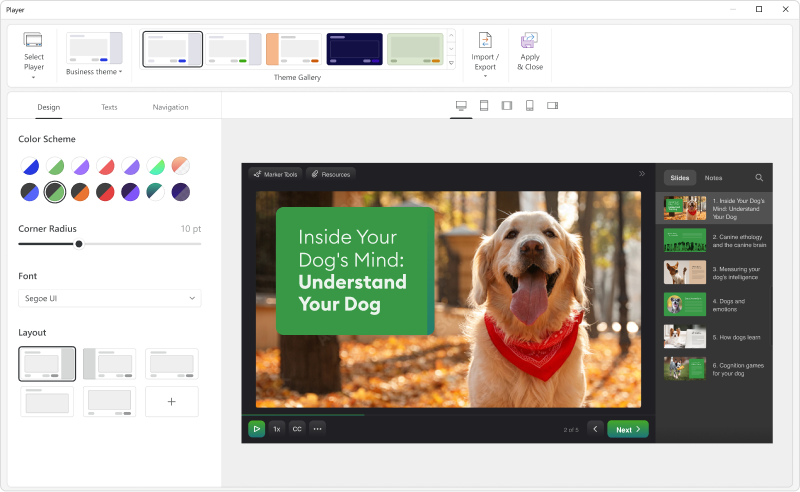
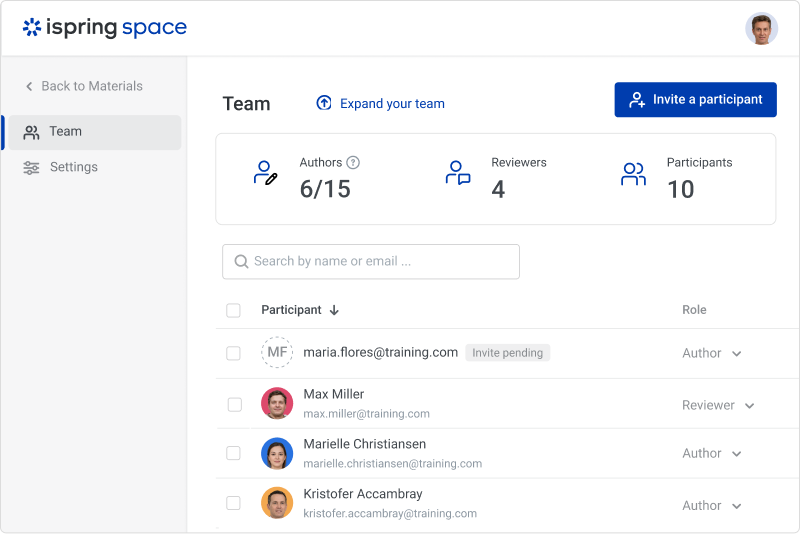
    Screenshot of iSpring SuiteScreenshot of the customizable course player — the layout can be changed as desired.Screenshot of a role-playScreenshot of course interactionsScreenshot of the online collaboration toolScreenshot of Video lessons and screencasts