A de minimis incentive was given to thank the reviewer for their time. The incentive was not used to bias or drive a particular response, nor was the incentive contingent on a positive endorsement. More Info
Warehouse Manager in Product Management at Food Connects (Food & Beverages, 11-50 employees)
Chose iSpring Suite
Our primary course and quiz creator was using Google Forms - iSpring Suite is several times better. Easier to use and makes more engaging content instead of bland questions that are easily ignorable by the user.
A de minimis incentive was given to thank the reviewer for their time. The incentive was not used to bias or drive a particular response, nor was the incentive contingent on a positive endorsement. More Info
IT Management Consulting in Customer Service at HiSolutions AG (Information Services, 201-500 employees)
Chose iSpring Suite
Compared to other applications, iSpring Suite is based on PowerPoint and therefore on a familiar way of working for creating content for knowledge transfer. This basis facilitates a very simple and uncomplicated transition to the new tool for new users. New users are quickly …
A de minimis incentive was given to thank the reviewer for their time. The incentive was not used to bias or drive a particular response, nor was the incentive contingent on a positive endorsement. More Info
Verified User
Chose iSpring Suite
If you know PowerPoint, you know iSpring Suite. Not only is there a big learning curve with the other software, it also meant to us to start from scratch with our PowerPoints, which would have taken weeks to do. I can't state enough how big of a deal it is that it's all within …
A de minimis incentive was given to thank the reviewer for their time. The incentive was not used to bias or drive a particular response, nor was the incentive contingent on a positive endorsement. More Info
A de minimis incentive was given to thank the reviewer for their time. The incentive was not used to bias or drive a particular response, nor was the incentive contingent on a positive endorsement. More Info
Verified User
Chose iSpring Suite
So much simpler. Integrates well with PowerPoint so there is little learning curve. Articulate is more powerful but that level of detail is not required for most applications. The learning curve with Articulate is much larger.
A de minimis incentive was given to thank the reviewer for their time. The incentive was not used to bias or drive a particular response, nor was the incentive contingent on a positive endorsement. More Info
IT Manager in Information Technology at Cloud Aero Ltd (Airlines/Aviation, 1-10 employees)
Chose iSpring Suite
We have chosen iSpring Suite over Articulate partially due to cost but also iSpring Suite does not distort the PowerPoint templates we have made as it does not import them into itself rather it becomes a part of PowerPoint.
A de minimis incentive was given to thank the reviewer for their time. The incentive was not used to bias or drive a particular response, nor was the incentive contingent on a positive endorsement. More Info
Training Director in Quality Assurance at AAR Corp (Airlines/Aviation, 51-200 employees)
Chose iSpring Suite
iSpring Suite is the only product I've used since I've been in my current role and I'm glad for that. It was so easy to learn and so easy to become proficient with that it makes hard for me to even imagine a product exists that will work better for me.
A de minimis incentive was given to thank the reviewer for their time. The incentive was not used to bias or drive a particular response, nor was the incentive contingent on a positive endorsement. More Info
Training and Employee Development Manager at Destination Transport, LLC (Logistics & Supply Chain, 51-200 employees)
Chose iSpring Suite
When comparing features, price point and ease of use, there was no question which I was choosing. iSpring Suite offered more features and was the easiest to use. Additionally, it was one of the most cost conscious choices. It was a no brainer!
A de minimis incentive was given to thank the reviewer for their time. The incentive was not used to bias or drive a particular response, nor was the incentive contingent on a positive endorsement. More Info
A de minimis incentive was given to thank the reviewer for their time. The incentive was not used to bias or drive a particular response, nor was the incentive contingent on a positive endorsement. More Info
Verified User
Chose iSpring Suite
This is our first software purchased on this aspect.
A de minimis incentive was given to thank the reviewer for their time. The incentive was not used to bias or drive a particular response, nor was the incentive contingent on a positive endorsement. More Info
Verified User
Chose iSpring Suite
Captivate was, I feel, for my experienced users and for a more professional level of course that our organisation did not require at this time. It was too daunting to learn it all to create simple courses fast Easy Generator - too expensive for our needs. iSpring Suite has a …
A de minimis incentive was given to thank the reviewer for their time. The incentive was not used to bias or drive a particular response, nor was the incentive contingent on a positive endorsement. More Info
A de minimis incentive was given to thank the reviewer for their time. The incentive was not used to bias or drive a particular response, nor was the incentive contingent on a positive endorsement. More Info
A de minimis incentive was given to thank the reviewer for their time. The incentive was not used to bias or drive a particular response, nor was the incentive contingent on a positive endorsement. More Info
Verified User
Chose iSpring Suite
We need Powerpoint compatibility because we can develop the training modules faster. Compared to all the authoring tools we have tried, iSpring is the most Powerpoint-friendly.
A de minimis incentive was given to thank the reviewer for their time. The incentive was not used to bias or drive a particular response, nor was the incentive contingent on a positive endorsement. More Info
Verified User
Chose iSpring Suite
I think iSpring Suite is just soooo much easier to learn and use than Captivate. It just adds a plugin to PowerPoint and is very intuitive to use. I found Captivate difficult to figure out, and a lot more expensive.
A de minimis incentive was given to thank the reviewer for their time. The incentive was not used to bias or drive a particular response, nor was the incentive contingent on a positive endorsement. More Info
A de minimis incentive was given to thank the reviewer for their time. The incentive was not used to bias or drive a particular response, nor was the incentive contingent on a positive endorsement. More Info
A de minimis incentive was given to thank the reviewer for their time. The incentive was not used to bias or drive a particular response, nor was the incentive contingent on a positive endorsement. More Info
A de minimis incentive was given to thank the reviewer for their time. The incentive was not used to bias or drive a particular response, nor was the incentive contingent on a positive endorsement. More Info
Verified User
Chose iSpring Suite
We find Adobe Captivate looks outdated, is clunky, has a terrible user interface and is not flexible.
A de minimis incentive was given to thank the reviewer for their time. The incentive was not used to bias or drive a particular response, nor was the incentive contingent on a positive endorsement. More Info
Verified User
Chose iSpring Suite
iSpring Suite is wayyyy easier to use and does all I need.
A de minimis incentive was given to thank the reviewer for their time. The incentive was not used to bias or drive a particular response, nor was the incentive contingent on a positive endorsement. More Info
Verified User
Chose iSpring Suite
For us, it's really important to have the freedom to innovate by freeing our creativity through the functions offered by iSpring Suite. Other solutions don't offer the same flexibility as iSpring Suite, and for us this was an important factor in our choice of the Ispring …
A de minimis incentive was given to thank the reviewer for their time. The incentive was not used to bias or drive a particular response, nor was the incentive contingent on a positive endorsement. TR verified that a representative sample of customers was invited. More Info
Director, RN and Credentialled Diabetes Educator in Corporate at EdHealth Australia (Health, Wellness and Fitness, 1-10 employees)
Chose iSpring Suite
I did my research a while ago and liked the ease with which it integrated into the PowerPoint presentations as I have a lot already prepared. Will be able to update them all in time to the new format.
A de minimis incentive was given to thank the reviewer for their time. The incentive was not used to bias or drive a particular response, nor was the incentive contingent on a positive endorsement. More Info
Verified User
Chose iSpring Suite
We've used Techsmith's "Camtasia" product, but only for video creation. It has a more powerful interface and feature-set, but none of the other tools that are in iSpring Suite.
A de minimis incentive was given to thank the reviewer for their time. The incentive was not used to bias or drive a particular response, nor was the incentive contingent on a positive endorsement. More Info
Verified User
Chose iSpring Suite
Is less words the offline system presents only these having to generate the scorm files which had conflicts and upload them and test them and test and test and test, while the creation of the scorm offers a feasibility to preview the scorm without the need to upload it to the …
A de minimis incentive was given to thank the reviewer for their time. The incentive was not used to bias or drive a particular response, nor was the incentive contingent on a positive endorsement. More Info
iSpring Suite gives me a platform to easily create training courses for any number of subjects, custom-designed to fit my workplace. I can include quizzes that allow me to track both the completion rate of the course and the success rate of the training. Its user-friendliness stands out and makes my role as Training Director much easier on a day-to-day basis.
A de minimis incentive was given to thank the reviewer for their time. The incentive was not used to bias or drive a particular response, nor was the incentive contingent on a positive endorsement. More Info
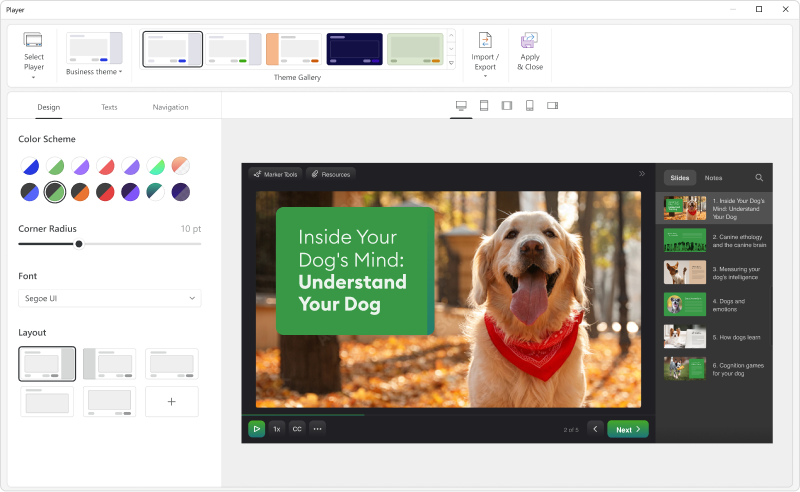
Add details on what the customized play includes when the mouse hovers over the icon. It took a bit of time to realize that this was where we could select different layouts.
A de minimis incentive was given to thank the reviewer for their time. The incentive was not used to bias or drive a particular response, nor was the incentive contingent on a positive endorsement. More Info
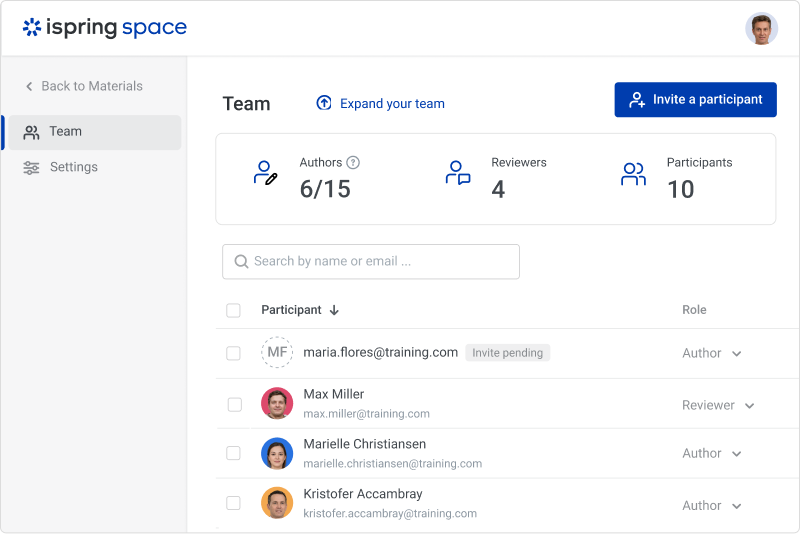
iSpring Suite is a perfect tool overall to create contents in collaboration with colleagues. There are some difficulties though in usability but the usability is OK in total. We are fully satisfied with the customer support. There are simple online tutorials and a team of competent support colleagues. The support content is sometimes not simply accessible, you need to search for them longer.
A de minimis incentive was given to thank the reviewer for their time. The incentive was not used to bias or drive a particular response, nor was the incentive contingent on a positive endorsement. More Info
Great software is only exceeded by their fantastic support. Prompt responses, complete with clearly outlined steps to follow, are just the beginning. There are tremendous resources and continual webinars to challenge what we think we know about the iSpring Suite. I often use PowerPoint to lay out marketing slides, add music and narration, then publish them as an MP4 video. I can count on iSpring support to assist me when I need help.
Ultimately, I selected iSpring Suite because of the ease of use and small learning curve. I needed to be able to start creating content immediately, and after doing trial periods with iSpring as well as some of the other options, it was clear that I could be up and running the quickest with iSpring. I don't see any features that are missing for what I need, and it was also the cheapest option.
A de minimis incentive was given to thank the reviewer for their time. The incentive was not used to bias or drive a particular response, nor was the incentive contingent on a positive endorsement. More Info
It has enhance my reputation personally within the organization. This has led to other departments requesting me by name to head up eLearning development projects, even delaying their own deadlines to ensure that I am involved.
Other than a few duds (I let some inexperienced vocal talent slip thru in the heat of multiple conflicting deadlines), learner feedback has skyrocketed over that developed before I became involved and standardized the effort on iSpring