iSpring Suite helps users build courses that are mobile-ready and adaptive. It’s integrated with PowerPoint, so users can create the…
$970
per year per user
Studio 360 (discontinued)
Score8.8 out of 10
N/A
Studio 360 for PowerPoint, or formerly Articulate Studio, was a PowerPoint plugin used to develop elearning course content. It has been discontinued and is no longer receiving support.
N/A
Pricing
iSpring Suite
Studio 360 (discontinued)
Editions & Modules
No answers on this topic
No answers on this topic
Offerings
Pricing Offerings
iSpring Suite
Studio 360 (discontinued)
Free Trial
Yes
No
Free/Freemium Version
Yes
No
Premium Consulting/Integration Services
No
No
Entry-level Setup Fee
No setup fee
No setup fee
Additional Details
Academic, non-profit, government and volume discounts are available.
Engineering Director in Professional Services at Synergie Training/SigmaPM (Construction, 1-10 employees)
Chose iSpring Suite
Slightly cheaper, maybe not so powerful but easy to use straight away on day 1. We had to make a quick decision and so didn't have time or resources to test and compare products. We looked at reviews and decided to try one on a free trial basis. It worked well so we bought it.
A de minimis incentive was given to thank the reviewer for their time. The incentive was not used to bias or drive a particular response, nor was the incentive contingent on a positive endorsement. More Info
A de minimis incentive was given to thank the reviewer for their time. The incentive was not used to bias or drive a particular response, nor was the incentive contingent on a positive endorsement. More Info
Account Executive in Sales at Clarity Solutions (E-Learning, 11-50 employees)
Chose iSpring Suite
I think iSpring is very similar to other main competitors (that we have evaluated) in terms of features and resources. The great difference is pricing, since iSpring has a low cost per license. It is very easy and quick to download, install and use, even during the trial period.
A de minimis incentive was given to thank the reviewer for their time. The incentive was not used to bias or drive a particular response, nor was the incentive contingent on a positive endorsement. More Info
iSpring Suite gives me a platform to easily create training courses for any number of subjects, custom-designed to fit my workplace. I can include quizzes that allow me to track both the completion rate of the course and the success rate of the training. Its user-friendliness stands out and makes my role as Training Director much easier on a day-to-day basis.
Articulate Studio is constantly surprising in terms of what it can do. It is like a "Swiss Army Knife" of functionality. I've used it to build portfolios, whole interactive websites, authoring videos and I often discover novel ways to make it useful on a pretty regular basis. What would be a situation where you would not want to use Articulate Studio? Well, even though you can use it to author video and to publish websites, it's not a replacement for a video editing package or a web platform like WordPress, but there are times when it will do certain things in an astoundingly simple way superior to other tools.
A de minimis incentive was given to thank the reviewer for their time. The incentive was not used to bias or drive a particular response, nor was the incentive contingent on a positive endorsement. More Info
A de minimis incentive was given to thank the reviewer for their time. The incentive was not used to bias or drive a particular response, nor was the incentive contingent on a positive endorsement. More Info
They made it very easy to understand how to add new content to the courses, including images, videos or audio, of course, you are still able to do text-based content as well.
Creating quizzes has never been easier. The ability to add controls to each question and what actions each answer creates, whether an additional question or passing to the next section. Customizing these actions are very easy to learn and add to your course.
Being able to use your own scoring mechanism is awesome! I like SCORM but there are many options to use including a custom one of your own. This ability allows you to pass your students over to a proprietary system that enrolls them in the next course, or use the built-in utilities to provide the next course or quiz, the choice is yours!
A de minimis incentive was given to thank the reviewer for their time. The incentive was not used to bias or drive a particular response, nor was the incentive contingent on a positive endorsement. More Info
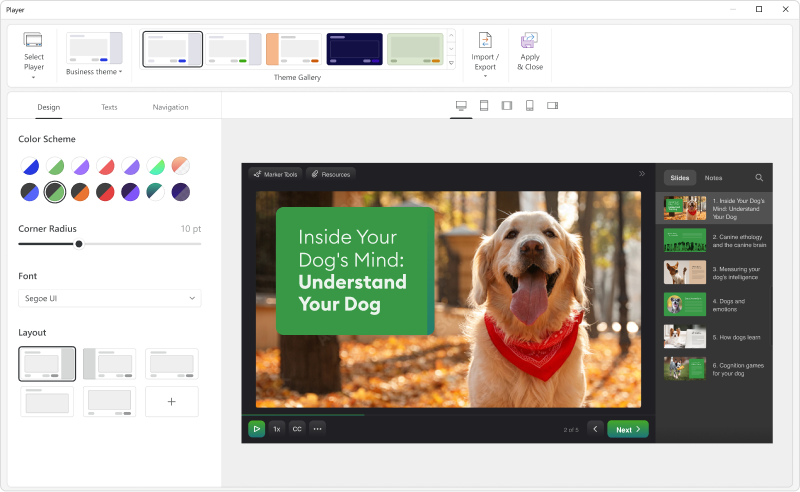
Add details on what the customized play includes when the mouse hovers over the icon. It took a bit of time to realize that this was where we could select different layouts.
A de minimis incentive was given to thank the reviewer for their time. The incentive was not used to bias or drive a particular response, nor was the incentive contingent on a positive endorsement. More Info
The audio editor is awful. Sometimes when you cut a section, it actually takes a different section that you selected. Especially when in zoom mode. You have to then undo the action, and re-do. Also, scrubbing through the audio is difficult. If you're exporting audio, it can glitch during the process. I avoid using the audio editor whenever I can.
After all these years, it's still a buggy program. You can be doing your recordings, and a sudden message appears saying that something went wrong and needs to close. I've done re-installs, contacted support, and I constantly clear the temp folder. Still happens. Also, it's a good idea to export your audio, and there have been times the program freezes up on me, and the audio file (in the .ppta file) gets corrupted and all audio is permanently lost.
The program can get slow when publishing, previewing or opening the audio editor.
The included Engage program is pretty good, but it needs more customization options. And I think they can add more modules that provide a little more engagement.
A de minimis incentive was given to thank the reviewer for their time. The incentive was not used to bias or drive a particular response, nor was the incentive contingent on a positive endorsement. More Info
A de minimis incentive was given to thank the reviewer for their time. The incentive was not used to bias or drive a particular response, nor was the incentive contingent on a positive endorsement. More Info
iSpring Suite is a perfect tool overall to create contents in collaboration with colleagues. There are some difficulties though in usability but the usability is OK in total. We are fully satisfied with the customer support. There are simple online tutorials and a team of competent support colleagues. The support content is sometimes not simply accessible, you need to search for them longer.
A de minimis incentive was given to thank the reviewer for their time. The incentive was not used to bias or drive a particular response, nor was the incentive contingent on a positive endorsement. More Info
This is very useable software even for novice eLearning authoring users. People with some PowerPoint experience should be fine with this software and even Excel!
A de minimis incentive was given to thank the reviewer for their time. The incentive was not used to bias or drive a particular response, nor was the incentive contingent on a positive endorsement. More Info
Great software is only exceeded by their fantastic support. Prompt responses, complete with clearly outlined steps to follow, are just the beginning. There are tremendous resources and continual webinars to challenge what we think we know about the iSpring Suite. I often use PowerPoint to lay out marketing slides, add music and narration, then publish them as an MP4 video. I can count on iSpring support to assist me when I need help.
I've never really had any major issues with the product (Other than the registration loop error)and my ten out of ten rating is based on the assistance I got when we initially set up the extension in Power Point. I found the support folks to be professional, helpful and friendly
A de minimis incentive was given to thank the reviewer for their time. The incentive was not used to bias or drive a particular response, nor was the incentive contingent on a positive endorsement. More Info
Ultimately, I selected iSpring Suite because of the ease of use and small learning curve. I needed to be able to start creating content immediately, and after doing trial periods with iSpring as well as some of the other options, it was clear that I could be up and running the quickest with iSpring. I don't see any features that are missing for what I need, and it was also the cheapest option.
A de minimis incentive was given to thank the reviewer for their time. The incentive was not used to bias or drive a particular response, nor was the incentive contingent on a positive endorsement. More Info
Articulate Studio is very much a leader in the e-learning space. It stacks up well against other tools designed to quickly and easily build and update CBTs by managers and super-users versus needing to invest time and effort in dedicated e-learning developers. Process improvement initiatives and cross-functional departments are empowered to develop their trainings themselves and identify areas for future development.
A de minimis incentive was given to thank the reviewer for their time. The incentive was not used to bias or drive a particular response, nor was the incentive contingent on a positive endorsement. More Info
It has enhance my reputation personally within the organization. This has led to other departments requesting me by name to head up eLearning development projects, even delaying their own deadlines to ensure that I am involved.
Other than a few duds (I let some inexperienced vocal talent slip thru in the heat of multiple conflicting deadlines), learner feedback has skyrocketed over that developed before I became involved and standardized the effort on iSpring
I only see positive impact since it is a very easy to use tool for rapid learning. The only point is to know what is possible to develop using this tool to avoid any kind of frustration afterwards.
Another positive impact is that we don't need a diversified development team. There is no need of technical professionals, and a creative instructional designer is enough to develop effective learning content using Studio.
The third positive impact is that Studio makes possible to realize short-term projects, mainly when there's already a PowerPoint presentation.
A de minimis incentive was given to thank the reviewer for their time. The incentive was not used to bias or drive a particular response, nor was the incentive contingent on a positive endorsement. More Info