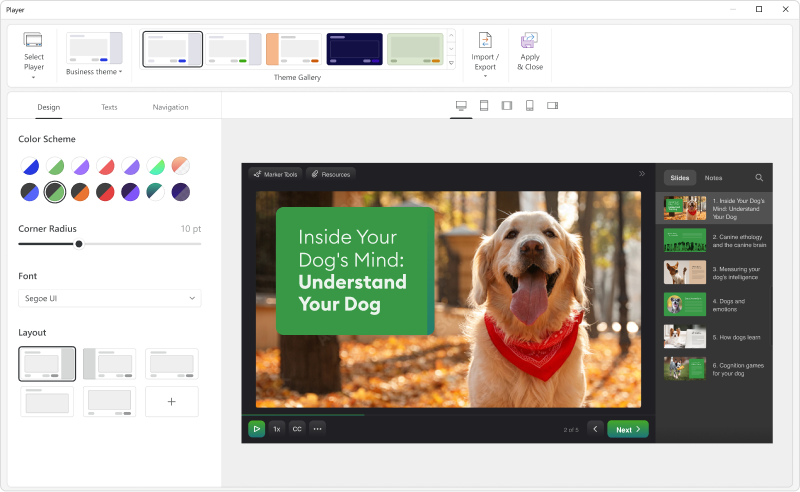
iSpring Suite helps users build courses that are mobile-ready and adaptive. It’s integrated with PowerPoint, so users can create the…
N/A
Quizizz
Score 9.0 out of 10
N/A
Quizizz is a learning platform that uses gamified quizzes to help people learn or teach anything, on any device, in-person or remotely. Quizizz is used by more than 20 million people per month in schools, homes, and offices around the world. The platform is used in classrooms in over 100 countries across the globe, and in over 50 percent of U.S. schools. They say they help educators and training professionals conduct quick assessments on any topic, and analyze results instantly—no grading…
N/A
Pricing
iSpring Suite
Quizizz
Editions & Modules
No answers on this topic
No answers on this topic
Offerings
Pricing Offerings
iSpring Suite
Quizizz
Free Trial
Yes
No
Free/Freemium Version
Yes
No
Premium Consulting/Integration Services
No
No
Entry-level Setup Fee
No setup fee
No setup fee
Additional Details
Academic, non-profit, government and volume discounts are available.
—
More Pricing Information
Community Pulse
iSpring Suite
Quizizz
Features
iSpring Suite
Quizizz
Learning Management
Comparison of Learning Management features of Product A and Product B
iSpring Suite
-
Ratings
Quizizz
8.8
Ratings
3% above category average
Course authoring
00 Ratings
7.40 Ratings
Course catalog or library
00 Ratings
7.00 Ratings
Player/Portal
00 Ratings
10.00 Ratings
Learning content
00 Ratings
9.80 Ratings
Progress tracking & certifications
00 Ratings
9.00 Ratings
Learning reporting & analytics
00 Ratings
10.00 Ratings
Social learning
00 Ratings
8.00 Ratings
Gamification
00 Ratings
9.50 Ratings
eLearning Content
Comparison of eLearning Content features of Product A and Product B
iSpring is well-suited for various industries that want to provide training platforms, lessons, lectures, and other learning modules. In these scenarios, iSpring allows individuals to curate content necessary for sharing information of all types and to deliver material in a way that best meets the targeted audience.
It is best suited in webinars since face-to-face is not yet allowed, we need to find or look for something that will create a bond with clients. It is very effective today, fun check or learning check after the presentation gives additional fun to each and everyone during the training.
The software is in constant revision, so if you search for help online, be sure you are researching the correct revision. There is a lot of debris information about iSpring Suite online.
The Presentation and Publishing features are somewhat intimidating at first. Be sure you pay attention to every detail. The training I develop is pretty standardized, so I was able to write instructions for myself to follow to ensure each instance was set up the same way each time.
There are a lot of 'extras' I never use, such as characters and interactions, so be sure your style of training development is aligned with what iSpring has to offer.
iSpring Suite is a perfect tool overall to create contents in collaboration with colleagues. There are some difficulties though in usability but the usability is OK in total. We are fully satisfied with the customer support. There are simple online tutorials and a team of competent support colleagues. The support content is sometimes not simply accessible, you need to search for them longer.
All reports are very informative and you can analyze the data by student, by class, or by question. The ease of sharing the assignments via Google Classroom is seamless! Teachers can input their own media and questions for anything (quiz, test, survey, emotional check in, etc)
Great software is only exceeded by their fantastic support. Prompt responses, complete with clearly outlined steps to follow, are just the beginning. There are tremendous resources and continual webinars to challenge what we think we know about the iSpring Suite. I often use PowerPoint to lay out marketing slides, add music and narration, then publish them as an MP4 video. I can count on iSpring support to assist me when I need help.
iSpring Suite is the only product I've used since I've been in my current role and I'm glad for that. It was so easy to learn and so easy to become proficient with that it makes hard for me to even imagine a product exists that will work better for me.
I prefer Quizizz to Kahoot for the report options, accessibility functions, and leaderboards. When I am using Kahoot whole group it is hard to see the question and answer options. Students used to only have the colored buttons to choose from on their screen, but now they have the ability to see them on the screen. The question bank for Quizizz is so much more extensive and the ease of making your own is appealing.
It has enhance my reputation personally within the organization. This has led to other departments requesting me by name to head up eLearning development projects, even delaying their own deadlines to ensure that I am involved.
Other than a few duds (I let some inexperienced vocal talent slip thru in the heat of multiple conflicting deadlines), learner feedback has skyrocketed over that developed before I became involved and standardized the effort on iSpring