iSpring Suite vs. Microsoft Hands-on Labs

Overview
ProductRatingMost Used ByProduct SummaryStarting Price
iSpring Suite
Score 8.1 out of 10
N/A
iSpring Suite helps users build courses that are mobile-ready and adaptive. It’s integrated with PowerPoint, so users can create the…N/A
Microsoft Hands-on Labs
Score 6.8 out of 10
N/A
Microsoft Hands-on Labs is a suite of elearning content which also features a virtual learning or training lab for cloud apps and services, instructor led training, and Microsoft Learn coding workshop.N/A
Pricing
iSpring SuiteMicrosoft Hands-on Labs
Editions & Modules
No answers on this topic
Offerings
Pricing Offerings
iSpring SuiteMicrosoft Hands-on Labs
Free Trial
YesNo
Free/Freemium Version
YesNo
Premium Consulting/Integration Services
NoNo
Entry-level Setup FeeNo setup feeNo setup fee
Additional DetailsAcademic, non-profit, government and volume discounts are available.
More Pricing Information
Community Pulse
iSpring SuiteMicrosoft Hands-on Labs
Best Alternatives
iSpring SuiteMicrosoft Hands-on Labs
Small Businesses
iSpring Learn
iSpring Learn
Score 9.6 out of 10
iSpring Learn
iSpring Learn
Score 9.6 out of 10
Medium-sized Companies
iSpring Learn
iSpring Learn
Score 9.6 out of 10
Infosec Skills
Infosec Skills
Score 9.9 out of 10
Enterprises
Articulate 360
Articulate 360
Score 9.3 out of 10
Infosec Skills
Infosec Skills
Score 9.9 out of 10
All AlternativesView all alternativesView all alternatives
User Ratings
iSpring SuiteMicrosoft Hands-on Labs
Likelihood to Recommend
9.1
(0 ratings)
6.0
(0 ratings)
Likelihood to Renew
9.1
(0 ratings)
-
(0 ratings)
Usability
8.3
(0 ratings)
-
(0 ratings)
Support Rating
9.3
(0 ratings)
-
(0 ratings)
Implementation Rating
9.1
(0 ratings)
-
(0 ratings)
User Testimonials
iSpring SuiteMicrosoft Hands-on Labs
Likelihood to Recommend
iSpring is well-suited for various industries that want to provide training platforms, lessons, lectures, and other learning modules. In these scenarios, iSpring allows individuals to curate content necessary for sharing information of all types and to deliver material in a way that best meets the targeted audience.
Read full review
The Microsoft Hands-on Labs were great for training when working alongside an instructor. They would show things on their screen, and I would work alongside with a real environment. Being able to actually use the environment and interact with it was more preferable than just a straight lecture. It allowed me hands-on practice.
Read full review
Pros
  • Great range of images to use to show real people in the slides across the slideset because of the number of different actions they are doing
  • Support is easy to access and always helpful with easy to understand advice as well as links to further knowledge
  • Recording narration and editing within the iSpring Suite presentation makes it easy to use this function as a novice.
Read full review
  • Actual Microsoft environment to play around with
  • Instructions alongside
  • Ability to save a session so you don't lose work
Read full review
Cons
  • The software is in constant revision, so if you search for help online, be sure you are researching the correct revision. There is a lot of debris information about iSpring Suite online.
  • The Presentation and Publishing features are somewhat intimidating at first. Be sure you pay attention to every detail. The training I develop is pretty standardized, so I was able to write instructions for myself to follow to ensure each instance was set up the same way each time.
  • There are a lot of 'extras' I never use, such as characters and interactions, so be sure your style of training development is aligned with what iSpring has to offer.
Read full review
  • Copying and pasting can be clunky
  • Sometimes the instructions are not accurate
  • For some Microsoft tools, it requires you to create a temporary account, which takes some time and is time-consuming
  • Have to remember to save or you will lose your environment
  • May not be the most user-friendly to initially start
Read full review
Likelihood to Renew
Not sure if management wants more eLearning.
Read full review
No answers on this topic
Usability
iSpring Suite is a perfect tool overall to create contents in collaboration with colleagues. There are some difficulties though in usability but the usability is OK in total. We are fully satisfied with the customer support. There are simple online tutorials and a team of competent support colleagues. The support content is sometimes not simply accessible, you need to search for them longer.
Read full review
No answers on this topic
Support Rating
Great software is only exceeded by their fantastic support. Prompt responses, complete with clearly outlined steps to follow, are just the beginning. There are tremendous resources and continual webinars to challenge what we think we know about the iSpring Suite. I often use PowerPoint to lay out marketing slides, add music and narration, then publish them as an MP4 video. I can count on iSpring support to assist me when I need help.
Read full review
No answers on this topic
Alternatives Considered
iSpring Suite is the only product I've used since I've been in my current role and I'm glad for that. It was so easy to learn and so easy to become proficient with that it makes hard for me to even imagine a product exists that will work better for me.
Read full review
I think Udemy is really superior as a platform, people create super high quality courses that get employees up to speed in days. The platform has a web and mobile app and has taking notes functionality that can be exported
Read full review
Return on Investment
  • The ROI on this product has been great
  • It has enhance my reputation personally within the organization. This has led to other departments requesting me by name to head up eLearning development projects, even delaying their own deadlines to ensure that I am involved.
  • Other than a few duds (I let some inexperienced vocal talent slip thru in the heat of multiple conflicting deadlines), learner feedback has skyrocketed over that developed before I became involved and standardized the effort on iSpring
Read full review
  • I think it has a positive impact in having a platform to train employees
  • I don't think the cost might be worth it given that the content is super dry
Read full review
ScreenShots

iSpring Suite Screenshots

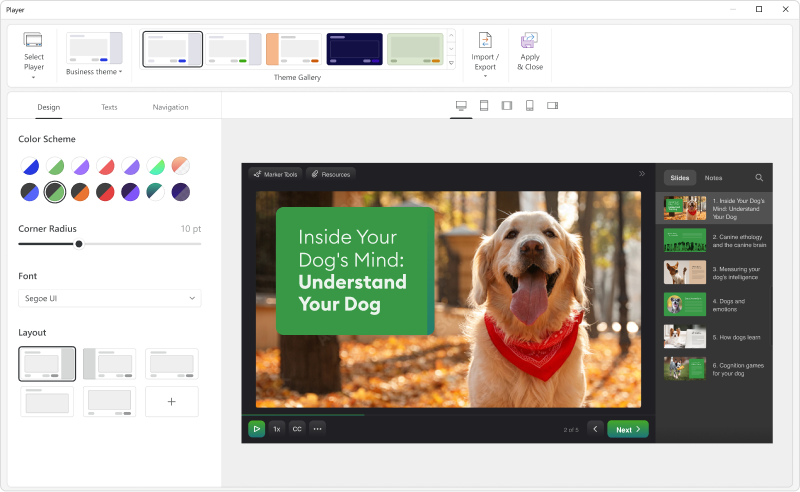
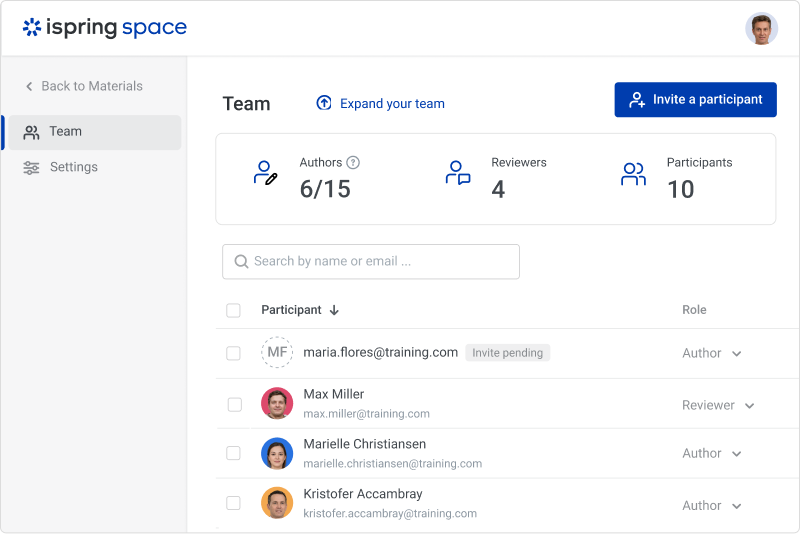
Screenshot of iSpring SuiteScreenshot of the customizable course player — the layout can be changed as desired.Screenshot of a role-playScreenshot of course interactionsScreenshot of the online collaboration toolScreenshot of Video lessons and screencasts