IBM Business Automation Workflow is a solution that helps users automate digital workflows to increase productivity, efficiency and insights — on premises or on cloud.
N/A
Kintone
Score7.4 out of 10
N/A
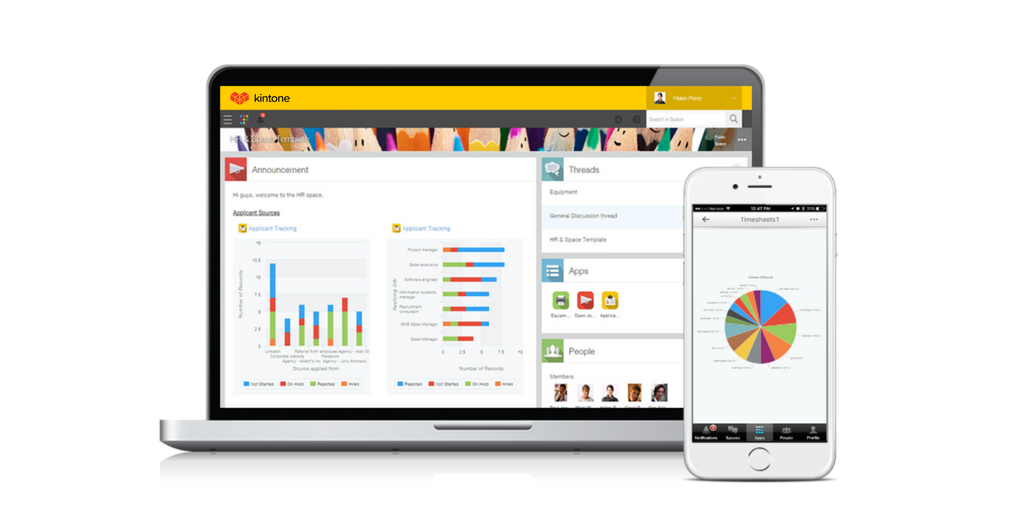
Kintone is a customizable digital workplace platform that lets the user manage data, tasks, and communication in one central place. Over 30,000 customers use Kintone’s no-code platform with more than 1.5 million database and workflow applications custom built for their businesses. The no-code drag-and-drop interface can be used to create custom database applications. Whether it’s sales leads, customer quotes, or inventory management, it can be organized in Kintone and viewed from the…
$24
per month per user
Pricing
IBM Business Automation Workflow
Kintone
Editions & Modules
No answers on this topic
Professional Subscription
$24
per month per user
Offerings
Pricing Offerings
IBM Business Automation Workflow
Kintone
Free Trial
Yes
Yes
Free/Freemium Version
No
No
Premium Consulting/Integration Services
No
Yes
Entry-level Setup Fee
No setup fee
Optional
Additional Details
—
All subscriptions have a minimum requirement of 5 users.
Have your process first on paper Its important to first document the process before venturing into BPMS. It will save a lot of pain and heartaches. A BPM tool is no magic bullet, it merely automates your process. Its upto you to put visibility and tracking on top of it. Provide monitoring so that you get a chance to improve your process continously. BPM is not an application If you are trying to build an application with BPM, chances are that your are alraedy failing. BPM must be a strategic initiative for an organization. Yes, you build Dashboards, Reports and other software in BPMS, however you do it at a process level not at an application level. http://bpmstech.blogspot.com/2011/05/bpm-initiative.htmlKnow the difference between process data and business datahttp://bpmstech.blogspot.com/2011/05/lombardi-best-practices.htmlhttp://bpmstech.blogspot.com/2012/02/bpm-system-architecture.html
Kintone is great if you want a software that will help you in managing your data, and keep track of which tasks are assigned to whom. It also helps to streamline communication and information in one central place. However, it is not for you if you are looking for something complex that has to manage a lot of data.
A de minimis incentive was given to thank the reviewer for their time. The incentive was not used to bias or drive a particular response, nor was the incentive contingent on a positive endorsement. More Info
System does a great job normalizing business process and automating order processing tasks. Before TeamWorks, the process was much more manual and more expensive staff ($65k to $70K) were required to manage the process. Since implementing TeamWorks, we need much lower-skilled workers to manage order processing.
System ensures that we have consistent data across all systems.
Rules engine is really the “company playbook” – it is the heart and soul of how the company works. It handles thousands of orders per day
A de minimis incentive was given to thank the reviewer for their time. The incentive was not used to bias or drive a particular response, nor was the incentive contingent on a positive endorsement. More Info
The system gets crashed when many instances go into the queue stage. The system even crashes and sometimes restarts automatically when the load on the server increases. We had to develop a separate software for this and maintain the same.
We cannot manipulate the data during run time. It is difficult to develop user-interfaces with complex functionality.
In order to consume external services that follow HTTP protocol, we need to use IDE for that, and consuming services from IDE takes a lot of time to give a response.
A de minimis incentive was given to thank the reviewer for their time. The incentive was not used to bias or drive a particular response, nor was the incentive contingent on a positive endorsement. More Info
I feel that Kintone is not well enough known yet. This means that other apps/APIs are not necessarily easy to connect with Kintone. Yes, you can use Zapier though for interfacing with other apps.
It would be great if it could give more customized options to change the look and format of certain things. You can make price quote apps, for example, but have to rely on 3rd party apps or programming skills to customize the look and fields.
If you make a table as an input field, it cannot connect to other internal Kintone apps for lookups and such.
I think there is more potential to make more customized data graphs.
A de minimis incentive was given to thank the reviewer for their time. The incentive was not used to bias or drive a particular response, nor was the incentive contingent on a positive endorsement. TR verified that a representative sample of customers was invited. More Info
This particular decision will be made by other people. Overall IBM BPM is the best BPM engine that I have worked with. It is implemented at our company and IT and business are already somewhat familiar with it. Therefore if asked I will recommend renewal as long as the price is reasonable.
I still think that there's a room for Kintone's future, and high expectations for them in additional features and innovative tools and supports. Truly hope that they will support email features, and standardized supports for various plug-ins with the 3rd party software and apps. In the meantime, we will have to consider our ways of doing our work in all aspects
A de minimis incentive was given to thank the reviewer for their time. The incentive was not used to bias or drive a particular response, nor was the incentive contingent on a positive endorsement. More Info
• The system is easy enough to use but, by definition, is a complex tool. However, they have done a good job generally balancing tool complexity / capability with usability. When comparing to MS Biz Talk, for example, Biz Talk has less functionality but is actually harder to use. • Software is very flexible. For somebody with the right technical background, it’s quite easy to write some Java code to overcome any hurdles or make the product do what is needed
Kintone is agile app and most of the time we can easily come up with new apps. However, there should be more feature-based drag and drop and or a visual-based usability, as we all want to minimize the number of clicks and dropdown menu selections as much as possible. Thanks.
A de minimis incentive was given to thank the reviewer for their time. The incentive was not used to bias or drive a particular response, nor was the incentive contingent on a positive endorsement. More Info
A de minimis incentive was given to thank the reviewer for their time. The incentive was not used to bias or drive a particular response, nor was the incentive contingent on a positive endorsement. TR verified that a representative sample of customers was invited. More Info
A de minimis incentive was given to thank the reviewer for their time. The incentive was not used to bias or drive a particular response, nor was the incentive contingent on a positive endorsement. TR verified that a representative sample of customers was invited. More Info
Issues can be raised through tickets and it works based on the priority of the issue. The Support Team response is also good and the solution is provided in a short span of time. In a case where the issue is serious, they try to find out the root cause and provide an alternative for it.
A de minimis incentive was given to thank the reviewer for their time. The incentive was not used to bias or drive a particular response, nor was the incentive contingent on a positive endorsement. More Info
I have had very specific questions about different aspects of the software, and I have always been able to get a hold of someone who could help. If my sales rep didn’t know the answer, he would get me in touch with someone who did know the answer. The whole team is very ready to help. It definitely feels like they view my success as their success, which is so important with this type of software.
A de minimis incentive was given to thank the reviewer for their time. The incentive was not used to bias or drive a particular response, nor was the incentive contingent on a positive endorsement. More Info
• Attended on premise sysadmin training for 4 days, 8 hours per day. Although further follow-up training was available, I never felt the need to go back. Training was very hands-on with real modeling (rather than just following a manual). Very effective.
• Very satisfied – not too difficult at all. • We had a consultant available as part of our contract, but we didn’t really need to use (except for some advice on ActiveDirectory and single sign-on)
Everyone has their own tastes of things and way they want to work. Asking them to adapt to the changes with the new tools or apps is always difficult. We would want to start with a very small but best example within the organization, which in our case was that the employees will not be bothered by the bosses by being asked to find the documents, status of the progresses, or major things/requests/projects.
A de minimis incentive was given to thank the reviewer for their time. The incentive was not used to bias or drive a particular response, nor was the incentive contingent on a positive endorsement. More Info
Pega Pega is a comprehensive suite which offers a unique theme of BPM development in the market. A no-coding approach based on rules with inheritance makes Pega a very powerful product. However Pega, falls short on integration centric capabilities and very rigid to customize. On the other hand IBM comes with array of products which suits needs of varying degree. Advanced integration is solved by BPEL Process Server which has support for state based patterns and mediation. Dynamic rules and event management can be solved with WODM, Cloud to on-premise connectivity with Cast Iron, Enterprise gateway and security usecases with DataPower, Social BPM with IBM BPM , WODM, mobify with Worklight. Pega has a little bit of eveything here and there. It solves the dynamic rule management, brings out the flavor of Social BPM and mobility with Antenna ( I guess) and predictive analytics as well in one single suite. There are certain usecases which needs to have a little bit of everything, however this little bits and pieces of functionality when its blows, Pega would have problems to scale. With IBM its a bit nightmare to maintain a variety of technologies, however you can wish to go for one without the other and go for something only when you truly need it. Pega vs IBM Its difficult to pick a winner. In nutshell when you want a full scale BPM with rich integration capabilities go for IBM BPM. On the other hand if you hava mature integration capability already, Pega can yield quick results for you as well. Pega's strength is its methodology. IBM BPM's strength is integration. Actually you can't go wrong with both in terms of implementation. My strong recommendation is to invest time to process analysis and pick a good vendor to support consulting and implementation.
Kintone is the easiest product to create from and the cost is the lowest I believe. In addition, reconfigurability and extendability are great. If you look for a low code tool, you can try Kintone. But as same as another low code tool, don't expect too much.
A de minimis incentive was given to thank the reviewer for their time. The incentive was not used to bias or drive a particular response, nor was the incentive contingent on a positive endorsement. More Info
A de minimis incentive was given to thank the reviewer for their time. The incentive was not used to bias or drive a particular response, nor was the incentive contingent on a positive endorsement. TR verified that a representative sample of customers was invited. More Info
It scales from small team interactions to business processes serving thousands of employees, as well as straight-through-processing needs that go well beyond. Of course, scale is always in the eye of the beholder, but IBM BPM does a good job of giving you all of the hooks, APIs, and data that you need to take on whatever scaling approaches you need to meet the load
A de minimis incentive was given to thank the reviewer for their time. The incentive was not used to bias or drive a particular response, nor was the incentive contingent on a positive endorsement. TR verified that a representative sample of customers was invited. More Info
A de minimis incentive was given to thank the reviewer for their time. The incentive was not used to bias or drive a particular response, nor was the incentive contingent on a positive endorsement. TR verified that a representative sample of customers was invited. More Info
A de minimis incentive was given to thank the reviewer for their time. The incentive was not used to bias or drive a particular response, nor was the incentive contingent on a positive endorsement. More Info