Heyflow is a no-code platform to build, design and integrate clickflows, headquartered in Hamburg. They state their belief that user interaction is the most important activity on the web. And they believe that clickflows are the best way to achieve great interactions. They aim to empower businesses to convert more traffic with clickflows.
$72
per month
Keap
Score 6.0 out of 10
N/A
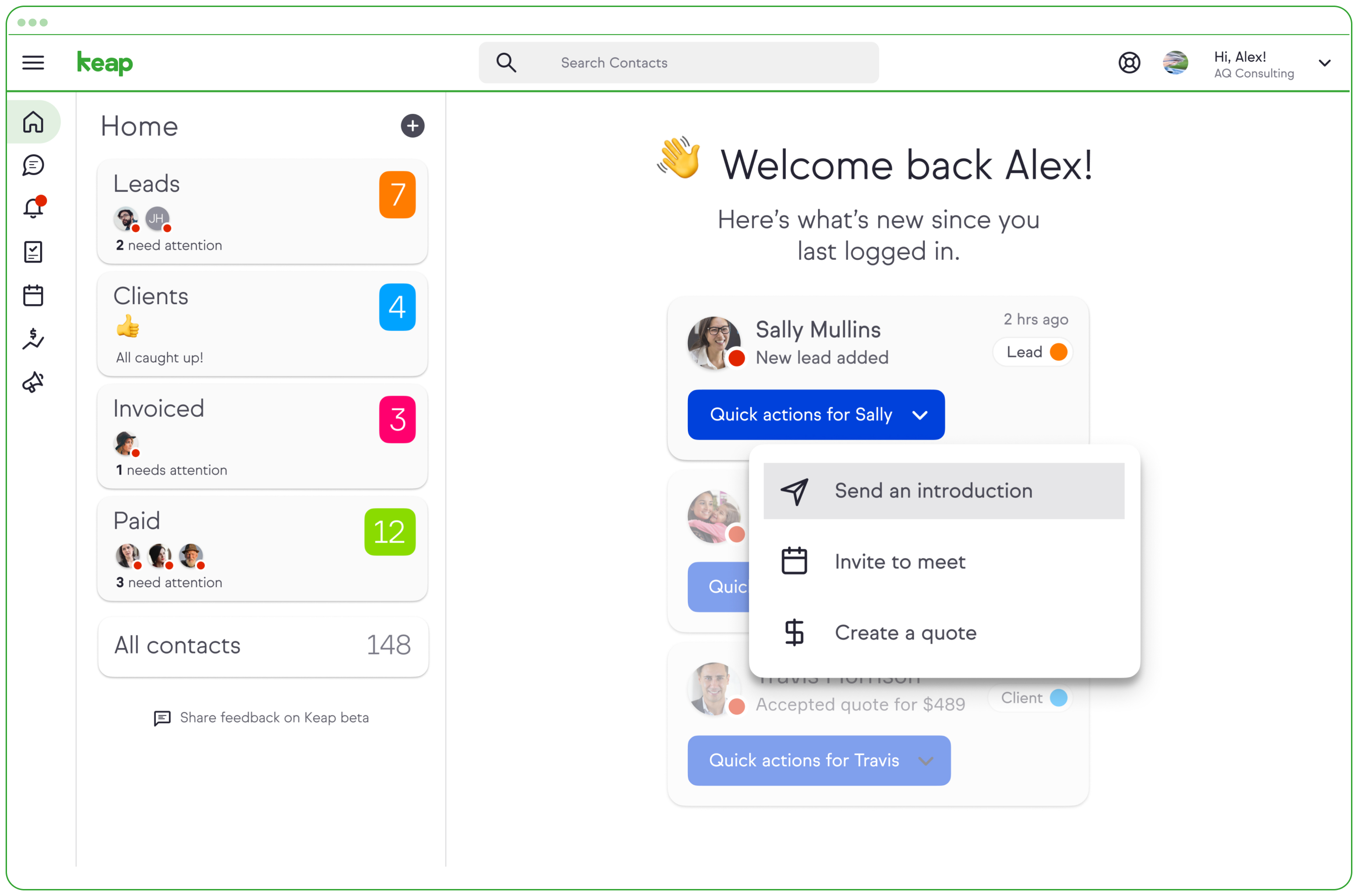
Keap is a small business-focused, comprehensive sales and marketing platform which combines basic contact management, CRM, marketing automation, and e-commerce capabilities into a single, subscription-based SaaS product.
$199
per month
Pricing
Heyflow
Keap
Editions & Modules
Basic
$72
per month
Pro
$144
per month
Business
$459
per month
Business
$459
per month
Enterprise
Contact Sales
Pro
$199.00
per month
Max
$289.00
per month
Max Classic
Contact Us
per year
Offerings
Pricing Offerings
Heyflow
Keap
Free Trial
Yes
Yes
Free/Freemium Version
No
No
Premium Consulting/Integration Services
No
No
Entry-level Setup Fee
No setup fee
Optional
Additional Details
Discount available for annual subscription as well as for start ups.
All plans with 1 user and 500 contacts. The price is $30.00 for each additional user.
More Pricing Information
Community Pulse
Heyflow
Keap
Features
Heyflow
Keap
Lead Management
Comparison of Lead Management features of Product A and Product B
Heyflow
7.1
Ratings
9% below category average
Keap
7.3
Ratings
12% below category average
Automated sales alerts and tasks
7.10 Ratings
7.30 Ratings
Automated follow-ups
7.10 Ratings
9.10 Ratings
Lead nurturing automation
00 Ratings
7.50 Ratings
Lead scoring and grading
00 Ratings
6.20 Ratings
Data quality management
00 Ratings
6.70 Ratings
Lead Management Integrations
Comparison of Lead Management Integrations features of Product A and Product B
Heyflow
8.7
Ratings
23% above category average
Keap
-
Ratings
Integrations with advertising platforms
9.90 Ratings
00 Ratings
Integrations with CRMs
7.90 Ratings
00 Ratings
Integrations with data storage tools
8.30 Ratings
00 Ratings
Integrations with lead automation tools
8.90 Ratings
00 Ratings
Conversion Rate Optimization
Comparison of Conversion Rate Optimization features of Product A and Product B
Heyflow
7.6
Ratings
1% below category average
Keap
-
Ratings
KPI analytics
7.30 Ratings
00 Ratings
Drop-off analytics
7.50 Ratings
00 Ratings
A/B tests
8.10 Ratings
00 Ratings
Form Building
Comparison of Form Building features of Product A and Product B
Heyflow
8.0
Ratings
9% above category average
Keap
-
Ratings
Drag & Drop editing
8.30 Ratings
00 Ratings
Branding customization
9.20 Ratings
00 Ratings
Different question types
7.30 Ratings
00 Ratings
Conditional logic paths
6.30 Ratings
00 Ratings
Embedded calculations
6.20 Ratings
00 Ratings
Form templates
6.50 Ratings
00 Ratings
Custom code
8.60 Ratings
00 Ratings
Web embedding
9.40 Ratings
00 Ratings
Mobile responsiveness
9.40 Ratings
00 Ratings
Date picker
7.10 Ratings
00 Ratings
File upload
9.10 Ratings
00 Ratings
Dynamic content
8.10 Ratings
00 Ratings
CRM Project Management
Comparison of CRM Project Management features of Product A and Product B
Heyflow
-
Ratings
Keap
7.7
Ratings
14% below category average
Task management
00 Ratings
8.80 Ratings
Billing and invoicing management
00 Ratings
7.40 Ratings
Reporting
00 Ratings
7.10 Ratings
Automated CRM activity logging
00 Ratings
6.40 Ratings
Sales pipeline management
00 Ratings
9.10 Ratings
Email & Online Marketing
Comparison of Email & Online Marketing features of Product A and Product B
Heyflow
-
Ratings
Keap
7.0
Ratings
16% below category average
WYSIWYG email editor
00 Ratings
9.00 Ratings
Dynamic content
00 Ratings
8.90 Ratings
Landing pages
00 Ratings
5.90 Ratings
A/B testing
00 Ratings
6.40 Ratings
Mobile optimization
00 Ratings
6.30 Ratings
Email deliverability reporting
00 Ratings
7.50 Ratings
List management
00 Ratings
8.40 Ratings
Triggered drip sequences
00 Ratings
9.00 Ratings
Campaign Management
Comparison of Campaign Management features of Product A and Product B
Heyflow
-
Ratings
Keap
7.7
Ratings
10% above category average
Calendaring
00 Ratings
8.30 Ratings
Reporting & Analytics
Comparison of Reporting & Analytics features of Product A and Product B
Heyflow
-
Ratings
Keap
5.2
Ratings
28% below category average
Dashboards
00 Ratings
7.20 Ratings
Standard reports
00 Ratings
3.60 Ratings
Custom reports
00 Ratings
4.70 Ratings
Platform & Infrastructure
Comparison of Platform & Infrastructure features of Product A and Product B
Its well suited for us when we start a new campaign independent from Unbounce, and for making more creative and fluid user flows. Its worked well for us on our lower volume lead campaigns, we havent yet used it for anything high volume. We love the drop off analysis, where it gives you an exit rate each step of the journey, but feel the a/b testing side could be improved, in Unbounce we can test 20 variants at once (due to the amount of traffic), doesnt seem as easy on Heyflow. Also I've hit a max number of flows quite quickly so probably due to upgrade account, however with Unbounce we could have 100s of flows
Keap is very good at contact management and automation creation but weaker at email campaign creation. I was particularly interested in a function where when manually entering a new contact, you are then able to email that contact using a premade HTML template. It will currently not do this. There is a workaround, but it is unnecessarily ponderous.
Restricted webhook functionality, wed like to be able to map fields without having to post the full request and change the receiving webhook our end to cater to Heyflow
a/b testing, not being able to 'keep' older variants which we may want to retest later
little things like we only do uk market so all phone numbers start with 01 or 07 so we want to have a placeholder example thats familiar to the user eg 07766554433 but the system is restricted to +447766554433 which is a conversion factor for us
More articles and videos on how to use the various functions of Keap
Having representatives designated to certain regions or companies for a point of contact when help is needed
More options when building the emails. While the click and drop options can be a plus, they can also be negative because you are limited to image and text sizing and positions
Heyflow hat mich von Anfang an begeistert – und das nicht nur wegen der intuitiven Benutzeroberfläche. Die Plattform schafft es, komplexe Prozesse wie Leadgenerierung, Qualifizierung oder Terminvereinbarungen in einfache, interaktive und visuelle Erlebnisse zu verwandeln.
In wenigen Minuten lassen sich Flows erstellen, anpassen und live schalten – ohne auf Entwickler warten zu müssen.
Mit Features wie progressiver Datenerfassung, A/B-Testing, personalisierter Ansprache und reibungsloser UX steigern wir messbar die Conversion Rates. Ich kann CI-konforme, moderne und mobiloptimierte Flows gestalten, die genau zu der Zielgruppe passen. Für mich ist Heyflow nicht nur ein Tool, sondern ein echter Gamechanger im digitalen Marketing. Es verbindet Effizienz mit Kreativität – und das mit einem Wow-Effekt für Nutzer und Kund:innen
We have invested a lot into Infusionsoft and are using it to automate our processes and marketing. Changing CRMs would have a HUGE cost for us and based on our evaluations, the grass isn't greener elsewhere. Infusiosoft fits most of our needs and is slowly getting better each year. Their support is great and we will continue to use them until something much better comes around or our company outgrows a small business CRM.
Intuitive interface: The platform should have a user-friendly interface that guides users through the design process seamlessly. Ease of customization: Users should be able to easily customize their forms, flows, and landing pages to match their branding and requirements. Accessibility: The platform should be accessible to users of all skill levels, from beginners to experienced designers. Speed and efficiency: Users should be able to quickly create and deploy their content without encountering unnecessary delays or complications. Helpful support and resources: Heyflow should provide adequate support and resources, such as tutorials, documentation, and customer service, to assist users in navigating the platform effectively.
You do need to spend some time on-boarding and implementing the software in order to have full functionality. We were lucky - we had colleagues at the university with experience with Keap and then hired an intern familiar with the software to get us set up and ready to use it. We've had some functionality issues with it along the way and that has frustrated myself and the other uses in our department.
Generally, very responsive support for even our more complicated issues. We do have some open issues that we need resolutions on and that I understand are complicated and will take longer to resolve but the open issues are significantly impacting to our business.
This training is taught often to the lowest common denominator so as to help as many customers of theirs as possible. We do the training and coaching and implementations for our clients. But clients who I know who have been to their training get trained well. The gap that can exist lies in you doing your part and really investing in using and building out the application. The training and education is only as good as your willingness to apply it.
The results of training online are often based on how people learn. The training was great but with feature updates, you just have to get in there sometimes and do it! The training definitely lays a firm enough foundation for you to be successful even if its can't be updated with every feature update.
If you do this by yourself it will likely take you 6-9 months to get it entirely set up, unless you have a full-time dedicated person handling it. I recommend hiring a prof service company to implement it for you. They should be able to do it all in 90 days or less.
Before I switched to Heyflow, I used Go High Level. The difference is night and day. Though Go High Level has some basic survey and quiz features, it's way harder to make it look professional and actually work like you want it to. First, I tried switching to ScoreApp, but I found the quiz design options lacking and found the way it was set up a bit confusing.
Keap is fast. The learning curve is shorter and they have an academy for learning with videos quite extensive that explain a lot of different scenarios, specially when you need to customize scenarios of automations and segments. Is cheaper if you consider that this services CRM + Mailing don´t come often in one package and the realiability to send mails is quite good.
You get a lot of features included, but you don't need to use them all at once to start seeing an effect. When you are ready to use them, they are there. It also scales without costing too much money.
Automation has allowed us to be more engaged and invested in our customers by reminding us about birthdays and other important events in their lives so that we can celebrate with them.
We lacked the manpower to sell and distribute orders online before setting up the payments and automation features. We now collect $5k+ a week in lost sales through online ordering.
List cleaning functionality and engagment settings have allowed us to run a 40-50% email open rate that allows us to create an engaged community around local events and opportunities as well as sales and special offerings.