Harvest is used to track time, gain insights from past projects, and get paid for work. Dedicated apps and integrations with popular tools like Asana and Slack allow Harvest to fit into a team’s workflow.
A selection of visual reports are offered to keep projects running smoothly and an organization's team supported. Harvest also helps to turn a team’s tracked time and expenses into professional nvoices and collect payment quickly with integrated online payments.
$13.75
per month per seat
QuickBooks Time
Score8.6 out of 10
N/A
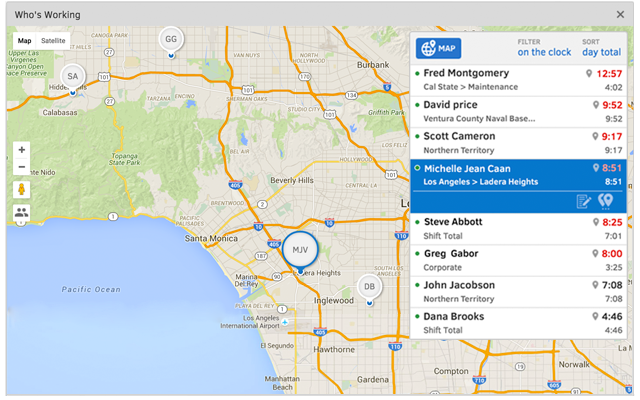
QuickBooks Time (formerly TSheets) is a cloud-based time tracking and scheduling app that allows employees to clock in and out from the job site with the devices they’ve already got in their pockets. The vendor aims to help companies replace paper timesheets with accurate, electronic time data as well as make payroll and invoicing faster and less costly. QuickBooks Time also accurately tracks time and GPS points (even without cell or internet service) then automatically syncs when back…
$0
1 user, unlimited projects
Pricing
Harvest
QuickBooks Time
Editions & Modules
Harvest Pro
$13.75
per month per seat
Harvest Premium
$17.50
per month per seat
Free
$0
1 user, unlimited projects
Premium
$8
per user/month + $20 base fee/month (paid annually)
Elite
$10
per user/month + $40 base fee/month (paid annually)
Offerings
Pricing Offerings
Harvest
QuickBooks Time
Free Trial
Yes
Yes
Free/Freemium Version
Yes
Yes
Premium Consulting/Integration Services
No
No
Entry-level Setup Fee
No setup fee
No setup fee
Additional Details
20% discount for annual billing on Pro and Premium plans.
A de minimis incentive was given to thank the reviewer for their time. The incentive was not used to bias or drive a particular response, nor was the incentive contingent on a positive endorsement. More Info
CEO in Marketing at BRAINSPIN (Marketing and Advertising, 1-10 employees)
Chose Harvest
The Harvest UI was much simpler. The others felt like they had too much going on and setting up and maintaining was confusing. Harvest's interface is very straightforward and easy enough for a non-techie to set up for their business. Toggl was the closest competitor and looked …
A de minimis incentive was given to thank the reviewer for their time. The incentive was not used to bias or drive a particular response, nor was the incentive contingent on a positive endorsement. More Info
Harvest is ideally suited for a variety of scenarios, particularly in the realms of freelance or consulting work, where accurate hour tracking for billing is crucial. It excels in small to medium businesses managing team projects, allowing for effective resource allocation and time management across multiple concurrent projects. For budgeting and forecasting, Harvest provides valuable data, aiding in accurately estimating the duration and cost of future projects based on past data. It's also highly beneficial for remote or distributed teams, thanks to its cloud-based platform that facilitates seamless coordination. Additionally, its detailed reporting features enhance client transparency, fostering trust through clear communication of time spent on projects. However, Harvest may be less suitable for larger enterprises with complex integration needs or specialized industries requiring more niche features. Small startups or individuals on tight budgets might find the cost challenging, especially if they don't fully utilize all its features. Lastly, for those needing only basic time tracking, simpler or free tools might be more appropriate, making Harvest an unnecessary expenditure for basic needs.
A de minimis incentive was given to thank the reviewer for their time. The incentive was not used to bias or drive a particular response, nor was the incentive contingent on a positive endorsement. More Info
It would be very useful for certain remote jobs that require a high level of presence, as in the case of web development, or remote maintenance sessions, so that when reviewing the work data it is possible to ensure that there will be no failures. By being able to include files in the management, from the equipment tab, it is possible to fully control the hours in which each change in these files were made.
A de minimis incentive was given to thank the reviewer for their time. The incentive was not used to bias or drive a particular response, nor was the incentive contingent on a positive endorsement. More Info
Offers several options on using the tool, for example, you can use the app on your phone, the app for desktop, or simply have the website open.
The timer integrates with other platforms. For example, our team uses Asana as our project management tool. Now, in real-time, I can know which projects my team is working on and whether we're implementing good time management strategies to meet our goals.
The summary break downs are wonderful! You can view an individual's hours as well as project hours. There are even notifications you could receive when your team is getting close to reaching the allotted time for a client's project.
A de minimis incentive was given to thank the reviewer for their time. The incentive was not used to bias or drive a particular response, nor was the incentive contingent on a positive endorsement. More Info
Support (their help desk team is incredibly helpful and always quick to respond).
Ease of access and use (the app is user-friendly an intuitive, and the desktop version is equally as approachable).
Manager functionality (it's useful to be able to clock employees in and out at multiple events on the same day by sorting them into different groups by manager/event).
A de minimis incentive was given to thank the reviewer for their time. The incentive was not used to bias or drive a particular response, nor was the incentive contingent on a positive endorsement. More Info
I’m still trying to figure out how tasks best associate to a specific project. There’s a couple different places to edit that and I’m a little confused as to best practice.
Does not integrate into basecamp which is our project management system
A de minimis incentive was given to thank the reviewer for their time. The incentive was not used to bias or drive a particular response, nor was the incentive contingent on a positive endorsement. More Info
The desktop version of the TSheets schedule does not have a search feature. This makes it challenging to find things you are looking for without extra work
The app can be a bit buggy. Though it is a great app, there are many reasons that the app will stop syncing and can cause problems with staff scheduling
A de minimis incentive was given to thank the reviewer for their time. The incentive was not used to bias or drive a particular response, nor was the incentive contingent on a positive endorsement. More Info
TSheets tech support people, like Shawn Sommer, from Tsheets. She has been instrumental, after terminating the person in charge of TSheets I was left with a learning curve too high to climb but after 10 mins of her instructions I was able to make payroll in no time. She cleared all errors that nobody had fixed before. TSheets is not a vendor for me, TSheets is my partner in business. Thank you TSheets.
Again, just a minor compatibility issues using with other platforms such as Basecamp, but it does do everything promised. The only downfall we have found is having to create a job in both platforms and then connecting them later vs being able to create a project once and having them automatically connect.
A de minimis incentive was given to thank the reviewer for their time. The incentive was not used to bias or drive a particular response, nor was the incentive contingent on a positive endorsement. More Info
Our employees find TSheets easy to use and spend minimal time at reporting hours using it. As an administrator and user of the TSheets "data and information" I am extremely positive on the functionality and reporting that it has provided me. From its ease of set-up to training to reporting, TSheets has made us so much more efficient from an administration standpoint
A de minimis incentive was given to thank the reviewer for their time. The incentive was not used to bias or drive a particular response, nor was the incentive contingent on a positive endorsement. More Info
They're very responsive and do their best to answer whatever questions we've had. Sometimes, the question or request we've made is for a feature that doesn't yet exist, however in most cases those features have been built later and did eventually address our need.
A de minimis incentive was given to thank the reviewer for their time. The incentive was not used to bias or drive a particular response, nor was the incentive contingent on a positive endorsement. More Info
I have never failed to have an issue resolved within minutes of contacting Support. Jen D recently assisted my with an export issue and I was back on track in less the 10 minutes. She was knowledgable and thought about the current and future contexts of the issue and assured there would be no recurrence next payroll.
A de minimis incentive was given to thank the reviewer for their time. The incentive was not used to bias or drive a particular response, nor was the incentive contingent on a positive endorsement. More Info
Harvest is significantly better than Jira. I think Jira's is not originally intended to be used as a time logging/management system, but we had been previously using it as that. It was much clunkier, and many employees had a difficult time using it as a user interface goes. Harvest is much more user friendly and has simplified the daily time-logging process for everyone in our office
A de minimis incentive was given to thank the reviewer for their time. The incentive was not used to bias or drive a particular response, nor was the incentive contingent on a positive endorsement. More Info
Besides Intuit Payroll (Sage), the only program I've used is WorkBrain through Menards, and it's more as a scheduling guideline for management, employees don't use it to punch in or out or record hours. However, WorkBrain does show scheduling and it matches with a punch clock to record those hours. Every other place I've used has used either punch clocks or handwritten time cards. I think the TSheets is modern, user-friendly, convenient, accessible, and cost-effective for the owners. It also streamlines payroll for the Accountant instead of manually entering all hours for multiple employees by hand into a software program like Sage.
A de minimis incentive was given to thank the reviewer for their time. The incentive was not used to bias or drive a particular response, nor was the incentive contingent on a positive endorsement. More Info
A de minimis incentive was given to thank the reviewer for their time. The incentive was not used to bias or drive a particular response, nor was the incentive contingent on a positive endorsement. More Info
A de minimis incentive was given to thank the reviewer for their time. The incentive was not used to bias or drive a particular response, nor was the incentive contingent on a positive endorsement. More Info