Goverlan Reach vs. Splashtop

Overview
ProductRatingMost Used ByProduct SummaryStarting Price
Goverlan Reach
Score 8.0 out of 10
Enterprise companies (1,001+ employees)
The Goverlan Remote Administration Suite from Goverlan is remote administration software for IT management.
$648
per year
Splashtop
Score 8.6 out of 10
N/A
Splashtop is a software solution for both remote access and remote support. Boasting 30+ million customers worldwide and users among both large and small organizations across the globe, Splashtop presents their solution as secure, high-performing, and fit to specific use-cases. Splashtop is ISO certified, SOC 2 and GDPR compliant. Splashtop Remote Access provides remote desktop connections for business professionals and teams to work from anywhere, using any device.…
$8.25
per month per user, billed annually
Pricing
Goverlan ReachSplashtop
Editions & Modules
Standard
$648
per year
Professional
$1,428
per year
Enterprise
$2,772
per year
Splashtop Remote Access Pro
$8.25
per month per user, billed annually
Splashtop Remote Access Performance
$13.00
per month per user, billed annually
Splashtop Remote Support Enterprise
Contact Sales
per month per concurrent technician, billed annually
Splashtop Remote Access Enterprise
Contact Sales
per month per user, billed annually
Splashtop On-Prem
Contact Sales
Splashtop Autonomous Endpoint Management (AEM)
Contact Sales
per month per endpoint, billed annually
Splashtop Remote Support SOS
Starting at $22.00
per month per concurrent technician, billed annually
Offerings
Pricing Offerings
Goverlan ReachSplashtop
Free Trial
YesYes
Free/Freemium Version
NoNo
Premium Consulting/Integration Services
NoNo
Entry-level Setup FeeNo setup feeNo setup fee
Additional Details* Each operator license allows the remote management and support of an unlimited number of INTERNAL endpoints * Each license includes between 10 to 20 manageable EXTERNAL endpoints (based on edition). Additional external endpoint licence is $5 per node per year (volume discount available) * Operator licenses can be purchased on a perpetual or subscription basis
More Pricing Information
Community Pulse
Goverlan ReachSplashtop
Features
Goverlan ReachSplashtop
Remote Administration
Comparison of Remote Administration features of Product A and Product B
Goverlan Reach
8.5
Ratings
5% above category average
Splashtop
7.8
Ratings
4% below category average
File transfer8.00 Ratings9.00 Ratings
Instant message9.00 Ratings7.90 Ratings
Access to sleeping/powered-off computers3.10 Ratings3.00 Ratings
Over-the-Internet remote session10.00 Ratings9.30 Ratings
Remote management of servers & workstations10.00 Ratings9.00 Ratings
Remote Active Directory® management10.00 Ratings00 Ratings
Centralized management dashboard9.00 Ratings7.10 Ratings
Session record9.00 Ratings7.20 Ratings
Monitoring and Alerts7.00 Ratings6.00 Ratings
Multi-platform remote control10.00 Ratings8.70 Ratings
Screen sharing00 Ratings9.30 Ratings
Initiate remote control from mobile00 Ratings7.60 Ratings
Annotations00 Ratings9.00 Ratings
Best Alternatives
Goverlan ReachSplashtop
Small Businesses
Getscreen.me
Getscreen.me
Score 9.7 out of 10
Getscreen.me
Getscreen.me
Score 9.7 out of 10
Medium-sized Companies
Remote Desktop Manager
Score 9.0 out of 10
Remote Desktop Manager
Score 9.0 out of 10
Enterprises
Remote Desktop Manager
Score 9.0 out of 10
Remote Desktop Manager
Score 9.0 out of 10
All AlternativesView all alternativesView all alternatives
User Ratings
Goverlan ReachSplashtop
Likelihood to Recommend
10.0
(0 ratings)
9.2
(0 ratings)
Likelihood to Renew
-
(0 ratings)
9.5
(0 ratings)
Usability
-
(0 ratings)
8.4
(0 ratings)
Availability
-
(0 ratings)
9.8
(0 ratings)
Performance
-
(0 ratings)
9.8
(0 ratings)
Support Rating
-
(0 ratings)
9.6
(0 ratings)
Implementation Rating
-
(0 ratings)
8.3
(0 ratings)
Configurability
-
(0 ratings)
5.0
(0 ratings)
Ease of integration
-
(0 ratings)
10.0
(0 ratings)
Product Scalability
-
(0 ratings)
9.8
(0 ratings)
Vendor post-sale
-
(0 ratings)
10.0
(0 ratings)
Vendor pre-sale
-
(0 ratings)
5.1
(0 ratings)
User Testimonials
Goverlan ReachSplashtop
Likelihood to Recommend
Inexpensive but full featured solution for IT Operations teams that need good tools.
Read full review
Well Suited for Remote users with PCs needing to login to specific remote PC's. It is less functional for remote users on Cell phones although Cell phone users can look on the remote PC to see if they need to logon from a desktop to conduct transactions
Read full review
Pros
  • Good configurable dashboard that can be personalized per audience
  • Built in packages for monitoring standard applications that can be personalized easily
  • Simple, easy to use update deployment configuration.
Read full review
  • Unbelievable performance! It's so fast I tested a PC game through it just for fun, and it was incredible!
  • The increase in productivity throughout our organization has been notable. The flexibility of employees to occasionally work remotely, when needed, has been hugely beneficial.
  • Enterprise IT tools like One-to-Many actions has saved us a lot of time and headache in certain situations, such as deploying a basic MSI or script. SOS has been a saving grace for some employees to receive remote IT support in emergency situations, as well.
Read full review
Cons
  • Machines must be online for actions to be performed, scopes allow you to rerun them against failed objects only but really a much better option would be for client agent to check in at power on for open jobs.
  • Newest version of Reach is glitchy on Windows 10 requiring the occasional restart of the application.
Read full review
  • Splashtop had a functionality issue with a Mac OS upgrade recently that prevented remote access for about two weeks. I had to request tickets directly and they had known about the impending issue without a collaborative solution between them and Apple.
  • Better Beta testing for version upgrades is always needed. Software is constantly changing so these types of platforms need to be at the forefront of resolving interoperability issues with Mac, Windows, Linux, etc.
  • The tech support for the issue I experience could have been more proactive. I was providing my client's IT provider and Splashtop with updates on the bug issue, where it should have been the other way around.
Read full review
Likelihood to Renew
No answers on this topic
I believe that I will renew Splashtop without any problems in the coming years as eating stable costs without increases even in critical periods such as the Covid virus, Splashtop allows access to 25 unattended stations and has continuous updates and new features. It also allows resale to users with sub-accounts
Read full review
Usability
No answers on this topic
It's hard to find any significant faults with Splashtop. It offers a very responsive remote access experience with clear and simple interface. There's very little learning curve as it's toolbar mimics other popular remote access solutions graphical user interface. It's gives you access to your remote computer quickly and stays out of your way
Read full review
Reliability and Availability
No answers on this topic
I've never had any issues with it, nor any connectivity issues. They always say when they'll be maintaining the system and it's always in the odd hours, so nobody uses then. But I've never had any issues.
Read full review
Performance
No answers on this topic
Pages and servers load fast, normal speed. It doesn't lag or anything like that. I don't integrate it with anything else.
Read full review
Support Rating
No answers on this topic
Splashtop has good customer support - they respond quickly and provide adequate solutions, but we honestly rarely find ourselves needing to reach out to them. The software is so easy to use and about as plug-and-play as it gets, so we generally don't run into an issue that does not have an immediate, obvious solution provided in the software.
Read full review
Implementation Rating
No answers on this topic
It couldn't have been any easier to setup and I have had no issues with it since it was implemented. It's a great product and makes remotely connecting to another device so simple and quick. I can't recommend it enough
Read full review
Alternatives Considered
Goverlan was a better overall value providing licensing flexibility, more features and consistent quality for a lower price point. There are many products that provide remote capabilities but this product goes well above and beyond most of them allowing remote installs and reporting features.
Read full review
Splashtop Business Enterprise is actually easier to implement and get it up and running, all users have to do is download the standard or personalize file and run it, then share the code with you and you are all set to go, i like it because you can even do it from your phone if necessary
Read full review
Scalability
No answers on this topic
It's a product that allows us to work remotely and access our servers from anywhere in the world. Our team works from different parts of the world and it's a great tool for us.
Read full review
Return on Investment
  • With a product like this it is entirely possible that you will see large increase in Help Desk efficiency for those who are willing to take the time to fully explore its possibilities.
  • Much more robust that any other remote support product I have used while still extremely cheap compared to competing products. This can bring enterprise level support options to those that may normally not be able to afford it.
  • Reporting features are invaluable to anyone wanting to truly know what is happening on their network.
Read full review
  • Since we cannot utilize an enterprise-level POS system, Splashtop bridges the data gap between our store locations and our headquarters. This is what enables us to function. Without remote terminal access, our business would be unable to operate. Period. I can't overstate this.
Read full review
ScreenShots

Goverlan Reach Screenshots

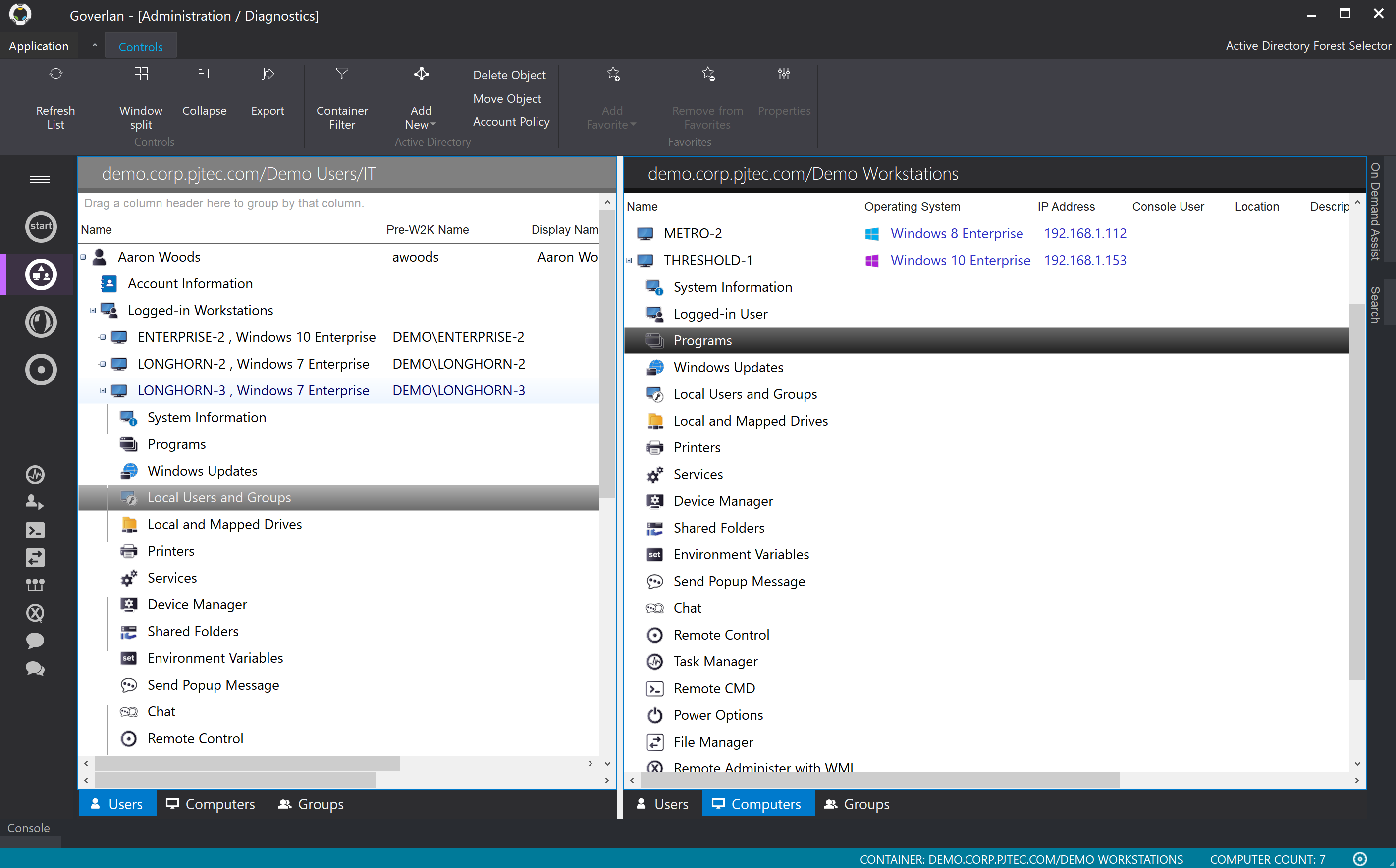
Screenshot of Real-time user and machine management and supportScreenshot of Global IT Process AutomationScreenshot of Goverlan File Manager

Splashtop Screenshots

Screenshot of Splashtop Streamer: Used to connect to and remote into computers.
Splashtop Business App: Used to connect from and remotely access other computers.Screenshot of Splashtop SOS - Accessed with a 9-digit session code, it can be customized with a brand, logo and text.Screenshot of a view of computer sessions.Screenshot of where users can transfer files and folders from local and remote computers during a session.Screenshot of Splashtop Remote Support Enterprise : On-demand support with service desk capabilities.Screenshot of a dashboard - This offers key insights on endpoint status, security metrics, and scheduled tasks.